Yes! You can use AI to fill out Medical Assessment for Transport Disability

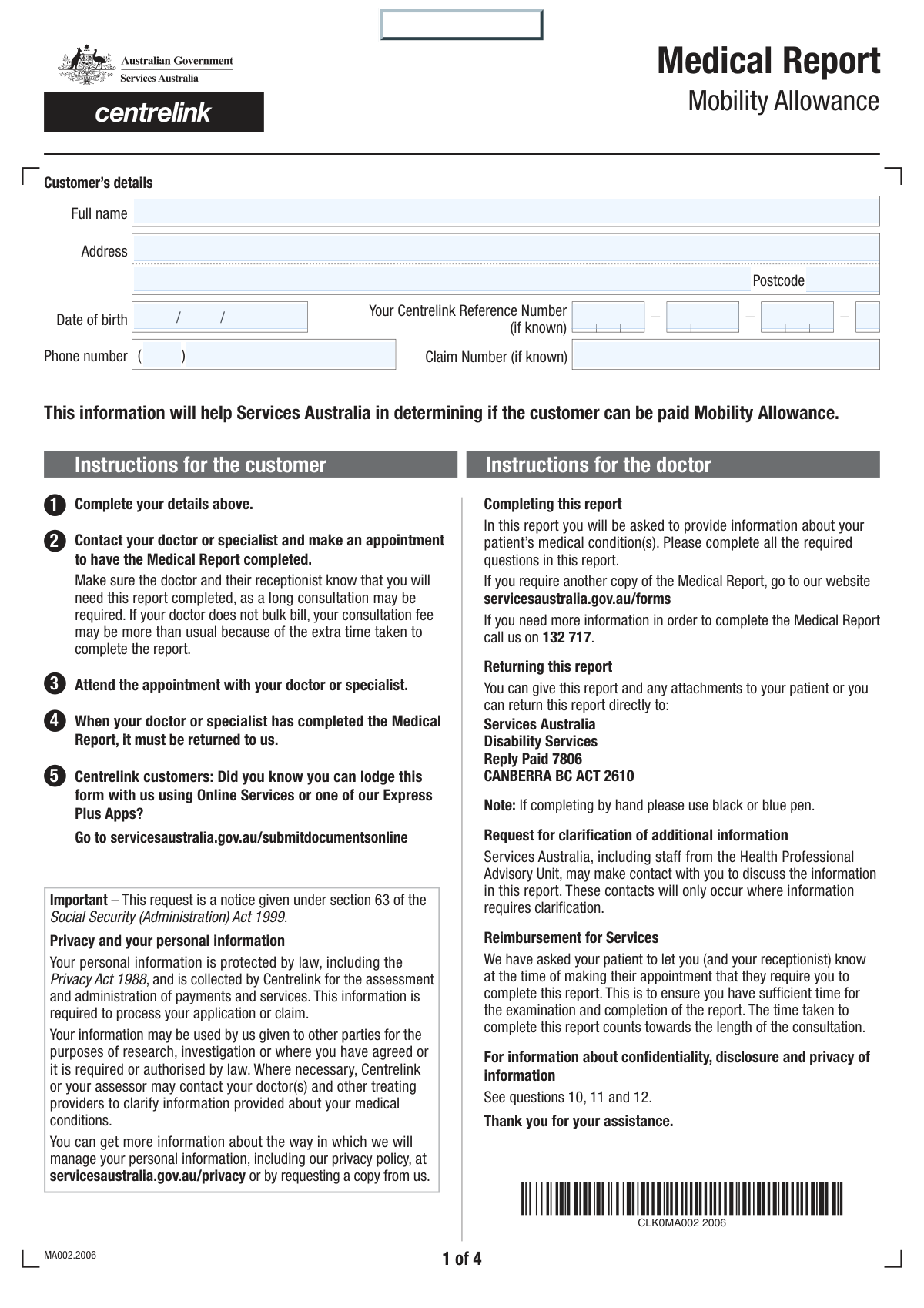
The Medical Assessment for Transport Disability is a crucial document completed by a healthcare professional to evaluate a patient's functional capacity, particularly their ability to use public transport. It provides a detailed account of physical, psychiatric, or intellectual disabilities, which is used by agencies to determine eligibility for transport concessions and support services. Today, this form can be filled out quickly and accurately using AI-powered services like Instafill.ai, which can also convert non-fillable PDF versions into interactive fillable forms.
Transport Disability Assessment is part of the disability forms, Medi-Cal forms, medical assessment forms, medical disability forms, medical forms and VA medical forms categories on Instafill.
Our AI automatically handles information lookup, data retrieval, formatting, and form filling.
It takes less than a minute to fill out Transport Disability Assessment using our AI form filling.
Securely upload your data. Information is encrypted in transit and deleted immediately after the form is filled out.

Form specifications

Form name: Medical Assessment for Transport Disability
Number of fields: 107
Number of pages: 4
Filled form examples: Form Transport Disability Assessment Examples
Language: English
main-image

Instafill Demo: How to fill out PDF forms in seconds with AI

How to Fill Out Transport Disability Assessment Online for Free in 2026

Are you looking to fill out a TRANSPORT DISABILITY ASSESSMENT form online quickly and accurately? Instafill.ai offers the #1 AI-powered PDF filling software of 2026, allowing you to complete your TRANSPORT DISABILITY ASSESSMENT form in just 37 seconds or less.
Follow these steps to fill out your TRANSPORT DISABILITY ASSESSMENT form online using Instafill.ai:
  1. 1 Navigate to Instafill.ai and upload or select the Medical Assessment for Transport Disability form.
  2. 2 Use the AI assistant to accurately fill in the patient's personal information, including their full name, address, and Centrelink Reference Number.
  3. 3 Answer the detailed questions about the patient's disability status, specifying whether it is physical, psychiatric, or intellectual.
  4. 4 Detail the patient's functional limitations by selecting the level of difficulty for activities like walking, using steps, and standing on public transport as prompted by the smart fields.
  5. 5 Provide any additional information regarding the permanence of the condition and whether any information should be withheld from the patient.
  6. 6 Enter your professional details, including your name, qualifications, provider number, and practice address.
  7. 7 Review the entire completed report for accuracy, then digitally sign and date the form to finalize the assessment.

Our AI-powered system ensures each field is filled out correctly, reducing errors and saving you time.

Why Choose Instafill.ai for Your Fillable Transport Disability Assessment Form?

Speed

Complete your Transport Disability Assessment in as little as 37 seconds.

Up-to-Date

Always use the latest 2026 Transport Disability Assessment form version.

Cost-effective

No need to hire expensive lawyers.

Accuracy

Our AI performs 10 compliance checks to ensure your form is error-free.

Security

Your personal information is protected with bank-level encryption.

Frequently Asked Questions About Form Transport Disability Assessment

This form is a medical report used to assess how a patient's physical, psychiatric, or intellectual disability impacts their ability to use public transport. It is typically used to support a claim or application for disability services or concessions.

A qualified medical professional, such as your doctor, must complete the medical assessment sections of this form. The patient is responsible for providing their personal details like name, address, and Centrelink Reference Number.

You should provide your CRN if you have one, as it helps the processing authority identify your case. If you do not have a CRN or do not know it, you may leave it blank, but it is recommended to include it if possible.

The form asks for a claim number only 'if it is known'. If you have not been assigned a claim number or are just starting your application, you can leave this field empty.

Your doctor should select the option that most accurately reflects the level of difficulty you experience, from 'No difficulty' to 'Cannot do'. It is important to be open with your doctor about your limitations for an accurate assessment.

In these sections, your doctor should provide a comprehensive description of your condition, explaining how it limits your ability to perform tasks related to using public transport. This includes details on mobility, cognitive functions, and social skills.

Your doctor can indicate that your condition is temporary in the 'Permanence of Difficulty' section. They will then need to specify if the difficulty is expected to last for less than 12 months or for 12 months or longer.

This section is for your doctor to flag if any information in the report could be harmful to your physical or mental health if released directly to you. If they check 'Yes', they must explain why the information should be withheld.

Yes, the form has separate, detailed sections to document physical disabilities as well as psychiatric or intellectual disabilities. Your doctor should complete all sections that are relevant to your conditions.

Yes, services like Instafill.ai use AI to accurately auto-fill personal information fields like your name, address, and reference numbers, which can save time and reduce errors. However, the medical evaluation must be completed by your doctor.

You can upload the form to the Instafill.ai platform, which will make the fields interactive. After you fill in your personal details, you can securely share the form with your doctor to complete their sections electronically.

If you have a non-fillable PDF, you can use a tool like Instafill.ai to convert it into an interactive, fillable form. This allows you and your doctor to easily type information directly into the document online.

Compliance Transport Disability Assessment
Validation Checks by Instafill.ai

1
Date of Birth Validity and Plausibility
This check ensures the 'Date of Birth' field is not empty, follows the DD/MM/YYYY format, and represents a valid date in the past. It prevents impossible dates like '32/13/2000' or future dates. This is critical for verifying the patient's identity and age, which can affect eligibility for services.
2
Postcode Format Validation
Validates that both the patient's and the doctor's 'Postcode' fields contain only numeric characters and adhere to the expected length (e.g., 4 digits for Australian postcodes). This ensures address data is accurate for mail correspondence and regional analysis. An invalid format would cause processing delays or returned mail.
3
Conditional Requirement for Physical Disability Details
This validation enforces a logical rule: if the 'Yes' checkbox for 'Physical Disabilities Inquiry' is selected, the 'Physical Disability Details' text field must not be empty. This ensures that a declaration of a disability is accompanied by the necessary explanatory details for assessment. If this check fails, the form is incomplete and cannot be properly evaluated.
4
Conditional Requirement for Psychiatric Disability Details
This check enforces that if the 'Yes' checkbox for 'Psychiatric or Intellectual Disabilities Inquiry' is selected, the corresponding 'Psychiatric or Intellectual Disabilities Details' field must be populated. It prevents submissions where a disability is indicated without the required context. Failure to provide details would render the assessment impossible.
5
Mutually Exclusive Disability Status Selection
Verifies that for the 'Disability Status Inquiry', only one option ('Yes' or 'No') is selected. The user cannot select both or leave both unselected. This prevents contradictory or ambiguous answers at the start of a critical section, ensuring the form's logic flows correctly.
6
Single Selection for Difficulty/Ability Levels
For each question group assessing a level of difficulty or ability (e.g., 'Difficulty Level for Walking 400 Metres'), this check confirms that exactly one option from the available choices has been selected. This prevents users from selecting multiple conflicting levels (e.g., 'No difficulty' and 'Serious difficulty') for the same activity, ensuring data integrity.
7
Logical Dependency for Temporary Disability Duration
This check ensures that if 'Temporary' is selected for 'Permanence of Difficulty', then one of the subsequent 'Duration of Difficulty' options ('Less than 12 months' or '12 months or longer') must also be selected. Conversely, if 'Permanent' is selected, these duration fields must be empty. This maintains logical consistency in the patient's prognosis data.
8
Conditional Requirement for Prejudicial Information Details
If the 'Yes' checkbox for 'Release of medical information' is ticked, this validation makes the 'Prejudicial Information Identification' and 'Reason for Non-Release' fields mandatory. This is a critical legal and ethical check to ensure that a doctor who flags potentially harmful information provides the required justification. A failure would mean incomplete documentation for a sensitive decision.
9
Doctor's Details Completeness Check
This validation ensures that all essential fields in the doctor's section are filled, including 'Doctor's Name', 'Provider Number', 'Address Line 1', 'Postcode', and 'Phone Number'. This is crucial for verifying the practitioner's identity and the authenticity of the report. Incomplete information would invalidate the submission.
10
Provider Number Format Validation
Checks that the 'Provider Number' field conforms to a predefined format (e.g., a specific number of digits, possibly with letters or other characters). This helps ensure the number is valid and can be used to verify the doctor's credentials with the relevant authorities. An incorrectly formatted number could lead to rejection or manual correction.
11
Signature Date Logic and Format
Ensures the 'Date' field next to the signature is a valid date in DD/MM/YYYY format, is not a future date, and is on or after the patient's date of birth. This validates that the report was signed on a logical date, which is essential for the document's legal and administrative validity. A future date, for example, would be invalid.
12
Patient Address Completeness
This check verifies that the 'Address Line 1' and 'Postcode' fields for the patient are mandatory and have been filled out. This is fundamental for patient identification and communication. Missing address information would prevent the processing of the application or any follow-up correspondence.
13
Centrelink Reference Number Integrity
This validation checks that if any one segment of the 'Centrelink Reference Number' is filled, all other segments are also filled and contain only numeric characters. While the field is optional, partial entries are invalid. This ensures that if a CRN is provided, it is complete and correctly formatted for system lookup.
14
Conditional Requirement for Detailed Public Transport Limitations
This check ensures that if the 'Q7' checkbox is selected (indicating there is additional information), the 'Detailed Public Transport Limitations' text area must be filled. This prevents a user from indicating they have more to add without actually providing the information. It ensures all relevant details are captured for a thorough assessment.

Common Mistakes in Completing Transport Disability Assessment

Incorrectly Splitting the Centrelink Reference Number (CRN)

The form requires the CRN to be entered into four separate segments, which is an unusual format that does not align with the standard 9-digit plus one-letter structure (e.g., 123 456 789 A). Applicants often get confused and enter the number incorrectly, such as putting three digits in each box, or they may leave it blank altogether. An incorrect CRN prevents automated data matching and can lead to significant delays or rejection of the claim. To avoid this, carefully read any instructions or examples, and if unsure, contact the issuing authority for clarification on how to segment the number for this specific form.

Ignoring Conditional Logic for Disability Sections

The form uses extensive conditional logic, where answering 'Yes' to a question (e.g., 'Do you have physical disabilities?') requires you to fill out subsequent detailed sections. A common error is to answer 'Yes' but then miss the required follow-up questions or text boxes, resulting in an incomplete application. Conversely, some people answer 'No' but fill out the details anyway, creating confusion. This mistake leads to processing delays as the agency must request the missing information. Always double-check that you have completed all required fields that are dependent on your 'Yes' answers.

Inconsistent Reporting of Disability and Difficulty Levels

Applicants sometimes provide contradictory information, such as stating they have a physical disability but then selecting 'No difficulty' for all subsequent activity-based questions (e.g., walking, standing, climbing steps). This inconsistency raises red flags for the assessor and suggests either the form was filled out carelessly or the condition may not meet the required threshold. Such contradictions will almost certainly lead to the form being returned for clarification, delaying the assessment. Ensure your answers across all related sections paint a clear and consistent picture of your condition and its impact.

Using the Wrong Date Format

The form explicitly requests dates in DD/MM/YYYY format, but people, especially those accustomed to the American MM/DD/YYYY format, often switch the day and month. Entering '05/10/2024' for October 5th when the system expects May 10th can cause critical errors, particularly for a Date of Birth, potentially leading to a failed identity verification. This simple mistake can invalidate the entire form. To prevent this, always confirm the required format and carefully enter the date. AI-powered form-filling tools like Instafill.ai can automatically format dates correctly based on the form's requirements.

Incorrectly Segmenting Address and Phone Number

The form splits the address and phone number into multiple fields (e.g., 'Address Line 1', 'Address Line 2', 'Phone Number First Part'). People frequently misinterpret this, putting their street number on line 1 and street name on line 2, or entering the first three digits of their mobile number in the 'area code' field. This can lead to returned mail and failed communication attempts. The correct way is to put the full street address (number and name) on Line 1 and the suburb/state on Line 2, and to use the area code (e.g., 02, 03) only for landlines in the phone prefix field.

Providing Vague or Insufficient Disability Descriptions

When asked to provide details about a disability in fields like 'Physical Disability Details', applicants or their doctors may use overly simple terms like 'bad back' or 'anxiety'. This information is too vague for an assessor to determine eligibility. The description must be detailed and functional, explaining exactly how the condition limits the patient's ability to perform relevant tasks, such as using public transport. Failing to provide sufficient detail will result in a request for more information, significantly delaying the application process.

Mishandling the 'Release of Medical Information' Section

This section is critical and often completed by a doctor. A common mistake is checking 'Yes' (that information could be prejudicial to the patient) but failing to complete the mandatory follow-up fields identifying the specific information and the reason for non-release. This creates a serious administrative and ethical issue. An incomplete response in this section will halt the process until the doctor provides the required clarification. It is crucial for the medical professional to complete this section accurately and fully.

Omitting the Doctor's Provider Number

The doctor's Provider Number is a unique identifier essential for verifying the legitimacy of the medical report. Doctors, when busy, may occasionally forget to fill in this field. An application submitted without a valid Provider Number cannot be processed, as the assessing authority cannot confirm the credentials of the signatory. This omission will always result in the form being rejected and returned to the applicant to be properly completed by the doctor.

Using an Incomplete or Informal Name

The 'Full Name' field requires the person's complete legal name as it appears on official identification documents like a passport or driver's license. Applicants sometimes use nicknames, initials, or shortened versions of their name (e.g., 'Mike' instead of 'Michael'). This causes a mismatch during identity verification checks against government databases, leading to the application being flagged or rejected. Always use your full, legal name to ensure a smooth verification process.

Answering for Multiple Difficulty Levels in a Single Category

For questions assessing difficulty with tasks like 'Walking 400 Metres', the form provides a scale from 'No difficulty' to 'Cannot do' via checkboxes. A user might mistakenly check two boxes, for example 'Minor difficulty' and 'Moderate difficulty', to indicate a range. However, the form is designed for a single selection per question. This creates an invalid response that cannot be processed, requiring the form to be sent back for correction. You must choose the one option that best describes the level of difficulty. If the form is a non-fillable PDF, a tool like Instafill.ai can convert it to a fillable version with correctly configured radio buttons to prevent this error.
Saved over 80 hours a year

“I was never sure if my IRS forms like W-9 were filled correctly. Now, I can complete the forms accurately without any external help.”

Kevin Martin Green

Your data stays secure with advanced protection from Instafill and our subprocessors

Robust compliance program

Transparent business model

You’re not the product. You always know where your data is and what it is processed for.

ISO 27001, HIPAA, and GDPR

Our subprocesses adhere to multiple compliance standards, including but not limited to ISO 27001, HIPAA, and GDPR.

Security & privacy by design

We consider security and privacy from the initial design phase of any new service or functionality. It’s not an afterthought, it’s built-in, including support for two-factor authentication (2FA) to further protect your account.

Fill out Transport Disability Assessment with Instafill.ai

Worried about filling PDFs wrong? Instafill securely fills medical-assessment-for-transport-disability forms, ensuring each field is accurate.