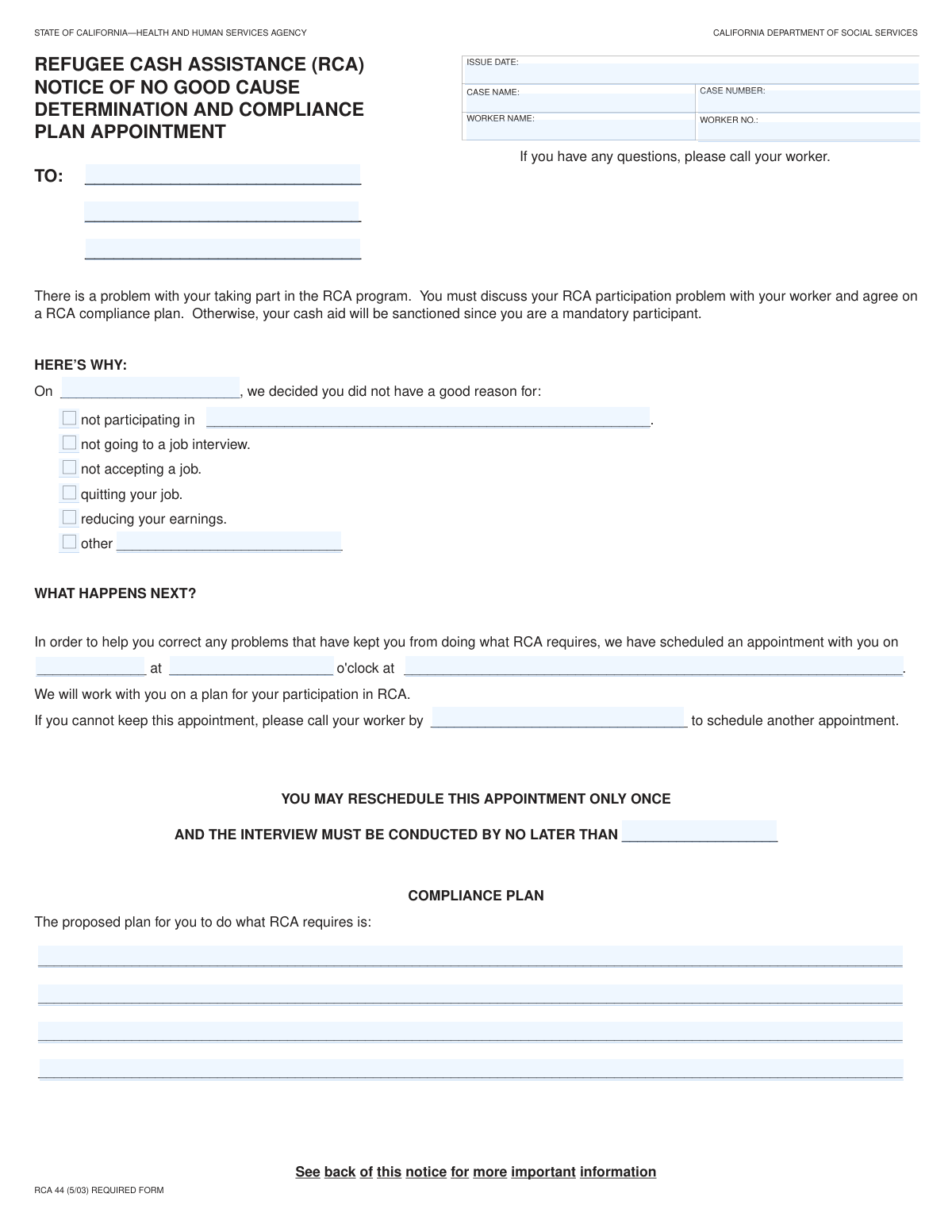
Yes! You can use AI to fill out RCA 3, Notice of Proposed Action - No Good Reason Determination and Proposed Compliance Plan
The RCA 3, or Notice of Proposed Action, is a crucial document issued by social services to individuals in the Refugee Cash Assistance (RCA) program. It formally communicates a determination that the recipient failed to meet program requirements (like attending a job interview or accepting a job) without a 'good reason' and details a plan to regain compliance. Failing to respond or comply can lead to sanctions or loss of benefits, making timely and accurate completion essential. Today, this form can be filled out quickly and accurately using AI-powered services like Instafill.ai, which can also convert non-fillable PDF versions into interactive fillable forms.
Our AI automatically handles information lookup, data retrieval, formatting, and form filling.
It takes less than a minute to fill out RCA 3 using our AI form filling.
Securely upload your data. Information is encrypted in transit and deleted immediately after the form is filled out.
Form specifications
| Form name: | RCA 3, Notice of Proposed Action - No Good Reason Determination and Proposed Compliance Plan |
| Number of fields: | 28 |
| Number of pages: | 2 |
| Language: | English |
| Categories: | compliance forms |
Instafill Demo: How to fill out PDF forms in seconds with AI
How to Fill Out RCA 3 Online for Free in 2026
Are you looking to fill out a RCA 3 form online quickly and accurately? Instafill.ai offers the #1 AI-powered PDF filling software of 2026, allowing you to complete your RCA 3 form in just 37 seconds or less.
Follow these steps to fill out your RCA 3 form online using Instafill.ai:
- 1 Navigate to Instafill.ai and upload or select the RCA 3 form to begin.
- 2 Use the AI assistant to automatically populate or manually enter the Case Information, including the case name, number, and worker details.
- 3 In the 'Reason for Determination' section, check the box that corresponds to the reason for the non-compliance notice.
- 4 Provide specific details related to the determination, such as the activity the recipient failed to participate in or the job they quit.
- 5 Clearly detail the 'Proposed Compliance Plan,' outlining the specific steps the recipient must take to meet RCA requirements.
- 6 Enter the appointment details and rescheduling information if applicable.
- 7 Review all entered information for accuracy, then use the platform to save, print, or electronically submit the completed form.
Our AI-powered system ensures each field is filled out correctly, reducing errors and saving you time.
Why Choose Instafill.ai for Your Fillable RCA 3 Form?
Speed
Complete your RCA 3 in as little as 37 seconds.
Up-to-Date
Always use the latest 2026 RCA 3 form version.
Cost-effective
No need to hire expensive lawyers.
Accuracy
Our AI performs 10 compliance checks to ensure your form is error-free.
Security
Your personal information is protected with bank-level encryption.
Frequently Asked Questions About Form RCA 3
This form is a notice of determination regarding your case. You likely received it because a decision was made that you did not meet a specific program requirement, such as participating in a required activity or attending a job interview.
Your case worker fills out and sends this form to you. As the recipient, you do not fill it out, but you must read it carefully and take the actions it describes.
This means the agency has decided that you did not have a valid excuse for failing to meet a program rule. The form will specify the exact reason, such as quitting a job or not accepting a job offer.
The Proposed Compliance Plan details the exact steps you need to take to get back into good standing with the program. Following this plan is necessary to resolve the issue and avoid penalties to your benefits.
First, check the 'Appointment Details' section for a scheduled meeting with your worker. If you cannot attend, you must call your worker by the date listed under 'Rescheduling Information' to set up a new time.
If you miss the scheduled appointment, you must contact your worker by the 'Call Worker By Date' to reschedule. Failure to do so could lead to negative consequences for your case, such as a reduction in benefits.
This indicates the determination was made because you failed to participate in a required activity. The 'Non-Participation Activity' field should provide more specific details about the program or task you missed.
When you call your worker, have this notice available for reference. You will need to provide your full name and the 'Case Number' listed in the top section of the form.
The 'Interview Completion Deadline' specifies the final date by which your rescheduled interview must take place. It is very important to meet this deadline to stay in compliance.
While this form outlines immediate compliance steps, you typically have the right to appeal decisions affecting your benefits. Contact your case worker or the agency's main office to ask about the formal appeal process and its deadlines.
Yes, services like Instafill.ai use AI to accurately auto-fill your information on various forms, which can save time and help prevent errors on applications or reporting documents.
To use Instafill.ai, you simply upload your form to their website. The AI technology makes the form interactive, allowing you to type your information directly into the fields and then download the completed document.
If you have a non-fillable or 'flat' PDF, you can use a tool like Instafill.ai. It can convert the document into an interactive, fillable form that you can easily complete and save on your computer.
Compliance RCA 3
Validation Checks by Instafill.ai
1
Mandatory Case Information Completeness
This check ensures that critical case identification fields, including 'Case Name', 'Case Number', and 'Worker Name', are not left empty. This information is fundamental for correctly identifying the case and associated personnel, and its absence would make the form unusable for processing. The form submission will be blocked until all these required fields are populated.
2
Valid Date Format
Verifies that all date fields ('Issue Date', 'Determination Date', 'Appointment Date', 'Call Worker By Date', 'Interview Completion Deadline') are entered in a valid and consistent format, such as MM/DD/YYYY. This ensures data integrity and prevents processing errors in downstream systems that rely on structured date information. If the format is invalid, the user will be prompted to correct the entry before submission.
3
Determination and Issue Date Logic
This validation confirms that the 'Determination Date' occurs on or before the 'Issue Date'. A determination must be made before a notice about it can be issued, so this check enforces a logical chronological order. An error will be displayed if the issue date precedes the determination date, preventing the creation of an illogical case timeline.
4
At Least One Reason for Determination Required
Ensures that at least one checkbox under the 'Reason for Determination' section is selected. The primary purpose of the form is to document why a determination was made, making this section mandatory. If no reason is selected, the form submission will be blocked, and the user will be instructed to choose the appropriate option(s).
5
Conditional 'Non-Participation Activity' Field
This validation confirms that the 'Non-Participation Activity' text field is filled out if the 'Not participating' checkbox is selected. This rule ensures that specific, required details are provided to explain the nature of the non-participation. If the box is checked and the field is empty, the user will be prompted to provide the necessary details to proceed.
6
Conditional 'Other Reason' Field
This check validates that the 'Other Reason for Determination' text area is completed if the 'Other reason' checkbox is marked. It is crucial for capturing determination reasons that do not fit into the standard categories, ensuring complete documentation. The system will flag an error if the checkbox is selected without a corresponding explanation.
7
Case Number Format Validation
Checks if the 'Case Number' field adheres to a predefined format, such as a specific length or an alphanumeric pattern. This validation ensures the case number is a valid identifier that can be used to accurately look up the case in the system. An invalid format will trigger an error message explaining the expected format to the user.
8
Recipient Address Completeness
Validates that the 'Recipient Address' contains essential components for a mailable address, such as a street address (line 1) and city, state, and ZIP code (likely in line 3). An incomplete address will result in failed communication with the recipient, which could have significant operational consequences. The system should check for non-empty values in critical address lines.
9
Future Appointment Date
Verifies that the 'Appointment Date' is set to a date in the future. Scheduling an appointment for a past date is a logical error that indicates a mistake in data entry. This check prevents nonsensical data and ensures appointments are scheduled correctly for future action.
10
Valid Appointment Time Format
This check ensures that the 'Appointment Time' is entered in a recognized time format, such as HH:MM AM/PM or a 24-hour format. Proper formatting is critical for scheduling systems and for clearly communicating the appointment details to the recipient. An invalid time format would cause confusion and must be corrected before submission.
11
Rescheduling Timeline Logic
This validation ensures the 'Call Worker By Date' is on or before the 'Interview Completion Deadline'. This enforces a logical sequence for rescheduling activities, where the deadline to initiate contact cannot be after the final deadline for the activity itself. A failure would indicate a data entry error that makes the timeline impossible to follow.
12
Proposed Compliance Plan Presence
Checks that the 'Proposed Compliance Plan' section is not left empty. This plan is a critical component outlining the recipient's path back to compliance and must be documented. An empty plan defeats the purpose of this section, so the system should require at least the first line of the plan to be filled out.
Common Mistakes in Completing RCA 3
The form contains multiple date fields, such as 'Issue Date', 'Determination Date', and 'Call Worker By Date'. A frequent error is entering the wrong type of date in a field, like using today's date for the official 'Issue Date'. This confusion can lead to missed deadlines and appointments, potentially jeopardizing benefits. To avoid this, carefully read each label and cross-reference dates with official case documents before entering them.
Users often omit essential address components like an apartment, suite, or unit number, or they enter an incorrect ZIP code. This mistake, typically made when rushing, can cause critical notices to be returned as undeliverable. Consequently, the recipient may miss important information or deadlines. Always double-check that the entire address, including any secondary designators, is correct and complete.
The 'Case Number' and 'Worker Number' are unique identifiers crucial for accurate filing. Simple data entry mistakes, such as transposing digits or mistaking a letter for a number (e.g., 'O' for '0'), are very common. These errors can cause significant processing delays or lead to the form being associated with the wrong case file entirely. To prevent this, slowly proofread each number against your source document.
The form requires a written explanation if 'Not participating' or 'Other reason' is checked. A critical error is checking one of these boxes but failing to fill in the corresponding text field ('Non-Participation Activity' or 'Other Reason for Determination'). This renders the submission incomplete and prevents the agency from understanding the situation, often resulting in an adverse decision. Always ensure you provide the mandatory explanation when required.
When completing fields like 'Other Reason for Determination' or 'Proposed Compliance Plan', individuals sometimes provide generic or unhelpful information, such as 'personal issues' or 'I will fix it.' This is insufficient for an agency to make an informed decision or approve a plan. Your explanation must be specific, detailed, and directly relevant to the issue at hand to be considered valid.
This form has two separate deadlines: 'Call Worker By Date' and 'Interview Completion Deadline'. A common misunderstanding is confusing the two, leading individuals to believe they have until the later date to make the initial phone call. Missing the 'Call Worker By Date' can result in forfeiting the chance to reschedule and may lead to immediate case sanctions. To avoid this, carefully note both distinct deadlines and act on the earliest one first.
For the 'Case Name' field, people sometimes enter a nickname, a shortened name, or misspell their legal name. This can cause record-matching failures within the agency's system, delaying the processing of the form. It is essential to use the full, official name exactly as it appears on other case documents. AI-powered form-filling tools like Instafill.ai can help prevent this by securely storing and accurately auto-filling correct legal names.
The 'Proposed Compliance Plan' is a critical section where the user must outline how they will resolve the non-compliance issue. A frequent mistake is writing a plan that is too general or does not directly address the specific 'Reason for Determination' cited earlier in the form. A weak or irrelevant plan is likely to be rejected, so it is vital to be specific, actionable, and focused on solving the exact problem identified.
Fields like 'Recipient Address' and 'Proposed Compliance Plan' are broken into multiple lines for clarity. However, users often try to cram all the information onto the first line, which can cut off text and make the entry unreadable or incomplete. This is especially difficult if the form is a flat, non-fillable PDF. It's important to use the provided lines correctly, and a tool like Instafill.ai can convert such PDFs into easy-to-use fillable forms to prevent this.
When filling out 'Appointment Time', users may forget to specify AM/PM or use a vague term like 'afternoon'. Similarly, the 'Appointment Location' might be entered as 'downtown office' without a full street address. This ambiguity creates confusion and can easily lead to a missed appointment, causing further compliance problems. Always provide a precise time and a complete, specific address to ensure there is no misunderstanding.
Saved over 80 hours a year
“I was never sure if my IRS forms like W-9 were filled correctly. Now, I can complete the forms accurately without any external help.”
Kevin Martin Green
Your data stays secure with advanced protection from Instafill and our subprocessors

Robust compliance program
Transparent business model
You’re not the product. You always know where your data is and what it is processed for.
ISO 27001, HIPAA, and GDPR
Our subprocesses adhere to multiple compliance standards, including but not limited to ISO 27001, HIPAA, and GDPR.
Security & privacy by design
We consider security and privacy from the initial design phase of any new service or functionality. It’s not an afterthought, it’s built-in, including support for two-factor authentication (2FA) to further protect your account.
Fill out RCA 3 with Instafill.ai
Worried about filling PDFs wrong? Instafill securely fills rca-3-notice-of-proposed-action-no-good-reason-determination-and-proposed-compliance-plan forms, ensuring each field is accurate.