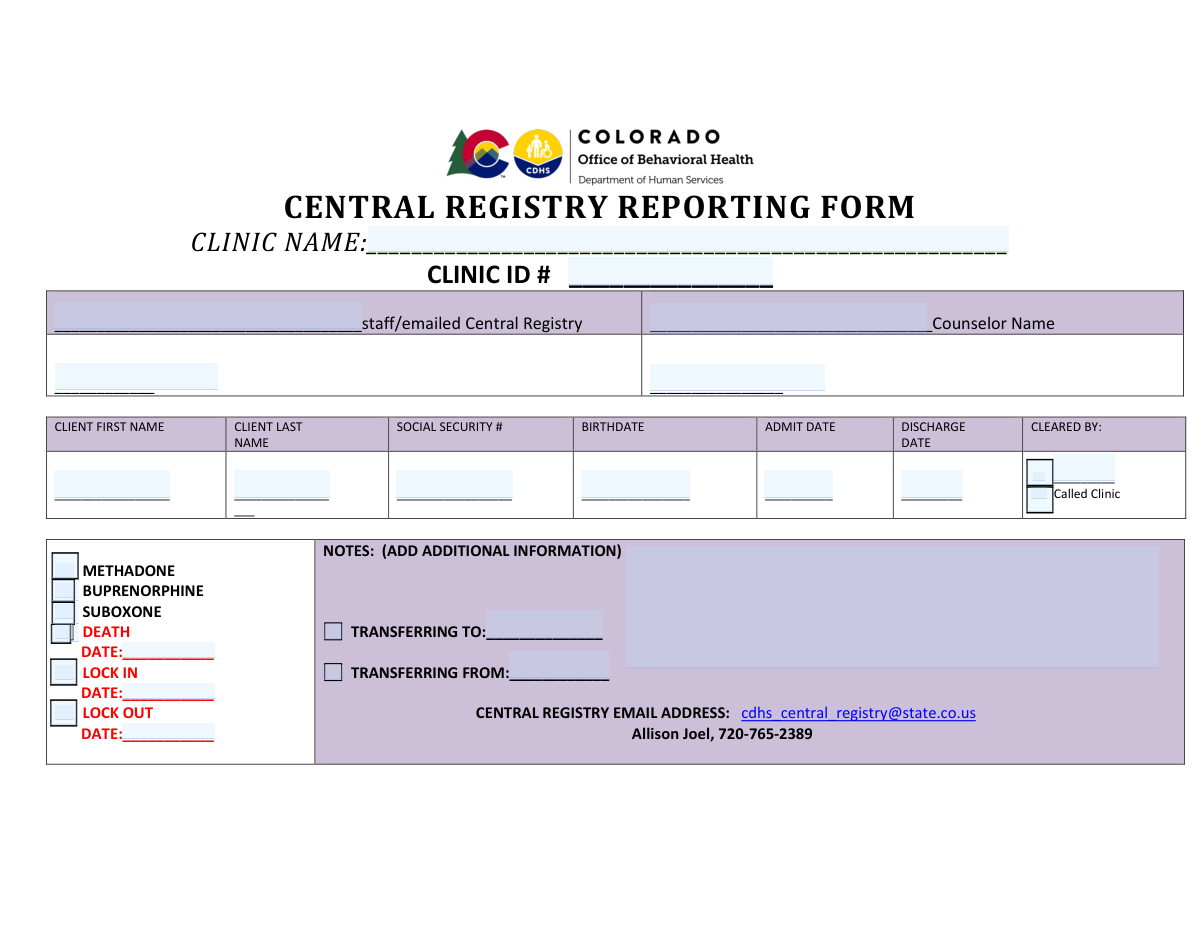
Yes! You can use AI to fill out Central Registry Reporting Form
This form is a crucial document for clinics, particularly those providing substance abuse treatment, to report client data to a state's Central Registry. It tracks key information such as admission/discharge dates, treatment type (e.g., Methadone, Buprenorphine), and client transfers to ensure accurate record-keeping and prevent dual enrollment in treatment programs. Today, this form can be filled out quickly and accurately using AI-powered services like Instafill.ai, which can also convert non-fillable PDF versions into interactive fillable forms.
Our AI automatically handles information lookup, data retrieval, formatting, and form filling.
It takes less than a minute to fill out Central Registry Reporting Form using our AI form filling.
Securely upload your data. Information is encrypted in transit and deleted immediately after the form is filled out.
Form specifications
| Form name: | Central Registry Reporting Form |
| Number of pages: | 1 |
| Language: | English |
Instafill Demo: How to fill out PDF forms in seconds with AI
How to Fill Out Central Registry Reporting Form Online for Free in 2026
Are you looking to fill out a CENTRAL REGISTRY REPORTING FORM form online quickly and accurately? Instafill.ai offers the #1 AI-powered PDF filling software of 2026, allowing you to complete your CENTRAL REGISTRY REPORTING FORM form in just 37 seconds or less.
Follow these steps to fill out your CENTRAL REGISTRY REPORTING FORM form online using Instafill.ai:
- 1 Navigate to Instafill.ai and upload or select the Central Registry Reporting Form.
- 2 Enter the clinic's name and ID number in the designated fields.
- 3 Provide the names of the reporting staff member and the client's counselor.
- 4 Input the client's personal information, including their full name, Social Security Number, and birthdate.
- 5 Fill in the relevant dates for the client's admission, discharge, and any lock-in or lock-out periods.
- 6 Check the appropriate boxes to indicate the type of treatment (e.g., Methadone, Buprenorphine) or other statuses like 'Death'.
- 7 Add any necessary notes, such as transfer details, then review the entire form for accuracy before submitting it to the Central Registry.
Our AI-powered system ensures each field is filled out correctly, reducing errors and saving you time.
Why Choose Instafill.ai for Your Fillable Central Registry Reporting Form Form?
Speed
Complete your Central Registry Reporting Form in as little as 37 seconds.
Up-to-Date
Always use the latest 2026 Central Registry Reporting Form form version.
Cost-effective
No need to hire expensive lawyers.
Accuracy
Our AI performs 10 compliance checks to ensure your form is error-free.
Security
Your personal information is protected with bank-level encryption.
Frequently Asked Questions About Form Central Registry Reporting Form
This form is used by clinics to report a client's admission, discharge, transfer, or other status changes to the state's Central Registry for opioid treatment program tracking.
Authorized clinic staff, such as a counselor or administrator, are responsible for completing and submitting this form with accurate client and clinic information.
You must provide the client's full name, Social Security Number, birth date, and the relevant dates for admission, discharge, or other status changes.
The completed form should be emailed to the Central Registry at [email protected]. For urgent questions, a contact number is also provided on the form.
These fields are used to report the start and end dates of a period where a client is restricted to receiving treatment from your specific clinic, which helps prevent dual enrollment in multiple programs.
You should fill out the client's admission details and enter the name of the previous clinic in the 'TRANSFERRING FROM' field in the Notes section.
These checkboxes indicate the type of medication-assisted treatment the client is receiving. You should check the box that corresponds to the client's prescribed medication.
If a client has passed away, check the 'DEATH' box and enter the date of death in the 'DEATH DATE' field. You should also enter this date as the 'Discharge Date' to officially close the record.
Enter the name of the staff member or official at the Central Registry who provided clearance for the client's admission, which is often obtained via a phone call.
Yes, services like Instafill.ai use AI to accurately auto-fill form fields from your client records, which can save significant time and reduce data entry errors.
Simply upload the Central Registry Reporting Form to the Instafill.ai platform. Its AI will make the document fillable and help you populate the fields quickly and accurately.
You can use a tool like Instafill.ai to convert the flat, non-fillable PDF into an interactive form that you can easily complete and save on your computer.
Yes, the Social Security Number is a required field as it serves as a unique identifier to ensure accurate tracking of the client within the Central Registry system.
Compliance Central Registry Reporting Form
Validation Checks by Instafill.ai
1
Social Security Number Format
This check verifies that the Social Security Number is entered in a valid format, either as a 9-digit number (XXXXXXXXX) or with hyphens (XXX-XX-XXXX). Proper SSN formatting is critical for unique client identification and preventing data corruption in the central registry. If the format is incorrect, the submission should be rejected with an error message prompting the user to correct the entry.
2
Mandatory Field Completion
Ensures that all required fields, such as Clinic Name, Clinic ID, Client First Name, Client Last Name, SSN, Birthdate, and Admit Date, are not empty. Submitting an incomplete form would lead to a deficient record that cannot be properly processed or tracked. A validation failure should prevent form submission and highlight all missing required fields.
3
Admit Date Chronology
Validates that the client's Admit Date is on or after their Birthdate. An admission date that precedes a birthdate is a logical impossibility and indicates a significant data entry error. This check maintains the integrity and logical consistency of the client's timeline.
4
Discharge Date Chronology
If a Discharge Date is provided, this validation ensures it occurs on or after the Admit Date. A client cannot be discharged from a clinic before they have been admitted. This rule prevents illogical record-keeping and ensures the sequence of events is accurate.
5
Birthdate in the Past
This check confirms that the entered Birthdate is a date in the past and not the current date or a future date. This simple validation prevents common data entry mistakes for a fundamental piece of client information. An invalid entry would make age-based calculations and reporting impossible.
6
Clinic ID Format Validation
Verifies that the Clinic ID number conforms to a predefined format (e.g., specific length, numeric, or alphanumeric pattern). This ensures that the reporting clinic can be accurately identified and linked within the central system. An invalid ID could cause the report to be misfiled or rejected entirely.
7
Conditional Death Date Requirement
If the 'DEATH' checkbox is selected, this validation makes the 'Death Date' field mandatory. It is crucial to capture the date of this critical event when it is reported to maintain a complete and accurate client record. Failure to provide the date when 'DEATH' is checked should result in a validation error.
8
Death Date vs. Admit Date Logic
Validates that the 'Death Date', if provided, is on or after the 'Admit Date'. A client's death cannot occur before they were admitted to the reporting clinic. This check upholds the logical sequence of events within the client's record.
9
Lock Out Date vs. Lock In Date Logic
If both 'Lock In Date' and 'Lock Out Date' are entered, this check ensures the 'Lock Out Date' is on or after the 'Lock In Date'. The lock-out event must logically follow the lock-in event. This prevents the creation of an impossible time range for the client's lock-in status.
10
Consistent Date Formatting
Ensures all date fields (Birthdate, Admit Date, Discharge Date, etc.) adhere to a single, consistent format like MM/DD/YYYY. Inconsistent formats can lead to data parsing errors, incorrect sorting, and failed database imports. This rule is essential for system-wide data integrity and usability.
11
Client Name Character Validation
This check ensures the Client First Name and Last Name fields contain valid characters (e.g., letters, spaces, hyphens) and are not empty or just whitespace. It helps maintain high data quality by preventing junk or nonsensical entries in critical name fields. A failed validation would prompt the user to enter a valid name.
12
Conditional Lock-In/Lock-Out Date Requirement
This validation ensures that if the 'LOCK IN' or 'LOCK OUT' checkbox is selected, the corresponding date field ('Lock In Date' or 'Lock Out Date') must be filled. A status change like a lock-in is meaningless without the associated date. This check guarantees that important status changes are accompanied by the necessary temporal data.
Common Mistakes in Completing Central Registry Reporting Form
Users often transpose digits, enter an incomplete number, or use incorrect formatting for the Social Security Number. Since the SSN is a primary unique identifier, any error can lead to a failure to match the client with their existing record, potentially creating duplicate entries or causing data to be misapplied. To avoid this, always double-check the SSN against an official source and enter it in the standard XXX-XX-XXXX format. AI-powered form fillers can help by validating the format automatically.
The form requires multiple dates (Birth, Admit, Discharge) but does not specify a format, leading to ambiguous entries like '01-02-2024'. This can be interpreted as either January 2nd or February 1st, causing significant data errors, especially in client timelines. To prevent this, always use a clear and unambiguous MM/DD/YYYY format. This ensures the date is interpreted correctly and prevents record-keeping errors.
This form appears to be a non-fillable PDF, requiring it to be printed and completed by hand. Poor or rushed handwriting can make critical information like names, dates, and ID numbers unreadable, leading to data entry errors, processing delays, and time-consuming follow-up calls for clarification. To avoid this, print clearly in block letters. Alternatively, a tool like Instafill.ai can convert the flat PDF into a digitally fillable version, ensuring all entries are typed and perfectly legible.
When filling out the 'TRANSFERRING TO' or 'TRANSFERRING FROM' fields, staff may enter vague information like 'a local clinic' or just a city name. This makes it impossible for the central registry to accurately track a client's movement and continuity of care between facilities. Always provide the full, official name of the clinic or facility to ensure a clear and auditable client history.
It is common for the person filling out the form to provide client details but forget to check the relevant boxes for medication (Methadone, Buprenorphine) or status (Death, Lock In). This omission renders the report incomplete, as the primary context for the submission is missing. Before submitting, perform a final review to ensure all applicable checkboxes that describe the client's status and treatment are marked.
Staff who know the client well may inadvertently use a nickname or a shortened version of their first name (e.g., 'Mike' instead of 'Michael'). This can cause a failure to match the report to the correct central registry file, as records are based on legal names. Always use the client's full legal first and last name as it appears on their official identification to ensure accurate record linkage.
The form has separate fields for status events (e.g., 'DEATH', 'LOCK IN') and their corresponding dates. A frequent error is checking a status box but forgetting to fill in the associated date, or vice-versa. This creates an incomplete and ambiguous record that requires follow-up to correct, delaying the processing of critical client status updates. Ensure that for every status event marked, the corresponding date field is also accurately completed.
Users sometimes use an internal acronym for the 'Clinic Name' or forget to include the 'Clinic ID #'. Without the full, official clinic name and unique ID, the central registry may struggle to identify the source of the report, leading to misfiling or rejection. To prevent this, always use the complete, registered clinic name and double-check the Clinic ID for accuracy before submission.
The 'Cleared By' field serves as an important authorization step, but it is often left blank or filled with an illegible signature or initial. This can invalidate the report, as it lacks proof of proper review and clearance by an authorized individual, potentially leading to compliance issues. To avoid this, the designated person should always print their full name clearly in this field to ensure the report is considered valid.
When filling out the form quickly, it's easy to accidentally enter the admission date in the discharge date field and vice versa. This creates a logical error in the client's timeline (e.g., a client being discharged before they were admitted), which will cause the record to be flagged or rejected by the registry's system. Carefully review all dates before submission, ensuring they are in the correct fields and in chronological order. AI-powered tools like Instafill.ai can help prevent this by flagging logical date inconsistencies.
Saved over 80 hours a year
“I was never sure if my IRS forms like W-9 were filled correctly. Now, I can complete the forms accurately without any external help.”
Kevin Martin Green
Your data stays secure with advanced protection from Instafill and our subprocessors

Robust compliance program
Transparent business model
You’re not the product. You always know where your data is and what it is processed for.
ISO 27001, HIPAA, and GDPR
Our subprocesses adhere to multiple compliance standards, including but not limited to ISO 27001, HIPAA, and GDPR.
Security & privacy by design
We consider security and privacy from the initial design phase of any new service or functionality. It’s not an afterthought, it’s built-in, including support for two-factor authentication (2FA) to further protect your account.
Fill out Central Registry Reporting Form with Instafill.ai
Worried about filling PDFs wrong? Instafill securely fills central-registry-reporting-form forms, ensuring each field is accurate.