Yes! You can use AI to fill out Macquarie Asset Management AML/KYC Form
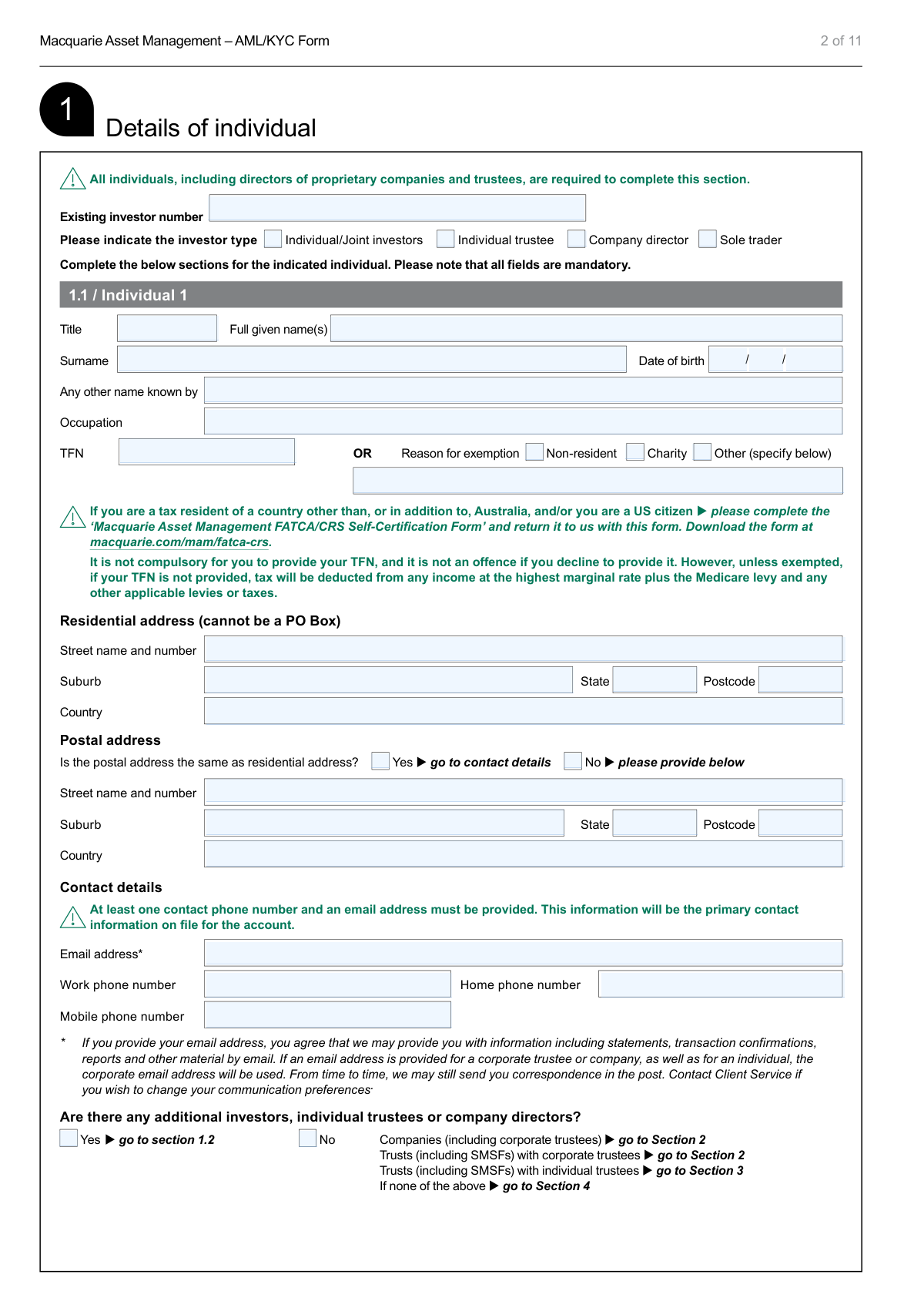
This form, the Macquarie Asset Management AML/KYC (Anti-Money Laundering/Know Your Customer) Form, is a mandatory document for new investors to provide essential identification and background information. It is used by Macquarie to comply with the Anti-Money Laundering and Counter-Terrorism Financing Act 2006, ensuring the legitimacy of funds and investors. Today, this form can be filled out quickly and accurately using AI-powered services like Instafill.ai, which can also convert non-fillable PDF versions into interactive fillable forms.
Our AI automatically handles information lookup, data retrieval, formatting, and form filling.
It takes less than a minute to fill out MAM-AML using our AI form filling.
Securely upload your data. Information is encrypted in transit and deleted immediately after the form is filled out.
Form specifications
| Form name: | Macquarie Asset Management AML/KYC Form |
| Number of pages: | 1 |
| Language: | English |
| Categories: | compliance forms, asset management forms |
Instafill Demo: How to fill out PDF forms in seconds with AI
How to Fill Out MAM-AML Online for Free in 2026
Are you looking to fill out a MAM-AML form online quickly and accurately? Instafill.ai offers the #1 AI-powered PDF filling software of 2026, allowing you to complete your MAM-AML form in just 37 seconds or less.
Follow these steps to fill out your MAM-AML form online using Instafill.ai:
- 1 Navigate to Instafill.ai and upload or select the Macquarie Asset Management AML/KYC Form.
- 2 Indicate your investor type (e.g., Individual, Company, Trust) to activate the relevant sections of the form.
- 3 Use the AI-assisted interface to complete the required sections with your personal, company, or trust details, including beneficial owners and directors.
- 4 Provide additional information regarding the purpose of your investment, source of funds, and source of wealth in Section 4.
- 5 Enter your nominated bank account details for redemption proceeds and income distribution in Section 5.
- 6 Carefully review all the information you've entered, then complete the client acknowledgement and authorization section with your digital or physical signature.
- 7 Download the completed form and gather the required certified identification documents to submit to Macquarie Asset Management via email or mail.
Our AI-powered system ensures each field is filled out correctly, reducing errors and saving you time.
Why Choose Instafill.ai for Your Fillable MAM-AML Form?
Speed
Complete your MAM-AML in as little as 37 seconds.
Up-to-Date
Always use the latest 2026 MAM-AML form version.
Cost-effective
No need to hire expensive lawyers.
Accuracy
Our AI performs 10 compliance checks to ensure your form is error-free.
Security
Your personal information is protected with bank-level encryption.
Frequently Asked Questions About Form MAM-AML
This form is used to collect identification information from investors to comply with Australia's Anti-Money Laundering and Counter-Terrorism Financing (AML/CTF) laws. It helps Macquarie verify your identity before you invest.
This form must be completed by all types of investors, including individuals, joint investors, companies, and various trusts such as SMSFs, managed investment schemes, and charities. The specific sections you need to fill out depend on your investor type.
The first page of the form includes a table that clearly shows which sections to complete based on your investor type (e.g., Individual, Company, or Trust). Follow the instructions in that table and at the end of each section to ensure you fill out all required parts.
As an individual, you must provide a certified copy of a government-issued photo ID, such as an Australian driver's license, an Australian passport, or a foreign passport. The form details other acceptable documents if you don't have these.
Take the original document and a photocopy to an authorized person, such as a Justice of the Peace, police officer, lawyer, or eligible accountant, who will verify it's a true copy. The form provides a full list of eligible certifiers on page 11.
You should email the completed form along with the required certified identification documents to [email protected]. Macquarie may request original certified copies to be sent by mail later.
Providing your TFN is not compulsory. However, if you choose not to provide it, tax may be withheld from any income distributions at the highest marginal rate.
If you are a tax resident of a country other than Australia or a US citizen, you must also complete and submit the 'Macquarie Asset Management FATCA/CRS Self-Certification Form' along with this AML/KYC form.
A beneficial owner is an individual who ultimately owns or controls 25% or more of the company's shares, or who otherwise exercises control over the company. Providing these details is a mandatory requirement under AML/CTF laws.
No, distributions and redemption proceeds can only be paid into an Australian bank account held in the investor's name. For example, if the investor is a trust, the bank account must be in the name of that trust.
For a company, the form must be signed by two directors, or a director and company secretary. For a trust, it generally requires the signatures of two trustees, or as specified in the trust deed.
If you need assistance, you can contact the Macquarie Asset Management Client Service team by phone at 1800 814 523 or by email at [email protected].
Yes, services like Instafill.ai use AI to accurately auto-fill form fields, which can save you time and help reduce errors. This is particularly useful for long and complex forms like this one.
Simply upload the Macquarie AML/KYC form to the Instafill.ai platform. The AI will make the document interactive, and you can then use its features to auto-fill your information, add signatures, and download the completed form for submission.
If you have a non-fillable or 'flat' PDF, you can use a service like Instafill.ai to convert it into an interactive, fillable form. This allows you to easily type your information directly into the fields before saving or printing.
Compliance MAM-AML
Validation Checks by Instafill.ai
1
Residential Address PO Box Prohibition
This validation checks that any field for a residential or principal business address does not contain 'PO Box' or similar variations. This is crucial for AML/KYC regulations which require a physical address for identity verification and risk assessment. A failure would prevent form submission until a valid physical address is provided.
2
TFN/ABN or Exemption Mandate
Verifies that for each Tax File Number (TFN) or Australian Business Number (ABN) field, either a valid number is entered or a reason for exemption is provided. This ensures compliance with tax reporting laws while respecting the voluntary nature of TFN/ABN disclosure. If neither is provided, the form is considered incomplete and tax may be withheld at the highest rate.
3
Investor Type Section Completion
This validation confirms that all sections required for the selected 'Investor type' (as defined in the table on page 1) have been filled out. For example, a 'Company' investor must have completed Sections 1, 2, 4, 5, and 6. This check ensures the logical flow of the form is followed and all necessary data for a specific entity type is captured.
4
Minimum Contact Information Requirement
Ensures that for each individual (Section 1), at least one valid phone number (Work, Home, or Mobile) and a valid email address are provided. This is a stated requirement in the form and is essential for Macquarie to communicate with the investor regarding their account. Failure to provide this minimum contact information will result in a validation error.
5
Bank Account Name and Investor Name Consistency
This check cross-references the 'Account name' in Section 5 with the investor's legal name provided in Sections 1, 2, or 3. The form explicitly forbids payments to third-party accounts, so the bank account must be in the name of the individual, company, or trust. A mismatch indicates a potential third-party payment, which would block the setup of payment instructions.
6
Australian BSB Format Validation
Validates that the Branch State Bank (BSB) number entered in Section 5 consists of exactly 6 digits, often formatted as XXX-XXX. This is a critical format check to ensure the validity of the bank account details for processing distributions and redemptions within the Australian banking system. An invalid BSB would lead to payment failure.
7
Signature Authority and Investor Type Alignment
Verifies that the number of signatures and the 'Title' of the signatories in Section 6 are appropriate for the investor type. For instance, a 'Company' requires two authorized signatories (e.g., two directors), while 'Joint investors' require two signatures. This is a legal and compliance check to ensure the form is executed with proper authority.
8
Unregulated Trust Conditional Section Enforcement
This rule activates only if the investor selects 'Other unregulated trust' in Section 3.1. It then checks for the mandatory completion of Section 3.3 (Beneficial owner of trust) and Section 3.4 (Settlor of trust). This is a key AML/CTF control to identify the ultimate controlling persons and originators of unregulated entities.
9
Logical Date of Birth Verification
Checks that all 'Date of birth' fields contain a valid and logical date. The validation ensures the date is in the past, is not a future date, and represents a plausible age for an investor (e.g., over 18 and under 120 years old). This helps prevent data entry errors and fraudulent applications.
10
Company Beneficial Ownership Declaration
For company applicants (Section 2), this validation ensures the 'Beneficial owners' section is fully completed. It requires details for each individual owning 25% or more of the company, or if none, the details of those who control the company. This is a fundamental KYC requirement to identify the ultimate natural persons behind a corporate entity.
11
Postal Address Conditional Logic
In Section 1.1, this check is triggered if the applicant answers 'No' to the question 'Is the postal address the same as residential address?'. It then validates that the subsequent postal address fields (Street, Suburb, etc.) are filled in. This ensures that if a separate mailing address is needed, it is captured completely.
12
Source of Funds and Wealth Declaration
This validation ensures that at least one option is selected for each of the 'source of investment', 'source of wealth', and 'purpose of investment' questions in Section 4. If 'Other' is selected for any of these, the corresponding specification field must not be empty. This is a critical AML check to understand the client's financial profile and the legitimacy of their funds.
13
Company Type Sub-Section Completion
In Section 2, after providing company details, the user must select a company type (e.g., Public listed, Proprietary). The validation must ensure that the corresponding sub-section (2.1, 2.2, 2.3, or 2.4) is completed as instructed by the form's branching logic. Failure to complete the correct sub-section leaves critical company information missing.
14
Required Documentation Attachment Check
Verifies that the required identification documents mentioned throughout the form (e.g., certified copy of passport, trust deed) have been attached or flagged as received. The system should check for the presence of these documents based on the investor type. This ensures the application is complete and can be processed without delays for missing paperwork.
Common Mistakes in Completing MAM-AML
The form's first page contains a table that explicitly directs different investor types (Individual, Company, Trust) to specific sections. A frequent error is applicants filling out sections irrelevant to them or skipping required ones. This leads to an incomplete application, causing significant processing delays as the firm must request the correct information. To avoid this, carefully review the table on page 1 before starting and only complete the sections marked for your specific investor entity.
The form has strict rules for who must sign in Section 6, depending on the investor type (e.g., two directors for a company, two trustees for a trust). A common mistake is having only one person sign when two are required, or having an unauthorized person sign. This invalidates the form legally and results in immediate rejection. Always consult the 'Who needs to sign?' guide on page 1 and ensure all required individuals sign and print their names and titles correctly.
Sections 1 and 2 explicitly state that a residential or principal place of business address 'cannot be a PO Box'. Applicants often enter a PO Box out of habit or for privacy reasons, but this is not compliant with Anti-Money Laundering (AML) regulations which require a physical address. This error will halt the application process until a valid physical street address is provided. Double-check that all address fields requiring a physical location do not contain a PO Box.
The application requires certified copies of identification, but applicants often fail to meet the specific requirements outlined on page 11. Mistakes include using an unapproved certifier, submitting a certification that is over 12 months old, or forgetting to attach the documents altogether. An invalid certification means the identity verification fails, preventing the account from being opened. Before submitting, verify your certifier is on the approved list and that the certification includes their name, date, and capacity, as specified.
In Section 5, the form states that the nominated bank account must be in the exact same name as the investor. A frequent error is providing a personal bank account for a trust or company investment. For example, an application for 'ABC Pty Ltd as trustee for the Smith Family Trust' must have a bank account with that full name, not just 'ABC Pty Ltd' or 'John Smith'. This mistake leads to failed distributions and redemption payments. Ensure the account name matches the applicant entity on the form precisely.
For companies and certain trusts, failing to identify and provide full details for all beneficial owners (Section 2) is a critical error. Applicants may misunderstand the 25% ownership threshold or who qualifies as a 'controller', leading to incomplete information. As this is a core AML/KYC requirement, any omission or inaccuracy will cause the application to be rejected pending further investigation. Carefully identify all individuals who own or control the entity and provide all their required details.
The form repeatedly instructs applicants who are tax residents of another country or US citizens to complete a separate 'FATCA/CRS Self-Certification Form'. Many applicants overlook this instruction, assuming the main form is sufficient. Failure to submit this mandatory supplementary form will result in an incomplete application and can lead to incorrect tax withholding or reporting issues. If you have any foreign tax residency, you must download and return this additional form.
The form requests completion in 'BLOCK LETTERS' with 'black ink' to ensure legibility. Applicants often use cursive, non-block letters, or other ink colors, resulting in information that is difficult to read and prone to data entry errors by the processing team. This can lead to incorrect details being recorded on the account. To prevent this, write slowly and clearly. Since the form is a non-fillable PDF, using a tool like Instafill.ai to convert it into a fillable version can eliminate legibility issues entirely by allowing you to type directly into the fields.
When filling out Section 3 for a trust, applicants often provide incomplete information. Common mistakes include listing only the trust's name without the trustees, failing to list all beneficiaries or classes of beneficiaries, or incorrectly filling out the 'Beneficial owner' and 'Settlor' sections, which are only required for unregulated trusts. These omissions create ambiguity and fail to meet regulatory requirements, causing delays. Ensure the full legal name of the trust (including trustees) is provided and all relevant subsections are completed accurately.
While providing a Tax File Number (TFN) or Australian Business Number (ABN) is not compulsory, the form requires a reason for exemption if one is not provided. Applicants often leave both the number and the exemption reason fields blank. The consequence is that tax will be automatically deducted from any income at the highest marginal rate. To avoid this, either provide the TFN/ABN or tick the appropriate exemption box.
Saved over 80 hours a year
“I was never sure if my IRS forms like W-9 were filled correctly. Now, I can complete the forms accurately without any external help.”
Kevin Martin Green
Your data stays secure with advanced protection from Instafill and our subprocessors

Robust compliance program
Transparent business model
You’re not the product. You always know where your data is and what it is processed for.
ISO 27001, HIPAA, and GDPR
Our subprocesses adhere to multiple compliance standards, including but not limited to ISO 27001, HIPAA, and GDPR.
Security & privacy by design
We consider security and privacy from the initial design phase of any new service or functionality. It’s not an afterthought, it’s built-in, including support for two-factor authentication (2FA) to further protect your account.
Fill out MAM-AML with Instafill.ai
Worried about filling PDFs wrong? Instafill securely fills macquarie-asset-management-amlkyc-form forms, ensuring each field is accurate.