Yes! You can use AI to fill out Arbejdernes Landsbank – Virksomhedsoplysninger og KYC/AML (kundekendskab) for erhvervskunder

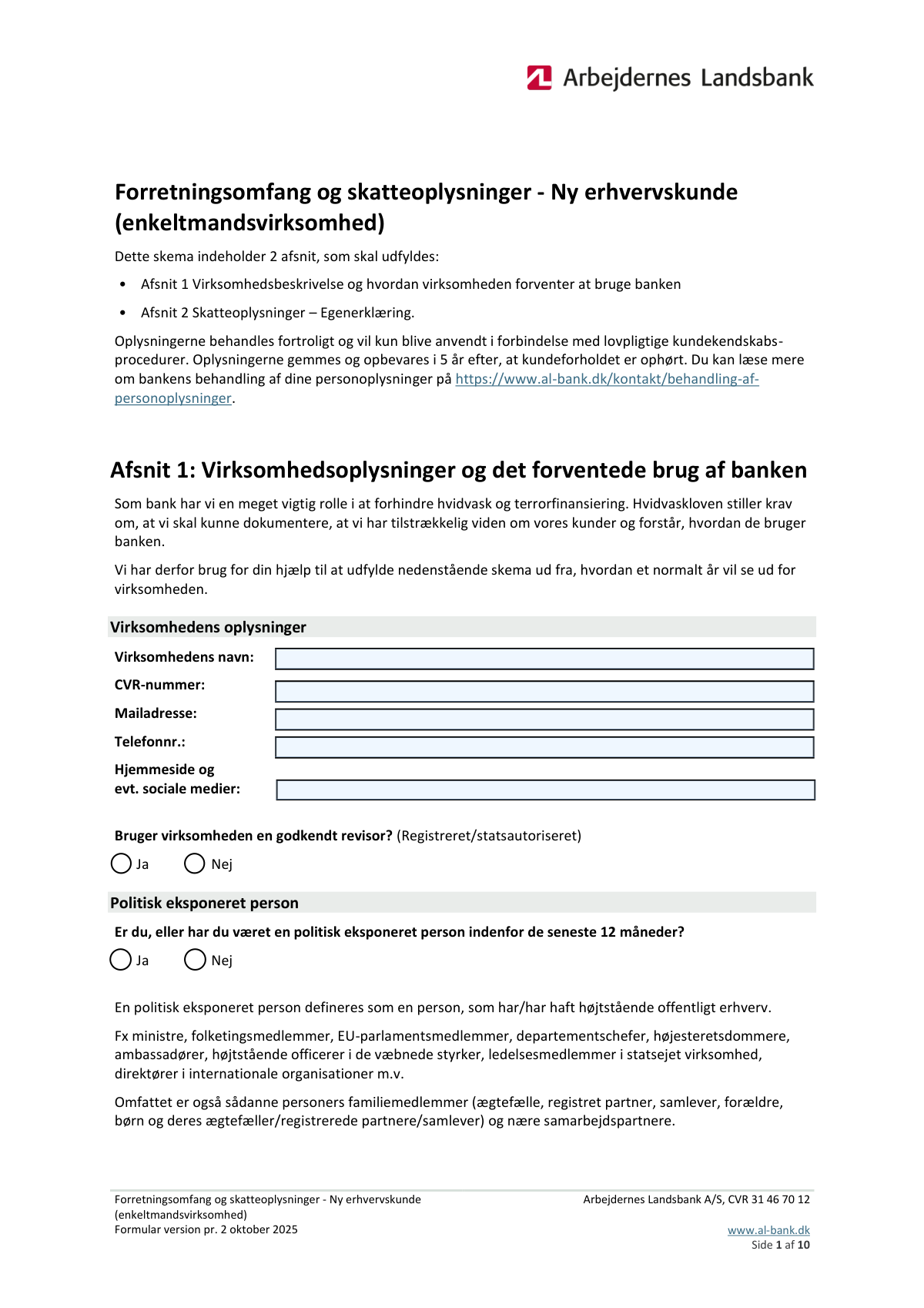
Dette er en erhvervs-KYC/AML (kundekendskab) formular til Arbejdernes Landsbank, hvor virksomheden oplyser identitets- og kontaktdata (fx virksomhedsnavn, CVR, e-mail), ejer-/risikoforhold (fx politisk eksponeret person), forretningsaktiviteter samt forventede ind- og udbetalinger og internationale overfĂžrsler. Oplysningerne bruges til bankens lovpligtige hvidvaskkontrol, risikovurdering og til at forstĂ„ virksomhedens transaktionsmĂžnstre, herunder lande, belĂžb, formĂ„l og modparter. Korrekt udfyldelse er vigtig for at undgĂ„ forsinkelser i onboarding, kontooprettelse eller lĂžbende compliance-opfĂžlgning. I dag kan formularen udfyldes hurtigt og prĂŠcist med AI‑drevne services som Instafill.ai, som ogsĂ„ kan konvertere ikke‑udfyldelige PDF‑versioner til interaktive, udfyldelige formularer.
Our AI automatically handles information lookup, data retrieval, formatting, and form filling.
It takes less than a minute to fill out ALB KYC Erhverv using our AI form filling.
Securely upload your data. Information is encrypted in transit and deleted immediately after the form is filled out.

Form specifications

Form name: Arbejdernes Landsbank – Virksomhedsoplysninger og KYC/AML (kundekendskab) for erhvervskunder
Number of pages: 9
Language: English
main-image

Instafill Demo: filling out a legal form in seconds

How to Fill Out ALB KYC Erhverv Online for Free in 2026

Are you looking to fill out a ALB KYC ERHVERV form online quickly and accurately? Instafill.ai offers the #1 AI-powered PDF filling software of 2026, allowing you to complete your ALB KYC ERHVERV form in just 37 seconds or less.
Follow these steps to fill out your ALB KYC ERHVERV form online using Instafill.ai:
  1. 1 Gå til Instafill.ai og upload formularen (PDF) eller vælg den relevante Arbejdernes Landsbank KYC/erhvervsformular fra biblioteket.
  2. 2 Indtast eller importer virksomhedens grunddata: virksomhedsnavn, CVR-nummer, e-mail, telefon, hjemmeside/sociale medier samt om virksomheden er registreret i Danmark (CVR).
  3. 3 Udfyld compliance-afsnit: angiv om der anvendes godkendt revisor, og om relevante personer er/har været politisk eksponerede (PEP) inden for de seneste 12 måneder.
  4. 4 Beskriv virksomheden: forretningsområder, produkter/ydelser, salgskanaler, kundesegmenter, leverandører, branchekoder, antal ansatte samt eventuelle udenlandske relationer/partnerskaber og tilknyttede lande.
  5. 5 Angiv forventet brug af bankprodukter og begrundelse for valg af Arbejdernes Landsbank, samt forventede indbetalingstyper (fx varesalg, støtte/lån, udbytte, kapitalafkast, andet) og eventuelle engangsbeløb (kilde, formål, dato).
  6. 6 Udfyld transaktionsforventninger: løbende indbetalinger (faktura, kontooverførsel, kort/Nets, MobilePay, andet) med antal overførsler, samt forventede kontante ind- og udbetalinger (summer, antal, største beløb og formål).
  7. 7 Angiv internationale overførsler ind/ud pr. land (antal, største beløb, samlet årligt beløb, afsender/modtager, formål, tidspunkt og valuta), gennemgå AI-valideringer for mangler/inkonsistenser, og eksportér/indsend den færdige formular.

Our AI-powered system ensures each field is filled out correctly, reducing errors and saving you time.

Why Choose Instafill.ai for Your Fillable ALB KYC Erhverv Form?

Speed

Complete your ALB KYC Erhverv in as little as 37 seconds.

Up-to-Date

Always use the latest 2026 ALB KYC Erhverv form version.

Cost-effective

No need to hire expensive lawyers.

Accuracy

Our AI performs 10 compliance checks to ensure your form is error-free.

Security

Your personal information is protected with bank-level encryption.

Frequently Asked Questions About Form ALB KYC Erhverv

Formularen bruges til at indsamle virksomhedsoplysninger, ejer-/personoplysninger og forventede betalings- og overfÞrselsmÞnstre (inkl. udland) som led i bankens kundekendskabs- og hvidvaskkontrol. Den hjÊlper banken med at forstÄ, hvordan kontoen og bankprodukterne forventes brugt.

Den skal typisk udfyldes af virksomheden (eller en tegningsberettiget person) i forbindelse med oprettelse eller opdatering af kundeforhold hos Arbejdernes Landsbank. Hvis der spĂžrges til personlige oplysninger (fx fĂždselsdato, statsborgerskab), er det normalt den relevante ejer/leder, der skal oplyses.

Du skal angive virksomhedens officielle navn, CVR-nummer (hvis relevant), e-mail, telefonnummer samt hjemmeside og evt. sociale medier. Oplysningerne bÞr matche registreringen (fx CVR) for at undgÄ forsinkelser.

SÊt kryds ved "Nej" under "Registered in Denmark (CVR)" og udfyld de Þvrige virksomhedsoplysninger sÄ prÊcist som muligt. Banken kan efterfÞlgende bede om dokumentation for udenlandsk registrering.

VÊlg "Ja", hvis virksomheden bruger en registreret eller statsautoriseret revisor, og "Nej" hvis ikke. Hvis du er i tvivl, sÄ tjek jeres aftale eller revisors titel/registrering.

PEP betyder, at du er (eller inden for de seneste 12 mÄneder har vÊret) i en fremtrÊdende offentlig/politisk position, som kan medfÞre ekstra kontrol. SÊt kryds ved "Ja" eller "Nej" ud fra din situation; banken kan bede om supplerende oplysninger ved "Ja".

Beskriv kort jeres primÊre og sekundÊre aktiviteter (fx rÄdgivning, e-handel, import/eksport) og angiv eventuelle udenlandske relationer/partnere samt hvilke lande de vedrÞrer. Medtag fx leverandÞrer, kunder, datterselskaber eller samarbejdspartnere i udlandet.

Angiv hvad I sÊlger, hvordan I sÊlger (webshop, fysisk butik, B2B, agenter osv.), og hvilke lande/regioner salget gÄr til. Hvis flere produkter sÊlges til forskellige lande, sÄ opdel det tydeligt (fx pr. produktlinje).

Her skal du beskrive jeres typiske kunder (privat, SMV, enterprise), branche, stþrrelse, evt. demografi og de vigtigste geografiske markeder. Det behþver ikke vére marketing-tekst—bare en klar, realistisk beskrivelse.

Skriv navn pĂ„ primĂŠre leverandĂžrer og landet, hvor hver leverandĂžr er placeret, fx "Supplier A — Tyskland". Hvis der er mange, sĂ„ angiv de vigtigste og brug formatet Ă©n pr. linje eller adskilt med komma, som feltet foreslĂ„r.

Udfyld de lande, der er plads til, og sĂŠt kryds ved feltet om tilknytning til mere end 5 lande. Banken kan derefter bede om en komplet liste eller yderligere detaljer.

Angiv realistiske estimater for Ärlige belÞb, antal transaktioner og stÞrste enkeltbelÞb, baseret pÄ budget, historik eller forventet aktivitet. Hvis du vÊlger "andet" som kilde (fx for kontante indbetalinger), skal du beskrive kilden i kommentarfeltet.

Udfyld felterne for hvert engangsbelĂžb med belĂžb, hvem pengene kommer fra, hvorfor de modtages, og forventet dato. Hvis der er flere end 5 engangsbelĂžb, sĂŠt kryds ved feltet om mere end 5, og vĂŠr klar til at give en samlet oversigt ved behov.

For hvert land skal du angive antal overfÞrsler pr. Är, stÞrste belÞb, samlet Ärligt belÞb, formÄl, afsender/modtager og hvornÄr overfÞrslerne forventes. Hvis I forventer overfÞrsler til/fra mere end 12 lande, skal I markere det relevante krydsfelt.

Ja—AI-vĂŠrktĂžjer som Instafill.ai kan hjĂŠlpe med at auto-udfylde felter korrekt og spare tid ved at udtrĂŠkke oplysninger fra dine kilder (fx CVR-data, budgetter og beskrivelser). Upload PDF’en til Instafill.ai, gennemgĂ„ de foreslĂ„ede svar, ret evt. detaljer (isĂŠr belĂžb/lande), og download den udfyldte version til indsendelse.

Hvis PDF’en ikke kan udfyldes direkte, kan Instafill.ai konvertere en flad, ikke-udfyldelig PDF til en interaktiv, udfyldelig formular. Derefter kan du udfylde felterne digitalt og gemme/indsende den férdige fil.

Compliance ALB KYC Erhverv
Validation Checks by Instafill.ai

1
Company legal name is present and plausibly complete
Validates that “Virksomhedens navn” is not empty, not only whitespace, and meets a minimum length (e.g., 2–3 characters) with reasonable character rules (letters, numbers, common punctuation like &.-). This is important because the legal name is a primary identifier used for onboarding, contracts, and matching against registries. If validation fails, block submission and prompt the user to enter the full official registered name (not initials only).
2
CVR number format and checksum validation (8 digits)
Checks that “CVR-nummer” contains exactly 8 digits after removing spaces and separators, and (if implemented) passes the Danish CVR modulus/checksum rules. This prevents typos and ensures the identifier can be used for reliable registry lookups and AML/KYC screening. If validation fails, show an error indicating the CVR must be 8 digits (and invalid if checksum fails) and require correction.
3
Registered in Denmark (CVR) selection is mutually exclusive and consistent with CVR field
Ensures exactly one of “Registered in Denmark (CVR) - Yes/No” is selected (not both, not neither). If “Yes” is selected, CVR-nummer must be provided and valid; if “No” is selected, CVR-nummer should be empty (or the form should require an alternative foreign registration identifier if available). If validation fails, prevent submission and instruct the user to correct the Yes/No selection and related identifier fields.
4
Company email address format and deliverability constraints
Validates that “Mailadresse” matches a standard email format (local@domain), has a valid domain structure, and does not contain illegal characters or spaces. This matters because the email is used for official correspondence, confirmations, and potential security/verification steps. If validation fails, reject the entry and request a valid, active email address.
5
Company phone number format (E.164-friendly) and minimum digits
Checks that “Telefonnummer” contains only allowed characters (+, digits, spaces, hyphens) and normalizes to a plausible international format with a minimum digit count (e.g., 8+ digits; E.164 max 15 digits). This reduces failed contact attempts and ensures consistent storage/telephony integration. If validation fails, prompt the user to include a valid number and country code where relevant.
6
Website and social media URLs are valid and safely parseable
Validates that “Hjemmeside og evt. sociale medier” entries separated by commas are either empty or valid URLs/handles, with acceptable schemes (https:// preferred) and no embedded scripts or unsafe characters. This is important to prevent malformed data and potential injection issues, and to ensure links can be used for due diligence. If validation fails, highlight the specific invalid URL segment and require correction or removal.
7
Approved auditor (Godkendt revisor) selection is mutually exclusive
Ensures only one of “Godkendt revisor - Ja” or “Godkendt revisor - Nej” is selected, and that at least one is selected if the question is required. This matters for compliance profiling and determining documentation requirements. If validation fails, block submission and require a single clear choice.
8
Politically exposed person (PEP) selection is mutually exclusive and complete
Ensures only one of “Politisk eksponeret person - Ja/Nej” is selected and that the question is answered. This is critical for AML compliance because PEP status changes the risk rating and triggers enhanced due diligence. If validation fails, prevent submission and require the user to select exactly one option.
9
Business description fields meet minimum content quality
Validates that narrative fields (e.g., “Business areas and foreign relations”, “Products/services and destination countries”, “Sales channels and destination countries”, “Primary customer segments”) are not empty and meet a minimum length/structure (e.g., at least one activity plus at least one country where requested). This ensures the bank can assess business model, geography, and AML risk. If validation fails, require additional detail and indicate which required elements (activities/countries/partners) are missing.
10
Primary suppliers list parsing and country presence per supplier
Checks that “Primary suppliers and source countries (1)” contains at least one supplier entry and that each entry includes both a supplier name and a country (e.g., separated by dash/em dash). This matters for supply-chain and geographic risk assessment and for consistent downstream parsing. If validation fails, show an error with an example format and require correction.
11
Industry (branch) code format and secondary codes list validation
Validates that “Branch code and secondary industries” contains at least one industry code in an expected format (e.g., numeric DK/NACE-style code length rules) and that additional codes/descriptions are comma-separated and parseable. Correct industry coding is important for regulatory reporting, risk scoring, and product eligibility. If validation fails, require a valid primary code and properly formatted secondary entries.
12
Number of employees is a non-negative integer within a reasonable range
Ensures “Number of employees” is an integer (no decimals, no text), is not negative, and is within a plausible upper bound (e.g., 0–1,000,000) to catch input errors. This supports risk profiling and operational sizing and prevents downstream calculation issues. If validation fails, prompt the user to enter a whole number and reject unrealistic values.
13
Country fields use a controlled vocabulary and avoid duplicates
Validates that all “Angiv et land 
” fields (countries for incoming transfers and country affiliations) are selected from a standardized list (ISO 3166 country names/codes) rather than free text, and flags duplicates across repeated country slots. This is important for consistent screening, sanctions checks, and reporting. If validation fails, require selection from the approved list and ask the user to remove or consolidate duplicate entries.
14
Country affiliation type required when an affiliation country is provided
For each “Angiv et land, som virksomheden har tilknytning til”, checks that the corresponding “Angiv typen af tilknytning 
” is filled (e.g., ownership, operations, customers, suppliers, management, etc.). This ensures the relationship is interpretable for AML and tax risk assessment. If validation fails, block submission and require an affiliation type for each provided country.
15
‘More than N countries’ checkboxes align with number of country entries
Validates that “Sét kryds her, hvis virksomheden har tilknytning til mere end 5 lande” is checked when the user indicates more than 5 affiliation countries (or when the form only provides 5 slots and the user needs to declare more). Similarly, validates “modtage penge fra mere end 12 lande” / “overfþre penge til mere end 12 lande” against the number of populated country transfer rows. If validation fails, prompt the user to either add the missing declaration or correct the number of listed countries to match the checkbox state.
16
Transfer rows completeness and numeric consistency (counts and amounts)
For each incoming/outgoing transfer country row, validates that required fields are present together: country, number of transfers per year, largest single amount (DKK), total annual amount (DKK), purpose, counterparty (sender/receiver), and expected timing/date. Also checks numeric logic: counts must be positive integers; amounts must be non-negative; and total annual amount must be greater than or equal to the largest single amount (and typically >= largest amount * 1 if count >= 1). If validation fails, highlight the specific row and field(s), reject inconsistent totals, and require correction before submission.

Common Mistakes in Completing ALB KYC Erhverv

Using a trade name instead of the official registered company name

Many people enter a brand name, shortened name, or a department name rather than the company’s full official name as registered (e.g., in CVR). This often happens because the everyday name is what staff see on the website or invoices, but it can cause mismatches during bank/KYC verification and delay onboarding. Always copy the exact legal name from the CVR register/registration documents, including punctuation and legal suffixes. AI-powered tools like Instafill.ai can pull and standardize the official name to match registry formatting.

Entering an invalid CVR number (wrong length, spaces, or non-Danish ID)

A common error is entering fewer/more than 8 digits, adding spaces, or accidentally using another identifier (VAT/SE number format, internal customer number, etc.). This happens when users copy from emails or documents that include formatting or prefixes, and it can lead to immediate validation failure or manual follow-up. Ensure the CVR is exactly 8 digits and preferably without spaces, as requested. Instafill.ai can validate the CVR length and numeric-only format automatically before submission.

Email and phone number entered in inconsistent or non-contactable formats

People often use a personal email instead of the company’s correspondence email, mistype the domain, or enter a phone number without country code when it’s needed. These mistakes happen because contact details are copied from signatures or old records, and the consequence is missed bank communication and stalled case handling. Use an actively monitored company mailbox and a primary phone number in international format (e.g., +45XXXXXXXX) if relevant. Instafill.ai can format phone numbers consistently and flag invalid email patterns.

Website/social media field filled with unstructured text or missing separators

Applicants frequently paste long sentences, omit “https://”, or list multiple links without commas even though the field asks for comma-separated URLs/profiles. This happens because users treat it like a comment field, but it can make links unusable for reviewers and trigger clarification requests. Provide clean URLs (preferably with https://) and separate each site/profile with a comma (e.g., https://example.dk, https://linkedin.com/company/xxx). Instafill.ai can normalize URLs and enforce the requested delimiter format.

Checking both Yes and No (or neither) on binary checkbox questions

For fields like “Godkendt revisor” and “Politisk eksponeret person” (and “Registered in Denmark (CVR)”), users sometimes tick both boxes or forget to tick any. This happens because the form uses two separate checkboxes instead of a single radio button, and it can invalidate the submission or force manual clarification. Choose exactly one option per Yes/No pair and review the form for contradictions before sending. Instafill.ai can enforce mutual exclusivity so only one of the two boxes can be selected.

Misunderstanding the PEP (politically exposed person) definition and 12-month rule

People often answer “No” because they think PEP only applies to current politicians, or they forget it includes the last 12 months and can include certain roles/associations depending on policy. This can lead to compliance issues, additional documentation requests, or delays if the bank later identifies PEP indicators. Read the question carefully and answer based on whether you are or have been a PEP within the last 12 months, and be prepared to provide details if “Yes.” Instafill.ai can add guided prompts and consistency checks to reduce misinterpretation.

Business description too vague or missing foreign relations/countries

In “Business areas and foreign relations” and related fields, many write generic statements like “consulting” or “trading” without specifying activities, partners, and the countries involved. This happens because users underestimate how detailed KYC/AML descriptions must be, and the consequence is follow-up questions or rejection due to insufficient transparency. Provide primary and secondary activities, name/describe foreign partners, and list all relevant countries explicitly. Instafill.ai can prompt for missing country details and ensure the narrative covers required elements.

Not mapping products/services to destination countries (mixing everything together)

Applicants often list products/services but forget to specify where each is sold, or they list countries without linking them to specific offerings. This happens because the field requires a structured mapping, and unstructured answers make risk assessment difficult and slow. Enter each product/service and the corresponding destination countries/territories (e.g., “Software subscriptions — DK, SE, NO; Physical goods — DE, NL”). Instafill.ai can help structure the response into consistent “item — countries” formatting.

Supplier list missing country per supplier or not following one-per-line/comma guidance

For “Primary suppliers and source countries,” people frequently provide only supplier names, omit the supplier’s country, or paste a block of text without separators. This happens when supplier data is copied from accounting systems that don’t include country in the same view, and it leads to incomplete AML screening and requests for clarification. Provide each supplier with its country in a consistent format (e.g., “Supplier A — Denmark, Supplier B — Germany”) and keep it readable. Instafill.ai can enforce the “name — country” pattern and flag missing country values.

Industry/branch code entered as a description only (or wrong code system)

Many users type only a textual industry description (e.g., “IT services”) or use an internal code rather than the official branch/industry code expected by the form. This happens because people don’t know the correct code source, and it can cause classification errors and extra back-and-forth with the bank. Enter the primary industry code plus any secondary codes, and include short descriptions separated by commas as requested. Instafill.ai can help format multiple codes consistently and reduce mismatches by validating expected code patterns.

Inconsistent transaction expectations (amounts, counts, countries, and checkboxes don’t match)

Across the many payment sections (incoming/outgoing transfers, cash deposits/withdrawals, one-off payments, “more than 12 countries,” “other” sources), users often provide numbers that contradict each other or forget to fill the follow-up fields after ticking a box. This happens because the form repeats similar blocks and it’s easy to miss dependencies, but inconsistencies can trigger compliance reviews and delays. Ensure that if you tick a method (e.g., MobilePay, card, invoices) you also provide the required number of transfers, and that totals align with the stated annual sums and country lists. Instafill.ai can detect missing dependent fields and cross-check totals/counts for consistency.
Saved over 80 hours a year

“I was never sure if my IRS forms like W-9 were filled correctly. Now, I can complete the forms accurately without any external help.”

Kevin Martin Green

Your data stays secure with advanced protection from Instafill and our subprocessors

Robust compliance program

Transparent business model

You’re not the product. You always know where your data is and what it is processed for.

ISO 27001, HIPAA, and GDPR

Our subprocesses adhere to multiple compliance standards, including but not limited to ISO 27001, HIPAA, and GDPR.

Security & privacy by design

We consider security and privacy from the initial design phase of any new service or functionality. It’s not an afterthought, it’s built-in, including support for two-factor authentication (2FA) to further protect your account.

Fill out ALB KYC Erhverv with Instafill.ai

Worried about filling PDFs wrong? Instafill securely fills arbejdernes-landsbank-virksomhedsoplysninger-og-kycaml-kundekendskab-for-erhvervskunder forms, ensuring each field is accurate.