Yes! You can use AI to fill out Template 1-1, Beneficial Ownership Declaration (PIC)

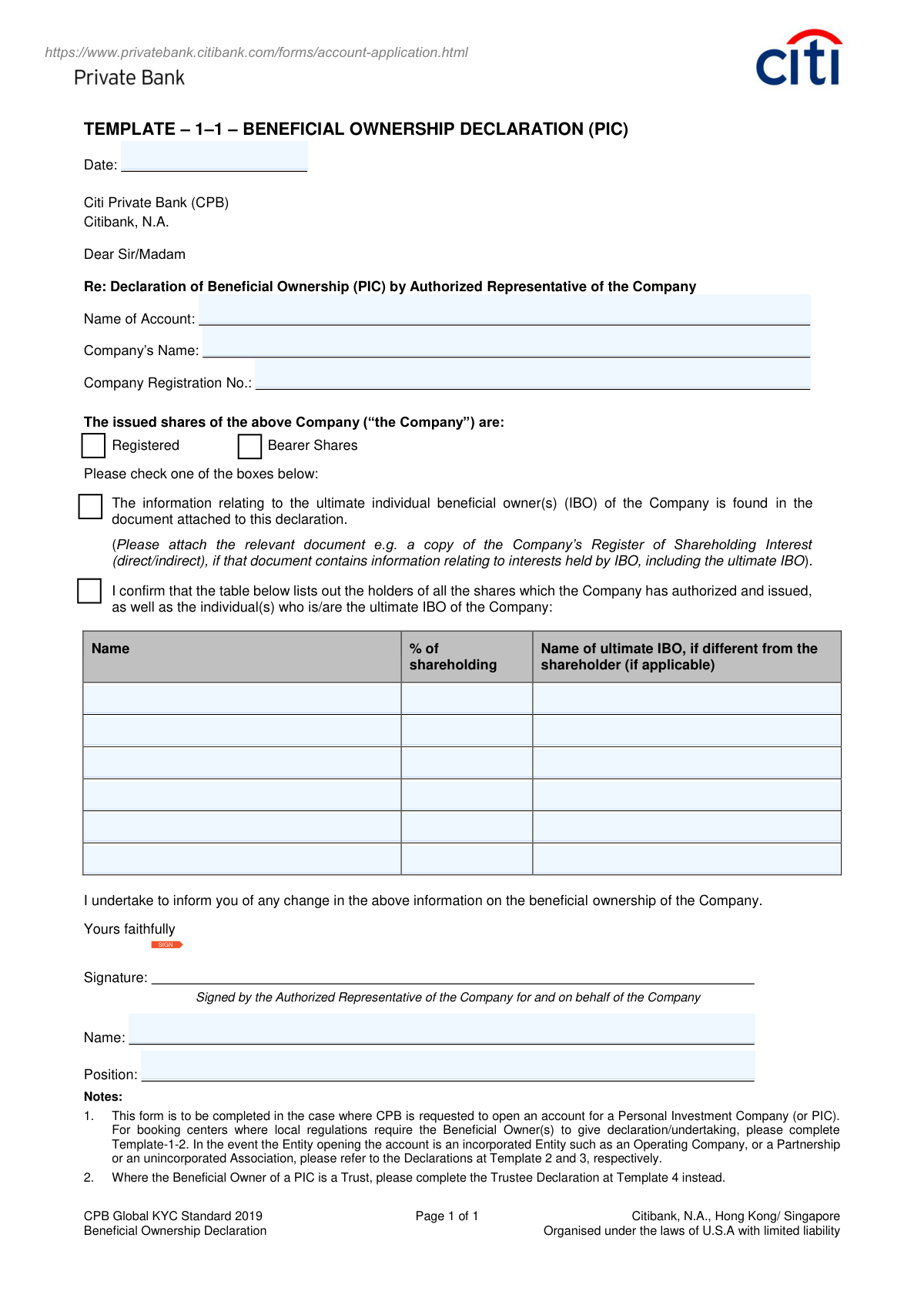
This form, also known as Template 1-1, is a declaration required by Citibank Private Bank when opening an account for a Personal Investment Company (PIC). Its purpose is to identify and document the ultimate individual beneficial owners (IBOs) of the company to comply with financial regulations and anti-money laundering (AML) standards. Today, this form can be filled out quickly and accurately using AI-powered services like Instafill.ai, which can also convert non-fillable PDF versions into interactive fillable forms.
Our AI automatically handles information lookup, data retrieval, formatting, and form filling.
It takes less than a minute to fill out Beneficial Ownership Declaration (PIC) using our AI form filling.
Securely upload your data. Information is encrypted in transit and deleted immediately after the form is filled out.

Form specifications

Form name: Template 1-1, Beneficial Ownership Declaration (PIC)
Number of pages: 1
Language: English
Categories: compliance forms
main-image

Instafill Demo: How to fill out PDF forms in seconds with AI

How to Fill Out Beneficial Ownership Declaration (PIC) Online for Free in 2026

Are you looking to fill out a BENEFICIAL OWNERSHIP DECLARATION (PIC) form online quickly and accurately? Instafill.ai offers the #1 AI-powered PDF filling software of 2026, allowing you to complete your BENEFICIAL OWNERSHIP DECLARATION (PIC) form in just 37 seconds or less.
Follow these steps to fill out your BENEFICIAL OWNERSHIP DECLARATION (PIC) form online using Instafill.ai:
  1. 1 Navigate to Instafill.ai and upload or select the Beneficial Ownership Declaration (PIC) form.
  2. 2 Use the AI assistant to input the date, account name, company name, and company registration number.
  3. 3 Indicate whether the company's issued shares are registered or bearer shares by checking the appropriate box.
  4. 4 Choose the method for providing beneficial ownership information: either by attaching a separate document or by filling out the provided table.
  5. 5 If using the table, list the names of all shareholders, their percentage of shareholding, and the names of the ultimate individual beneficial owners (IBOs).
  6. 6 The authorized representative of the company must provide their signature, full name, and position.
  7. 7 Review all entered information for accuracy before finalizing and submitting the declaration to Citibank.

Our AI-powered system ensures each field is filled out correctly, reducing errors and saving you time.

Why Choose Instafill.ai for Your Fillable Beneficial Ownership Declaration (PIC) Form?

Speed

Complete your Beneficial Ownership Declaration (PIC) in as little as 37 seconds.

Up-to-Date

Always use the latest 2026 Beneficial Ownership Declaration (PIC) form version.

Cost-effective

No need to hire expensive lawyers.

Accuracy

Our AI performs 10 compliance checks to ensure your form is error-free.

Security

Your personal information is protected with bank-level encryption.

Frequently Asked Questions About Form Beneficial Ownership Declaration (PIC)

This form is used to declare the ultimate individual beneficial owners (IBOs) of a Personal Investment Company (PIC). It is a required part of Citibank Private Bank's Know Your Customer (KYC) process for opening a new account.

An authorized representative of a Personal Investment Company (PIC) must complete and sign this form when applying to open an account with Citi Private Bank.

A PIC is a company established for personal investment purposes. If your entity is an Operating Company, Partnership, or Trust, you must use a different form as indicated in the notes section, such as Template 2, 3, or 4.

An IBO is the natural person who ultimately owns or controls the company. This applies even if their ownership is indirect, through a chain of other companies or legal entities.

The first checkbox is for when you are attaching a separate official document, like a share register, that lists the IBOs. The second checkbox is for when you are manually listing all shareholders and IBOs directly in the table on the form.

The attached document, such as a Register of Shareholding Interest, must clearly identify all direct and indirect interests held by the ultimate individual beneficial owners of the company.

List the shareholder company's name and its ownership percentage in the first two columns. In the third column, you must provide the name of the individual person(s) who is the ultimate beneficial owner of that shareholder company.

An Authorized Representative is a person, such as a company director or secretary, who has the legal authority to sign documents and act on behalf of the company.

By signing the form, you are making a legal commitment to notify Citibank Private Bank promptly if there are any future changes to the company's beneficial ownership structure.

This declaration should be submitted as part of your complete account application package. Please follow the specific submission instructions provided by your Citi Private Bank relationship manager.

Yes, services like Instafill.ai use AI to accurately auto-fill form fields from your saved information, which can save you time and help prevent errors.

You can upload the form to Instafill.ai, which will make the fields interactive and fillable online. You can then complete the form, add your digital signature, and download the finished document.

If you have a non-fillable or 'flat' PDF, you can use a tool like Instafill.ai. It can convert the static PDF into an interactive, fillable form for you to complete on your computer.

Compliance Beneficial Ownership Declaration (PIC)
Validation Checks by Instafill.ai

1
Ensures Date is Valid and Not in the Future
This check verifies that the 'Date' field is filled in a recognized format (e.g., YYYY-MM-DD) and represents a date that is on or before the submission date. It is crucial for establishing an accurate timeline for the declaration. A missing, invalid, or future date could render the legal declaration void and cause compliance issues.
2
Verifies Completeness of Company Identification Fields
This validation ensures that 'Company's Name', 'Name of Account', and 'Company Registration No.' are all populated. These fields are fundamental for uniquely identifying the legal entity opening the account. Failure to provide this information prevents the bank from performing necessary due diligence and linking the declaration to the correct entity.
3
Confirms Selection of Share Type
This check ensures that one of the two checkboxes, 'Registered' or 'Bearer Shares', has been selected. This information is critical for understanding the nature of the company's ownership structure and assessing risk. An unselected option leaves a key detail ambiguous, halting the account opening process until clarified.
4
Ensures a Declaration Method is Chosen
This validation confirms that the user has selected one of the two primary declaration methods: either providing information via an attached document or by filling out the shareholder table. This choice dictates which subsequent information is required and how the beneficial ownership is verified. The form is incomplete and cannot be processed without this selection.
5
Conditional Table Population
If the user checks the box indicating the shareholder information is in the table below, this validation ensures at least one row of the table is completely filled out with a Name and % of shareholding. Selecting this option without providing any data makes the declaration meaningless. The submission should be rejected until the required shareholder details are entered.
6
Verifies Attachment for Document-Based Declaration
If the user checks the box indicating the beneficial ownership information is in an attached document, this validation confirms that a file has actually been attached to the submission. This is critical as the entire declaration relies on the external document. A failed check means the core information is missing, and the submission must be rejected.
7
Validates Shareholding Percentage is a Valid Number
This check ensures that every entry in the '% of shareholding' column is a valid numerical value between 0.01 and 100. Non-numeric or out-of-range values would make calculating total ownership impossible and indicate a data entry error. This validation is essential for the integrity of the ownership breakdown.
8
Ensures Total Shareholding Percentage Equals 100%
This is a crucial logical check that sums all values in the '% of shareholding' column and verifies that the total is exactly 100%. A total less than or greater than 100% indicates an incomplete or incorrect declaration of all beneficial owners. This discrepancy is a major red flag for compliance and must be corrected before the form can be accepted.
9
Checks for Complete Information in Each Populated Shareholder Row
For any row in the shareholder table where a 'Name' is entered, this validation ensures the corresponding '% of shareholding' is also filled out. A name without a percentage is incomplete information and prevents a full understanding of the ownership structure. The form should be returned to the user to complete the missing data for that shareholder.
10
Confirms Authorized Representative's Details are Complete
This validation ensures the 'Name' and 'Position' fields for the authorized representative who is signing the form are both completed. This information is legally required to confirm the identity and authority of the person making the declaration on behalf of the company. An incomplete section would question the validity of the entire submission.
11
Verifies Presence of Authorized Representative's Signature
This check confirms that the 'Signature' field contains a digital signature or an uploaded signature image. The signature is the legal attestation that the information provided is true and accurate. A missing signature renders the entire declaration non-binding and legally invalid.
12
Validates Company Registration Number Format
This check verifies that the 'Company Registration No.' field is not empty and contains a plausible alphanumeric string. While the exact format varies by jurisdiction, this prevents submission of clearly invalid data like 'N/A' or 'pending'. This ensures a valid identifier is provided for regulatory checks and record-keeping.
13
Checks for Ultimate IBO Name when Shareholder is an Entity
This validation checks if the shareholder listed in the 'Name' column appears to be a company or entity rather than an individual. If so, it flags if the 'Name of ultimate IBO' column is empty, as the purpose is to identify the ultimate individual beneficial owner. This check helps enforce the 'look-through' requirement of KYC regulations to prevent ownership from being obscured by corporate layers.

Common Mistakes in Completing Beneficial Ownership Declaration (PIC)

Using the PIC Form for a Non-PIC Entity

The form's notes clearly state it is for a Personal Investment Company (PIC) and directs users to other templates for entities like trusts or operating companies. This mistake happens when filers overlook the fine print, leading to an immediate rejection of the submission and significant processing delays. To prevent this, always read all instructions and notes carefully to confirm you are using the correct form for your specific legal entity.

Inconsistent Company Name Entry

Applicants often enter slightly different names in the 'Name of Account' and 'Company's Name' fields, for example, using a trade name in one and the full legal name in the other. This discrepancy creates ambiguity and forces the bank to halt the process for verification. It is critical to use the exact, official registered company name consistently across all fields to ensure a smooth application process.

Omitting the Share Type Selection

The form requires a mandatory selection between 'Registered' and 'Bearer Shares' via a checkbox. This simple but crucial step is easily missed, rendering the declaration incomplete and guaranteeing its return for correction. Always perform a final review to ensure one of these two boxes is checked before submitting the form.

Ambiguous Declaration Method Selection

The form offers two distinct methods for declaring beneficial ownership: attaching a document or filling out the table. Common errors include checking both boxes, checking neither, or selecting the table option but leaving it empty. This forces the bank to seek clarification, delaying the account opening. You must choose only one method and fully execute it by either attaching the specified document or completely filling in the shareholder table.

Incomplete Shareholder Percentage Calculation

A frequent data entry error is providing a list of shareholding percentages that do not add up to exactly 100%. This mathematical error, often due to oversight or miscalculation, will be automatically flagged by the financial institution's compliance systems, leading to rejection. Using a calculator or an AI-powered form-filling tool like Instafill.ai can help validate these calculations to ensure accuracy.

Failing to Identify the Ultimate Individual Beneficial Owner (IBO)

A critical mistake is confusing the direct shareholder with the 'ultimate individual beneficial owner' (IBO). If the listed shareholder is another company or a nominee, the filer must trace ownership to the actual person who ultimately benefits and list them in the final column. Leaving the IBO column blank in such cases is a major compliance failure that will stop the application until the correct individual is identified.

Listing a Corporation or Trust as an IBO

The form's purpose is to identify the ultimate *individual* beneficial owner. Applicants sometimes mistakenly list another corporation or a trust in the IBO column, failing to trace ownership to a natural person. This is incorrect, as regulations require identifying the individual at the end of the ownership chain; if a trust is the owner, a different form (Template 4) must be used.

Incomplete Authorized Representative Information

The signatory section requires a signature, printed name, and official position. It is common for one of these fields to be left blank or for the signatory to lack the proper authority to sign on behalf of the company. This invalidates the entire declaration, as the bank cannot verify its authenticity. Ensure the form is signed by a person with legal authority (e.g., Director) and that their full name and title are clearly printed.

Submitting a Poor Quality or Handwritten Form

Since this form is often available as a non-fillable PDF, users may print, handwrite, and scan it. This frequently results in illegible handwriting, smudges, or low-quality scans that cause data entry errors and rejection. To avoid this, AI tools like Instafill.ai can convert flat PDFs into digitally fillable versions, ensuring all information is clear, legible, and professional.

Failing to List All Shareholders

When opting to fill the table, applicants sometimes only list the majority shareholders instead of all of them, as required. The form explicitly asks for a list of 'all the shares which the Company has authorized and issued.' An incomplete list misrepresents the ownership structure and will be rejected, with a request for a revised and complete declaration.
Saved over 80 hours a year

“I was never sure if my IRS forms like W-9 were filled correctly. Now, I can complete the forms accurately without any external help.”

Kevin Martin Green

Your data stays secure with advanced protection from Instafill and our subprocessors

Robust compliance program

Transparent business model

You’re not the product. You always know where your data is and what it is processed for.

ISO 27001, HIPAA, and GDPR

Our subprocesses adhere to multiple compliance standards, including but not limited to ISO 27001, HIPAA, and GDPR.

Security & privacy by design

We consider security and privacy from the initial design phase of any new service or functionality. It’s not an afterthought, it’s built-in, including support for two-factor authentication (2FA) to further protect your account.

Fill out Beneficial Ownership Declaration (PIC) with Instafill.ai

Worried about filling PDFs wrong? Instafill securely fills template-1-1-beneficial-ownership-declaration-pic forms, ensuring each field is accurate.