
Yes! You can use AI to fill out Form 130-U, Application for Texas Title and/or Registration
Don't type 107 fields by hand. Tell our AI about yourself, or upload your driver's license, and it fills every field in seconds. You check it, then download, print or sign.
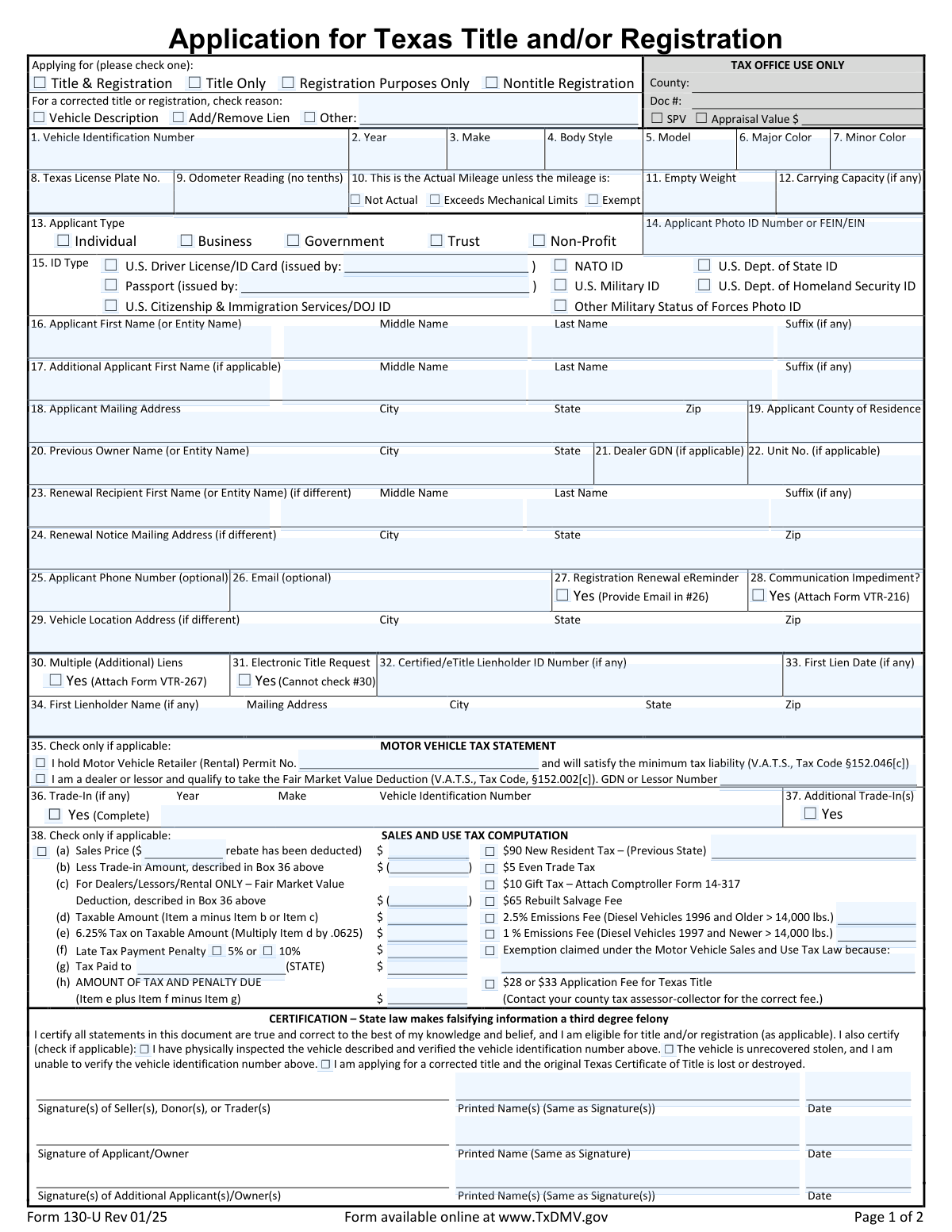
The AI does the filling. You just check it.
No typing into boxes, nothing to install.
What this form asks for
The AI fills all of it, from your answers or your documents.
The AI checks your answers before you download
14 checks built for this form, so a wrong date or a missing answer is caught before anyone else sees it.
This check ensures the 'Vehicle Identification Number (VIN)' field contains exactly 17 alphanumeric characters (A-Z, 0-9) with no spaces or hyphens. This is crucial for uniquely identifying a vehicle and preventing fraudulent or erroneous submissions. If the VIN is not 17 characters or contains invalid symbols, the form submission will be rejected with an error message prompting the user to enter the VIN exactly as it appears on the vehicle's documentation.
This validation checks that the 'Applicant Email Address' field is not empty and contains a validly formatted email if the user has checked the 'Yes I want a Registration Renewal eReminder' box. This is important to ensure the user's request for electronic reminders can be fulfilled. If the box is checked but the email field is empty or invalid, the system will display an error message requiring a valid email address to proceed.
This check validates that the 'Other Reason for Correction' text field is filled out when the 'Other' checkbox under 'Correction Reason' is selected. This ensures that when a non-standard reason for correction is chosen, a specific explanation is provided for processing. Failure to provide a description when 'Other' is checked will result in a validation error, preventing form submission until the reason is described.
This validation ensures the applicant name fields are filled out correctly based on the selected 'Applicant Type'. If 'Individual' is chosen, the 'Applicant First Name' and 'Applicant Last Name' fields are required. If 'Business', 'Government', 'Trust', or 'Non-Profit' is selected, the 'Applicant First Name (or Entity Name)' field must be filled, and the Last/Middle/Suffix fields should be empty. This prevents data entry errors and ensures the legal name is captured correctly for the entity type.
This validation rule ensures that if 'U.S. Driver License/ID Card' is selected as the 'ID Type', the 'Issuing State (Driver License/ID Card)' field must be completed. This is necessary to verify the provided identification document against the correct jurisdiction's records. If the ID type is selected but the issuing state is left blank, the user will be prompted to provide the state abbreviation or name before the form can be submitted.
This check verifies that the 'Sales and Use Tax Exemption Reason' field is completed if the 'Exemption claimed under the Motor Vehicle Sales and Use Tax Law' checkbox is ticked. It is a critical compliance check to ensure that all tax exemption claims are properly documented with a valid statutory reason. An error will be triggered if the box is checked without a corresponding reason, preventing the submission of an unsubstantiated tax exemption claim.
And 8 more checks
- Validates Vehicle Model Year is a 4-Digit Number
- Enforces Uppercase Format for Body Style
- Requires Previous State for New Resident Tax Calculation
- Validates Trade-In Details are Provided when Claimed
- Ensures Odometer Reading is a Whole Number
- Validates Format of Monetary Amount Fields
- Requires Printed Name with Applicant Signature
- Lien Information Consistency Check
Let AI fill out your Form 130-U
No typing. Every field filled in seconds, checked, ready to sign.
How to Fill Out Form 130-U Online for Free in 2026
What the AI walks you through.
- Navigate to Instafill.ai and upload your Form 130-U, or find it in the platform's template library.
- Complete the 'Vehicle Description' section by providing the VIN, make, model, year, and odometer reading.
- Enter the applicant's information, including full legal name, mailing address, and identification details.
- If applicable, provide details for any lienholders in the 'Lien Information' section.
- Fill out the 'Sales and Use Tax Computation' section to determine the total tax and fees due, including details of any trade-in or exemptions.
- Review all sections for accuracy, then electronically sign and date the application as the applicant/owner.
- Download the completed, signed Form 130-U to submit to your county tax assessor-collector's office with other required documents.
Common Mistakes in Completing Form 130-U
The ones the AI is built to catch.
Incorrect or Incomplete Vehicle Identification Number (VIN)
Improperly Entering a Business or Entity Name
Inaccurate Odometer Reading or Missing Status
Errors in Sales & Use Tax Calculation
Missing Explanation for 'Other' Correction Reason
Incorrect Vehicle Color Entry
Confusing Applicant and Vehicle Address Fields
Entering Vehicle Body Style in the Wrong Format
Forgetting to Attach Required Supplemental Forms
Mismatched Printed Name and Signature
Individual Applicants Incorrectly Completing Dealer Sections
Incorrectly Identifying Applicant Type and ID
Frequently Asked Questions About Form 130-U
Is it really free for 7 days?
Can I fill other forms too?
How do I cancel?
How does the AI fill out Form 130-U?
What happens to my information?
How complex is Form 130-U to fill out?
What is this form used for?
Who needs to fill out this form?
What information do I need to have ready before I start?
How do I correctly enter the Vehicle Identification Number (VIN)?
My car is only one color. What should I enter for the 'Minor Color' field?
I just moved to Texas. Which tax do I pay?
The vehicle was a gift. How do I fill out the tax section?
What is a lienholder and when do I need to fill out that section?
I need to correct my title but I lost the original. What do I do?
What does it mean if the odometer reading 'Exceeds Mechanical Limits'?
What is a 'Registration Renewal eReminder'?
Can AI tools help me fill out this form?
How can I fill this form out online?
The PDF form I have is not fillable. What can I do?
Get your Form 130-U filled out by AI
$0 today. Cancel before Nov 10 and you pay nothing.
Other forms like this one
registration forms: Form DE 1, Commercial Employer Account Registration, Form 69-001, Industrial Hemp Registration, Form VTR-60, Application for Replacement License Plate(s) and/or Registration Sticker, Food (Registration of Premises) (Jersey) Order 2001 — Schedule 1 (Article 4(1)) — Form of Application for Registration of Food Premises, Discovery Health Practice Registration Form 2026 (DHHPR2001), Course Roster and Location Registration Form, Fidelity Change of Account Registration: Changing to an Individual, Joint, or Custodial Brokerage Account, Fidelity Change of Account Registration — Changing to a Trust, Estate, Guardian, or Conservator Brokerage Account, Fidelity Change of Account Registration — Cash Management Account, MS(R) 21A, Application for the Registration of a Ship under the (Malta) Merchant Shipping Act, 1973, Anmeldung zum R+V-Firmenportal Vorsorge (Registration for the R+V Company Portal for Pensions), Form SSA-1694, Entity Registration and Taxpayer Information, Form IIGAREG, Institutional Account Registration Form, Form 2, Application for Licensure and First Registration, Licensed Clinical Social Worker, BIR Form No. 1901, Application for Registration For Self-Employed (Single Proprietor/Professional), Mixed Income Individuals, Non-Resident Alien Engaged in Trade/Business, Estate and Trust, California Voter Registration Cancellation Request Form, Form MV-82, Vehicle Registration/Title Application, Form 1-S, Full Requirement Initial Charity Registration Application, New York Vehicle Registration/Title Application, Form MV-145V, Application for Severely Disabled Veteran, Severely Disabled Veteran Motorcycle Plate Decal or Disabled Veteran Registration Plate
Texas title forms: Affidavit of Death for Transferring Title on Property Listed in a Transfer on Death Deed
title application forms: Form MV-82TON, Application for Title, Form REG 343, Application for Title, Form REG 227, Application for Replacement or Transfer of Title, Form REG 227, Application for Replacement or Transfer of Title, Form VR-005, Application for Certificate of Title, Form MV-82, Vehicle Registration/Title Application, New York Vehicle Registration/Title Application, Universal Title Application (Form OS/SS-UTA), Application for Duplicate Certificate of Title, Form MV2119, Replacement Title Application, Application for a Medicare Entitlement Statement (MS015), Form TC-656, Utah Title Application, Form REG 343, Application for Title or Registration (Rev. 12/2022), Form REG 343, Application for Title or Registration (Rev. 2/2012), Form REG 343, Application for Title or Registration (Rev. 12/2022) (Duplicate)
Let AI fill out your Form 130-U
Your trial starts once a card is added. You pay nothing before Nov 10.
Our AI already knows this form, all 107 fields of it. Skip the typing: tell it about yourself, or upload what you have, and it fills the whole form in seconds.
- AI fills every field on the form, checkboxes included
- No typing into boxes: answer a few questions, or upload your driver's license, an old copy of this form, a photo of a document
- The AI checks the answers; you review and change anything before you download
- Download the finished PDF, print it, or sign it online
- Encrypted, and never used to train AI
Cancel before Nov 10 and you pay nothing.
A card is needed to start the trial. Cancel in two clicks from your account.
Terms · Privacy