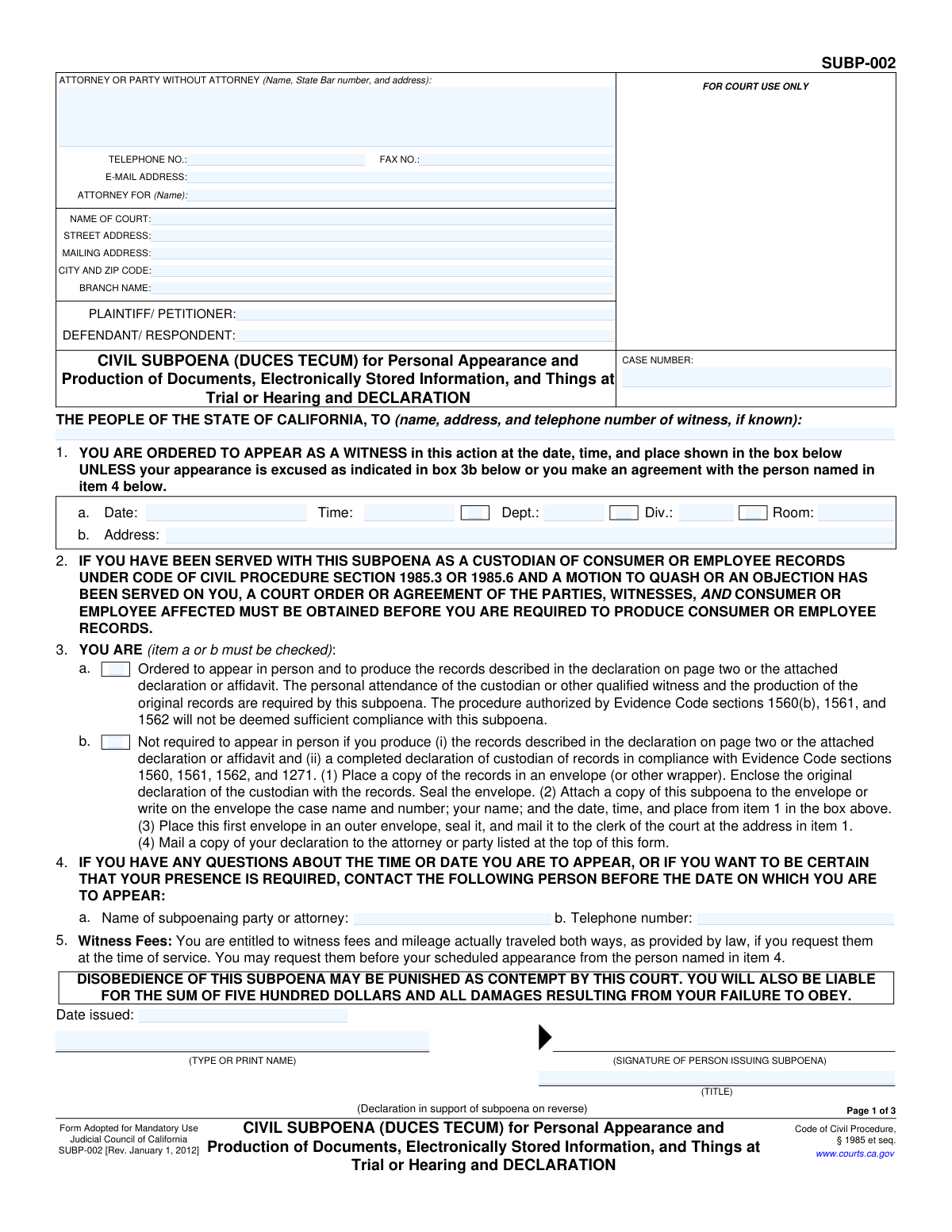
Yes! You can use AI to fill out Form SUBP-002, CIVIL SUBPOENA (DUCES TECUM) for Personal Appearance and Production of Documents, Electronically Stored Information, and Things at Trial or Hearing and DECLARATION

Form SUBP-002, the Civil Subpoena Duces Tecum, is a mandatory Judicial Council of California form used to legally require a witness to personally appear at a trial or hearing and bring specified documents, electronically stored information, or other tangible things. It is a critical tool in civil litigation for compelling the production of evidence and testimony necessary for a case. Today, this form can be filled out quickly and accurately using AI-powered services like Instafill.ai, which can also convert non-fillable PDF versions into interactive fillable forms.
Our AI automatically handles information lookup, data retrieval, formatting, and form filling.
It takes less than a minute to fill out SUBP-002 using our AI form filling.
Securely upload your data. Information is encrypted in transit and deleted immediately after the form is filled out.

Form specifications

Form name: Form SUBP-002, CIVIL SUBPOENA (DUCES TECUM) for Personal Appearance and Production of Documents, Electronically Stored Information, and Things at Trial or Hearing and DECLARATION
Number of fields: 79
Number of pages: 3
Language: English
main-image

Instafill Demo: How to fill out PDF forms in seconds with AI

How to Fill Out SUBP-002 Online for Free in 2026

Are you looking to fill out a SUBP-002 form online quickly and accurately? Instafill.ai offers the #1 AI-powered PDF filling software of 2026, allowing you to complete your SUBP-002 form in just 37 seconds or less.
Follow these steps to fill out your SUBP-002 form online using Instafill.ai:
  1. 1 Navigate to Instafill.ai and upload your SUBP-002 form or select it from the template library.
  2. 2 Provide the case information, including the court details, case number, and the names of the plaintiff and defendant.
  3. 3 Enter the full name and address of the witness being subpoenaed, along with the specific date, time, and location for their appearance.
  4. 4 Complete the declaration section by clearly listing the documents, electronically stored information, or things to be produced.
  5. 5 Articulate the 'good cause' for the production of the items and explain why they are material to the issues in the case.
  6. 6 Review all the information you've entered for accuracy and completeness before generating the final document.
  7. 7 Download, print, and sign the completed SUBP-002, then follow the legal procedures for having it properly served on the witness.

Our AI-powered system ensures each field is filled out correctly, reducing errors and saving you time.

Why Choose Instafill.ai for Your Fillable SUBP-002 Form?

Speed

Complete your SUBP-002 in as little as 37 seconds.

Up-to-Date

Always use the latest 2026 SUBP-002 form version.

Cost-effective

No need to hire expensive lawyers.

Accuracy

Our AI performs 10 compliance checks to ensure your form is error-free.

Security

Your personal information is protected with bank-level encryption.

Frequently Asked Questions About Form SUBP-002

This form, the Civil Subpoena (Duces Tecum), is a legal court order used to compel a witness to appear in person at a trial or hearing and to produce specific documents, electronically stored information, or other physical items.

An attorney or a party in a lawsuit (plaintiff or defendant) who is not represented by an attorney fills out this form. It is then served on the witness who possesses the records or items needed for the case.

It depends on which box is checked in Section 3. If box 3a is checked, you must appear in person with the original records; if box 3b is checked, you may be able to just send copies of the records without appearing.

The declaration requires a detailed list of the items to be produced, a statement of 'good cause' explaining why they are necessary, and an explanation of how these items are material to the issues in the case.

Disobeying a subpoena may be punished as contempt of court. You could also be held liable for a $500 penalty plus all damages resulting from your failure to obey.

Yes, you are entitled to witness fees and mileage for travel both ways, as provided by law. You should request them from the person named in item 4 at the time of service or before your scheduled appearance.

The Proof of Service page must be filled out by the person who delivers the subpoena to the witness. It is filed with the court to prove that the witness was properly and legally notified.

You should contact the person listed in item 4 on the first page of the form. Their name and telephone number are provided specifically for questions about the time and date of your appearance.

If you have a flat, non-fillable PDF, you can use a service like Instafill.ai to convert it into an interactive form. This allows you to easily type your information directly into the required fields online.

Yes, services like Instafill.ai use AI to accurately auto-fill form fields with your case and personal information. This can save significant time and help prevent common errors.

To fill out this form online, you can upload it to a platform like Instafill.ai. The service will make the document interactive and can assist you in completing the fields before you print it for signing and service.

This means you are in possession of sensitive records belonging to a consumer or an employee. Special rules apply, and you should not produce these records if an objection has been filed, unless you receive a court order or an agreement from all parties.

Compliance SUBP-002
Validation Checks by Instafill.ai

1
Mutually Exclusive Appearance Requirement
Validates that in Item 3, exactly one of the two checkboxes ('Ordered to appear in person' or 'Not required to appear in person') is selected. This is critical because these options dictate the witness's legal obligation to appear. If neither or both are checked, the subpoena is ambiguous and unenforceable.
2
Conditional Appearance Details Requirement
Checks that if 'Ordered to appear in person' (Item 3a) is selected, then the 'Date', 'Time', and 'Address' fields in Item 1 must be filled out. These details are essential for the witness to know where and when to appear. Failure to provide this information when requiring an appearance makes the subpoena defective.
3
Future Appearance Date
Ensures the 'Appearance Date' in Item 1 is a valid date set in the future, after the 'Date issued' and the 'Date of delivery' from the Proof of Service. This is important to provide the witness with reasonable and legal notice. A date in the past or before service is logically impossible and invalidates the subpoena's command.
4
Case Information Consistency Across Pages
Verifies that the 'Case Number', 'Plaintiff/Petitioner', and 'Defendant/Respondent' fields are identical across all three pages of the form. This check prevents clerical errors and ensures that all pages of the submitted document belong to the same legal case. Mismatched pages could lead to rejection by the court clerk or confusion.
5
Declaration Support Selection
Validates that on page two, exactly one of the checkboxes for 'the attached affidavit' or 'the following declaration' is selected. The subpoena requires justification for the production of documents, and this choice specifies the format of that justification. An invalid selection makes the basis for the subpoena unclear.
6
Conditional Declaration Content
If 'the following declaration' is checked on page two, this validates that the declarant's role is selected and that the text areas for paragraphs 2, 3, and 4 are not empty. These paragraphs contain the legal justification for the subpoena, and their absence renders the declaration incomplete and legally insufficient.
7
Exclusive Declarant Role Selection
Ensures that within the declaration section on page two, only one role (e.g., 'plaintiff', 'defendant', 'attorney for') is checked. The declarant must have a single, clear role in the context of the declaration. Selecting multiple roles would create ambiguity about the declarant's standing.
8
Attorney Representation Specification
Checks that if the 'Attorney for (specify)' checkbox is selected in the declaration section, the corresponding text field specifying the party's name is filled. Simply checking the box is insufficient; the form must clearly state which party the attorney is representing. This is crucial for establishing the attorney's authority to make the declaration.
9
Service Date Chronology
Validates that the 'Date of delivery' on the Proof of Service (page 3) is on or after the 'Date issued' on page 1. A subpoena cannot be legally served before it has been officially issued. This check ensures the sequence of events is logical and legally compliant.
10
Valid Phone Number Format
Verifies that the 'TELEPHONE NO.' for the attorney/party and the contact person in Item 4 are entered in a recognizable phone number format (e.g., (XXX) XXX-XXXX). This ensures that the contact information is usable for any necessary communication. An improperly formatted number could hinder communication and cause delays.
11
Required Case and Party Identification
Ensures that the 'Case Number', 'Plaintiff/Petitioner', and 'Defendant/Respondent' fields in the header are not empty. These fields are the primary identifiers for the legal action and are mandatory for the form to be filed and associated with the correct court case. Missing information would result in immediate rejection.
12
Witness Information Completeness
Validates that the 'name, address, and telephone number of witness' field is filled. The subpoena is directed to a specific person or entity, and without this information, it is impossible to serve or enforce. This is the most fundamental piece of information for the subpoena's recipient.
13
Proof of Service Server Status
On the Proof of Service page, this check ensures that exactly one checkbox under 'Person serving' (Item 3) is selected. The status of the person serving the subpoena (e.g., sheriff, registered process server) is a legal requirement for validating the service. Failure to specify this status can invalidate the proof of service.
14
Conditional Witness Fee Amount
Verifies that if the 'were offered or demanded and paid' checkbox is checked on the Proof of Service, the corresponding 'Amount' field contains a positive numeric value. This confirms that a fee was actually paid and records the amount for legal purposes. The field should not be empty or zero if payment is indicated.
15
Declaration Date Logic
Ensures the 'Date' of the declaration on page 2 is on or after the 'Date issued' on page 1. The declaration, which supports the subpoena, cannot logically be signed and dated before the subpoena itself is created. This maintains a correct chronological record of the document's creation.

Common Mistakes in Completing SUBP-002

Vague Description of Documents to be Produced

Users often provide an overly broad or ambiguous list of documents in Paragraph 2 of the declaration, such as 'all documents relating to the project.' This happens due to a lack of specificity or an attempt to cast a wide net. Such requests are legally improper and are highly likely to result in a motion to quash, delaying the legal process and requiring the subpoena to be re-drafted and re-served. To avoid this, clearly specify document types, date ranges, and subjects with as much particularity as possible.

Failing to Specify Appearance Requirement in Item 3

A critical error is forgetting to check either box 3a (personal appearance required) or 3b (records production sufficient) on the first page. This omission creates ambiguity about the witness's obligations, making the subpoena confusing and potentially unenforceable. The witness may either fail to appear when needed or appear unnecessarily, wasting time and resources. Always double-check that one of these mutually exclusive boxes is selected to clearly define the witness's duty.

Inadequate Justification for Good Cause and Materiality

In Paragraphs 3 and 4 of the declaration, many filers use boilerplate or conclusory statements like 'the documents are relevant to the case.' This fails to meet the legal requirement of showing specific facts that demonstrate why the documents are necessary (good cause) and material to the issues. A subpoena with a weak declaration is vulnerable to being quashed by the court, nullifying the request. To prevent this, provide a detailed, fact-specific explanation for both good cause and materiality.

Incorrect Case or Court Identification

Simple data entry errors, such as transposing digits in the Case Number or using an incorrect court branch name, are frequent. These mistakes can cause the document to be rejected by the court clerk or misfiled, leading to significant delays and potential missed deadlines. It is crucial to copy the case number and full court name and address exactly as they appear on all official court documents. AI-powered tools like Instafill.ai can help prevent these errors by saving and accurately populating recurring case information.

Incomplete or Unsigned Declaration on Page 2

The declaration supporting the document request is often submitted incomplete. Common mistakes include failing to check the box identifying the declarant (plaintiff, attorney, etc.), forgetting to date the declaration, or neglecting to sign it. An incomplete or unsigned declaration is invalid, which in turn invalidates the entire request for documents, rendering the 'Duces Tecum' portion of the subpoena void.

Omitting Contact Information for Witness Inquiries

Item 4, which provides contact information for the subpoenaing party or attorney, is sometimes left blank. This prevents the witness from being able to confirm their appearance, ask questions, or negotiate the scope of production. This can lead to confusion, unnecessary appearances if the matter is continued, or a failure to appear, forcing the parties to involve the court. Always provide a direct name and telephone number in this section.

Incorrectly Identifying the Witness or Custodian of Records

The subpoena may be addressed to a generic company name without specifying 'Custodian of Records,' or to an individual who does not have legal control over the requested documents. This results in the subpoena being served on the wrong party, who has no obligation or ability to comply. To be effective, research and identify the specific individual or the correct legal title (e.g., 'Custodian of Records' for a business entity) to ensure the subpoena is directed to the person with possession and control of the information.

Transposing Plaintiff and Defendant Names

A surprisingly common data entry mistake is swapping the names of the Plaintiff/Petitioner and the Defendant/Respondent in the case caption. This clerical error can cause confusion for the court, the recipient of the subpoena, and all parties involved. While it may seem minor, it reflects a lack of attention to detail and can lead to the document being returned by the clerk for correction. Using a tool like Instafill.ai can help ensure consistency and accuracy across all case documents.

Failure to Select a Support Method on Page 2

At the very top of page 2, the form requires the user to check a box indicating whether the document production is supported by 'the attached affidavit' or 'the following declaration.' Forgetting to check either box creates a fatal defect, as it's unclear what legal basis is being used to justify the request for documents. This omission can be grounds for the recipient to object to and ignore the production request.

Using a Non-Fillable PDF Version of the Form

Parties sometimes find a flat, non-fillable PDF image of the form online and attempt to fill it out by hand, leading to illegible entries and mistakes. This can cause the form to be rejected by the court or misinterpreted by the recipient. It is crucial to use the official, fillable version from the judicial council website. If only a non-fillable version is available, tools like Instafill.ai can convert it into an interactive, fillable form, ensuring clarity and reducing data entry errors.
Saved over 80 hours a year

“I was never sure if my IRS forms like W-9 were filled correctly. Now, I can complete the forms accurately without any external help.”

Kevin Martin Green

Your data stays secure with advanced protection from Instafill and our subprocessors

Robust compliance program

Transparent business model

You’re not the product. You always know where your data is and what it is processed for.

ISO 27001, HIPAA, and GDPR

Our subprocesses adhere to multiple compliance standards, including but not limited to ISO 27001, HIPAA, and GDPR.

Security & privacy by design

We consider security and privacy from the initial design phase of any new service or functionality. It’s not an afterthought, it’s built-in, including support for two-factor authentication (2FA) to further protect your account.

Fill out SUBP-002 with Instafill.ai

Worried about filling PDFs wrong? Instafill securely fills form-subp-002-civil-subpoena-duces-tecum-for-personal-appearance-and-production-of-documents-electronically-stored forms, ensuring each field is accurate.