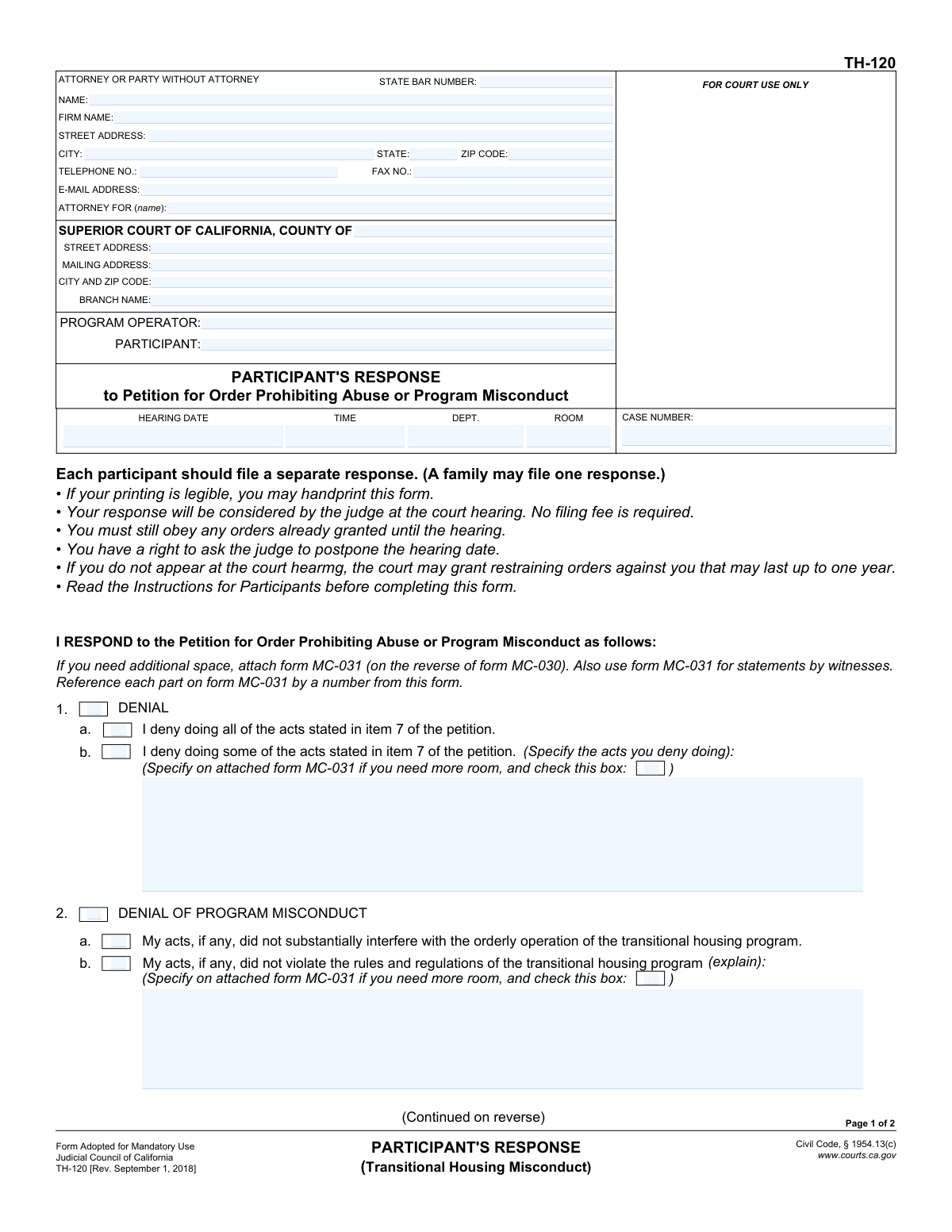
Yes! You can use AI to fill out Form TH-120, Participant's Response to Petition for Order Prohibiting Abuse or Program Misconduct (Transitional Housing Misconduct)
Form TH-120, Participant's Response, is a legal document used in the Superior Court of California by an individual to formally respond to a petition alleging misconduct within a transitional housing program. It allows the participant to deny allegations, provide justifications for their actions, or raise other legal defenses before a court hearing. Today, this form can be filled out quickly and accurately using AI-powered services like Instafill.ai, which can also convert non-fillable PDF versions into interactive fillable forms.
Our AI automatically handles information lookup, data retrieval, formatting, and form filling.
It takes less than a minute to fill out TH-120 using our AI form filling.
Securely upload your data. Information is encrypted in transit and deleted immediately after the form is filled out.
Form specifications
| Form name: | Form TH-120, Participant's Response to Petition for Order Prohibiting Abuse or Program Misconduct (Transitional Housing Misconduct) |
| Number of fields: | 61 |
| Number of pages: | 1 |
| Language: | English |
Instafill Demo: How to fill out PDF forms in seconds with AI
How to Fill Out TH-120 Online for Free in 2026
Are you looking to fill out a TH-120 form online quickly and accurately? Instafill.ai offers the #1 AI-powered PDF filling software of 2026, allowing you to complete your TH-120 form in just 37 seconds or less.
Follow these steps to fill out your TH-120 form online using Instafill.ai:
- 1 Navigate to Instafill.ai, upload your copy of Form TH-120, or select it from the platform's document library.
- 2 Use the AI assistant to automatically populate the header with your personal information, attorney details (if any), court location, and case number.
- 3 In the 'Denial' section (Item 1), check the appropriate box to either deny all or some of the acts alleged in the petition.
- 4 Address the 'Denial of Program Misconduct' (Item 2) and 'Justification or Excuse' (Item 3) sections by providing clear, concise explanations for your actions as prompted.
- 5 Complete the sections for 'Wrong Program' (Item 4), 'Program Contract' (Item 5), and 'Other Defenses' (Item 6) by checking the relevant boxes and explaining your position.
- 6 Carefully review all entered information for accuracy, then date and sign the declaration under penalty of perjury.
- 7 Download the completed, ready-to-file PDF of your TH-120 response for submission to the court.
Our AI-powered system ensures each field is filled out correctly, reducing errors and saving you time.
Why Choose Instafill.ai for Your Fillable TH-120 Form?
Speed
Complete your TH-120 in as little as 37 seconds.
Up-to-Date
Always use the latest 2026 TH-120 form version.
Cost-effective
No need to hire expensive lawyers.
Accuracy
Our AI performs 10 compliance checks to ensure your form is error-free.
Security
Your personal information is protected with bank-level encryption.
Frequently Asked Questions About Form TH-120
This form is used by a participant in a transitional housing program to officially respond to a petition filed against them by the program operator. It allows you to deny allegations, provide justifications for your actions, and present your side of the story to the court before the hearing.
You need to fill out this form if you are the 'Participant' named in a 'Petition for Order Prohibiting Abuse or Program Misconduct' related to a transitional housing program. Each participant should file a separate response, though a family is permitted to file one response together.
No, the form clearly states that no filing fee is required to submit your response.
If you do not appear at the court hearing, the court may automatically grant the restraining orders requested by the program operator. These orders can remain in effect for up to one year.
If you run out of space on the form, you must use Form MC-031 for your additional explanations. Make sure to check the box on Form TH-120 indicating that you have attached another page.
Use Section 1 to state that you did not do the acts you are accused of. Use Section 3 if you did do some or all of the acts, but you believe you had a valid reason or excuse for doing them.
Yes, you must continue to obey any orders that have already been granted by the court until the hearing. Filing this response does not pause or cancel any existing orders.
This section allows you to argue that the petition should be denied because of issues with your contract. For example, you might argue that you never signed a contract, or that your contract is missing legally required information like program rules or a summary of your rights.
Yes, the form notes that you have the right to ask the judge to postpone the hearing date. You will need to follow the court's specific procedures for requesting a continuance.
Yes, services like Instafill.ai use AI to help you accurately auto-fill form fields with your information. This can save you time and help prevent common mistakes.
You can use a service like Instafill.ai to fill out this form online. Simply upload the PDF to their platform, and it will become an interactive form that you can type into directly.
If you have a non-fillable PDF, you can use a tool like Instafill.ai to convert it into an interactive, fillable form. This allows you to easily type your answers instead of having to print and handwrite the document.
Compliance TH-120
Validation Checks by Instafill.ai
1
Ensures Case Number Consistency Across Pages
This check verifies that the 'CASE NUMBER' entered in the header of Page 1 is identical to the 'CASE NUMBER' in the header of Page 2. Maintaining consistency is critical for ensuring all pages of the document are correctly associated with the same legal case. A mismatch could lead to filing errors or the second page being misattributed.
2
Validates Mandatory Party and Court Identification
This validation ensures that the 'SUPERIOR COURT OF CALIFORNIA, COUNTY OF', 'PROGRAM OPERATOR', and 'PARTICIPANT' fields are all completed. These fields are fundamental for identifying the jurisdiction and the primary parties involved in the legal action. Submission with this information missing would render the document un-fileable and invalid.
3
Mutually Exclusive Denial Selection in Section 1
This check ensures that the participant selects either 'I deny doing all of the acts' or 'I deny doing some of the acts' in Section 1, but not both. These options are mutually exclusive and selecting both creates a logical contradiction in the response. The form should enforce a choice of one or the other to ensure the participant's denial is clear.
4
Conditional Requirement for Partial Denial Specification
If the participant checks the box for 'I deny doing some of the acts stated in item 7 of the petition' (Section 1), this validation confirms that the accompanying text field '(Specify the acts you deny doing)' is filled. This is crucial for the court to understand which specific allegations are being contested. Failure to specify makes the partial denial ambiguous and ineffective.
5
Conditional Requirement for Program Misconduct Explanation
This check verifies that if the box 'My acts, if any, did not violate the rules and regulations of the transitional housing program' (Section 2.b) is checked, the corresponding '(explain)' text field is completed. The explanation is necessary to provide context and reasoning for this defense. Without it, the claim is unsubstantiated and may be disregarded by the court.
6
Conditional Requirement for Justification or Excuse Details
If either checkbox in Section 3 ('My acts served a legitimate purpose' or 'My acts were constitutionally protected') is selected, this validation ensures the corresponding '(specify)' text field is filled out. The court requires a specific reason for any claim of justification or excuse. An empty specification field makes the defense incomplete and unsupported.
7
Conditional Requirement for 'Other Defenses' Explanation
This validation ensures that if the participant checks the box for 'I have other defenses or reasons a court order should not be granted' (Section 6), the associated '(explain)' text field is not empty. This field is mandatory to articulate any defenses not covered elsewhere on the form. A checked box without an explanation provides no actionable information for the court.
8
Validates Signature Date and Printed Name Presence
This check confirms that the 'Date' and 'TYPE OR PRINT NAME' fields are both completed in the signature block on Page 2. As the form is signed under penalty of perjury, the date of signing and the clear identification of the signatory are legally required. An unsigned or undated form is invalid.
9
Validates Signature Date Format and Plausibility
This check ensures the 'Date' field in the signature block contains a valid calendar date (e.g., MM/DD/YYYY) and is not a date in the future. An invalid or future date would call the authenticity and timing of the declaration into question. The date must reflect the actual day of signing.
10
Validates 'Number of pages attached' is a Non-Negative Integer
This validation confirms that the value entered in the 'Number of pages attached' field is a whole number (integer) and is not negative. This field quantifies additional documentation, so it must be a valid count. Text or negative numbers would be invalid data and cause processing errors.
11
Cross-Validates Attached Pages Count and Checkboxes
This check ensures logical consistency between the 'Number of pages attached' field and the various 'Specify on attached form MC-031' checkboxes. If the number of pages is greater than zero, at least one of these checkboxes must be ticked. Conversely, if any of these checkboxes are ticked, the number of pages must be greater than zero.
12
Validates Attorney State Bar Number Requirement
If the 'NAME' field in the 'ATTORNEY OR PARTY WITHOUT ATTORNEY' section is filled, this check ensures the 'STATE BAR NUMBER' field is also completed. An attorney representing a party must provide their bar number for identification and verification of their credentials. This is a standard requirement for legal filings.
13
Validates Email Address Format
This check verifies that if an email address is provided in the 'E-MAIL ADDRESS' field, it conforms to a standard email format (e.g., '[email protected]'). This ensures that any electronic communications from the court will be deliverable. An incorrectly formatted email address would lead to failed communication.
14
Ensures Party Name Consistency Across Pages
This validation verifies that the 'PROGRAM OPERATOR' and 'PARTICIPANT' names entered on Page 1 match the corresponding names on Page 2. Consistent naming is essential for document integrity and to prevent confusion during case processing. Discrepancies could suggest the pages belong to different documents.
Common Mistakes in Completing TH-120
Participants often check the box in Section 1 for 'I deny doing some of the acts' but then fail to specify which acts they are denying. This ambiguity can be interpreted by the court as a failure to properly contest the allegations, potentially weakening their defense. To avoid this, clearly list every specific act from the petition that you deny, using an attachment (form MC-031) if the provided space is insufficient.
The top of page 2 requires the 'PROGRAM OPERATOR', 'PARTICIPANT', and 'CASE NUMBER' to be re-entered. People frequently overlook this, assuming the information from page 1 is sufficient. If the pages are separated, this omission can cause significant administrative delays or lead to the second page being misfiled. Always ensure all header information is completely filled out on every page of the form.
A missing signature or date in Section 7 is a critical error that invalidates the entire response. This often happens when filers are rushed or focused on the detailed explanations. An unsigned declaration is not legally binding and will be rejected by the court, which could result in default orders being issued against you. Always double-check that you have signed and dated the form before filing.
In sections requiring an explanation (e.g., Sections 2, 3, and 6), individuals may provide vague, emotional, or irrelevant information instead of clear, factual statements. The court needs specific facts to understand your defense, such as why your acts did not violate program rules or were constitutionally protected. To be effective, focus on providing concise, factual details that directly address the legal points raised in that section.
The form instructs users to attach form MC-031 for additional space, but people make several mistakes: they forget to check the box indicating an attachment is used, they fail to attach the form at all, or they don't reference the corresponding section number on the attachment. This makes it difficult for the judge to connect your detailed explanations to the correct part of your response. Always check the relevant box and clearly label each attached explanation with the corresponding item number (e.g., 'Response to Item 3.a').
A common error is selecting options that contradict each other, such as checking 'I deny doing all of the acts' in Section 1, but then checking a box in Section 3 which begins 'I have done some or all of the acts of which I am accused, but the actions are justified...'. This creates confusion and undermines the credibility of the response. Carefully read each section and ensure your selections present a consistent and logical defense.
When representing themselves, participants often get confused by the 'ATTORNEY OR PARTY WITHOUT ATTORNEY' section. They may leave the 'ATTORNEY FOR (name):' field blank or fill it out incorrectly. If you do not have an attorney, you should enter your own name or 'Self-Represented' in this field. AI-powered tools like Instafill.ai can help prevent these errors by guiding users to correctly populate personal and representative information.
While the form permits handprinting, submitting a response with illegible writing is a frequent problem. If the court clerk or judge cannot read your name, address, or explanations, your filing may be rejected or your defense may not be properly considered. To ensure clarity, it is best to type directly into the form. If the form is a non-fillable PDF, a service like Instafill.ai can convert it into an interactive, fillable version, eliminating any risk of illegible handwriting.
The header of the form requires the court information, party names, and case number, which must match the original 'Petition for Order Prohibiting Abuse' exactly. Participants sometimes guess or enter incomplete information, leading to filing rejections or delays. To avoid this, carefully copy all information from the top section of the petition you received. Using an AI form-filler like Instafill.ai can automate this process, ensuring accuracy by pulling data from related case documents.
Saved over 80 hours a year
“I was never sure if my IRS forms like W-9 were filled correctly. Now, I can complete the forms accurately without any external help.”
Kevin Martin Green
Your data stays secure with advanced protection from Instafill and our subprocessors

Robust compliance program
Transparent business model
You’re not the product. You always know where your data is and what it is processed for.
ISO 27001, HIPAA, and GDPR
Our subprocesses adhere to multiple compliance standards, including but not limited to ISO 27001, HIPAA, and GDPR.
Security & privacy by design
We consider security and privacy from the initial design phase of any new service or functionality. It’s not an afterthought, it’s built-in, including support for two-factor authentication (2FA) to further protect your account.
Fill out TH-120 with Instafill.ai
Worried about filling PDFs wrong? Instafill securely fills form-th-120-participants-response-to-petition-for-order-prohibiting-abuse-or-program-misconduct-transitional-housing forms, ensuring each field is accurate.