Yes! You can use AI to fill out New Jersey Judiciary Attorney Fee Response Request

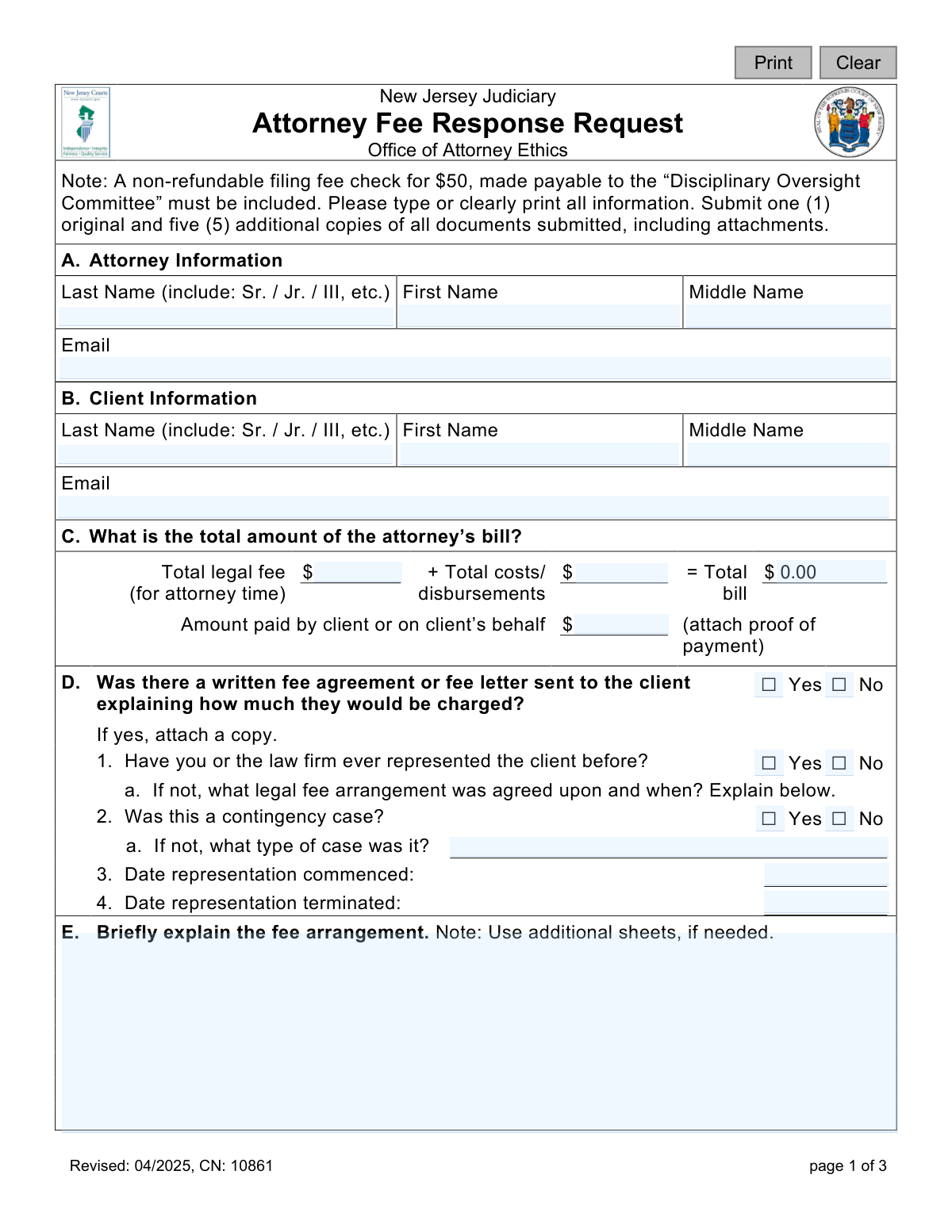
This form is an official document from the New Jersey Judiciary's Office of Attorney Ethics, used by an attorney to formally respond when a client initiates a fee arbitration process to dispute legal charges. The attorney must provide detailed information about the fee arrangement, billing history, payments received, and a direct response to the client's claims. Today, this form can be filled out quickly and accurately using AI-powered services like Instafill.ai, which can also convert non-fillable PDF versions into interactive fillable forms.
CN: 10861 is part of the court response forms and New Jersey forms categories on Instafill.
Our AI automatically handles information lookup, data retrieval, formatting, and form filling.
It takes less than a minute to fill out CN: 10861 using our AI form filling.
Securely upload your data. Information is encrypted in transit and deleted immediately after the form is filled out.

Form specifications

Form name: New Jersey Judiciary Attorney Fee Response Request
Number of fields: 70
Number of pages: 1
Language: English
main-image

Instafill Demo: How to fill out PDF forms in seconds with AI

How to Fill Out CN: 10861 Online for Free in 2026

Are you looking to fill out a CN: 10861 form online quickly and accurately? Instafill.ai offers the #1 AI-powered PDF filling software of 2026, allowing you to complete your CN: 10861 form in just 37 seconds or less.
Follow these steps to fill out your CN: 10861 form online using Instafill.ai:
  1. 1 Navigate to Instafill.ai and upload or select the Attorney Fee Response Request form.
  2. 2 Use the AI assistant to accurately populate your information and your client's information in Sections A and B.
  3. 3 Enter the financial details in Section C, including the total legal fee, costs, and any amounts already paid by the client.
  4. 4 Answer the detailed questions in Sections D through I regarding the fee agreement, billing history, and any related legal actions, attaching all required documentation.
  5. 5 Provide a written response to the client's specific dispute in Section J and identify any other attorneys involved in Section K.
  6. 6 Complete the Attorney Certification section by signing and dating the form to verify the accuracy of the information provided.
  7. 7 Review the completed form for accuracy, then download, print the required number of copies, and submit it along with the non-refundable filing fee to the Disciplinary Oversight Committee.

Our AI-powered system ensures each field is filled out correctly, reducing errors and saving you time.

Why Choose Instafill.ai for Your Fillable CN: 10861 Form?

Speed

Complete your CN: 10861 in as little as 37 seconds.

Up-to-Date

Always use the latest 2026 CN: 10861 form version.

Cost-effective

No need to hire expensive lawyers.

Accuracy

Our AI performs 10 compliance checks to ensure your form is error-free.

Security

Your personal information is protected with bank-level encryption.

Frequently Asked Questions About Form CN: 10861

This form is used by an attorney in New Jersey to formally respond to a client's request for fee arbitration. It allows the attorney to present their side of a fee dispute to the District Fee Arbitration Committee.

An attorney must complete this form after their client has initiated a fee dispute by filing an Attorney Fee Arbitration Request. This form serves as the attorney's official response in the arbitration proceeding.

Yes, a non-refundable filing fee of $50 is required. The check must be made payable to the 'Disciplinary Oversight Committee' and submitted with the form.

You must attach several documents, including proof of client payments, a copy of the written fee agreement if one exists, copies of your time records, and any notices related to fee changes. Be sure to check each section for specific document requirements.

You are required to submit one original and five additional copies of the completed form and all attached documents.

In Section D, check 'No' and use the space provided to explain the verbal legal fee arrangement that was agreed upon, including when the agreement was made.

Use Section F to explain the reason for the difference between the initial quote and the final bill. You must also state when the client was advised of this change and attach any documents authorizing it.

In Section H, check 'No' and use the space provided to explain why time records were not kept. You are still required to attach an itemized list showing the dates and amounts of any payments made by the client.

Yes, you must disclose the lawsuit in Section I. You need to provide the date of service on the client and state whether you provided the required pre-action notice, attaching a copy if you did.

By signing, you certify that your statements are true and that you have mailed a copy of the form to the client via certified mail. You also acknowledge that providing willfully false information is subject to punishment.

Yes, services like Instafill.ai use AI to auto-fill form fields accurately and save time. This can help ensure all required information is entered correctly before submission.

You can use a service like Instafill.ai to complete this form online. Simply upload the PDF, and the platform will make it fillable, allowing you to type your information directly into the fields.

If you have a non-fillable or 'flat' PDF, you can upload it to Instafill.ai. The service can convert it into an interactive, fillable form that you can easily complete on your computer.

Compliance CN: 10861
Validation Checks by Instafill.ai

1
Ensures Filing Fee Payment is Confirmed
This check verifies that the non-refundable $50 filing fee has been paid, as indicated by the 'Filing Fee Paid' checkbox in the 'For internal use only' section. The form explicitly states this fee is mandatory for processing. If the fee is not marked as paid, the submission is considered incomplete and cannot be filed or reviewed by the Office of Attorney Ethics.
2
Validates Attorney and Client Name Completeness
This check ensures that the First Name and Last Name fields for both the attorney (Section A) and the client (Section B) are not empty. These fields are fundamental for identifying the parties involved in the fee dispute. A submission without complete identification for both parties is invalid and will be rejected.
3
Verifies Email Address Format
This validation confirms that the email addresses provided for the attorney (attyEmail) and client (clientEmail) follow a standard format (e.g., [email protected]). Correct email addresses are crucial for official communication, notifications, and sending copies of documents. An invalid format will trigger an error to ensure contact information is accurate.
4
Verifies Total Bill Calculation
This check ensures the mathematical accuracy of the amounts in Section C. It validates that the 'Total legal fee' plus 'Total costs/disbursements' equals the 'Total bill' amount. This is critical for establishing a clear and undisputed total amount at the start of the form, preventing submission with basic calculation errors.
5
Ensures Logical Date Chronology for Representation
This validation checks that the 'Date representation terminated' (D4) is on or after the 'Date representation commenced' (D3). A termination date that precedes the commencement date is a logical impossibility. This check prevents data entry errors and ensures the timeline of the attorney-client relationship is coherent.
6
Conditional Requirement for Fee Agreement Attachment
If the user answers 'Yes' to 'Was there a written fee agreement?' (Section D), this check verifies that a corresponding document has been attached. The form requires this documentation to substantiate the attorney's claim about the fee structure. Failure to attach the agreement when indicated will result in an incomplete submission.
7
Conditional Requirement for Lawsuit Details
This check is triggered if the attorney answers 'Yes' to 'Have you brought a lawsuit for your fees?' (Section I). It then validates that the 'date of service of process' is provided and the 'pre-action notice' question is answered. This information is essential for the committee to understand the full legal context of the fee dispute.
8
Validates Justification for Bill Discrepancy
If the 'final bill' (E2) is different from the 'initial fee quoted' (E1), this validation ensures that Section F is completed. The attorney must provide a reason for the change and the date the client was advised. This is a critical transparency requirement, and leaving it blank when a discrepancy exists will halt the submission.
9
Ensures Consistency Between Total Bill and Final Bill
This check verifies that the 'Total bill' amount listed in Section C is identical to the 'final bill' amount listed in Section E(2). These two fields represent the same value and must match for the form to be internally consistent. A mismatch indicates a data entry error that must be corrected before submission.
10
Conditional Explanation for Lack of Time Records
If the attorney answers 'No' to 'Did you maintain time records in this case?' (Section H), this validation ensures that a written explanation is provided in the designated text box. Time records are a key piece of evidence in fee disputes, and their absence must be justified. An empty explanation will render the submission incomplete.
11
Validates Completeness of Third-Party Attorney Information
If the attorney answers 'Yes' to involving another attorney or firm (Section K), this check ensures that the attorney's full name, firm name, and full mailing address are provided. This information is mandatory for serving notice to all relevant parties as required by rule R. 1:20A-3(b). Incomplete information would prevent proper procedure and invalidate the submission.
12
Validates Format of Monetary Fields
This check iterates through all fields representing dollar amounts (e.g., 'Total legal fee', 'Amount paid by client') and ensures they contain valid, non-negative numeric values. This prevents the submission of forms with non-numeric or invalid characters in financial fields, ensuring data integrity for financial calculations and review.
13
Validates Format of All Date Fields
This validation ensures that all date entry fields on the form (e.g., 'Date representation commenced', 'Date client was advised', 'Date of service') are entered in a valid and recognizable date format. Consistent date formatting is essential for establishing accurate timelines and for the system to process the data correctly. An invalid format would prompt the user for correction.
14
Ensures Attorney Certification is Complete
This check verifies that the 'Attorney Certification' section is fully completed, including the attorney's signature, printed name, and the date. The certification is a sworn statement attesting to the truthfulness of the submission. An unsigned or incomplete certification renders the entire document legally invalid and will be rejected.
15
Conditional Explanation for New Client Fee Arrangement
If the attorney answers 'No' to 'Have you or the law firm ever represented the client before?' (Section D1), this check ensures the explanation for the agreed-upon legal fee arrangement is filled out. For new clients, establishing the initial agreement is crucial context for the fee committee. A missing explanation makes the submission incomplete.

Common Mistakes in Completing CN: 10861

Forgetting the Filing Fee or Making it Payable Incorrectly

The form explicitly requires a non-refundable $50 check payable to the 'Disciplinary Oversight Committee'. Attorneys often overlook this instruction, forget to include the check, or make it out to the wrong entity, such as the 'Office of Attorney Ethics'. This mistake leads to immediate rejection of the filing and delays the arbitration process until the correct payment is received. To avoid this, double-check the payee and amount before sealing the envelope.

Submitting an Incorrect Number of Copies

The instructions clearly state to submit one original and five additional copies of all documents, including attachments. This is a common procedural error where filers only send the original, causing significant processing delays as the office must then make the copies themselves or return the packet. To prevent this, create a checklist for all submission requirements, including the six total document sets, before mailing. This ensures the committee has everything needed to distribute to its members promptly.

Failure to Attach Required Supporting Documents

Throughout the form, filers are required to attach documents like the written fee agreement (Section D), proof of payment (Section C), and time records (Section H). A frequent mistake is checking 'Yes' to having these documents but failing to include them in the submission packet. This omission weakens the attorney's position and can lead to the committee making decisions based on incomplete information. Using a tool like Instafill.ai can help by creating a checklist of required attachments based on your answers.

Inconsistent Financial Figures Across Sections

Attorneys sometimes enter conflicting monetary values in different parts of the form, such as the 'Total bill' in Section C not matching the 'Final bill' in Section E(2). This happens due to manual calculation errors or referencing different invoices. Such inconsistencies undermine the credibility of the submission and force the committee to question the accuracy of the entire fee claim. To avoid this, calculate all figures carefully and cross-reference them between sections before finalizing the form.

Incomplete Justification for Fee Increases

Section F requires a detailed reason if the final bill is higher than the initial quote, including the date the client was advised of the change. A common error is providing a vague, one-sentence explanation or leaving this section blank altogether. This failure to justify the increase can be interpreted as a lack of transparency and may prejudice the committee against the attorney. Always provide a clear, chronological explanation and attach any documents that support the change.

Vague or Unresponsive Rebuttal to Client's Claims

Section J is the attorney's opportunity to directly respond to the client's specific disagreements with the bill. Many attorneys make the mistake of writing a general defense of their work instead of a point-by-point rebuttal to the issues raised by the client. This misses the purpose of the section and can be seen as evasive. To be effective, carefully review the client's 'Attorney Fee Arbitration Request' form and address each of their stated objections with facts, dates, and references to supporting documents.

Missing or Illegible Information

The form requires all information to be typed or clearly printed, but submissions are often received with illegible handwriting or blank fields. This is especially common for names, dates, and email addresses, which can halt communication and processing. An incomplete or unreadable form may be returned, delaying the entire proceeding. Using an AI-powered tool like Instafill.ai can convert this non-fillable PDF into a fillable version, ensuring all entries are typed, legible, and complete.

Forgetting to Attach Proof of Service or Pre-Action Notice

In Section I, if a lawsuit for fees was filed, the attorney must state if a pre-action notice was provided and attach a copy with proof of mailing. This is a critical procedural step that is often missed. Forgetting to include this proof can have serious consequences for the fee claim in court. Always maintain meticulous records of all client communications and procedural notices and ensure copies are included with the submission as required.

Mathematical Errors in Fee Calculation

Section C requires the attorney to add 'Total legal fee' and 'Total costs/disbursements' to arrive at the 'Total bill'. Simple arithmetic errors are surprisingly common, leading to an incorrect total that casts doubt on the entire submission's accuracy. These mistakes can be easily avoided by using a calculator or spreadsheet to verify the sum before entering it on the form. AI form-filling tools like Instafill.ai can also perform these calculations automatically to prevent errors.

Unsigned or Undated Attorney Certification

The final certification section requires the attorney's signature and the date to validate the submission. Forgetting to sign or date the form is a simple but critical error that renders the entire document invalid. This oversight will result in the form being returned and will delay the start of the arbitration process. Always perform a final review of the completed form, paying special attention to the signature block before mailing.
Saved over 80 hours a year

“I was never sure if my IRS forms like W-9 were filled correctly. Now, I can complete the forms accurately without any external help.”

Kevin Martin Green

Your data stays secure with advanced protection from Instafill and our subprocessors

Robust compliance program

Transparent business model

You’re not the product. You always know where your data is and what it is processed for.

ISO 27001, HIPAA, and GDPR

Our subprocesses adhere to multiple compliance standards, including but not limited to ISO 27001, HIPAA, and GDPR.

Security & privacy by design

We consider security and privacy from the initial design phase of any new service or functionality. It’s not an afterthought, it’s built-in, including support for two-factor authentication (2FA) to further protect your account.

Fill out CN: 10861 with Instafill.ai

Worried about filling PDFs wrong? Instafill securely fills new-jersey-judiciary-attorney-fee-response-request forms, ensuring each field is accurate.

Related forms by category

court response forms Form MC 03, Answer, Civil, Request for Reasonable Accommodations and Response, MC 70a, Review of Request for Reasonable Accommodations and Response, Form CH-120, Response to Request for Civil Harassment Restraining Orders, Form CH-178, Response to Request for Release of Minor's Confidential Information (Civil Harassment Prevention), Form CH-620, Response to Request to Modify/Terminate Civil Harassment Restraining Order (Civil Harassment Prevention), Form DV-120, Response to Request for Domestic Violence Restraining Order (Domestic Violence Prevention), Form DV-178, Response to Request for Release of Minor's Confidential Information (Domestic Violence Prevention), Form EA-720, Response to Request to Renew Restraining Order (Elder or Dependent Adult Abuse Prevention), Form CR-402, Prosecuting Agency's Response to Petition/Application Under Health and Safety Code Section 11361.8—Adult Crimes, Form CR-417, Response by District Attorney to Petition to Terminate Sex Offender Registration, Form EA-250, Proof of Service of Response by Mail (Elder or Dependent Adult Abuse Prevention), Form EA-320, Response to Request for Elder or Dependent Adult Restraining Order Allowing Contact, Form CH-720, Response to Request to Renew Restraining Order (Civil Harassment Prevention), Form DV-720, Response to Request to Renew Restraining Order (Domestic Violence Prevention), Form EA-120, Response to Request for Elder or Dependent Adult Abuse Restraining Orders, Form FL-220, Response to Petition to Determine Parental Relationship (Uniform Parentage), Judicial Council of California Form GV-020, Response to Gun Violence Emergency Protective Order (Gun Violence Prevention), Form GV-120, Response to Petition for Gun Violence Restraining Order, Form FL-270, Response to Petition for Custody and Support of Minor Children · + 7 more →
New Jersey forms State of New Jersey Alternate Benefit Program Withdrawal Request Acknowledgement Receipt, Horizon Blue Cross Blue Shield of New Jersey Applied Behavior Analysis Supplemental Information Form, State of New Jersey Application for Employment (Form DPF-663), New Jersey Judiciary Plea Form (Plea 01), Supplemental Plea Form for Certain Sexual Offenses: Megan’s Law/Parole Supervision for Life/Community Supervision for Life (Plea 05), Financial Questionnaire to Establish Indigency, New Jersey Judiciary Resource Family Information Form, Foreclosure Case Information Statement (FCIS) - Appendix XII-B2, New Jersey Judiciary Records Request Form, Superior Court of New Jersey, Application for Appeal and Order, FL Certification of Requested Background Checks for Kinship Legal Guardianship, Certification of Caregiver as to Knowledge of Identity and/or Location of Parents, FL Order Judgment for Kinship Legal Guardianship, New Jersey Judiciary Certification of Repair and Plea of Guilty, Uniform Summary Support Order (USSO), New Jersey Judiciary Volunteer Application (CN 10293), Application to Take the New Jersey Court Interpreter Oral Examination, New Jersey Judiciary Attorney Fee Arbitration Request, Order to Show Cause with Temporary Restraints Pursuant to Rule 4:52, Tax Court of New Jersey, State Tax Complaint · + 158 more →