Instafill.ai now fills PDF form tables row by row and reads long PDF attachments page by page
Over the two weeks before August 26, 2025, Instafill.ai rolled out a core algorithm update with two changes to how forms are filled: how tables are filled, and how a PDF used as a source file is read. Both change the AI that does the filling, not the interface. The update was live for every account, paid and trial, on August 25, 2025, with nothing to switch on.
Update 1: Tables are filled row by row
Before the update, a table could be mostly right and still miss a cell or put a value in the wrong column. Now Instafill.ai first builds a dataset from your attachments, then writes row 1, row 2, row 3, and so on, instead of filling the whole table at once. Each value is matched to its place before the next row starts, which makes a table fill predictable.
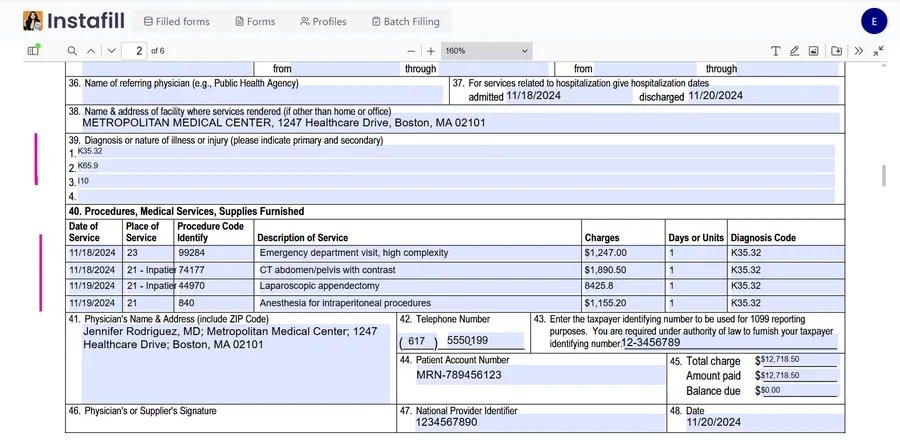
The source files can be long: 70 to 100 pages or more, such as insurance policies, full patient records or legal case files with exhibits. Facts scattered across a long file are pulled together and lined up row by row, for example the details of an insurance claim table, or a patient packet that holds intake forms, labs, notes and discharge summaries.
The source data does not have to be a table. If the PDF has a sentence or a bullet like "05/01/2025 — MRI — $3,000", the AI splits it into Date, Description and Amount and writes a clean row. Repeating lists are treated as table candidates, and each item becomes its own row. If a table in the form is not recognized automatically, you mark the table area once, and the same row-by-row fill applies after that.
Update 2: A PDF used as a source file is read page by page
PDFs are hard to extract from, especially long or busy ones. Attachments are now parsed one page at a time. For each page, Instafill.ai extracts the text (with OCR if needed), picks up basic layout hints and normalizes the result, then moves on, however long the file is.
Multi-column pages, prints of web portals and scans with images and captions all go through the same flow. Tables and lists are read where they exist, and free text is read together with its nearby headings, so a field such as "Employer EIN", "Policy Number" or "Claimant DOB" is found even when the formatting changes. Duplicates across pages are reconciled so the right value wins.
The point is long documents: insurance plan booklets and EOB bundles, EMR exports and discharge summaries, legal and compliance packets, loan packages and statement bundles. Before the update, a detail on a late page could be missed. With the page-by-page flow, a detail on page 3 and one on page 73 get the same treatment.
What to know
The system works with various text patterns in PDF source documents. It helps if the data is already in a table, but that is not required. There is no limit on the number of attachments, but attach only what you need, because too many unrelated files add noise.
Questions about the update go to [email protected].
Since this post
Table filling was extended in later updates, including lists as their own data type and rows that fill only where there is data. The February 2026 core technology update covers them, and Table and list processing describes how tables work today.