
Yes! You can use AI to fill out Illinois CFS 718-4, Request for Transfer of Background Clearance Information
Don't type 9 fields by hand. Tell our AI about yourself, or upload a document you already have, and it fills every field in seconds. You check it, then download, print or sign.
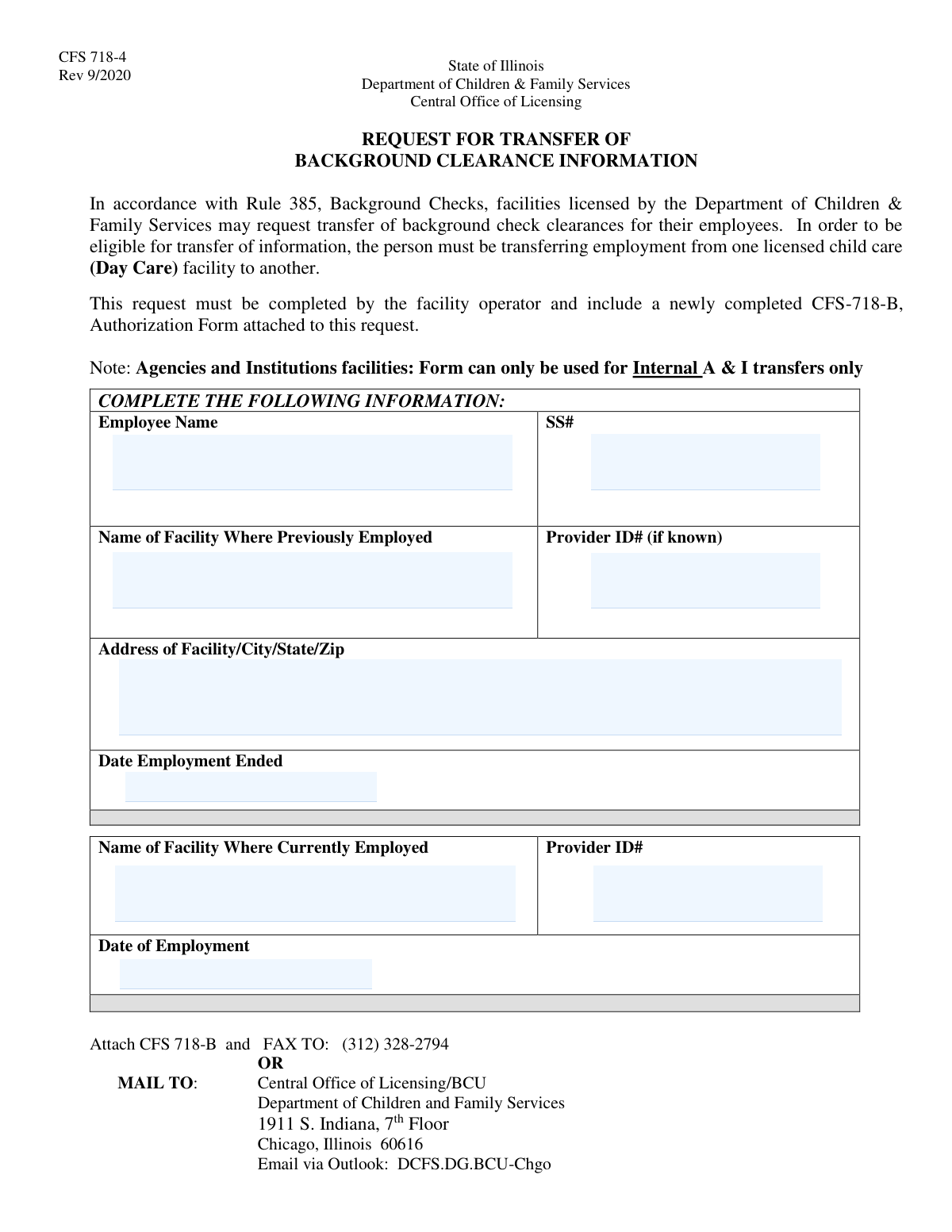
The AI does the filling. You just check it.
No typing into boxes, nothing to install.
What this form asks for
The AI fills all of it, from your answers or your documents.
The AI checks your answers before you download
12 checks built for this form, so a wrong date or a missing answer is caught before anyone else sees it.
This check ensures the 'Employee Name' field is not left blank. The employee's full name is a primary identifier required to locate their existing background clearance records. A submission without a name is unprocessable and will be rejected, as the subject of the request cannot be identified.
This validation verifies that the Social Security Number is provided and adheres to the 9-digit format, either as XXXXXXXXX or XXX-XX-XXXX. It also checks against known invalid SSN patterns, such as those starting with '000' or '666'. An accurate SSN is critical for uniquely identifying the employee in the background check system, and failure to provide a valid one will prevent the transfer.
This check confirms that the 'Name of Facility Where Previously Employed' field is filled out. This information is essential for verifying the employee's work history and confirming the origin of the background check being transferred. Without the previous facility's name, the department cannot validate the employee's eligibility for a transfer.
This validation ensures the address for the previous facility is complete, including a street address, city, state, and a valid 5-digit ZIP code. A complete and accurate address is necessary to properly identify the previous licensed facility in state records. Incomplete address information can cause significant delays or rejection of the transfer request.
This check validates that the 'Date Employment Ended' is a valid date and occurs in the past, prior to the submission date. This date establishes the timeline of employment and is a key factor in determining if the background check is still recent enough to be eligible for transfer. A future or invalid date would make the request logically inconsistent and result in failure.
This validation ensures the 'Current Facility Provider ID#' field is not empty. This ID is a mandatory, unique identifier for the new employing facility, confirming it is licensed by the DCFS and eligible to receive clearance information. A missing provider ID will result in an automatic rejection of the request.
And 6 more checks
- Current Employment Start Date Validity
- Employment Date Chronology
- Distinct Previous and Current Facilities
- CFS-718-B Attachment Verification
- Previous Facility State Location
- Employment Gap Eligibility
Let AI fill out your CFS 718-4
No typing. Every field filled in seconds, checked, ready to sign.
How to Fill Out CFS 718-4 Online for Free in 2026
What the AI walks you through.
- Navigate to Instafill.ai and upload or select the Illinois CFS 718-4 form.
- Provide the employee's personal information, including their full name and Social Security Number.
- Enter the details of the employee's previous employment, such as the facility name, address, and employment end date.
- Input the information for the employee's current facility, including its name, provider ID, and the date of employment.
- Review the form automatically populated by the AI to ensure all information is accurate and complete.
- Ensure the newly completed CFS-718-B Authorization Form is attached as required.
- Download the completed form package and submit it to the Central Office of Licensing via fax, mail, or email as instructed on the form.
Common Mistakes in Completing CFS 718-4
The ones the AI is built to catch.
Forgetting to Attach Form CFS-718-B
Using Abbreviated or Incorrect Facility Names
Incorrect or Incomplete Social Security Number
Omitting the Current Facility's Provider ID
Submitting an Illegible, Hand-Written Form
Misunderstanding Transfer Eligibility Rules
Providing an Incomplete Previous Facility Address
Employee Incorrectly Completing the Form
Incorrect Submission Method or Address
Using Inconsistent or Ambiguous Date Formats
Frequently Asked Questions About CFS 718-4
Is it really free for 7 days?
Can I fill other forms too?
How do I cancel?
How does the AI fill out CFS 718-4?
What happens to my information?
How complex is CFS 718-4 to fill out?
What is the purpose of the CFS 718-4 form?
Who is responsible for filling out this form?
Can I use this form for any new employee?
What other documents do I need to submit with this request?
How do I submit the completed CFS 718-4 form?
What if I don't know the Provider ID for the employee's previous facility?
My facility is an 'Agency and Institution' (A & I). Can I use this form?
Why is the employee's Social Security Number required?
Can I use an AI tool to help fill out this form?
How can I fill out the CFS 718-4 form online?
The PDF version of the form I found is not fillable. What should I do?
Can I use this form to transfer a background check from a facility in another state?
How current must the employment transfer be?
Get your CFS 718-4 filled out by AI
$0 today. Cancel before Nov 10 and you pay nothing.
Other forms like this one
employment forms: Form I-765, Application for Employment Authorization, Form CMS L564, Request for Employment Info, Form OF-306, Declaration for Federal Employment, Form NYS DHR, Employment Complaint Form, Form AO 78, Application for Employment, Illinois State Board of Education (ISBE) Application for Employment (ISBE 61-08), Prudential Group Disability Insurance – Education and Employment History Form (GL.2009.009, Ed. 06/2017), HR-Pol-Rec&Res-04 Employment Application Form (Recruitment of Permanent Employees), City of Carlinville Application for Employment (An Equal Opportunity Employer), U.S. Equal Employment Opportunity Commission (EEOC) Form 453, Recommendation for Recognition, The Prudential Insurance Company of America Group Disability Insurance – Education and Employment History Form (GL.2009.009, Ed. 06/2017), St. Paul’s Hospital Application for Employment (職位申請表) – SPHF-HRD-035, U.S. Equal Employment Opportunity Commission (EEOC) Form 453, Recommendation for Recognition, Prudential Group Disability Insurance – Education and Employment History Form (GL.2009.009, Ed. 06/2017), Claim for Special Employment Advance (SU514), New York State Employment Application: Part 1 – Pre-Interview (Form #S1000), New York State Employment Application Form, Sidney Sussex College Cambridge, Application for Employment, Z83, Application for Employment in the Republic of South Africa Government Department, ENVIRONMENTAL MONITORING LABORATORY, LLC Employment Application
CMS forms: CMS-1500 (02-12), Health Insurance Claim Form (NUCC Approved) (OMB 0938-1197), Form CMS L564, Request for Employment Info, Form CMS-10114, NPI Application/Update, Form CMS-588, EFT Authorization Agreement, Form CMS-460, Medicare Participation Agreement, Form CMS-4040, Request for Enrollment in Medicare Part B, Form CMS-2567, Statement of Deficiencies, Form CMS-1763, Request for Termination of Medicare Coverage, Form CMS-116, CLIA Application, Form CMS-855O, Medicare Enrollment Application, Form CMS-40B, Application for Enrollment in Medicare Part B, Form CMS-588, Electronic Funds Transfer (EFT) Authorization Agreement, CMS-855I, Medicare Enrollment Application for Physicians and Non-Physician Practitioners, Form CMS-855R, Medicare Enrollment Application - Reassignment of Medicare Benefits, CMS-855R, Medicare Enrollment Application: Reassignment of Medicare Benefits, CMS-855R, Medicare Enrollment Application: Reassignment of Medicare Benefits, Medicare Enrollment Application for Durable Medical Equipment, Prosthetics, Orthotics, and Supplies (DMEPOS) Suppliers, CMS-855S, CMS-855B, Medicare Enrollment Application for Clinics/Group Practices and Other Suppliers, CMS-855A, Medicare Enrollment Application for Institutional Providers, Form CMS-855A, Medicare Enrollment Application for Institutional Providers
Let AI fill out your CFS 718-4
Your trial starts once a card is added. You pay nothing before Nov 10.
Our AI already knows this form, all 9 fields of it. Skip the typing: tell it about yourself, or upload what you have, and it fills the whole form in seconds.
- AI fills every field on the form, checkboxes included
- No typing into boxes: answer a few questions, or upload a document you already have, an old copy of this form, a photo of a document
- The AI checks the answers; you review and change anything before you download
- Download the finished PDF, print it, or sign it online
- Encrypted, and never used to train AI
Cancel before Nov 10 and you pay nothing.
A card is needed to start the trial. Cancel in two clicks from your account.
Terms · Privacy