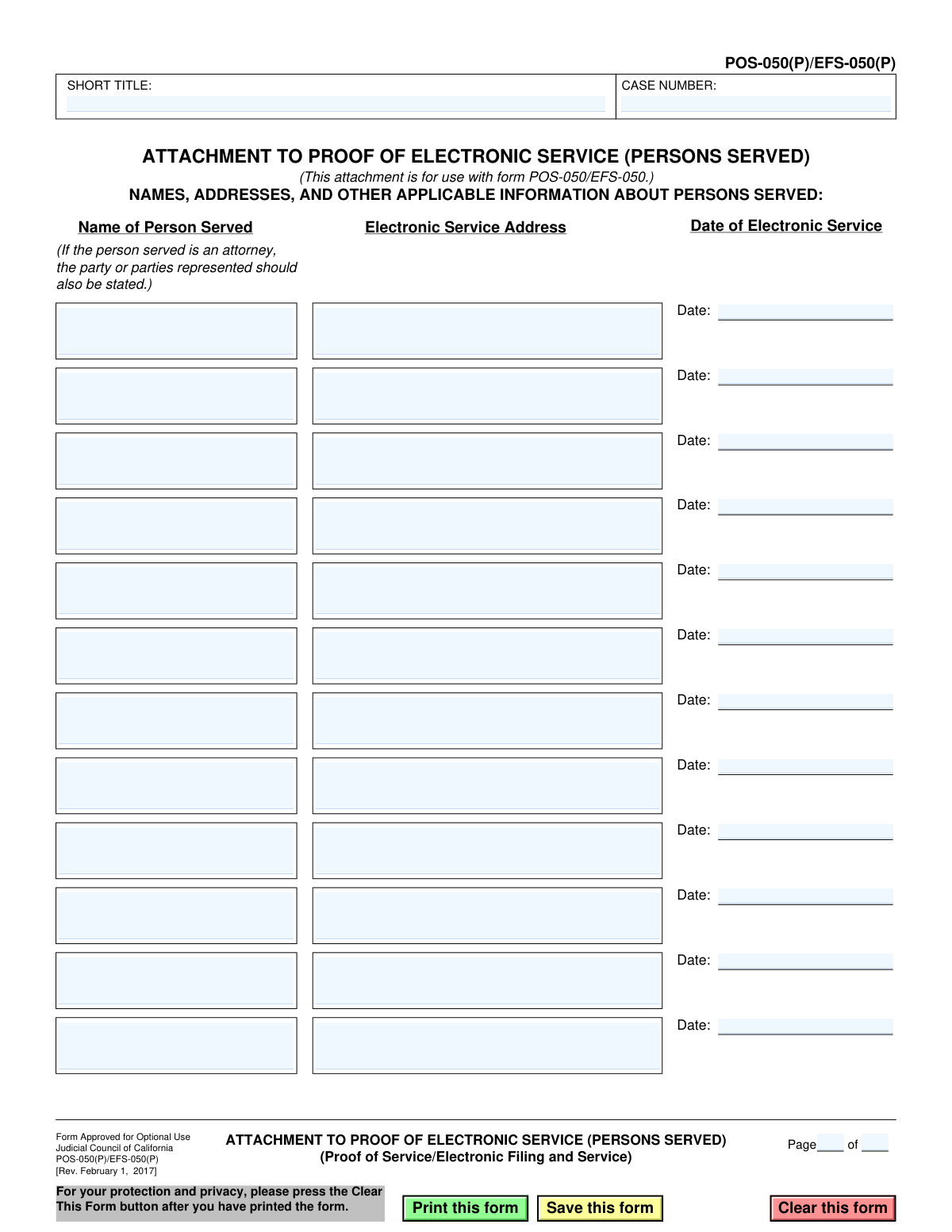
Yes! You can use AI to fill out Form POS-050(P)/EFS-050(P), Attachment to Proof of Electronic Service (Persons Served)
Form POS-050(P)/EFS-050(P) is a supplemental document for California's Proof of Electronic Service (Form POS-050/EFS-050). It is used when there is insufficient space on the main form to list all individuals and parties who received legal documents electronically. Today, this form can be filled out quickly and accurately using AI-powered services like Instafill.ai, which can also convert non-fillable PDF versions into interactive fillable forms.
POS-050(P)/EFS-050(P) is part of the
California court forms and proof of service forms categories on Instafill.
Our AI automatically handles information lookup, data retrieval, formatting, and form filling.
It takes less than a minute to fill out POS-050(P)/EFS-050(P) using our AI form filling.
Securely upload your data. Information is encrypted in transit and deleted immediately after the form is filled out.
Form specifications
| Form name: | Form POS-050(P)/EFS-050(P), Attachment to Proof of Electronic Service (Persons Served) |
| Number of fields: | 44 |
| Number of pages: | 1 |
| Language: | English |
Instafill Demo: How to fill out PDF forms in seconds with AI
How to Fill Out POS-050(P)/EFS-050(P) Online for Free in 2026
Are you looking to fill out a POS-050(P)/EFS-050(P) form online quickly and accurately? Instafill.ai offers the #1 AI-powered PDF filling software of 2026, allowing you to complete your POS-050(P)/EFS-050(P) form in just 37 seconds or less.
Follow these steps to fill out your POS-050(P)/EFS-050(P) form online using Instafill.ai:
- 1 Navigate to Instafill.ai and upload or select the POS-050(P)/EFS-050(P) form.
- 2 Enter the Case Number and Short Title of the case in the header section of the form.
- 3 For each person served, input their full name. If the person is an attorney, also state the party or parties they represent.
- 4 Provide the specific Electronic Service Address (e.g., email address) where the documents were sent for each person listed.
- 5 Enter the exact date of electronic service for each corresponding person.
- 6 Review all the names, addresses, and dates for accuracy before finalizing the document.
- 7 Save or print the completed attachment to be filed along with the main Proof of Electronic Service form (POS-050/EFS-050).
Our AI-powered system ensures each field is filled out correctly, reducing errors and saving you time.
Why Choose Instafill.ai for Your Fillable POS-050(P)/EFS-050(P) Form?
Speed
Complete your POS-050(P)/EFS-050(P) in as little as 37 seconds.
Up-to-Date
Always use the latest 2026 POS-050(P)/EFS-050(P) form version.
Cost-effective
No need to hire expensive lawyers.
Accuracy
Our AI performs 10 compliance checks to ensure your form is error-free.
Security
Your personal information is protected with bank-level encryption.
Frequently Asked Questions About Form POS-050(P)/EFS-050(P)
This form is an attachment used to list additional people who were served legal documents electronically. You use it when you run out of space on the main Proof of Electronic Service form, POS-050/EFS-050.
You only need to use this form if you are electronically serving documents to more people than can be listed on the primary Proof of Electronic Service form. It provides extra space for additional recipients.
No, this form is approved for optional use. It is only necessary if the main Proof of Service form (POS-050/EFS-050) does not have enough space for you to list everyone you served electronically.
You will need the case number, the short case title, and for each person served, their name, their electronic service address, and the date of service. If serving an attorney, you must also name the party they represent.
An 'Electronic Service Address' is typically the email address that the party or their attorney has consented to use for receiving official court documents electronically.
In the 'Name of Person Served' column, you must list the attorney's name and also state which party or parties they represent in the case.
The 'Short Title' is the abbreviated name of your case, such as 'Smith v. Jones'. This should be consistent with the short title used on other documents filed in your case.
You can use multiple copies of this attachment page if needed. Just be sure to number the pages correctly in the 'Page __ of __' section at the bottom.
This attachment should be filed with the court together with the main Proof of Electronic Service form (POS-050/EFS-050). It becomes part of the official record of service.
You should enter the exact date on which you transmitted the documents to the person's electronic service address. This is the date the electronic service was completed.
Yes, services like Instafill.ai use AI to accurately auto-fill form fields with your case and party information, which can save you time and help prevent errors.
You can use a service like Instafill.ai to easily complete this form online. Simply upload the form, and the platform will make the fields interactive for you to fill, download, and print.
If you have a non-fillable or 'flat' PDF, you can upload it to Instafill.ai. The service can convert it into an interactive, fillable form that you can complete on your computer.
Compliance POS-050(P)/EFS-050(P)
Validation Checks by Instafill.ai
1
Case Number Presence
Ensures the 'CASE NUMBER' field is not empty. The case number is a critical identifier for associating the document with the correct legal case in the court's filing system. A missing case number will result in the filing being rejected or misfiled.
2
Short Title Presence
Verifies that the 'SHORT TITLE' field has been filled out. This field provides a human-readable identifier for the case (e.g., 'Smith v. Jones') and is used for quick reference and routing. Submissions without a short title can cause confusion and delays in processing.
3
At Least One Person Served
Checks that at least one full row containing the 'Name of Person Served', 'Electronic Service Address', and 'Date of Electronic Service' is completed. The purpose of this form is to list individuals who were served, so an empty form is invalid. If no one is listed, the form serves no purpose and should not be submitted.
4
Service Entry Completeness
Validates that for any given row, if one field is filled (e.g., 'Name of Person Served'), then the other two fields in that same row ('Electronic Service Address' and 'Date of Electronic Service') must also be filled. Incomplete entries are ambiguous and legally insufficient as proof of service. This check ensures each service record is whole.
5
Electronic Service Address Format
Confirms that the value in the 'Electronic Service Address' field is a valid email address format (e.g., '[email protected]'). Since this is a proof of electronic service, a correctly formatted electronic address is required to demonstrate valid service. An invalid format would invalidate the proof of service for that person.
6
Date of Service Format Validation
Ensures that all 'Date of Electronic Service' fields contain a valid date in a recognized format (e.g., MM/DD/YYYY). An improperly formatted date is ambiguous and can lead to legal challenges regarding the timeliness of the service. The system should reject any non-date or malformed date entries.
7
Date of Service Plausibility (No Future Dates)
Verifies that the 'Date of Electronic Service' is not a date in the future. A proof of service attests to an action that has already occurred. A future date is a logical impossibility and indicates a data entry error, which would invalidate the document.
8
Pagination Logic
Checks that the current page number (Page X) is not greater than the total number of pages (of Y). For example, 'Page 3 of 2' is a logical error. This validation prevents nonsensical pagination that could confuse court clerks and suggest that pages are missing.
9
Pagination Completeness
Ensures that if a page number is entered (e.g., 'Page 1'), the total number of pages is also specified (e.g., 'of 3'). Both parts of the pagination are required to understand the document's full length and ensure no pages are missing. An incomplete pagination field can lead to the document being rejected.
10
Person Served Name Validity
Validates that the 'Name of Person Served' field contains a plausible name and is not just random characters, symbols, or excessively short. This field must clearly identify the individual or entity being served for the proof of service to be legally valid. A warning is raised for suspicious entries.
11
Attorney Representation Check
Scans the 'Name of Person Served' field for keywords like 'Attorney for', 'Esq.', or 'Law Offices'. The form instructions state that the party represented by an attorney should be listed. If an attorney is detected but no represented party is mentioned, a warning should be issued to the user to ensure compliance with form instructions.
12
Service Date Consistency
Compares all entered 'Date of Electronic Service' fields on the attachment. Typically, all parties are served the same document on the same day. If different dates are found, the system should raise a warning to the user to confirm this is intentional and not a data entry error.
Common Mistakes in Completing POS-050(P)/EFS-050(P)
Users often forget to fill in the 'CASE NUMBER' and 'SHORT TITLE' at the top of the page. This happens because they focus on the main table and treat the header as boilerplate. Without this information, the attachment cannot be correctly associated with its corresponding case file, leading to rejection by the court clerk and significant delays in processing the proof of service.
The form explicitly requires that if the person served is an attorney, the filer must also state the party or parties they represent. A common mistake is to only list the attorney's name, which is insufficient. This omission can create ambiguity and may lead to challenges regarding the validity of the service, as it's not clear which party in the case was officially served through their counsel.
Typos in email addresses (e.g., 'gamil.com' instead of 'gmail.com') are extremely common and render the service invalid. This mistake often occurs due to manual data entry and lack of careful proofreading. An incorrect address means the intended recipient never receives the documents, which can invalidate the entire proof of service and require the process to be repeated, wasting time and resources.
Some filers mistakenly enter a street address into the 'Electronic Service Address' column. This indicates a fundamental misunderstanding of 'electronic service' and the purpose of this specific form. This error makes the entry completely non-compliant, as service was not effected electronically, and will result in the court rejecting the proof of service for that individual.
People frequently enter the date they are filling out the form, rather than the actual date the electronic service was completed. The 'Date of Electronic Service' must correspond to the exact date the documents were transmitted. An incorrect date can create legal disputes over deadlines and the timeliness of the service, potentially jeopardizing the filer's legal position.
Entering a partial name, an alias, or misspelling the name of the person or attorney being served creates ambiguity. This can happen due to haste or working from inaccurate records. An unclear or incorrect name can be grounds for the opposing party to challenge the validity of the service, arguing they were not properly identified and served.
When serving many parties, multiple attachment pages may be necessary, requiring the 'Page ___ of ___' fields to be filled out. Filers often leave this blank or write 'Page 1 of 1' on every page. This can lead to pages being lost or filed out of order, resulting in an incomplete record and the court not having proof that all parties were served.
This form, POS-050(P)/EFS-050(P), is an attachment and is not a standalone document. A critical error is submitting it to the court without the main 'Proof of Electronic Service' form (POS-050/EFS-050) that it is meant to supplement. This results in an incomplete filing that will be rejected by the court clerk, as it lacks the necessary declaration and signature from the main form.
The information on this attachment must perfectly match the information on the main POS-050/EFS-050 form and other case documents. Discrepancies, such as different service dates or a different list of documents served, can arise from careless data entry. Such inconsistencies undermine the credibility of the filing and can be used by opposing counsel to question the integrity of the service process.
While the form doesn't mandate a specific format, using inconsistent formats (e.g., MM/DD/YY, Month D, YYYY, DD-MM-YYYY) across different entries can cause confusion. This often happens when information is copied from various sources or entered over several sessions. To avoid ambiguity, a consistent, clear format like MM/DD/YYYY should be used for all date entries. AI-powered form filling tools like Instafill.ai can help prevent many of these errors by auto-populating data consistently, validating email formats, and ensuring all required fields are completed. If the form is a non-fillable PDF, Instafill.ai can also convert it into an interactive, fillable version to streamline the process.
Saved over 80 hours a year
“I was never sure if my IRS forms like W-9 were filled correctly. Now, I can complete the forms accurately without any external help.”
Kevin Martin Green
Your data stays secure with advanced protection from Instafill and our subprocessors

Robust compliance program
Transparent business model
You’re not the product. You always know where your data is and what it is processed for.
ISO 27001, HIPAA, and GDPR
Our subprocesses adhere to multiple compliance standards, including but not limited to ISO 27001, HIPAA, and GDPR.
Security & privacy by design
We consider security and privacy from the initial design phase of any new service or functionality. It’s not an afterthought, it’s built-in, including support for two-factor authentication (2FA) to further protect your account.
Fill out POS-050(P)/EFS-050(P) with Instafill.ai
Worried about filling PDFs wrong? Instafill securely fills form-pos-050pefs-050p-attachment-to-proof-of-electronic-service-persons-served forms, ensuring each field is accurate.