
Instafill.ai
7 days free
AI form filling · 49 fields · 1 page · done in seconds

Yes! You can use AI to fill out Form TH-140, Proof of Personal Service (Transitional Housing Misconduct)

Don't type 49 fields by hand. Tell our AI about yourself, or upload a document you already have, and it fills every field in seconds. You check it, then download, print or sign.
7 days free, then $19.99/month · Cancel anytime
AI fills it, no typingEncrypted, never used to train AICancel in two clicks
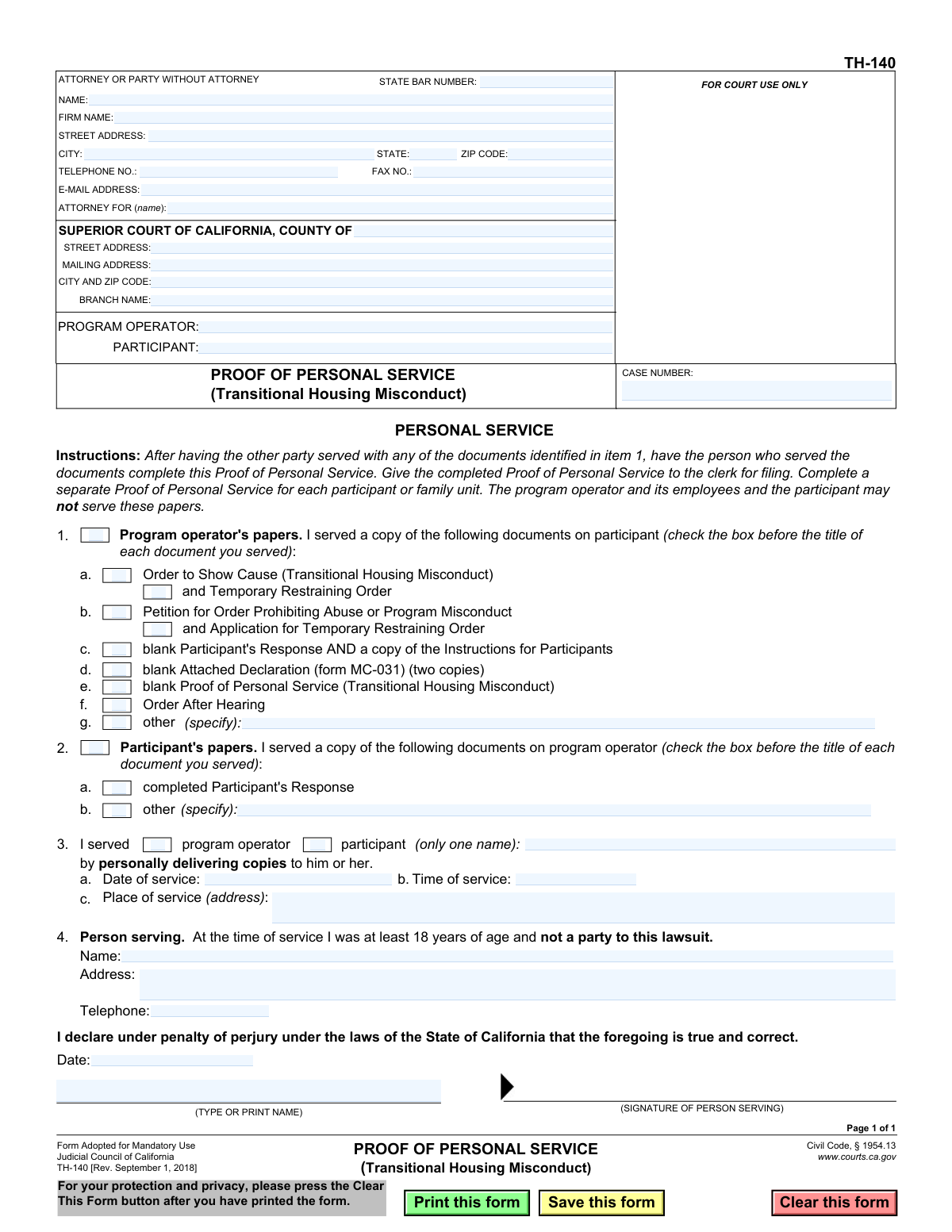
Form TH-140, Proof of Personal Service (Transitional Housing Misconduct), page 1
Basic · 41/100Form Complexity Index

The AI does the filling. You just check it.

No typing into boxes, nothing to install.

Tell the AI about youAnswer a few questions in plain words, or upload a document you already have. That is all the typing there is.
AI fills every field in secondsIt puts each answer in the right box on every page, checkboxes included.
Check it and downloadReview every field, change anything, then download, print or sign the PDF.

What this form asks for

The AI fills all of it, from your answers or your documents.

Form TH-140 is a legal document used in the Superior Court of California to provide official proof that legal papers in a transitional housing misconduct case have been personally delivered to the involved party. This sworn statement, completed by the person who served the documents, is crucial for the court record to show that proper legal notification has occurred. Today, this form can be filled out quickly and accurately using AI-powered services like Instafill.ai, which can also convert non-fillable PDF versions into interactive fillable forms.
Fillable fields49
Pages1
Form Complexity IndexBasic, 41/100

The AI checks your answers before you download

15 checks built for this form, so a wrong date or a missing answer is caught before anyone else sees it.

At Least One Document Served

Ensures that at least one checkbox is marked in either Section 1 (Program operator's papers) or Section 2 (Participant's papers). A Proof of Service form must specify which documents were served to be valid. If no documents are selected, the form is incomplete and fails to prove anything, leading to its rejection.

Mutually Exclusive Document Sections

Validates that document checkboxes are selected in either Section 1 or Section 2, but not both simultaneously. This form is intended to document a single instance of service (e.g., operator serving participant OR participant serving operator). Selections in both sections create an ambiguous record that would be rejected by the court clerk.

Required Specification for 'Other' Document

Checks that if the 'other (specify)' checkbox is marked in Section 1 or Section 2, the corresponding text field is not empty. This is crucial for the court record to accurately reflect all documents that were served. Failure to specify the 'other' document makes the service of that particular item legally insufficient.

Single Recipient Selection

Verifies that in Section 3, only one of the two checkboxes ('program operator' or 'participant') is marked as the recipient of the service. The form is designed to document service on a single party per submission. Selecting both creates ambiguity and would invalidate the form for filing purposes.

Person Served Name Required

Ensures the name of the individual who was personally served is entered in Section 3. This is a fundamental requirement of personal service, as it identifies the specific recipient. Without this name, the proof of service is legally insufficient and invalid.

Valid Service Date and Time

Validates that the 'Date of service' and 'Time of service' in Section 3 are provided in a valid format and represent a past or current time, not a future one. This is critical for establishing the legal timeline of the case. An invalid, missing, or future date would render the service ineffective and legally void.

And 9 more checks
  • Complete Service Address
  • Server Cannot Be a Party to the Case
  • Server Contact Information Completeness
  • Declaration Date Logic Check
  • Server Printed Name Consistency
  • Case Number Presence
  • Court County Specification
  • Attorney Bar Number Validation
  • Server Phone Number Format

Let AI fill out your TH-140

No typing. Every field filled in seconds, checked, ready to sign.

7 days free, then $19.99/month · Cancel anytime

How to Fill Out TH-140 Online for Free in 2026

What the AI walks you through.

  1. Navigate to Instafill.ai and upload or select the TH-140 Proof of Personal Service form.
  2. Use the AI assistant to automatically populate court information, such as the county, court address, and case number.
  3. Identify the program operator and participant involved in the case.
  4. Check the boxes to indicate which specific legal documents were served on the participant or program operator.
  5. Enter the details of the service, including the name of the person served, the date, time, and physical address of service.
  6. Provide the name, address, and contact information of the person who performed the service, then have them sign and date the declaration under penalty of perjury.
  7. Review the completed form for accuracy, then download, print, and file it with the court clerk.

Common Mistakes in Completing TH-140

The ones the AI is built to catch.

Server Is a Party to the Case
The form explicitly states that the person serving the documents must not be a party to the lawsuit. This mistake often happens when a participant or program operator tries to save money or time by serving the papers themselves. This action completely invalidates the service, requiring the process to be repeated correctly, which can delay the case and lead to negative legal consequences. To avoid this, always use a neutral third party who is at least 18 years old, such as a friend, relative not involved in the case, or a professional process server.
Missing Signature or Date on Declaration
The server must sign and date the declaration in section 4, affirming the information is true under penalty of perjury. People often rush and forget this final step, treating it like any other field. An unsigned or undated Proof of Service is invalid and will be rejected by the court clerk, halting case progress until a properly executed form is filed. Always perform a final review of the form before submission, paying special attention to the signature and date lines.
Incorrectly Checking Served Documents
In sections 1 or 2, the server must check a box for each individual document that was delivered. A common error is checking the wrong boxes, or failing to check all boxes for the documents included in the service packet. This creates a discrepancy that the opposing party can use to claim they were not properly served with a specific order or notice, potentially invalidating a hearing or ruling. To prevent this, the server should have a checklist and physically verify each document against the form as they are being prepared for service.
Vague or Incomplete 'Place of service' Address
Section 3 requires the specific address where service occurred, but filers sometimes enter vague descriptions like 'at their home' or 'workplace'. This is insufficient for a legal document, which requires a complete and unambiguous street address, city, and state. An incomplete address can be grounds for challenging the validity of the service. To avoid this, the server must record the full municipal address where the papers were physically handed to the recipient.
Missing or Inaccurate Case Number
The case number is the primary identifier that links the Proof of Service to the correct court file. This field is often left blank or filled with transposed numbers, especially on supplemental forms filed after the initial petition. Without the correct case number, the court clerk cannot file the document, leaving the official record without proof that service was completed and causing significant delays. Always copy the case number exactly from the court-stamped initial petition or a recent court order.
Confusing Date of Service with Date of Signing
The form has two distinct date fields: 'Date of service' in section 3 and 'Date' under the signature line in section 4. People frequently enter the same date in both places, even if they signed the form a day or two after performing the service. This inaccuracy can create legal ambiguity and be used to question the server's credibility. The server must carefully enter the actual date the documents were delivered in section 3, and the date they are signing the form in section 4.
Illegible Handwriting
Legal forms require clear, legible information, but are often filled out by hand with poor penmanship. If the server's name, the address of service, or other key details are unreadable, the court clerk may reject the form or key the information into the system incorrectly. This can cause notices to be sent to the wrong address or make it impossible to contact the server if questions arise. To prevent this, use a fillable PDF; if the form is a flat PDF, a tool like Instafill.ai can make it fillable, allowing you to type all information for maximum clarity.
Incomplete Server Information in Section 4
After filling out the details of the service, the server sometimes forgets to provide their own full name, address, and telephone number at the bottom of the form. This information is required to identify the server as a real, contactable individual who can attest to the service. Leaving this section blank can lead to the form's rejection, as it makes the declaration unverifiable. The person serving must ensure they fill out their personal details completely in section 4.
Filling Out the Wrong Document Section (1 vs. 2)
The form contains two separate sections for listing served documents: Section 1 for when the Program Operator is serving the Participant, and Section 2 for when the Participant is serving the Program Operator. A server might mistakenly fill out the wrong section, creating a record that doesn't match who actually performed the service. This error makes the proof of service invalid for the intended purpose. Carefully read the heading of each section to ensure you are documenting the service in the correct context.
Incorrect Court Information
The header requires the specific county, address, and branch name of the Superior Court handling the case. People often guess, use a generic county court address, or leave the branch name blank. Filing a document with incorrect court information can cause it to be rejected or misrouted, leading to critical delays. This can be avoided by carefully copying the court information from the original petition or using the court's official website to verify the correct address and branch for the case. AI-powered tools like Instafill.ai can also help by auto-populating correct court data based on the case number or county.

Frequently Asked Questions About TH-140


Is it really free for 7 days?
Yes. You pay $0 today. Cancel before Nov 4 and you are never charged. Keep it, and it is $19.99 a month for 5 fills of your TH-140.
Can I fill other forms too?
This plan is for your TH-140: your own AI agent fills it as often as 5 times a month. To fill other forms and upload your own, choose a Professional plan from your account.
How do I cancel?
From your account, in two clicks, any time. No email, no call.
How does the AI fill out TH-140?
You answer a few questions in plain words, or upload a document you already have. The AI reads what you give it and puts each answer into the right field of TH-140, on every page, in seconds. It checks the answers against the form's own rules, and you review and change anything before you download, print or sign.
What happens to my information?
It is encrypted in transit and at rest, and it is never used to train AI.
How complex is TH-140 to fill out?
TH-140 has a Form Complexity Index of 41 out of 100, in the basic tier: 49 fillable fields across 1 page. Instafill.ai's AI fills it in under a minute, with every field there for you to review before you download.
What is the purpose of the TH-140 Proof of Personal Service form?
This form is a legal document used to prove to the court that legal papers in a transitional housing misconduct case were successfully hand-delivered to the other party, either the program operator or the participant.
Who is supposed to fill out this form?
The person who actually delivered (served) the documents must complete and sign this form. This person cannot be the program operator, its employees, or the participant involved in the case.
Can I serve the documents myself if I am the participant or program operator?
No, the instructions explicitly state that parties to the case, including the participant and program operator, may not serve these papers. You must have a neutral third party who is at least 18 years old do it.
What information is needed to complete the Proof of Personal Service?
You will need the court and case information, a list of the specific documents that were served, the full name of the person served, and the exact date, time, and address where the service occurred. The person who served the papers must also provide their name, address, and signature.
How do I know which boxes to check in sections 1 and 2?
Check the boxes in section 1 if you served papers on behalf of the program operator. Check the boxes in section 2 if you served papers on behalf of the participant, making sure to mark only the documents you actually delivered.
What do I write in section 3 of the form?
In section 3, you must check whether you served the program operator or the participant, write their full name, and provide the specific date, time, and address where you personally handed them the documents.
What are the requirements for someone to be a server?
The person serving the documents must be at least 18 years of age and not a party to the lawsuit. This ensures the service is performed by a neutral individual.
What should I do with the form after it is completed and signed?
After the server completes and signs the form, it must be given to the court clerk for filing. This officially records the proof of service with the court.
Do I need to fill out a separate form for each person I serve?
Yes, the instructions require you to complete a separate Proof of Personal Service form for each individual participant or family unit that is served.
What happens if I don't file a Proof of Personal Service?
If this form is not filed, the court has no official record that the other party received the legal documents. This can cause significant delays or lead to the dismissal of your case.
Can AI tools help me fill out this form?
Yes, services like Instafill.ai use AI to accurately auto-fill form fields with your information, which can save time and help prevent errors.
How can I fill out the TH-140 form online?
You can use a service like Instafill.ai to upload the form, fill it out on your computer or mobile device, and then download the completed document for printing and signing.
The PDF version of this form I found is not fillable. What can I do?
If you have a non-fillable PDF, you can use a tool like Instafill.ai. It can convert flat PDFs into interactive, fillable forms that you can easily complete online.
Encrypted in transit and at restNever used to train AIDelete your forms any time

Get your TH-140 filled out by AI

$0 today. Cancel before Nov 4 and you pay nothing.

Other forms like this one

California court forms: Judicial Council of California Form SC-105, Request for Court Order and Answer (Small Claims), Judicial Council of California Form SC-120, Defendant’s Claim and ORDER to Go to Small Claims Court (Small Claims), Judicial Council of California Form SER-001, Request for Sheriff to Serve Court Papers, Judicial Council of California Form SER-001, Request for Sheriff to Serve Court Papers, Affidavit for Collection of Personal Property California Probate Code Section 13100, Form POS-040, Proof of Service—Civil, Declaration of Facts of Death (California Superior Court), declaration-of-marriage-for-court-proceeding-california-family-law, ADOPT-200, Adoption Request, ADOPT-200, Stepparent Adoption Request, ADOPT-210, Adoption Agreement, ADOPT-310, Contact After Adoption Agreement, Judicial Council of California Form ADOPT-200, Adoption Request, Form ADR-107, Mediation Attendance Sheet, Form ADR-110, Order Appointing Referee, Form ADR-109, Stipulation or Motion for Order Appointing Referee, Form ADR-102, Request for Trial De Novo After Judicial Arbitration, Form ADR-108, Referee's Report (Code Civ. Proc., §§ 638, 639), Form ADR-106, Petition to Confirm, Correct, or Vacate Contractual Arbitration Award, Form ADR-104, Rejection of Award and Request for Trial After Attorney-Client Fee Arbitration

proof of service forms: Form POS-040, Proof of Service—Civil, Judicial Council of California Form SC-104, Proof of Service (Small Claims), Judicial Council of California Form SC-104, Proof of Service (Small Claims), Form DV-200, Proof of Personal Service (CLETS) (Domestic Violence Prevention), Illinois Circuit Court Eviction Summons and Proof of Service of Eviction Summons & Eviction Complaint (Form E-S 3507.3), proof-of-electronic-service-appellate, Form APP-009, Proof of Service (Appellate Division), Form APP-109, Proof of Service (Appellate Division), Form GC-020(P), PROOF OF PERSONAL SERVICE OF NOTICE OF HEARING— GUARDIANSHIP OR CONSERVATORSHIP, Form APP-109E, Proof of Electronic Service (Appellate Division), Proof of Personal Service of Notice of Initial Appearance—CARE Act Proceedings, Form CARE-116, Proof of Personal Service of Notice of Hearing—CARE Act Proceedings, Form CR-106, Proof of Service — Criminal Record Clearing, CARE-107, Proof of Personal Service of Notice of Order for CARE Act Report, Form CIV-120, Notice of Entry of Dismissal and Proof of Service, Form DAL-012, Proof of Service—Disability Access Litigation, Form DE-120(P), Proof of Personal Service of Notice of Hearing—Decedent's Estate or Trust, Form EA-200, Proof of Personal Service (Elder or Dependent Adult Abuse Prevention), Form EA-260, Proof of Service of Order After Hearing by Mail (Elder or Dependent Adult Abuse Prevention), Form FL-115, Proof of Service of Summons (Family Law—Uniform Parentage—Custody and Support)

7 days free, then $19.99/month · Cancel anytime