Yes! You can use AI to fill out Illinois CFS 718-4, Request for Transfer of Background Clearance Information

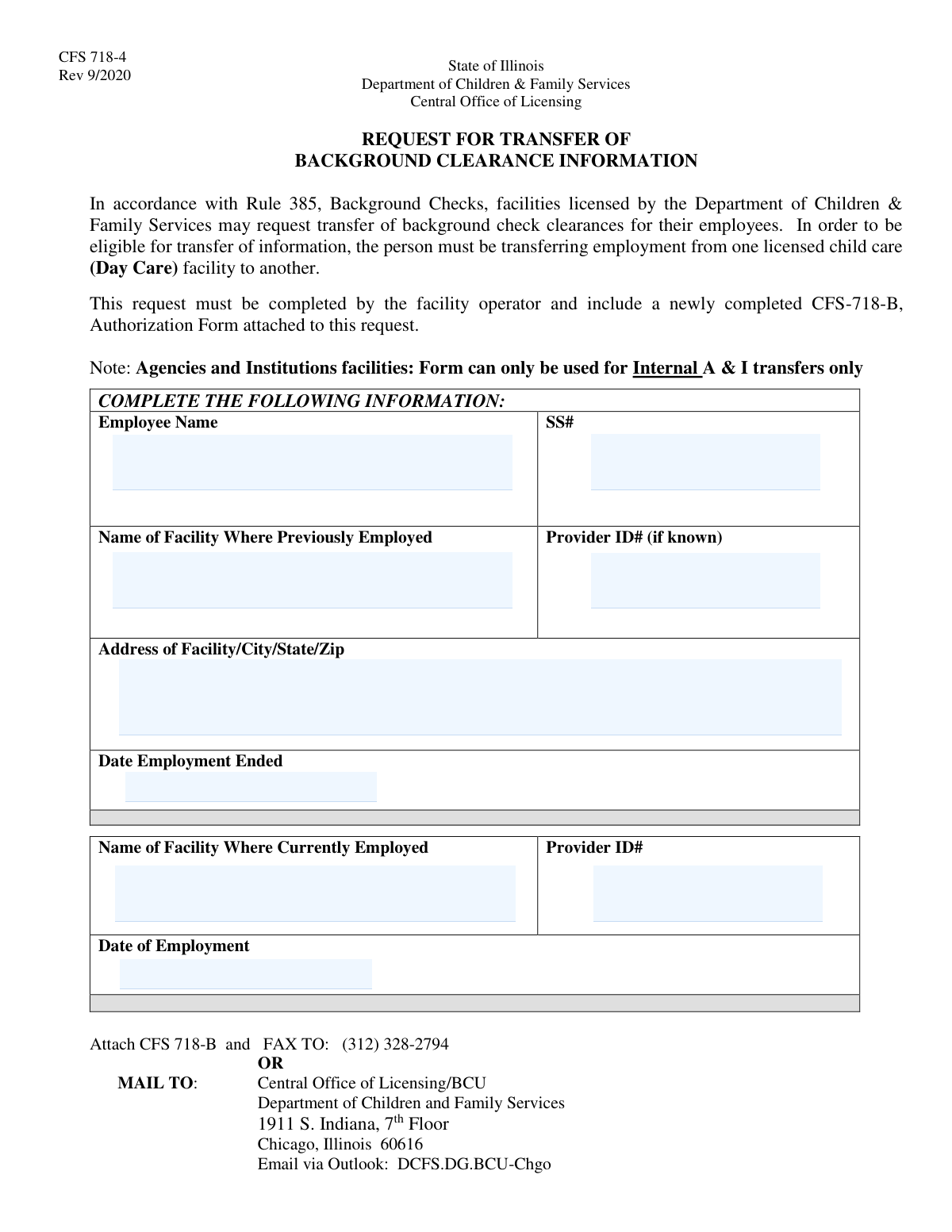
The Illinois CFS 718-4, Request for Transfer of Background Clearance Information, is a form submitted to the Department of Children & Family Services (DCFS) by a licensed child care facility. Its purpose is to transfer an employee's existing background check clearance from their previous licensed child care employer to their new one, streamlining the hiring process. Today, this form can be filled out quickly and accurately using AI-powered services like Instafill.ai, which can also convert non-fillable PDF versions into interactive fillable forms.
CFS 718-4 is part of the CMS forms and employment forms categories on Instafill.
CFS 718-4 has a simple Form Complexity Index of 25/100 — 9 fillable fields across 1 page. Instafill’s AI completes it accurately in under a minute.

Form specifications

Form name: Illinois CFS 718-4, Request for Transfer of Background Clearance Information
Number of fields: 9
Number of pages: 1
FCI: Simple (25/100)
Field instructions: CFS 718-4 Instructions
Language: English
Our AI automatically handles information lookup, data retrieval, formatting, and form filling.
It takes less than a minute to fill out CFS 718-4 using our AI form filling.
Securely upload your data. Information is encrypted in transit and deleted immediately after the form is filled out.
Preview of Illinois CFS 718-4, Request for Transfer of Background Clearance Information

Instafill Demo: How to fill out PDF forms in seconds with AI

How to Fill Out CFS 718-4 Online for Free in 2026

Are you looking to fill out a CFS 718-4 form online quickly and accurately? Instafill.ai offers the #1 AI-powered PDF filling software of 2026, allowing you to complete your CFS 718-4 form in just 37 seconds or less.
Follow these steps to fill out your CFS 718-4 form online using Instafill.ai:
  1. 1 Navigate to Instafill.ai and upload or select the Illinois CFS 718-4 form.
  2. 2 Provide the employee's personal information, including their full name and Social Security Number.
  3. 3 Enter the details of the employee's previous employment, such as the facility name, address, and employment end date.
  4. 4 Input the information for the employee's current facility, including its name, provider ID, and the date of employment.
  5. 5 Review the form automatically populated by the AI to ensure all information is accurate and complete.
  6. 6 Ensure the newly completed CFS-718-B Authorization Form is attached as required.
  7. 7 Download the completed form package and submit it to the Central Office of Licensing via fax, mail, or email as instructed on the form.

Our AI-powered system ensures each field is filled out correctly, reducing errors and saving you time.

Why Choose Instafill.ai for Your Fillable CFS 718-4 Form?

Speed

Complete your CFS 718-4 in as little as 37 seconds.

Up-to-Date

Always use the latest 2026 CFS 718-4 form version.

Cost-effective

No need to hire expensive lawyers.

Accuracy

Our AI performs 10 compliance checks to ensure your form is error-free.

Security

Your personal information is protected with bank-level encryption.

Frequently Asked Questions About CFS 718-4

CFS 718-4 has a Form Complexity Index of 25 out of 100, placing it in the simple complexity tier. This score is calculated deterministically from the form’s own structure using Instafill’s published Form Complexity Index methodology, so it can be reproduced and independently verified — it is not a subjective estimate.

For CFS 718-4 specifically, the score reflects 9 fillable fields across 1 page, grouped into 3 sections. The number of fields is the largest factor in the base score (weighted 36%), followed by how difficult those fields are to complete based on their type, where free-text and signature fields count for more than simple checkboxes (26%). The number of pages that actually contain fields (15%), the amount of conditional “fill-only-if” logic (16%), and how many sections the form is divided into (7%) account for the rest of the base. On top of that base, the index adds points for tables and repeating lists, bundled instruction pages, and dense page layouts — capturing difficulty the base alone can miss.

In practical terms, a simple score means the form is quick to complete, with only a handful of straightforward fields. Instafill removes that effort entirely: our AI reads your information, maps each value to the correct field — including the conditional ones — and completes CFS 718-4 accurately in under a minute, with every field available for you to review before you download. See exactly how the Form Complexity Index is calculated.

This form is used to request the transfer of an employee's existing background check clearance from one licensed Illinois child care facility to another, which can save time and avoid a new background check.

The operator of the facility where the employee is currently being hired is responsible for completing and submitting this form. It is not filled out by the employee.

No, this form is only for employees who are transferring employment from one licensed child care (Day Care) facility to another within Illinois. The employee must have an existing, valid clearance to be eligible for transfer.

You must attach a newly completed and signed CFS-718-B, Authorization Form, to this request. The transfer cannot be processed without this accompanying document.

You can submit the form and the required CFS 718-B attachment by fax, by mail to the Central Office of Licensing in Chicago, or via Outlook email to DCFS.DG.BCU-Chgo.

The form states the previous Provider ID is only needed 'if known.' If you cannot locate it, you may leave that field blank, but ensure you provide the complete facility name and address.

According to the form, A & I facilities can only use this form for internal transfers. You cannot use it to transfer a clearance from a Day Care or a different, unaffiliated A & I facility.

The employee's Social Security Number is a critical identifier used by the DCFS to accurately locate the correct background clearance records for a successful transfer.

Yes, services like Instafill.ai use AI to accurately auto-fill form fields, which can save you time and help reduce errors when completing paperwork like the CFS 718-4.

You can use a service like Instafill.ai to fill out the form online. Simply upload the PDF, and the platform will make the fields interactive so you can type in your information before printing for submission.

If you have a non-fillable PDF, you can use a tool like Instafill.ai to convert it into an interactive, fillable form. This allows you to type your information directly and create a clean, professional-looking document.

No, this form is specifically for transferring clearances between facilities licensed by the Illinois Department of Children & Family Services. Clearances from other states are not eligible for this transfer process.

The form does not specify a maximum time gap between employments, but the transfer is dependent on the employee having a currently valid background clearance on file with the DCFS.

Compliance CFS 718-4
Validation Checks by Instafill.ai

1
Employee Name Completeness
This check ensures the 'Employee Name' field is not left blank. The employee's full name is a primary identifier required to locate their existing background clearance records. A submission without a name is unprocessable and will be rejected, as the subject of the request cannot be identified.
2
SSN Format and Validity
This validation verifies that the Social Security Number is provided and adheres to the 9-digit format, either as XXXXXXXXX or XXX-XX-XXXX. It also checks against known invalid SSN patterns, such as those starting with '000' or '666'. An accurate SSN is critical for uniquely identifying the employee in the background check system, and failure to provide a valid one will prevent the transfer.
3
Previous Facility Name Requirement
This check confirms that the 'Name of Facility Where Previously Employed' field is filled out. This information is essential for verifying the employee's work history and confirming the origin of the background check being transferred. Without the previous facility's name, the department cannot validate the employee's eligibility for a transfer.
4
Previous Facility Address Completeness
This validation ensures the address for the previous facility is complete, including a street address, city, state, and a valid 5-digit ZIP code. A complete and accurate address is necessary to properly identify the previous licensed facility in state records. Incomplete address information can cause significant delays or rejection of the transfer request.
5
Previous Employment End Date Logic
This check validates that the 'Date Employment Ended' is a valid date and occurs in the past, prior to the submission date. This date establishes the timeline of employment and is a key factor in determining if the background check is still recent enough to be eligible for transfer. A future or invalid date would make the request logically inconsistent and result in failure.
6
Current Facility Provider ID Requirement
This validation ensures the 'Current Facility Provider ID#' field is not empty. This ID is a mandatory, unique identifier for the new employing facility, confirming it is licensed by the DCFS and eligible to receive clearance information. A missing provider ID will result in an automatic rejection of the request.
7
Current Employment Start Date Validity
This check verifies that the 'Date of Employment' for the current role is a valid date and is not in the distant future. This date marks the beginning of the new employment and is necessary for the department's records. An invalid or missing date prevents the correct processing of the transfer.
8
Employment Date Chronology
This cross-field validation ensures the 'Date of Employment' at the current facility is on or after the 'Date Employment Ended' at the previous facility. This logical check prevents chronological errors in the employee's work history, which could indicate a data entry mistake. An illogical date sequence would require the user to correct the information before the form can be submitted.
9
Distinct Previous and Current Facilities
This check verifies that the 'Name of Facility Where Previously Employed' is different from the 'Name of Facility Where Currently Employed'. The form's purpose is to transfer clearance between two separate facilities. Identical facility names may indicate a misunderstanding of the form's use, as internal staff changes may follow a different process.
10
CFS-718-B Attachment Verification
This check confirms that the mandatory CFS-718-B Authorization Form has been attached to the submission. This signed authorization is a legal requirement for the department to access and transfer the employee's sensitive background information. A request submitted without this attachment is considered incomplete and cannot be processed.
11
Previous Facility State Location
This validation checks that the state entered in the previous facility's address is 'Illinois' or 'IL'. Since the form is issued by the State of Illinois for transfers between its licensed facilities, the previous employer is expected to be within the same jurisdiction. An out-of-state address would likely render the employee ineligible for this specific transfer process.
12
Employment Gap Eligibility
This check calculates the time between the previous employment end date and the current employment start date to ensure it falls within a permissible timeframe (e.g., 180 days). Regulations often require a completely new background check if there is a significant gap in employment in a licensed child care role. This validation enforces that policy to prevent the transfer of expired or invalid clearances.

Common Mistakes in Completing CFS 718-4

Forgetting to Attach Form CFS-718-B

The form explicitly requires a newly completed CFS-718-B Authorization Form to be attached, but this is a frequently missed step. Without this separate authorization, the DCFS cannot legally access or transfer the employee's background information, leading to an automatic rejection of the request. This causes significant delays in the hiring process, requiring a complete resubmission. To avoid this, always create a checklist and confirm the CFS-718-B is attached before faxing, mailing, or emailing the request.

Using Abbreviated or Incorrect Facility Names

Facility operators often enter informal names, acronyms, or misspell the official names of the previous or current child care facilities. This makes it difficult for the DCFS to locate the correct facility records in their system, especially if a Provider ID is missing. An incorrect name can lead to a failed search and rejection of the transfer request, requiring resubmission and delaying the employee's clearance. Always use the full, official, and licensed name of both facilities as it appears on state licensing documents.

Incorrect or Incomplete Social Security Number

Simple data entry errors like typos, transposed digits, or accidentally omitting a number are common when entering the employee's Social Security Number. The SSN is the primary unique identifier for background check records, so even a single-digit error will result in a mismatch and make it impossible to locate the existing clearance. This causes the entire transfer request to be denied. Carefully proofread the SSN before submission, or use a tool like Instafill.ai which can help validate numerical field formats to reduce errors.

Omitting the Current Facility's Provider ID

While the previous facility's Provider ID is optional, the ID for the current facility is a key identifier for the requesting entity. Operators sometimes leave this field blank if they don't have the number handy. This omission forces DCFS staff to manually look up the facility, which can delay processing, or they may reject the form as incomplete. The facility operator completing the form should have this number readily available from their licensing documentation to ensure swift processing.

Submitting an Illegible, Hand-Written Form

This form is often printed and filled out by hand, leading to handwriting that can be difficult to read, especially after being faxed or scanned. Illegible names, numbers, or addresses can be misinterpreted by data entry staff, causing a failed search and rejection of the request. To prevent this, print clearly in block letters or use a service like Instafill.ai, which can convert flat, non-fillable PDFs into digital forms, allowing you to type directly onto the document for perfect clarity.

Misunderstanding Transfer Eligibility Rules

The form is strictly for employees transferring between licensed child care (Day Care) facilities within Illinois. Operators mistakenly request transfers for employees from out-of-state facilities, different types of licensed agencies (as noted for A&I), or for individuals who were not previously employed in a licensed capacity. Such requests are ineligible and will be denied, wasting time. Before submitting, confirm the employee's previous and current roles both meet the specific 'licensed child care facility' criteria.

Providing an Incomplete Previous Facility Address

Applicants sometimes forget to include the full street address, city, state, or zip code for the previous employer. This information is a crucial secondary identifier for DCFS to verify the facility, especially if the name is common or the Provider ID is unknown. An incomplete address can lead to processing delays while staff attempt to find the missing information or may result in the outright rejection of the form. Always provide the complete and accurate address.

Employee Incorrectly Completing the Form

The instructions state the 'request must be completed by the facility operator,' but it is sometimes given to the new employee to fill out. The employee may not have access to critical information like the correct facility Provider IDs, leading to errors and omissions. This technically violates the form's instructions and increases the likelihood of rejection. The director or operator of the new facility should always be the one to complete and submit the form to ensure accuracy and compliance.

Incorrect Submission Method or Address

The form provides a specific fax number, mailing address, and email address for the Central Office of Licensing. People may mistakenly send it to a local DCFS office, a different department, or mistype the email address, causing the request to be lost or significantly delayed. A lost form means the background check transfer process never starts. Always double-check the submission details on the current version of the form before sending.

Using Inconsistent or Ambiguous Date Formats

When entering the 'Date Employment Ended' and 'Date of Employment', people may use various formats like 'Jan 5, 2023' or '5/1/23', which can create ambiguity (is it May 1st or January 5th?). Incorrect dates can affect eligibility for the transfer and may cause the request to be flagged for manual review or rejected. To prevent confusion, always use the standard and unambiguous MM/DD/YYYY format for all dates on the form.
Saved over 80 hours a year

“I was never sure if my IRS forms like W-9 were filled correctly. Now, I can complete the forms accurately without any external help.”

Kevin Martin Green

Your data stays secure with advanced protection from Instafill and our subprocessors

Robust compliance program

Transparent business model

You’re not the product. You always know where your data is and what it is processed for.

ISO 27001, HIPAA, and GDPR

Our subprocesses adhere to multiple compliance standards, including but not limited to ISO 27001, HIPAA, and GDPR.

Security & privacy by design

We consider security and privacy from the initial design phase of any new service or functionality. It’s not an afterthought, it’s built-in, including support for two-factor authentication (2FA) to further protect your account.

Fill out CFS 718-4 with Instafill.ai

Worried about filling PDFs wrong? Instafill securely fills illinois-cfs-718-4-request-for-transfer-of-background-clearance-information forms, ensuring each field is accurate.

Related forms by category

CMS forms CMS-1500 (02-12), Health Insurance Claim Form (NUCC Approved) (OMB 0938-1197), Form CMS L564, Request for Employment Info, Form CMS-10114, NPI Application/Update, Form CMS-588, EFT Authorization Agreement, Form CMS-460, Medicare Participation Agreement, Form CMS-4040, Request for Enrollment in Medicare Part B, Form CMS-2567, Statement of Deficiencies, Form CMS-1763, Request for Termination of Medicare Coverage, Form CMS-116, CLIA Application, Form CMS-855O, Medicare Enrollment Application, Form CMS-40B, Application for Enrollment in Medicare Part B, Form CMS-1763, Request for Termination, Form CMS-588, Electronic Funds Transfer (EFT) Authorization Agreement, CMS-855I, Medicare Enrollment Application for Physicians and Non-Physician Practitioners, Form CMS-855R, Medicare Enrollment Application - Reassignment of Medicare Benefits, CMS-855R, Medicare Enrollment Application: Reassignment of Medicare Benefits, CMS-855R, Medicare Enrollment Application: Reassignment of Medicare Benefits, Form CMS-855O, Medicare Enrollment Application for Eligible Ordering, Certifying and Prescribing Physicians and Other Eligible Professionals, Medicare Enrollment Application for Durable Medical Equipment, Prosthetics, Orthotics, and Supplies (DMEPOS) Suppliers, CMS-855S, Form CMS-855I, Medicare Enrollment Application for Physicians and Non-Physician Practitioners · + 41 more →
employment forms Form I-765, Application for Employment Authorization, Form CMS L564, Request for Employment Info, Form OF-306, Declaration for Federal Employment, Form NYS DHR, Employment Complaint Form, Form AO 78, Application for Employment, Illinois State Board of Education (ISBE) Application for Employment (ISBE 61-08), Form SS-8 (Rev. December 2023), Determination of Worker Status for Purposes of Federal Employment Taxes and Income Tax Withholding, Prudential Group Disability Insurance – Education and Employment History Form (GL.2009.009, Ed. 06/2017), HR-Pol-Rec&Res-04 Employment Application Form (Recruitment of Permanent Employees), City of Carlinville Application for Employment (An Equal Opportunity Employer), U.S. Equal Employment Opportunity Commission (EEOC) Form 453, Recommendation for Recognition, The Prudential Insurance Company of America Group Disability Insurance – Education and Employment History Form (GL.2009.009, Ed. 06/2017), St. Paul’s Hospital Application for Employment (職位申請表) – SPHF-HRD-035, U.S. Equal Employment Opportunity Commission (EEOC) Form 453, Recommendation for Recognition, Prudential Group Disability Insurance – Education and Employment History Form (GL.2009.009, Ed. 06/2017), Claim for Special Employment Advance (SU514), New York State Employment Application: Part 1 – Pre-Interview (Form #S1000), New York State Employment Application Form, Sidney Sussex College Cambridge, Application for Employment, Z83, Application for Employment in the Republic of South Africa Government Department · + 35 more →