Yes! You can use AI to fill out Palliative Care Program Eligibility Certification Form

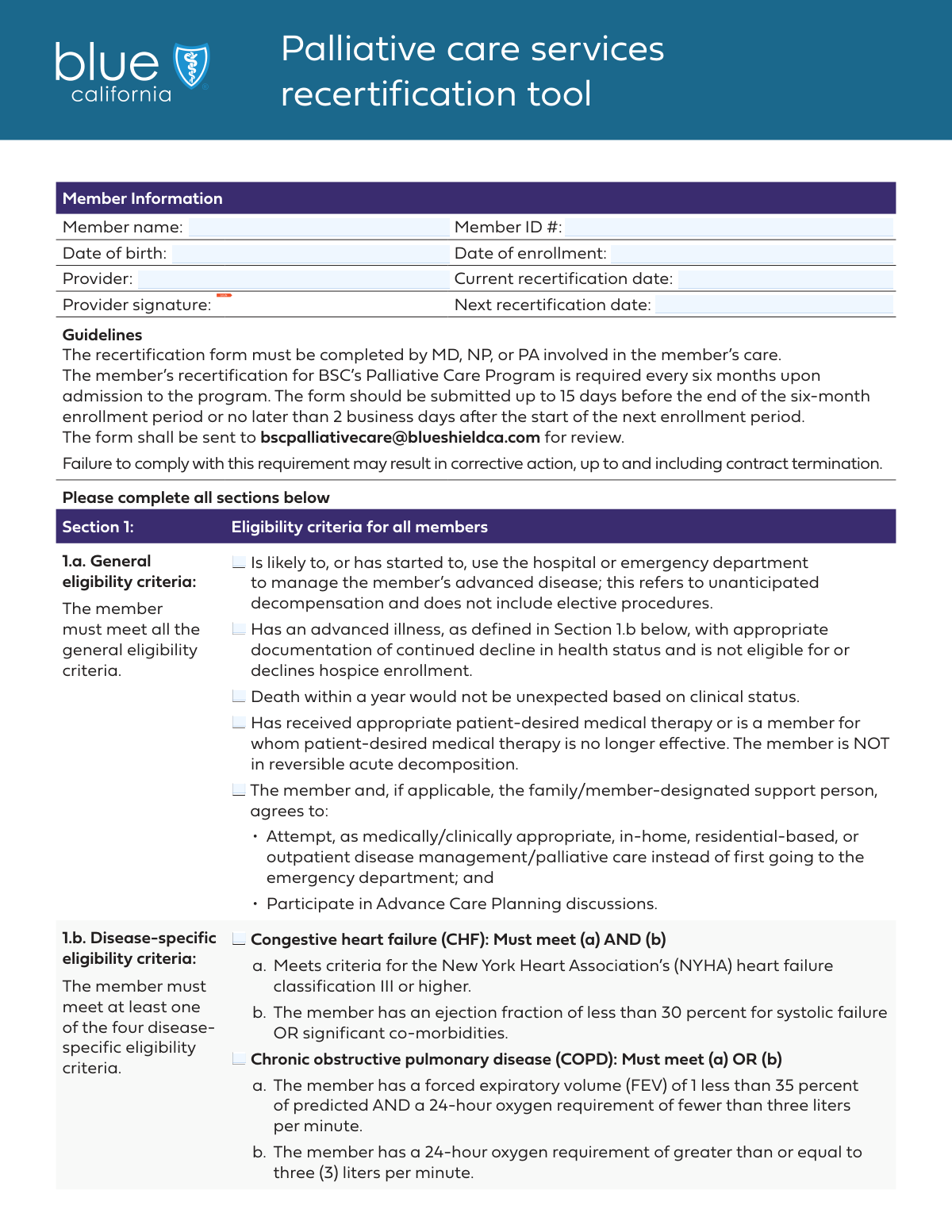
This form is a medical certification used by healthcare providers to assess and confirm a patient's eligibility for enrollment in a palliative care program. It documents the patient's advanced illness, specific disease criteria, and agreement to pursue palliative care, ensuring they receive appropriate support and services. Today, this form can be filled out quickly and accurately using AI-powered services like Instafill.ai, which can also convert non-fillable PDF versions into interactive fillable forms.
Our AI automatically handles information lookup, data retrieval, formatting, and form filling.
It takes less than a minute to fill out Palliative Care Certification using our AI form filling.
Securely upload your data. Information is encrypted in transit and deleted immediately after the form is filled out.

Form specifications

Form name: Palliative Care Program Eligibility Certification Form
Number of fields: 29
Number of pages: 3
Language: English
Categories: CAR forms, certification forms, L.A. Care forms
main-image

Instafill Demo: How to fill out PDF forms in seconds with AI

How to Fill Out Palliative Care Certification Online for Free in 2026

Are you looking to fill out a PALLIATIVE CARE CERTIFICATION form online quickly and accurately? Instafill.ai offers the #1 AI-powered PDF filling software of 2026, allowing you to complete your PALLIATIVE CARE CERTIFICATION form in just 37 seconds or less.
Follow these steps to fill out your PALLIATIVE CARE CERTIFICATION form online using Instafill.ai:
  1. 1 Navigate to Instafill.ai and upload or select the Palliative Care Program Eligibility Certification Form.
  2. 2 Use the AI assistant to automatically populate the 'Member Information' section, including the member's name, ID, and relevant dates.
  3. 3 Carefully review and check the applicable boxes under 'General Eligibility Criteria' based on the patient's clinical status and care preferences.
  4. 4 Select the relevant conditions from the 'Disease-Specific Eligibility Criteria' and 'Diagnosis Conditions' sections, such as CHF, COPD, or advanced cancer.
  5. 5 If the patient's condition is not listed, check 'Other' and provide a detailed description in the 'Other Condition Details' section.
  6. 6 Compose the required 'Brief Narrative' to support the patient's continued enrollment and have the provider add their digital signature.
  7. 7 Review the entire completed form for accuracy, then securely download, print, or share the finalized document directly from the platform.

Our AI-powered system ensures each field is filled out correctly, reducing errors and saving you time.

Why Choose Instafill.ai for Your Fillable Palliative Care Certification Form?

Speed

Complete your Palliative Care Certification in as little as 37 seconds.

Up-to-Date

Always use the latest 2026 Palliative Care Certification form version.

Cost-effective

No need to hire expensive lawyers.

Accuracy

Our AI performs 10 compliance checks to ensure your form is error-free.

Security

Your personal information is protected with bank-level encryption.

Frequently Asked Questions About Form Palliative Care Certification

This form is used to certify or recertify a member's eligibility for a palliative care program based on their advanced illness and specific health criteria. It is completed by a healthcare provider to document the member's medical condition.

A healthcare provider must complete and sign this form. The provider's signature certifies the accuracy of the clinical information provided to determine the member's eligibility for the program.

You must provide the member's full name, Member ID, date of birth, and enrollment date. Additionally, the provider's name and the current and next recertification dates are required.

This means that based on the member's clinical status and disease progression, it is medically plausible that they could pass away within the next 12 months. It is a key indicator for palliative care eligibility.

Review the member's overall health status and check the boxes that apply. This includes assessing their likelihood of using the hospital, their agreement to pursue palliative care, and whether their current medical therapy is no longer effective.

If the member's diagnosis is not listed, check the 'Other' box under 'Other Condition Details' and provide a specific description of their condition in the 'Other Condition' field.

In the 'Brief Narrative' section, provide a concise summary of the clinical findings that support the member's enrollment or continued enrollment in the program. This should justify why the member meets the eligibility criteria.

Yes, the form includes specific criteria for pediatric palliative care, such as conditions where curative treatment may fail or those requiring intensive long-term care. You must also confirm that the family or legal guardian agrees to these services.

General criteria apply to all applicants and assess overall health decline and care preferences. Disease-specific criteria provide detailed clinical benchmarks for conditions like CHF or COPD to further confirm eligibility.

Yes, services like Instafill.ai use AI to accurately auto-fill form fields from your records. This can save significant time and help reduce data entry errors, especially for recurring member information.

To fill this form online, upload it to the Instafill.ai platform. The AI will make the fields interactive, allowing you to type in your information or connect a data source to auto-fill the form.

If your PDF is not fillable, you can use a service like Instafill.ai. It can convert flat, non-interactive PDFs into fillable forms that you can complete easily on your computer.

This means the member and/or their support person has agreed to seek in-home or outpatient palliative care for managing their disease, rather than immediately going to the emergency department for non-acute issues.

The 'Current Recertification Date' is the date of this evaluation to continue the member's enrollment. The 'Next Recertification Date' is the future date when the member's eligibility must be reviewed again.

Compliance Palliative Care Certification
Validation Checks by Instafill.ai

1
Ensures Recertification Date Chronology
This check validates that the 'Next Recertification Date' is a date that occurs after the 'Current Recertification Date'. This is crucial for maintaining a logical and accurate timeline for member care and program eligibility reviews. If this validation fails, the form cannot be submitted, and the user will be prompted to enter a future date for the next recertification.
2
Validates Date of Birth is in the Past
This validation ensures that the 'Date of Birth' provided is a valid date and occurs before the current date. Entering a future or invalid date would make the member's record inaccurate and could cause errors in age-dependent eligibility calculations. A failed validation will prevent form submission and require the user to correct the date.
3
Verifies Enrollment Date is After Date of Birth
This check confirms that the 'Date of Enrollment' is a valid date that occurs on or after the member's 'Date of Birth'. It is logically impossible for a member to be enrolled before they were born, and this check prevents data entry errors that compromise record integrity. If the enrollment date precedes the birth date, an error message will be displayed, blocking submission.
4
Requires at Least One General Eligibility Criterion
This validation ensures that at least one checkbox under the 'General Eligibility Criteria' section is selected. This is a critical step to confirm that the member meets the fundamental requirements for program enrollment. Without meeting at least one general criterion, the member is not eligible, and the form submission will be blocked with a message indicating the section needs to be completed.
5
Requires at Least One Specific Diagnosis
This check verifies that at least one checkbox from the 'Disease-Specific Eligibility Criteria' or 'Diagnosis Conditions' sections is selected. This is necessary to document the specific medical condition that qualifies the member for the program. Failure to select a condition results in an incomplete application and will prevent submission until a qualifying diagnosis is indicated.
6
Enforces Conditional Diagnosis Selection
This validation enforces the rule that diagnosis conditions like 'Advanced cancer' or 'Liver disease' can only be selected if the 'Has advanced illness...' checkbox is also checked. This maintains logical consistency, ensuring that specific diagnoses are only provided when the general prerequisite condition is met. If this rule is violated, the user will be alerted to either check the 'Has advanced illness' box or deselect the specific diagnosis.
7
Mandates 'Other Condition' Details when 'Other' is Checked
This check ensures that if the 'Other' checkbox is selected in the diagnosis section, the corresponding 'Other Condition' text field must be filled out. This is vital for capturing necessary details about unlisted conditions that qualify a member for the program. If 'Other' is checked but the text field is empty, the form submission will be halted until the condition is described.
8
Requires 'Other' Checkbox if 'Other Condition' is Detailed
This validation is the inverse of the previous one, ensuring that if any text is entered into the 'Other Condition' field, the 'Other' checkbox must be selected. This prevents orphaned data and ensures the form accurately reflects that a non-standard condition is being reported. A failure would trigger a prompt for the user to check the 'Other' box to classify the provided text.
9
Verifies Provider Signature Completion
This check confirms that the 'Provider Signature' field has been completed, signifying the provider's attestation to the accuracy of the information. The signature is a legal and procedural requirement for validating the assessment and enrollment request. An incomplete signature field will block the submission and prompt the provider to sign the form.
10
Ensures Brief Narrative is Provided
This validation ensures the 'Brief Narrative' text area is not empty and contains supporting information for the member's enrollment. This narrative provides crucial context that checkboxes alone cannot, justifying the need for the program's services. An empty narrative field will result in a validation error, requiring the user to provide the necessary descriptive text.
11
Validates Pediatric Consent for Minors
This check enforces that if 'The member is under the age of 21' checkbox is selected, the 'The family and/or legal guardian agrees...' checkbox must also be selected. This is a critical legal and ethical requirement for providing palliative care services to minors. If the member is marked as under 21 but consent is not checked, the form cannot be submitted.
12
Cross-Validates Age with Pediatric Flag
This validation compares the member's calculated age (from 'Date of Birth') with the 'The member is under the age of 21' checkbox. If the member's age is 21 or older, this checkbox should not be selected, preventing contradictory information. A mismatch will trigger an error, requiring the user to correct either the date of birth or the checkbox selection.
13
Validates Member ID Format
This check ensures the 'Member ID' conforms to a predefined format, such as being a specific length or containing only alphanumeric characters. This is essential for data integrity and ensuring the member can be correctly identified within the system. An incorrectly formatted ID will trigger an error and prevent submission until it is corrected.

Common Mistakes in Completing Palliative Care Certification

Inconsistent Date Formatting

People often enter dates in various formats like DD-MM-YY or use words instead of the required MM/DD/YYYY format, which leads to data processing errors. This can delay a member's enrollment or recertification by causing the submission to be rejected by automated systems. To avoid this, always use the MM/DD/YYYY format. AI-powered tools like Instafill.ai can automatically format dates correctly, preventing these errors.

Entering an Incorrect or Incomplete Member ID

The Member ID is often mistyped, or digits are transposed, because it is a long string of numbers entered manually. An incorrect ID is a critical error that prevents the form from being matched to the correct member, leading to outright rejection and delays in care authorization. Always double-check the Member ID against the member's official identification card before submitting.

Misinterpreting Complex Eligibility Criteria

The form uses specific clinical terminology like 'unanticipated decompensation' or 'NYHA heart failure classification III' that can be easily misinterpreted by staff who are rushed or less familiar with the definitions. Checking the wrong box can lead to an incorrect eligibility assessment and denial of crucial palliative care services. It is vital to carefully read each criterion and consult with a clinical supervisor if there is any uncertainty.

Ignoring Conditional Field Requirements

The form contains several fields with conditional logic, such as filling out 'Advanced cancer' only if 'Has an advanced illness' is checked. Users often miss these instructions, leading to incomplete or contradictory submissions that must be returned for correction. This error will invalidate the entry and delay the review process. Smart form-filling tools can help by validating these dependencies automatically.

Providing a Vague or Missing 'Other Condition' Description

When a member's condition isn't listed, users may check the 'Other' box but then forget to provide a description or write something unhelpful like 'multiple issues.' This provides no actionable information for the reviewer, forcing them to request clarification and delaying the enrollment decision. To prevent this, always provide a concise but specific clinical diagnosis in the 'Other Condition' text field when the 'Other' box is checked.

Forgetting the Provider Signature

The provider's signature is essential for authenticating the medical assessment, but it is a commonly missed field, especially on multi-page or non-fillable PDF forms. A missing signature results in the form's immediate rejection, requiring it to be sent back, signed, and resubmitted, which causes significant delays in care. If the form is a flat PDF, tools like Instafill.ai can convert it into a fillable version that allows for easy digital signing.

Writing an Insufficient Brief Narrative

The 'Brief Narrative' section is critical for justifying enrollment, but it is often filled with generic statements like 'Patient is sick' instead of specific clinical evidence. A weak narrative fails to provide the context needed to support the checked criteria, which can be a primary reason for the denial of services. The narrative should concisely summarize key findings, recent events, and functional decline that demonstrate why the member meets the program's criteria.

Confusing Current and Next Recertification Dates

Users can easily mix up the 'Current Recertification Date' and the 'Next Recertification Date', or enter the submission date instead of the actual certification date. This error can disrupt the authorization timeline, potentially leading to a lapse in coverage or services for the member. To avoid this, carefully verify these specific dates from the member's official plan documents before entry.

Not Selecting All Relevant Co-morbidities

A provider might only check the box for the member's primary diagnosis, such as 'Advanced cancer', while overlooking other significant co-morbidities like 'Chronic kidney disease'. This provides an incomplete clinical picture and may result in an underestimation of the member's needs or affect their eligibility. It is important to conduct a thorough chart review and select all applicable disease-specific criteria to accurately represent the member's health status.

Making Contradictory Selections

With numerous checkboxes, it's possible to select options that conflict with each other, such as checking criteria for both adult COPD and a pediatric-specific condition on the same form. Such contradictions create confusion for the reviewer and will require follow-up to clarify the member's true status, delaying the approval process. A final review of all selections is crucial to ensure they form a consistent and logical clinical picture.
Saved over 80 hours a year

“I was never sure if my IRS forms like W-9 were filled correctly. Now, I can complete the forms accurately without any external help.”

Kevin Martin Green

Your data stays secure with advanced protection from Instafill and our subprocessors

Robust compliance program

Transparent business model

You’re not the product. You always know where your data is and what it is processed for.

ISO 27001, HIPAA, and GDPR

Our subprocesses adhere to multiple compliance standards, including but not limited to ISO 27001, HIPAA, and GDPR.

Security & privacy by design

We consider security and privacy from the initial design phase of any new service or functionality. It’s not an afterthought, it’s built-in, including support for two-factor authentication (2FA) to further protect your account.

Fill out Palliative Care Certification with Instafill.ai

Worried about filling PDFs wrong? Instafill securely fills palliative-care-program-eligibility-certification-form forms, ensuring each field is accurate.