
Yes! You can use AI to fill out Proof of Service—Sex Offender Registration Termination (Pen. Code, § 290.5)
Don't type 65 fields by hand. Tell our AI about yourself, or upload your driver's license, and it fills every field in seconds. You check it, then download, print or sign.
The AI does the filling. You just check it.
No typing into boxes, nothing to install.
What this form asks for
The AI fills all of it, from your answers or your documents.
The AI checks your answers before you download
14 checks built for this form, so a wrong date or a missing answer is caught before anyone else sees it.
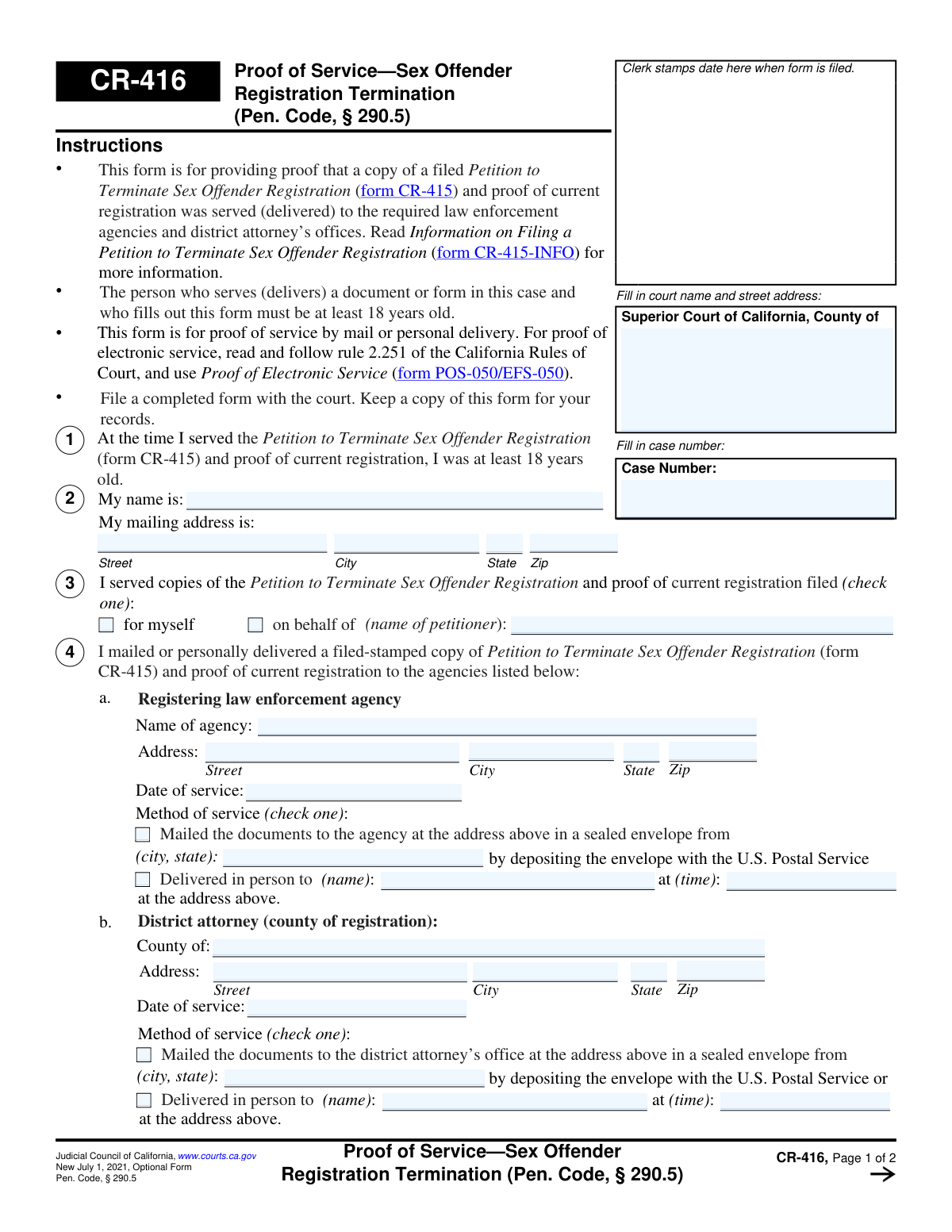
Checks that the 'Case Number' field is filled out on both page 1 and page 2. It also validates that the value entered in both fields is identical. This is critical for ensuring the document is correctly associated with the proper legal case file, and a mismatch could cause the form to be rejected or misfiled.
Validates that the server's name is provided in Section 2 ('My name is:') and in the declaration block in Section 5 ('Type or print server’s name'). It also cross-references these two fields to ensure they contain the same name. This is important for verifying the identity of the person attesting to the service.
Ensures that in Section 3, one of the two checkboxes ('for myself' or 'on behalf of') is selected. If 'on behalf of' is checked, this validation also confirms that the petitioner's name is provided in the corresponding text field. This prevents ambiguity about who the service is being performed for, which is essential for the petition's legal standing.
Verifies that all fields for the 'Registering law enforcement agency' in Section 4a are completed, including agency name, address, date of service, and method of service. This service is a primary requirement of the process, and incomplete information for this section would render the proof of service invalid.
Verifies that all fields for the 'District attorney (county of registration)' in Section 4b are completed, including county, address, date of service, and method of service. Similar to the registering agency, serving the DA is a non-optional step. Failure to provide complete proof for this service will result in the form's rejection.
For each agency listed in Section 4, this check confirms that exactly one method of service ('Mailed' or 'Delivered in person') is selected. The system should prevent the user from selecting both or neither option. This is critical for accurately documenting how the service was performed, as different legal rules may apply to each method.
And 8 more checks
- Conditional Mailing Information Requirement
- Conditional Personal Delivery Information Requirement
- Valid Date of Service Format
- Logical Date of Service Chronology
- Valid Time of Delivery Format
- Declaration Block Completeness
- Server Address Completeness
- ZIP Code Format Validation
Let AI fill out your CR-416
No typing. Every field filled in seconds, checked, ready to sign.
How to Fill Out CR-416 Online for Free in 2026
What the AI walks you through.
- Navigate to Instafill.ai and upload or select the CR-416 form.
- Use the AI assistant to accurately input the Superior Court name, address, and the specific case number.
- Provide your personal information as the server, including your full name and mailing address, confirming you are over 18.
- Indicate whether you are serving the documents for yourself or on behalf of another petitioner.
- Enter the details for each agency served, including the agency name, address, date of service, and method of service (mail or personal delivery); Instafill.ai can help find official addresses.
- Review all the auto-filled information for completeness and accuracy, making any necessary corrections.
- Electronically sign and date the declaration under penalty of perjury, then download the completed form to file with the court and keep for your records.
Common Mistakes in Completing CR-416
The ones the AI is built to catch.
Petitioner Incorrectly Acting as the Server
Entering Petitioner's Information in the Server's Section
Incomplete or Inconsistent Case Information
Signing the Declaration Before Service is Complete
Missing Specifics in Service Details
Mishandling 'County of Conviction' Sections
Failing to Serve All Required Documents
Forgetting the Server's Signature
Illegible Handwriting
Frequently Asked Questions About CR-416
Is it really free for 7 days?
Can I fill other forms too?
How do I cancel?
How does the AI fill out CR-416?
What happens to my information?
How complex is CR-416 to fill out?
What is the purpose of Form CR-416, Proof of Service?
Who is supposed to fill out this form?
What documents do I need to serve?
Who must I serve the petition and proof of registration to?
What if my county of conviction is the same as my county of registration?
How can I serve the documents?
What do I do with Form CR-416 after I've filled it out?
When should the server sign and date this form?
What if I need to serve more agencies than there is space for on the form?
Can AI tools help me fill out Form CR-416?
How can I fill out Form CR-416 online?
The PDF of Form CR-416 I have is not fillable. What should I do?
Get your CR-416 filled out by AI
$0 today. Cancel before Nov 1 and you pay nothing.
Other forms like this one
California court forms: Judicial Council of California Form SC-105, Request for Court Order and Answer (Small Claims), Judicial Council of California Form SC-120, Defendant’s Claim and ORDER to Go to Small Claims Court (Small Claims), Judicial Council of California Form SER-001, Request for Sheriff to Serve Court Papers, Judicial Council of California Form SER-001, Request for Sheriff to Serve Court Papers, Affidavit for Collection of Personal Property California Probate Code Section 13100, Form POS-040, Proof of Service—Civil, Declaration of Facts of Death (California Superior Court), declaration-of-marriage-for-court-proceeding-california-family-law, ADOPT-200, Adoption Request, ADOPT-200, Stepparent Adoption Request, ADOPT-210, Adoption Agreement, ADOPT-310, Contact After Adoption Agreement, Judicial Council of California Form ADOPT-200, Adoption Request, Form ADR-107, Mediation Attendance Sheet, Form ADR-110, Order Appointing Referee, Form ADR-109, Stipulation or Motion for Order Appointing Referee, Form ADR-102, Request for Trial De Novo After Judicial Arbitration, Form ADR-108, Referee's Report (Code Civ. Proc., §§ 638, 639), Form ADR-106, Petition to Confirm, Correct, or Vacate Contractual Arbitration Award, Form ADR-104, Rejection of Award and Request for Trial After Attorney-Client Fee Arbitration
proof of service forms: Form POS-040, Proof of Service—Civil, Judicial Council of California Form SC-104, Proof of Service (Small Claims), Judicial Council of California Form SC-104, Proof of Service (Small Claims), Form DV-200, Proof of Personal Service (CLETS) (Domestic Violence Prevention), Illinois Circuit Court Eviction Summons and Proof of Service of Eviction Summons & Eviction Complaint (Form E-S 3507.3), proof-of-electronic-service-appellate, Form APP-009, Proof of Service (Appellate Division), Form APP-109, Proof of Service (Appellate Division), Form GC-020(P), PROOF OF PERSONAL SERVICE OF NOTICE OF HEARING— GUARDIANSHIP OR CONSERVATORSHIP, Form APP-109E, Proof of Electronic Service (Appellate Division), Proof of Personal Service of Notice of Initial Appearance—CARE Act Proceedings, Form CARE-116, Proof of Personal Service of Notice of Hearing—CARE Act Proceedings, Form CR-106, Proof of Service — Criminal Record Clearing, CARE-107, Proof of Personal Service of Notice of Order for CARE Act Report, Form CIV-120, Notice of Entry of Dismissal and Proof of Service, Form DAL-012, Proof of Service—Disability Access Litigation, Form DE-120(P), Proof of Personal Service of Notice of Hearing—Decedent's Estate or Trust, Form EA-200, Proof of Personal Service (Elder or Dependent Adult Abuse Prevention), Form EA-260, Proof of Service of Order After Hearing by Mail (Elder or Dependent Adult Abuse Prevention), Form FL-115, Proof of Service of Summons (Family Law—Uniform Parentage—Custody and Support)
Let AI fill out your CR-416
Your trial starts once a card is added. You pay nothing before Nov 1.
Our AI already knows this form, all 65 fields of it. Skip the typing: tell it about yourself, or upload what you have, and it fills the whole form in seconds.
- AI fills every field on both pages, checkboxes included
- No typing into boxes: answer a few questions, or upload your driver's license, an old copy of this form, a photo of a document
- The AI checks the answers; you review and change anything before you download
- Download the finished PDF, print it, or sign it online
- Encrypted, and never used to train AI
Cancel before Nov 1 and you pay nothing.
A card is needed to start the trial. Cancel in two clicks from your account.
Terms · Privacy