Instafill.ai added three form management updates on February 12, 2026
On February 12, 2026, Instafill.ai added three updates that give you more control over how you fine-tune and manage your forms: regenerate fine-tuning, multi-select field editing, and automatic fine-tuning for newly added fields.
1. Regenerate fine-tuning
The AI and processing algorithms are improved every week, with better handling of tables, repeatable sections, cross-page structures and field grouping. A form fine-tuned more than a few weeks ago does not have those improvements.
Regenerate fine-tuning applies the latest AI to an existing form in one click and keeps your manual edits. Field names, descriptions, groups, dependencies and ignored fields stay exactly as you set them. Only the fields you have not edited by hand are regenerated.
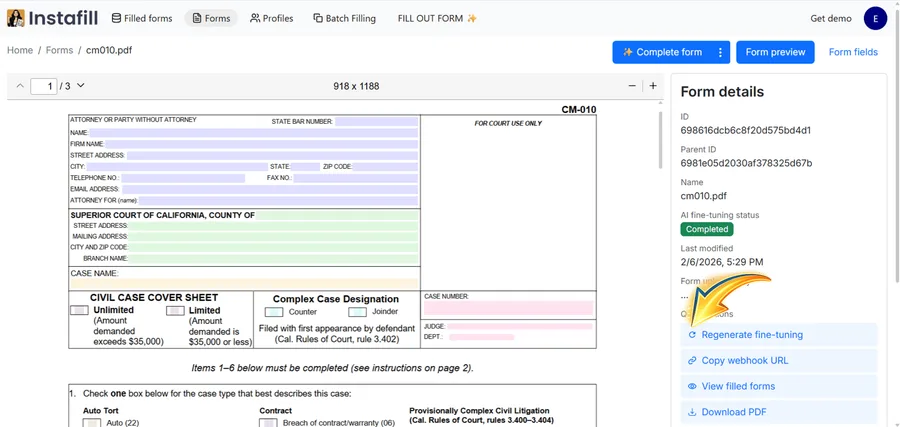
The button is in the form details panel. The post recommended it for forms added months earlier, because tables, repeatable sections and cross-page field structures are processed much better now.
2. Multi-select field editing
Editing fields one at a time is fine for a standard form. On a 20- or 50-page application with hundreds of fields, it is slow, especially when you need to ignore a whole section, fine-tune a batch of fields or add selected fields to an existing group.
Select several fields with Ctrl+click (Cmd+click on a Mac) and a control bar appears at the bottom of the page. From it you can:
- Turn "Ignore when filling out" on or off for all selected fields at once
- Run fine-tuning for just the selected fields
- Edit field grouping in a batch
- Create a table from the selected fields, when they are all on the same page
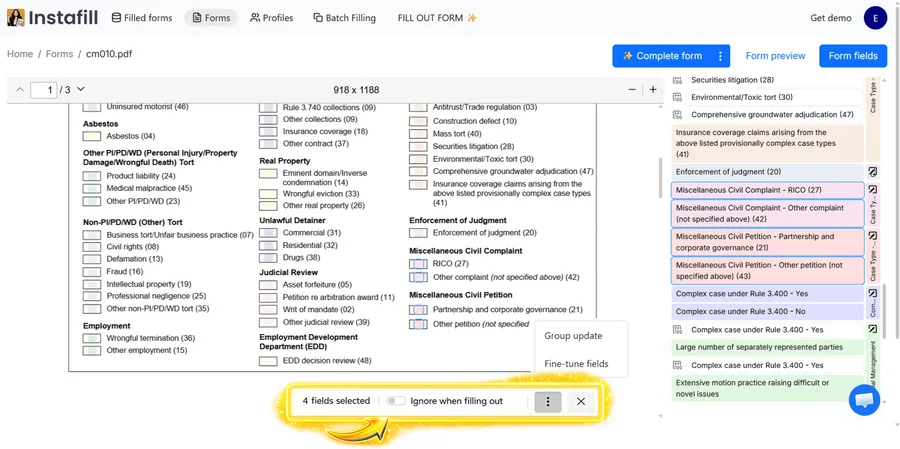
This helps most on forms with repeating structures, large checkbox groups, or sections where many fields need the same treatment.
3. Auto fine-tune for newly added fields
When you add fields to a form with the Update PDF form layout feature, fine-tuning now runs automatically for only those new fields. The system compares the updated field set with the original, finds what was added and runs a targeted fine-tuning, without reprocessing the existing fields or touching their settings.
This is useful after you convert a flat PDF into a fillable form and the AI misses some fields. Add them in the layout editor and they are fine-tuned without extra steps. Fine-tuning status updates in real time on the forms list.
Availability
Regenerate fine-tuning and auto fine-tune for new fields were available to all users on paid plans. The Regenerate button appears in the form details panel of any form whose fine-tuning has completed or failed. Multi-select editing is part of the Field editor, a power-user tool that Instafill.ai turns on for an account on request through [email protected].
These updates matter most for forms that need custom configuration, such as complex government applications, multi-page licensing packets and industry-specific documents. The current descriptions are on the field management and AI training pages, and the Field editor's steps are in How to edit fillable fields on a converted form. Forms that start as scans or flat PDFs are created with flat-to-fillable conversion.