Yes! You can use AI to fill out JACS Request to Change Administrator Form (Judiciary Account Charge System)
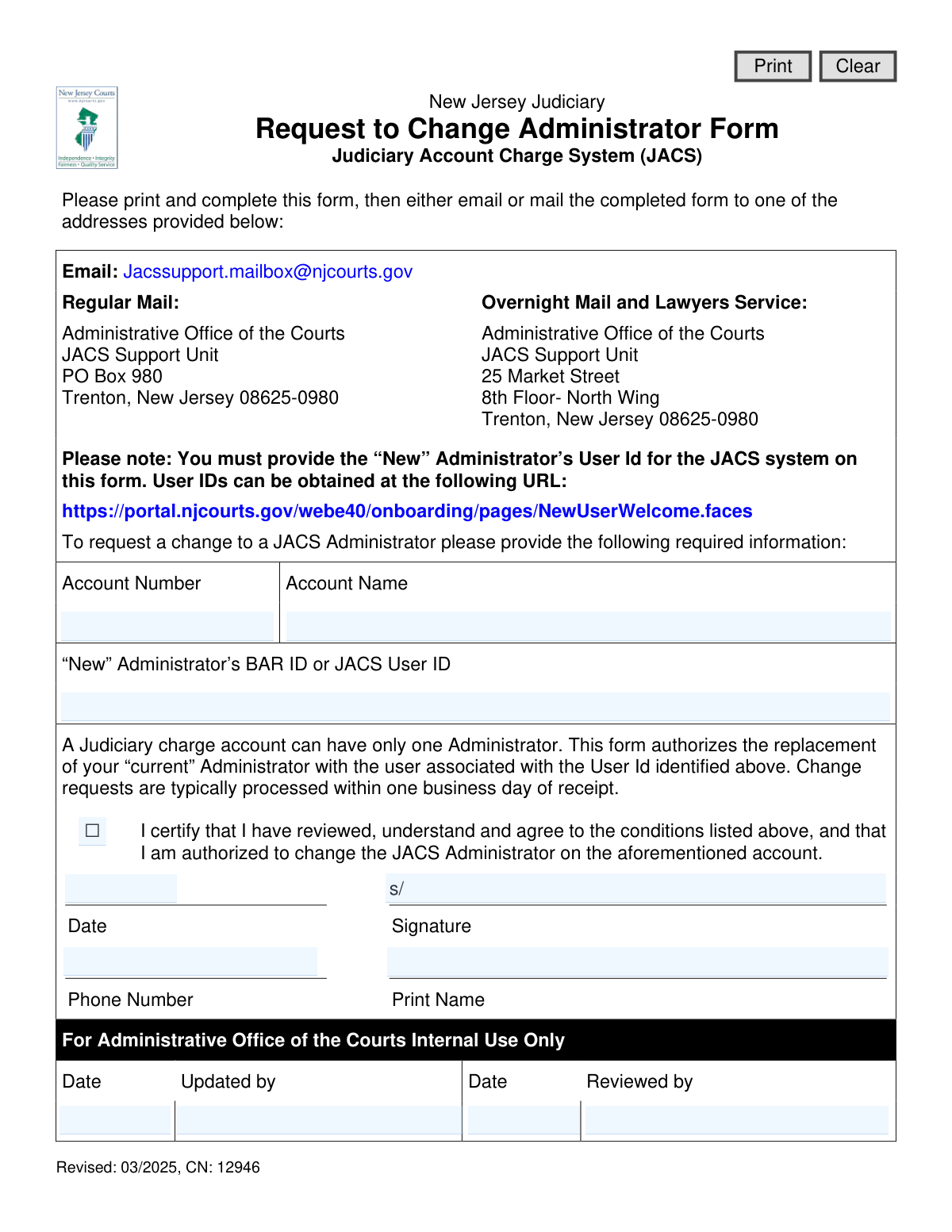
This form is an official request to the New Jersey Judiciary to change the designated administrator for a Judiciary Account Charge System (JACS) account. It is essential for ensuring that the correct individual has administrative control and access to manage the account's billing and usage. Today, this form can be filled out quickly and accurately using AI-powered services like Instafill.ai, which can also convert non-fillable PDF versions into interactive fillable forms.
Our AI automatically handles information lookup, data retrieval, formatting, and form filling.
It takes less than a minute to fill out NJ JACS CN 12946 using our AI form filling.
Securely upload your data. Information is encrypted in transit and deleted immediately after the form is filled out.
Form specifications
| Form name: | JACS Request to Change Administrator Form (Judiciary Account Charge System) |
| Number of fields: | 14 |
| Number of pages: | 1 |
| Language: | English |
Instafill Demo: How to fill out PDF forms in seconds with AI
How to Fill Out NJ JACS CN 12946 Online for Free in 2026
Are you looking to fill out a NJ JACS CN 12946 form online quickly and accurately? Instafill.ai offers the #1 AI-powered PDF filling software of 2026, allowing you to complete your NJ JACS CN 12946 form in just 37 seconds or less.
Follow these steps to fill out your NJ JACS CN 12946 form online using Instafill.ai:
- 1 Navigate to Instafill.ai and upload or select the JACS Request to Change Administrator Form.
- 2 Use the AI assistant to automatically fill in your JACS Account Number and Account Name.
- 3 Enter the BAR ID or JACS User ID for the new administrator as required.
- 4 Review the certification statement and check the box to confirm you are authorized to make this change.
- 5 Provide your printed name, phone number, and the current date in the designated fields.
- 6 Digitally sign the form to authorize the administrator change.
- 7 Download the completed form and submit it to the New Jersey Judiciary via the email or mail addresses provided on the form.
Our AI-powered system ensures each field is filled out correctly, reducing errors and saving you time.
Why Choose Instafill.ai for Your Fillable NJ JACS CN 12946 Form?
Speed
Complete your NJ JACS CN 12946 in as little as 37 seconds.
Up-to-Date
Always use the latest 2026 NJ JACS CN 12946 form version.
Cost-effective
No need to hire expensive lawyers.
Accuracy
Our AI performs 10 compliance checks to ensure your form is error-free.
Security
Your personal information is protected with bank-level encryption.
Frequently Asked Questions About Form NJ JACS CN 12946
This form is used to officially change the designated administrator for a Judiciary Account Charge System (JACS) account with the New Jersey Judiciary.
An authorized representative of the JACS account, such as a current administrator or managing partner, must complete and sign this form to request a change in the account's administrator.
No, a Judiciary charge account can only have one administrator at a time. Submitting this form authorizes the replacement of the current administrator with the new user specified.
You must provide the JACS Account Number, Account Name, and the new administrator's BAR ID or JACS User ID. The person authorizing the change must also sign, date, and provide their printed name and phone number.
A JACS User ID is a unique identifier for the Judiciary's online portal. The new administrator can obtain one by registering at the URL provided on the form: https://portal.njcourts.gov/webe40/onboarding/pages/NewUserWelcome.faces.
The form cannot be processed without the new administrator's User ID. Your request will be delayed or rejected until this required information is provided.
Change requests are typically processed within one business day of receipt by the JACS Support Unit.
You can email the completed form to [email protected] or send it via regular or overnight mail to the Administrative Office of the Courts at the address listed on the form.
The person signing the form must be authorized to make administrative changes to the JACS account. By signing, you are certifying that you have this authority.
Once the change is processed, the previous administrator will no longer have administrative privileges for the specified JACS account.
Yes, services like Instafill.ai use AI to accurately auto-fill form fields, which can save you time and help ensure the information is entered correctly.
You can use a service like Instafill.ai to fill out the form on your computer. Simply upload the PDF, and the tool will allow you to type your information directly into the fields before printing for signature.
If you have a non-fillable or 'flat' PDF, you can use a tool like Instafill.ai. It can convert the non-fillable PDF into an interactive, fillable form that you can complete online.
Compliance NJ JACS CN 12946
Validation Checks by Instafill.ai
1
Account Number Presence
Verifies that the 'Account Number' field (acctNum) is not empty. This field is essential for identifying which JACS account the change request applies to. If this field is left blank, the submission cannot be processed and the user will be prompted to provide the account number.
2
Account Name Presence
Ensures that the 'Account Name' field (acctName) has been filled out. The account name is used in conjunction with the account number to confirm the correct account is being modified. A missing account name will result in a validation error, preventing submission until it is provided.
3
JACS Account Verification
Performs a backend check to confirm that the provided 'Account Number' (acctNum) and 'Account Name' (acctName) correspond to a valid and active account in the JACS database. This is a critical integrity check to prevent unauthorized or erroneous changes to the wrong account. If no match is found, the user is notified that the account details are incorrect.
4
New Administrator ID Requirement
Validates that the 'New Administrator’s BAR ID or JACS User ID' field (admiID) is not empty. This ID is the most critical piece of information for this form, as it identifies the user who will become the new administrator. The form cannot be processed without this information.
5
New Administrator ID Existence
Checks against the Judiciary's user database to ensure the provided 'admiID' is a valid, existing, and active User ID. This prevents typos and ensures the new administrator account actually exists and can be assigned. If the ID is not found, the user will receive an error stating the User ID is invalid.
6
Administrator Change Logic
Verifies that the user identified by 'admiID' is not the same person who is already the current administrator for the specified 'acctNum'. The purpose of the form is to change the administrator, so assigning the same person is a redundant and likely erroneous action. If the new ID matches the current administrator's ID, the system will display a warning.
7
Certification Checkbox Requirement
Ensures the certification checkbox ('cert') has been checked. This action serves as a legal confirmation that the submitter is authorized to make the change and agrees to the terms. The form submission will be blocked until this box is checked.
8
Signature Presence
Checks that the signature field ('sig') is not empty. The signature is required to authorize the change request. For digital forms, this means a digital signature must be applied or an image of a signature uploaded; for paper forms, it must be physically signed. A missing signature invalidates the request.
9
Printed Name Requirement
Validates that the 'Print Name' field (sigName) associated with the signature is filled out. This provides a clear, legible record of the person who authorized the change, which is necessary for auditing and verification purposes. The submission will fail if the printed name is missing.
10
Signature Date Format and Plausibility
Verifies that the 'Date' field (sigDt) contains a date in a valid format (e.g., MM/DD/YYYY) and that the date is not in the future or unreasonably far in the past. This ensures the date of authorization is recorded accurately. An invalid or future date will trigger an error message.
11
Contact Phone Number Format
Checks that the 'Phone Number' field (sigPhone) is in a valid US phone number format (e.g., 10 digits, with or without common separators like hyphens or parentheses). This ensures that JACS support staff can contact the signatory if there are any questions about the request. An improperly formatted number will prompt the user for correction.
12
Internal Use Fields Exclusion
Ensures that fields designated 'For Administrative Office of the Courts Internal Use Only' (e.g., fouoUpdateName, fouoUpdateDt) are not editable or validated on the user's end. This prevents users from accidentally or intentionally filling out sections reserved for internal processing. These fields should be read-only or hidden from the user's view.
Common Mistakes in Completing NJ JACS CN 12946
Saved over 80 hours a year
“I was never sure if my IRS forms like W-9 were filled correctly. Now, I can complete the forms accurately without any external help.”
Kevin Martin Green
Your data stays secure with advanced protection from Instafill and our subprocessors

Robust compliance program
Transparent business model
You’re not the product. You always know where your data is and what it is processed for.
ISO 27001, HIPAA, and GDPR
Our subprocesses adhere to multiple compliance standards, including but not limited to ISO 27001, HIPAA, and GDPR.
Security & privacy by design
We consider security and privacy from the initial design phase of any new service or functionality. It’s not an afterthought, it’s built-in, including support for two-factor authentication (2FA) to further protect your account.
Fill out NJ JACS CN 12946 with Instafill.ai
Worried about filling PDFs wrong? Instafill securely fills jacs-request-to-change-administrator-form-judiciary-account-charge-system forms, ensuring each field is accurate.