Yes! You can use AI to fill out New Fidelity Account® — Inherited IRA for a Non-Spouse Individual

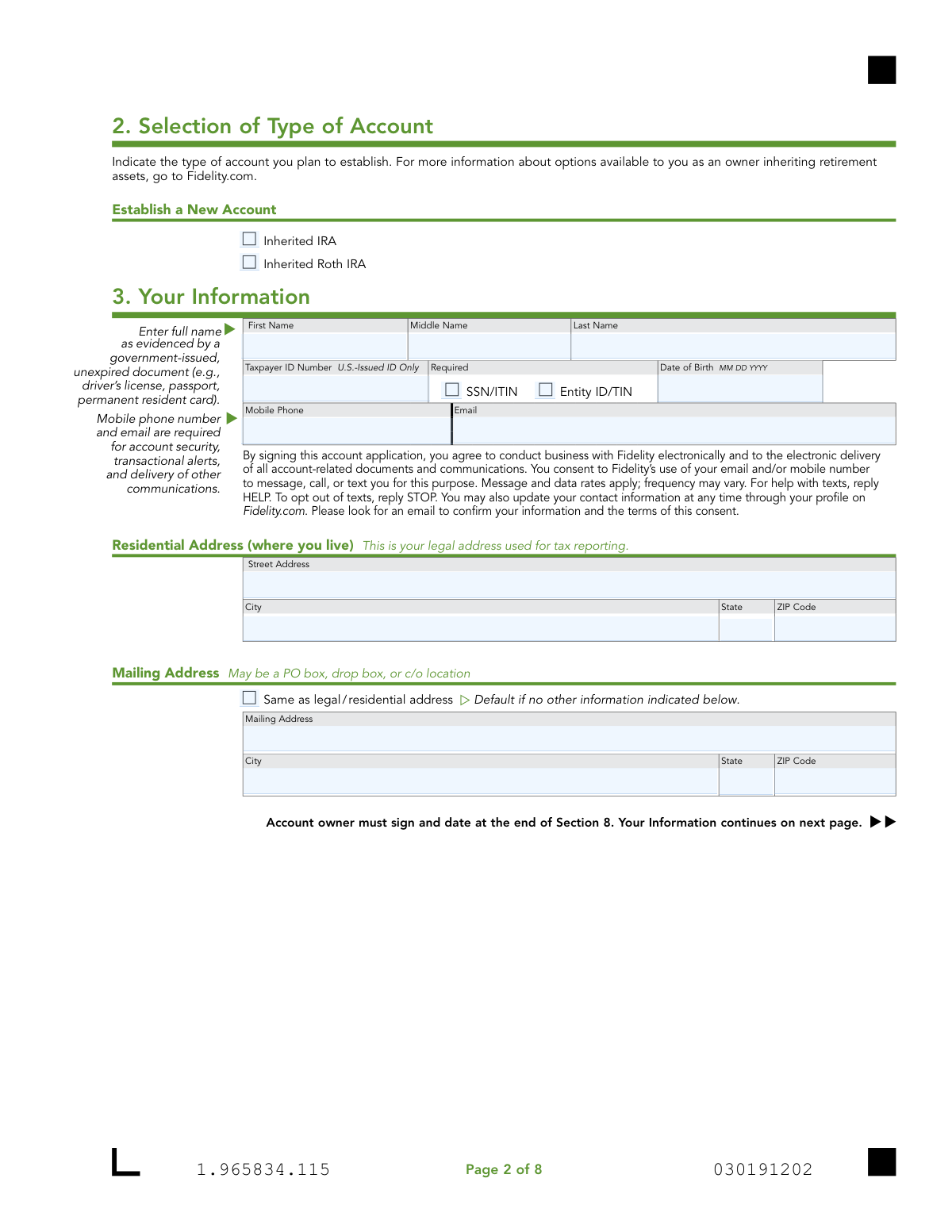
This Fidelity application is designed for individuals who are non-spouse beneficiaries of an IRA or a qualified retirement plan from a deceased owner. It allows the beneficiary to establish a new Inherited IRA or Inherited Roth IRA to properly manage the assets they've received. Completing this multi-page form accurately is crucial for compliance and proper account setup. Today, this form can be filled out quickly and accurately using AI-powered services like Instafill.ai, which can also convert non-fillable PDF versions into interactive fillable forms.
Our AI automatically handles information lookup, data retrieval, formatting, and form filling.
It takes less than a minute to fill out Fidelity Inherited IRA for a Non-Spouse Individual Application using our AI form filling.
Securely upload your data. Information is encrypted in transit and deleted immediately after the form is filled out.

Form specifications

Form name: New Fidelity Account® — Inherited IRA for a Non-Spouse Individual
Number of pages: 1
Language: English
Categories: IRA forms, Fidelity forms
main-image

Instafill Demo: How to fill out PDF forms in seconds with AI

How to Fill Out Fidelity Inherited IRA for a Non-Spouse Individual Application Online for Free in 2026

Are you looking to fill out a FIDELITY INHERITED IRA FOR A NON-SPOUSE INDIVIDUAL APPLICATION form online quickly and accurately? Instafill.ai offers the #1 AI-powered PDF filling software of 2026, allowing you to complete your FIDELITY INHERITED IRA FOR A NON-SPOUSE INDIVIDUAL APPLICATION form in just 37 seconds or less.
Follow these steps to fill out your FIDELITY INHERITED IRA FOR A NON-SPOUSE INDIVIDUAL APPLICATION form online using Instafill.ai:
  1. 1 Navigate to Instafill.ai, upload or select the 'New Fidelity Account — Inherited IRA for a Non-Spouse Individual' application.
  2. 2 Use the AI assistant to provide information about the deceased IRA owner, including their name, Tax ID, and date of death, and attach a copy of the death certificate.
  3. 3 Enter your personal information as the beneficiary, including your name, address, Tax ID, date of birth, and citizenship status.
  4. 4 Select the funding method for the new account, such as transferring assets from the deceased's Fidelity IRA, another firm, or rolling over from an employer-sponsored plan.
  5. 5 Designate your own primary and contingent beneficiaries for the new inherited account in Section 6.
  6. 6 Complete Section 7 if the deceased was subject to a Required Minimum Distribution (RMD) in their year of death and had not yet withdrawn it.
  7. 7 Carefully review all the information you've entered for accuracy, then electronically sign and date the application to finalize the process.

Our AI-powered system ensures each field is filled out correctly, reducing errors and saving you time.

Why Choose Instafill.ai for Your Fillable Fidelity Inherited IRA for a Non-Spouse Individual Application Form?

Speed

Complete your Fidelity Inherited IRA for a Non-Spouse Individual Application in as little as 37 seconds.

Up-to-Date

Always use the latest 2026 Fidelity Inherited IRA for a Non-Spouse Individual Application form version.

Cost-effective

No need to hire expensive lawyers.

Accuracy

Our AI performs 10 compliance checks to ensure your form is error-free.

Security

Your personal information is protected with bank-level encryption.

Frequently Asked Questions About Form Fidelity Inherited IRA for a Non-Spouse Individual Application

This form is used by a non-spouse beneficiary, who is over 18, to open a new Inherited IRA or Inherited Roth IRA after the original account owner has passed away. It establishes a new account to properly receive and manage the inherited retirement assets.

You should not use this form if you are a spouse beneficiary, a minor, an estate, a trust, or an entity like a charity. Fidelity has a separate application, the 'Fidelity Inherited IRA for Minors/Non-Individuals,' for those situations.

You must include a copy of the deceased's death certificate. Depending on the deceased's state of residence, a state inheritance tax waiver may also be required.

You are a successor beneficiary if you are inheriting an IRA from someone who was also a beneficiary, not the original account owner. In this case, you must provide information for both the original owner and the deceased beneficiary you are inheriting from.

Section 4, 'Funding Method,' allows you to transfer assets from the deceased's Fidelity IRA, transfer from another firm using a Transfer of Assets form, or roll over funds from an employer-sponsored plan. You must provide the account details for the assets you are moving.

Only complete Section 7 if the deceased was subject to RMDs and had not withdrawn the full amount in their year of death. As the beneficiary, you are responsible for taking this distribution by December 31 of that year.

You are opening a new account in your name, and Section 6 allows you to designate who will inherit any remaining assets upon your death. You cannot name yourself as a beneficiary on this new account.

For the fastest processing, you can scan the QR code on the form or visit Fidelity.com/upload-inherited-IRA-NS to digitally upload the completed application and required documents. If you cannot upload it, mailing instructions are available on Fidelity's website.

This choice depends on the type of account you inherited. If you inherited a traditional IRA, you will open an Inherited IRA; if you inherited a Roth IRA, you will open an Inherited Roth IRA, which may offer tax-free qualified distributions.

No, this application is specifically for non-spouse beneficiaries. Spouses have different options, such as rolling over assets into their own IRA, and should contact Fidelity directly for guidance.

If you have a non-fillable or 'flat' PDF, services like Instafill.ai can convert it into an interactive form. Simply upload the file to the platform to make it fillable online.

Yes, services like Instafill.ai use AI to help you accurately auto-fill form fields, saving you time and helping to prevent common errors. These tools are designed to simplify the process of completing complex documents.

To use Instafill.ai, you would upload this PDF to their platform. The AI will identify all the form fields, allowing you to enter your information once and have it populated accurately throughout the document before you print or submit it.

Compliance Fidelity Inherited IRA for a Non-Spouse Individual Application
Validation Checks by Instafill.ai

1
Verifies Deceased's Date of Death is After Date of Birth
This check ensures the 'Date of Death' entered in Section 1 for the deceased IRA owner is chronologically after their 'Date of Birth'. This is a fundamental logical validation to prevent data entry errors and ensure the integrity of the deceased's information. A failure would indicate a clear mistake in the provided dates, requiring correction before the application can be processed.
2
Validates Applicant is Over 18 Years of Age
Based on the 'Date of Birth' provided in Section 3, this validation confirms the applicant is at least 18 years old, as stipulated on the first page of the application. This is a legal and compliance requirement for opening this type of account. If the applicant is under 18, the application should be rejected and the user directed to the 'Inherited IRA for Minors' application.
3
Ensures Required Contact Information is Present and Formatted Correctly
This check verifies that the 'Mobile Phone' and 'Email' fields in Section 3 are not empty, as the form states they are required for security and communication. It also validates that the inputs match standard formats for a phone number and an email address (e.g., contains '@' and a domain). Missing or invalid contact information would prevent account setup and critical communications, so the form submission would be blocked until corrected.
4
Validates Foreign Citizen's Government ID is Not Expired
If the applicant identifies as a 'Foreign citizen' in Section 3, this check ensures that the 'ID Expiration Date' provided is in the future. Federal regulations require a valid, unexpired government-issued ID for account opening. An expired ID would fail this validation, and the application would be held pending submission of current identification documents.
5
Enforces Conditional Logic for Employment Status
This validation checks the employment information in Section 3 for logical consistency. If 'Employed' is selected, the 'Employer' field must be filled. If 'Retired' or 'Not employed' is selected, the 'Source of Income' field is required. This ensures that Fidelity collects the necessary information about the applicant's financial background as required by industry regulations.
6
Verifies Primary Beneficiary Share Percentages Sum to 100%
This check calculates the sum of all 'Share Percentage' fields for the Primary Beneficiaries listed in Section 6. If any primary beneficiaries are designated, the total percentage must equal exactly 100%. This is critical to ensure the applicant's assets are distributed according to their exact wishes and to prevent legal disputes upon their death.
7
Verifies Contingent Beneficiary Share Percentages Sum to 100%
Similar to the primary beneficiary check, this validation ensures the 'Share Percentage' for all Contingent Beneficiaries in Section 6 sums to exactly 100%. While contingent beneficiaries only inherit if all primary beneficiaries are deceased, their allocation must also be clearly and completely defined. An incorrect sum would make the designation ambiguous and legally problematic.
8
Prevents Applicant from Naming Themselves as a Beneficiary
This check compares the name and Taxpayer ID Number of each beneficiary listed in Section 6 against the applicant's information from Section 3. An individual cannot be the owner and a beneficiary of the same inherited IRA. A match would result in a validation error, as this is a logically impossible and invalid designation.
9
Validates RMD Amount is Provided When Required
This check is triggered if the applicant answers 'YES' to the initial question in Section 7 regarding the deceased's Required Minimum Distribution (RMD). If 'YES' is selected, the 'Amount' field in Section 7a becomes mandatory. This ensures that the legally required year-of-death RMD is processed correctly, preventing potential tax penalties for the beneficiary.
10
Ensures Tax Withholding Rate is a Whole Number
For the tax withholding fields in Section 7c, this validation confirms that any entered value is a whole number without decimals or symbols, as specified on the form. This ensures the data is in the correct format for the processing system to apply the proper tax withholding rate. An invalid format would cause the calculation to fail and require user correction.
11
Confirms Mandatory Signature and Date are Present
This is a critical completeness check to verify that the 'OWNER SIGNATURE' and 'TODAY’S DATE' fields in Section 8 are not blank. The signature is legally required to execute the agreements outlined in the application. Without a signature and date, the form is invalid and cannot be processed.
12
Validates Account Type Selection
This check ensures that the applicant has selected at least one account type in Section 2, either 'Inherited IRA' or 'Inherited Roth IRA'. This selection is fundamental to the application, as it dictates the type of account to be opened and the tax rules that will apply. The submission cannot proceed without this essential choice being made.
13
Validates Taxpayer ID Number Format
This validation checks that the 'Taxpayer ID Number' for the deceased owner (Section 1) and the applicant (Section 3) adheres to the standard format for a U.S. Social Security Number (SSN) or Taxpayer Identification Number (TIN). Correct formatting (e.g., XXX-XX-XXXX) is crucial for tax reporting and identity verification. An incorrectly formatted ID would cause downstream processing and IRS reporting to fail.
14
Validates Successor Beneficiary Date Logic
This check applies if the applicant is a successor beneficiary, indicated by filling out the 'Original Owner's Information' in Section 1. It verifies that the 'Date of Death' of the 'Deceased IRA Owner' (the first beneficiary) is on or after the 'Date of Death' of the 'Original Owner'. This ensures the chain of inheritance is chronologically possible and the data is logically sound.

Common Mistakes in Completing Fidelity Inherited IRA for a Non-Spouse Individual Application

Confusing the Deceased Owner with the Original Owner

In Section 1, applicants who are direct beneficiaries often mistakenly fill out the 'Original Owner's Information' section, which is intended only for successor beneficiaries. This happens due to the complex nature of inheritance chains. This error causes confusion and requires clarification from Fidelity, delaying the account setup as the lineage of the inheritance must be correctly established.

Selecting the Incorrect Inherited Account Type

In Section 2, a beneficiary may not know whether the deceased's account was a Traditional IRA or a Roth IRA and may guess incorrectly. Choosing the wrong account type has significant tax implications and can lead to complicated and costly corrections. To avoid this, applicants must refer to the deceased's account statements or contact the previous financial institution to confirm the exact account type before filling out the form.

Providing an Incomplete or Mismatched Legal Name

Applicants often provide a nickname, an initial, or a shortened version of their name in Section 3 instead of their full legal name as it appears on their government-issued ID. This discrepancy will cause the application to fail mandatory identity verification checks. This halts the account opening process until the applicant resubmits the form with the correct information, causing significant delays.

Misinterpreting the 'Associations' and 'Affiliations' Sections

The industry-specific language in Section 3 regarding associations with broker-dealers or affiliations with publicly traded companies is often confusing. Applicants may incorrectly assume it doesn't apply to them or their family members and skip it. Failure to disclose this information can lead to regulatory compliance violations, which Fidelity is required to address, delaying the account and potentially requiring additional paperwork.

Submitting Incomplete Asset Transfer Information

When completing the 'Funding Method' in Section 4, applicants frequently omit required details like the full account number, the previous firm's statement, or the plan recordkeeper's contact information. An incomplete or inaccurate request prevents the transfer of assets. This is a primary reason for processing delays, as Fidelity cannot locate and move the funds without the exact details, requiring the applicant to be contacted for more information.

Making Errors in Beneficiary Designations

In Section 6, it is common for applicants to make mathematical errors ensuring share percentages total 100%, or to forget to provide a beneficiary's Taxpayer ID number or date of birth. Another critical error is naming oneself as the beneficiary. These mistakes can render the beneficiary designations invalid, potentially leading to legal complications and disputes upon the new account owner's death. Using a tool like Instafill.ai can help by performing calculations and validating that all required fields are completed.

Incorrectly Handling the Deceased's Final RMD

Section 7, which deals with the deceased's Required Minimum Distribution (RMD), is highly complex and often mishandled. Beneficiaries may not know if an RMD was due for the year of death and either skip the section when it's required or fill it out unnecessarily. Failing to take a required RMD can result in substantial IRS penalties, so it is crucial to verify this information before submitting the application.

Entering Invalid Tax Withholding Percentages

In the tax withholding section (7c), the form requires whole numbers for percentages, but applicants often enter decimal points or dollar signs. This formatting error makes the entry invalid and will cause the form to be rejected. To avoid this, applicants must enter only whole numbers (e.g., '10' for 10%). AI-powered form fillers like Instafill.ai can automatically enforce correct data formats, preventing such rejections.

Forgetting to Sign and Date the Application

Forgetting to sign and date the application in Section 8 is one of the most frequent yet easily avoidable mistakes. An unsigned or undated form is legally invalid and cannot be processed under any circumstances. This oversight brings the entire process to a halt until a correctly signed and dated copy of the signature page is received by Fidelity.

Ignoring Formatting and Legibility Instructions

The instructions specify filling the form using 'CAPITAL letters and black ink,' but many people use lowercase letters, cursive, or blue ink. Poor legibility or incorrect ink can cause errors when the document is scanned by optical character recognition (OCR) systems, leading to data entry mistakes or rejection. If the form is a non-fillable PDF, a tool like Instafill.ai can convert it to a fillable version, ensuring all entries are typed, legible, and correctly formatted.

Failing to Include Required Supporting Documents

The application explicitly requires a copy of the deceased's death certificate and potentially a state inheritance tax waiver. Applicants often forget to include these essential documents with their submission. An application package that is missing required documentation is considered incomplete and will be immediately rejected, forcing the process to start over once the documents are gathered.
Saved over 80 hours a year

“I was never sure if my IRS forms like W-9 were filled correctly. Now, I can complete the forms accurately without any external help.”

Kevin Martin Green

Your data stays secure with advanced protection from Instafill and our subprocessors

Robust compliance program

Transparent business model

You’re not the product. You always know where your data is and what it is processed for.

ISO 27001, HIPAA, and GDPR

Our subprocesses adhere to multiple compliance standards, including but not limited to ISO 27001, HIPAA, and GDPR.

Security & privacy by design

We consider security and privacy from the initial design phase of any new service or functionality. It’s not an afterthought, it’s built-in, including support for two-factor authentication (2FA) to further protect your account.

Fill out Fidelity Inherited IRA for a Non-Spouse Individual Application with Instafill.ai

Worried about filling PDFs wrong? Instafill securely fills new-fidelity-account-inherited-ira-for-a-non-spouse-individual forms, ensuring each field is accurate.