Yes! You can use AI to fill out New Jersey Judiciary Guardianship Report Comprehensive Accounting Form

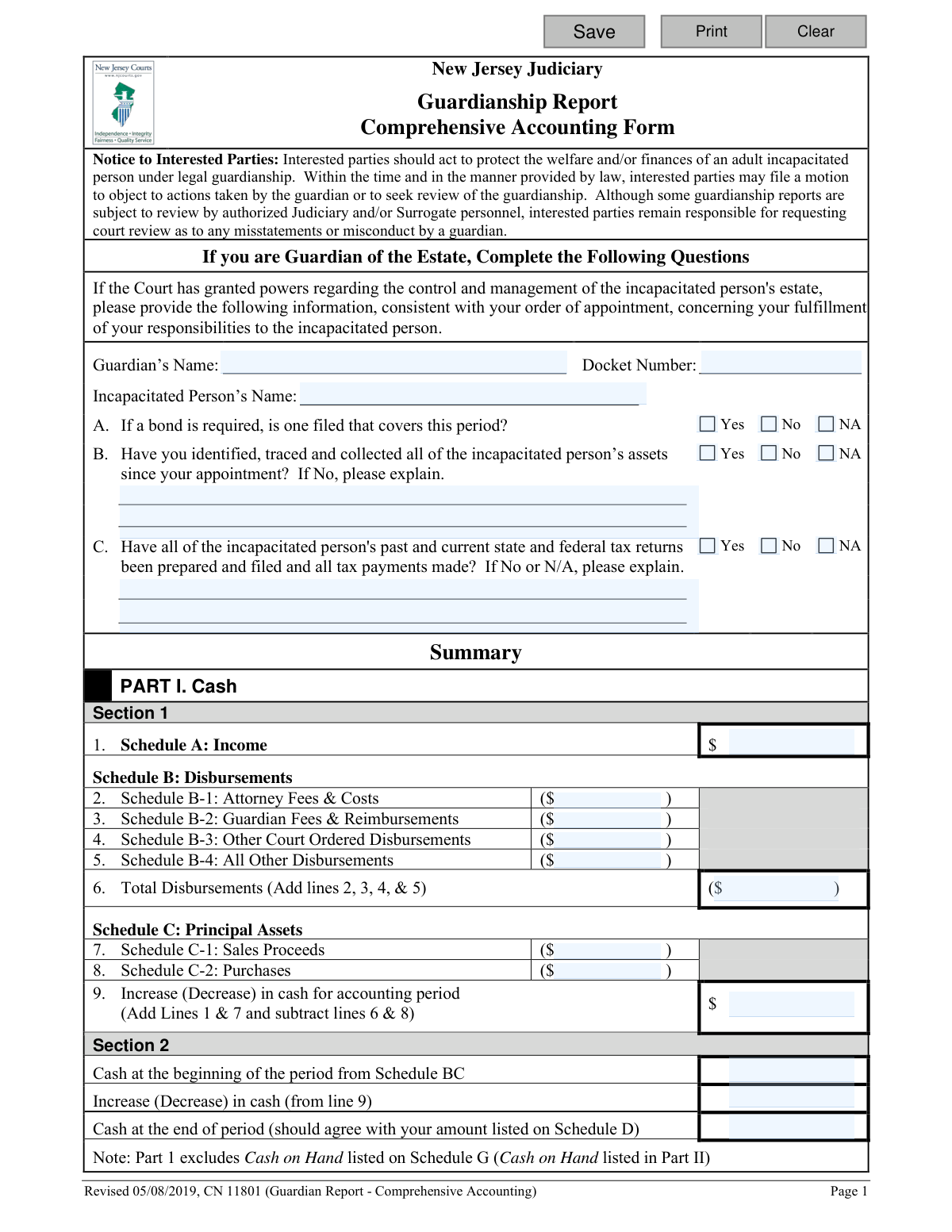
This form is a detailed financial report required by the New Jersey Judiciary for guardians managing the estate of an incapacitated person. It requires a comprehensive accounting of all income, disbursements, assets, and liabilities over a specific reporting period, substantiated by various schedules and attachments. Its purpose is to ensure transparency and proper management of the incapacitated person's finances for court oversight. Today, this form can be filled out quickly and accurately using AI-powered services like Instafill.ai, which can also convert non-fillable PDF versions into interactive fillable forms.
CN 11801 is part of the New Jersey forms and new account forms categories on Instafill.
Our AI automatically handles information lookup, data retrieval, formatting, and form filling.
It takes less than a minute to fill out CN 11801 using our AI form filling.
Securely upload your data. Information is encrypted in transit and deleted immediately after the form is filled out.

Form specifications

Form name: New Jersey Judiciary Guardianship Report Comprehensive Accounting Form
Number of fields: 680
Number of pages: 1
Language: English
main-image

Instafill Demo: How to fill out PDF forms in seconds with AI

How to Fill Out CN 11801 Online for Free in 2026

Are you looking to fill out a CN 11801 form online quickly and accurately? Instafill.ai offers the #1 AI-powered PDF filling software of 2026, allowing you to complete your CN 11801 form in just 37 seconds or less.
Follow these steps to fill out your CN 11801 form online using Instafill.ai:
  1. 1 Navigate to Instafill.ai and upload your PDF of the Comprehensive Accounting Form or select it from the platform's template library.
  2. 2 Use the AI tool to automatically identify and label all fields across the form's multiple pages and schedules (A, B, C, D, E, F, G, BA, BC).
  3. 3 Gather all necessary financial documents, including bank statements for the beginning and end of the period, proof of income, receipts, and records of asset transactions.
  4. 4 Follow the guided prompts to enter data into each schedule, detailing income, court-ordered and other disbursements, asset sales, and purchases. The AI can assist with calculations and data organization.
  5. 5 Complete the asset and liability schedules (BA, BC, D, G) by providing values for real estate, personal property, and debts. The system will use this data to auto-populate the summary section.
  6. 6 Carefully review the entire completed form. Use the reconciliation schedules (E and F) to verify the accuracy of your financial figures and ensure all totals match.
  7. 7 Electronically sign the certification, download the final document, and file the original with the Surrogate's office, including all required attachments.

Our AI-powered system ensures each field is filled out correctly, reducing errors and saving you time.

Why Choose Instafill.ai for Your Fillable CN 11801 Form?

Speed

Complete your CN 11801 in as little as 37 seconds.

Up-to-Date

Always use the latest 2026 CN 11801 form version.

Cost-effective

No need to hire expensive lawyers.

Accuracy

Our AI performs 10 compliance checks to ensure your form is error-free.

Security

Your personal information is protected with bank-level encryption.

Frequently Asked Questions About Form CN 11801

This form is used by a court-appointed guardian of an estate to provide a detailed financial report on the assets, income, and expenses of an incapacitated person. It helps the New Jersey Judiciary monitor the management of the person's estate.

You must file the Comprehensive Accounting Form if you are the guardian of an estate and the Judgment of Incapacity specifically directs you to do so. This form is more detailed than the alternative 'EZ' form.

You are required to attach copies of statements from each bank or financial institution for both the beginning and the end of the accounting period. Failing to include these statements will result in an incomplete filing.

For regular, recurring expenses, you can group them by category and report them on a monthly or annual basis. For example, you can list 'Monthly Groceries' or 'Cable Bill (12 months)' and provide the total amount spent for the period.

Schedule B-1 is exclusively for attorney fees and costs that have been specifically approved by a court order. Schedule B-4 is for all other general living expenses and disbursements that do not require prior court approval, such as food, utilities, and clothing.

You should report a reasonable estimate of the fair market value, not the municipal tax-assessed value. You can use a recent appraisal if one is available, but you are not required to get a new formal appraisal every year.

It is acceptable to adjust your reporting period to align with your bank statements. For instance, you can end your first report at the end of the previous month and then file subsequent reports for a full 12-month period based on statement cycles.

You must file the original, signed report with the Surrogate's office. Be aware that there is a filing fee of $5 per page for all documents you submit, including the cover page and all schedules.

Yes, the instructions suggest you can consult with an attorney, accountant, or other financial professional for assistance. Reasonable fees for such professional services are allowable expenses from the incapacitated person's estate, subject to court approval.

You must answer 'No' to question B on the form and provide a detailed explanation. Describe the assets you are aware of, who has custody of them, and the steps you have taken to retrieve them for the guardianship estate.

Schedule A is for regular income like Social Security, pensions, or employment earnings. Schedule C-1 is for reporting cash received from selling a principal asset, such as a house, car, or shares of stock.

Yes, services like Instafill.ai use AI to help you accurately auto-fill form fields, which can save you significant time and reduce errors. This is especially helpful for complex forms with many repetitive data entries.

Simply upload the Comprehensive Accounting Form PDF to the Instafill.ai platform. The AI will identify all the form fields, allowing you to quickly type in your information, save your progress, and download the completed document.

You can use a service like Instafill.ai, which can convert flat, non-fillable PDFs into interactive, fillable forms. This allows you to type your information directly into the fields on your computer instead of printing and filling it out by hand.

Compliance CN 11801
Validation Checks by Instafill.ai

1
Summary Total Disbursements Calculation
This check verifies that the 'Total Disbursements' amount on Summary line 6 is the correct sum of lines 2, 3, 4, and 5 (Attorney Fees, Guardian Fees, Other Court Ordered Disbursements, and All Other Disbursements). This is crucial for ensuring the mathematical accuracy of the overall cash flow summary. If this calculation fails, it indicates a data entry or summation error in the disbursement schedules, leading to an incorrect accounting.
2
Summary Net Cash Change Calculation
Validates that the 'Increase (Decrease) in cash for accounting period' on Summary line 9 is correctly calculated by adding total income (Line 1) and sales proceeds (Line 7), then subtracting total disbursements (Line 6) and purchases (Line 8). This is the core calculation that determines the net cash flow over the period. A failure here invalidates the entire cash summary and prevents proper reconciliation.
3
Summary Section 2 Cash Reconciliation
This check ensures that the 'Cash at the end of period' equals the 'Cash at the beginning of the period' plus the 'Increase (Decrease) in cash (from line 9)'. This is a fundamental accounting principle to verify that the starting balance, plus all inflows and minus all outflows, equals the final balance. If this check fails, it points to a significant discrepancy in the reported financial activities.
4
Schedule and Summary Totals Consistency
Verifies that the total amount calculated at the bottom of each individual schedule (e.g., Schedule A Total Income, Schedule B-1 Total Fees) exactly matches the corresponding line item in the Summary section (e.g., Summary Line 1, Summary Line 2). This ensures that the summary accurately reflects the detailed data provided in the schedules. A mismatch would mean the summary is misleading and not supported by the detailed transaction lists.
5
Schedule E Bank Transfer Balance
This validation confirms that the 'Total Transfer In' amount equals the 'Total Transfer Out' amount in Schedule E. This is critical for ensuring that all funds moved between accounts are fully accounted for and none have been lost or misplaced during transfers within the guardianship estate. A discrepancy requires an explanation and could indicate a reporting error or a misappropriation of funds.
6
Schedule F Bank Account Reconciliation Logic
For each bank account column in Schedule F, this check validates the core reconciliation formula: Beginning Balance + Transfers In + Income/Sales Proceeds - Disbursements/Purchases - Transfers Out must equal the Ending Balance. This is the most detailed check, ensuring the integrity of all recorded transactions for each specific account. Failure indicates a mathematical error, a missing transaction, or an incorrect starting/ending balance, making the account reconciliation unreliable.
7
Schedule F and Schedule D Ending Balance Match
This check cross-references the calculated 'Ending Balance' for each account in the Schedule F reconciliation with the stated 'Amount' for the same account in Schedule D (Cash at the End of the Period). This confirms that the reconciled balance matches the balance reported from the end-of-period bank statements. If the values do not match, it suggests either the reconciliation in Schedule F is incorrect or the ending balance in Schedule D was entered improperly.
8
Conditional Explanation for Negative Responses
Ensures that if the user answers 'No' to question B ('Have you identified, traced and collected all of the incapacitated person’s assets?') or question C ('Have all...tax returns been...filed?'), the corresponding explanation field is not empty. This is important because a 'No' answer signifies a potential problem or uncompleted duty that the court must be made aware of. Failure to provide an explanation leaves the court without critical context for its review.
9
Court Order Date Requirement for B-Schedules
Validates that any disbursement listed in Schedule B-1 (Attorney Fees), B-2 (Guardian Fees), or B-3 (Other Court Ordered Disbursements) has a non-empty 'Court Order Date'. These schedules are exclusively for payments specifically approved by the court, and the date of the authorizing judgment or order is a mandatory piece of information. Missing dates would render the entry incomplete and its authorization questionable.
10
Attachment Confirmation for Bank Statements
This check verifies that the user has confirmed the attachment of required bank statements for Schedule BC (Beginning of Period) and Schedule D (End of Period). The form explicitly requires these documents to substantiate the reported cash balances. This validation ensures the filer acknowledges the requirement, and if the system can detect uploads, it confirms their presence, preventing the submission of an incomplete and unverifiable report.
11
Header Information Completeness
This validation ensures that the 'Guardian’s Name', 'Docket Number', and 'Incapacitated Person’s Name' fields are all filled out. This information is essential for identifying the case and the parties involved, and for correctly filing the document with the court. Submitting a form without this basic identification would make it impossible to process and associate with the correct guardianship case.
12
Summary Part II Asset Change Calculation
This check verifies that the 'Increase (Decrease) in assets for accounting period' in Part II of the Summary is the correct result of subtracting the 'Beginning assets, from Schedule BA' from the 'Ending assets, from Schedule G'. This calculation provides a high-level overview of the change in value of non-cash assets during the reporting period. An incorrect value here would misrepresent the performance or changes in the estate's tangible property and investments.

Common Mistakes in Completing CN 11801

Forgetting to Attach Required Bank Statements

Schedules BC and D explicitly require attaching copies of bank statements for the beginning and end of the accounting period. Failing to include these attachments makes the accounting incomplete and is a primary reason for rejection by the court. To avoid this, create a checklist of all required documents, including statements for every account listed, before submitting the report.

Mathematical Errors in the Summary Section

The Summary section requires numerous calculations, such as totaling disbursements and calculating the net change in cash. Simple arithmetic mistakes are very common when done by hand and will cause the entire report to be inaccurate and out of balance. These errors lead to rejection and require the guardian to find the mistake and refile. To prevent this, use a calculator for every step and double-check all totals, or use a tool that performs calculations automatically.

Misreporting Internal Bank Transfers

A frequent error is to list a transfer of funds between two of the estate's accounts as both an 'Income' (Schedule A) and a 'Disbursement' (Schedule B-4). This incorrectly inflates both totals and makes reconciliation impossible. Internal transfers should only be reported on Schedule E, the Bank Transfer Schedule, to show the movement of funds without affecting the overall financial picture.

Failing to Reconcile Bank Accounts in Schedule F

Schedule F is a critical worksheet designed to prove the accounting is accurate, but it is often completed incorrectly or skipped entirely. If the 'Ending Balance' calculated on Schedule F does not match the actual bank statement balance from Schedule D, it signals a fundamental error in the report. This discrepancy guarantees scrutiny and likely rejection, so it is essential to complete this schedule carefully to find and fix any mistakes before filing.

Listing Unapproved Fees in Court-Ordered Schedules

Schedules B-1, B-2, and B-3 are reserved exclusively for fees and costs specifically approved by a court order. Guardians mistakenly list all professional fees they paid, rather than only the amounts itemized in the court judgment. This can result in the accounting being rejected and may require the guardian to personally reimburse the estate for any unapproved payments.

Using Incorrect Valuation for Non-Cash Assets

When reporting assets on Schedules BA and G, filers often use the wrong valuation method, such as using a property's tax-assessed value instead of its fair market value. This misrepresents the estate's true worth and can cause issues if the asset is later sold. To avoid this, use reasonable, current market estimates as guided by the instructions, such as consulting real estate websites or Kelley Blue Book for vehicles.

Providing Incomplete Details for Disbursements

Schedule B-4 requires specific details for all other disbursements, including category, check number, date, and payee. Filers often leave fields blank, especially for recurring expenses or cash purchases, making the transactions difficult for reviewers to verify. This lack of transparency can trigger requests for more information and delay the report's approval. Maintaining meticulous records throughout the year is the best way to ensure all fields can be completed accurately.

Confusing Regular Expenses with Principal Asset Transactions

Guardians often miscategorize payments, confusing routine disbursements (Schedule B-4) with transactions involving principal assets (Schedules C-1 and C-2). For example, a monthly mortgage payment is a disbursement, while the proceeds from selling that house belong on Schedule C-1. This error fundamentally skews the financial summary of the estate's activities and will require correction.

Neglecting to Provide Required Explanations

On the first page, questions regarding the collection of all assets (Item B) and the filing of taxes (Item C) require a written explanation if the answer is 'No' or 'N/A'. A common oversight is to check the box but leave the explanation field blank. This makes the form incomplete and forces the court to request clarification, delaying the entire review process.

Submitting an Illegible, Hand-Written Form

If the guardian only has a non-fillable PDF, they may print it and fill it out by hand, often leading to illegible entries, numbers written in the wrong columns, and calculation errors. This makes the report difficult to process and may lead to its return. AI-powered tools like Instafill.ai can convert a flat PDF into a cleanly fillable version, preventing legibility issues and helping ensure accuracy.
Saved over 80 hours a year

“I was never sure if my IRS forms like W-9 were filled correctly. Now, I can complete the forms accurately without any external help.”

Kevin Martin Green

Your data stays secure with advanced protection from Instafill and our subprocessors

Robust compliance program

Transparent business model

You’re not the product. You always know where your data is and what it is processed for.

ISO 27001, HIPAA, and GDPR

Our subprocesses adhere to multiple compliance standards, including but not limited to ISO 27001, HIPAA, and GDPR.

Security & privacy by design

We consider security and privacy from the initial design phase of any new service or functionality. It’s not an afterthought, it’s built-in, including support for two-factor authentication (2FA) to further protect your account.

Fill out CN 11801 with Instafill.ai

Worried about filling PDFs wrong? Instafill securely fills new-jersey-judiciary-guardianship-report-comprehensive-accounting-form forms, ensuring each field is accurate.

Related forms by category

New Jersey forms State of New Jersey Alternate Benefit Program Withdrawal Request Acknowledgement Receipt, Horizon Blue Cross Blue Shield of New Jersey Applied Behavior Analysis Supplemental Information Form, State of New Jersey Application for Employment (Form DPF-663), New Jersey Judiciary Plea Form (Plea 01), Supplemental Plea Form for Certain Sexual Offenses: Megan’s Law/Parole Supervision for Life/Community Supervision for Life (Plea 05), Financial Questionnaire to Establish Indigency, New Jersey Judiciary Resource Family Information Form, Foreclosure Case Information Statement (FCIS) - Appendix XII-B2, New Jersey Judiciary Records Request Form, Superior Court of New Jersey, Application for Appeal and Order, FL Certification of Requested Background Checks for Kinship Legal Guardianship, Certification of Caregiver as to Knowledge of Identity and/or Location of Parents, FL Order Judgment for Kinship Legal Guardianship, New Jersey Judiciary Certification of Repair and Plea of Guilty, Uniform Summary Support Order (USSO), New Jersey Judiciary Volunteer Application (CN 10293), Application to Take the New Jersey Court Interpreter Oral Examination, New Jersey Judiciary Attorney Fee Arbitration Request, Order to Show Cause with Temporary Restraints Pursuant to Rule 4:52, Tax Court of New Jersey, State Tax Complaint · + 268 more →
new account forms New Account Agreement, Vanguard 403(b)(7) New Account Form, New Fidelity Account Application — SIMPLE IRA, New Fidelity Account — Retirement Plan Account, New Fidelity Account® — SIMPLE IRA, New Fidelity Account® — SIMPLE IRA, New Fidelity Account® — Trust — Brokerage, Fidelity Advisor Entity New Account Application, Fidelity Institutional CHET Advisor 529 Plan New Account Application, Fidelity Advisor Entity New Account Application, New Fidelity Account® — Inherited IRA for a Non-Spouse Individual, New Account Agreement - Trading Direct, New Account Agreement, BlackRock New Account Application For Non-Retirement Accounts, New York Life Investments Funds Individual Retirement Account Application and NYLIFE Securities LLC Investor Profile, New Fidelity Account® — Trust — Brokerage, new-jersey-judiciary-guardianship-report-ez-accounting-form, adult-guardianship-ez-accounting-form-additional-pages, jacs-request-to-change-administrator-form-judiciary-account-charge-system