Yes! You can use AI to fill out New Fidelity Account — Retirement Plan Account

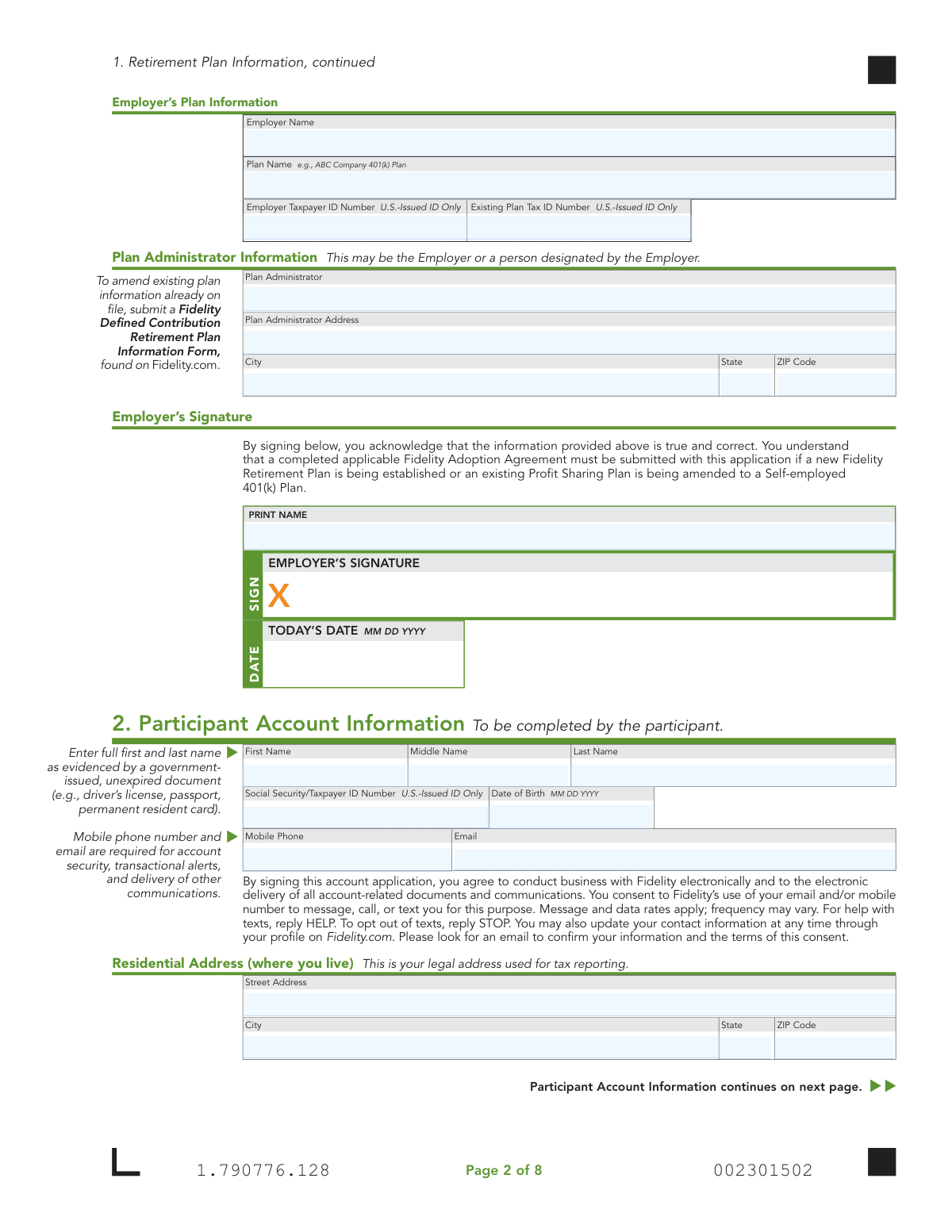
This application is used to establish a new Fidelity Retirement Plan account for employers and participants. It covers various plan types including the Fidelity Self-Employed 401(k), Roth Self-Employed 401(k), Profit Sharing, and Money Purchase Plans, gathering essential information about the employer, plan, participant, and funding. Today, this form can be filled out quickly and accurately using AI-powered services like Instafill.ai, which can also convert non-fillable PDF versions into interactive fillable forms.
Our AI automatically handles information lookup, data retrieval, formatting, and form filling.
It takes less than a minute to fill out Fidelity Retirement Plan Account Application using our AI form filling.
Securely upload your data. Information is encrypted in transit and deleted immediately after the form is filled out.

Form specifications

Form name: New Fidelity Account — Retirement Plan Account
Number of pages: 1
Language: English
Categories: retirement forms, retirement plan forms, Fidelity forms, retirement account forms
main-image

Instafill Demo: How to fill out PDF forms in seconds with AI

How to Fill Out Fidelity Retirement Plan Account Application Online for Free in 2026

Are you looking to fill out a FIDELITY RETIREMENT PLAN ACCOUNT APPLICATION form online quickly and accurately? Instafill.ai offers the #1 AI-powered PDF filling software of 2026, allowing you to complete your FIDELITY RETIREMENT PLAN ACCOUNT APPLICATION form in just 37 seconds or less.
Follow these steps to fill out your FIDELITY RETIREMENT PLAN ACCOUNT APPLICATION form online using Instafill.ai:
  1. 1 Navigate to Instafill.ai and upload or select the Fidelity Retirement Plan Account Application.
  2. 2 Use the AI assistant to complete Section 1 with the employer's plan information, specifying the type of plan being established or modified.
  3. 3 Provide the participant's personal details in Section 2, including name, SSN, address, citizenship, and employment information.
  4. 4 In Section 3, indicate how the account will be initially funded, such as by check deposit or a transfer from another financial institution.
  5. 5 Designate primary and contingent beneficiaries in Section 4, providing their personal information and share percentages.
  6. 6 Carefully review all auto-filled information for accuracy before the participant and plan administrator electronically sign and date the application in Section 5.
  7. 7 Securely download the completed form and submit it to Fidelity along with any other required documents, like an Adoption Agreement or Transfer of Assets form.

Our AI-powered system ensures each field is filled out correctly, reducing errors and saving you time.

Why Choose Instafill.ai for Your Fillable Fidelity Retirement Plan Account Application Form?

Speed

Complete your Fidelity Retirement Plan Account Application in as little as 37 seconds.

Up-to-Date

Always use the latest 2026 Fidelity Retirement Plan Account Application form version.

Cost-effective

No need to hire expensive lawyers.

Accuracy

Our AI performs 10 compliance checks to ensure your form is error-free.

Security

Your personal information is protected with bank-level encryption.

Frequently Asked Questions About Form Fidelity Retirement Plan Account Application

This form is used to establish a retirement plan account for self-employed individuals or small businesses. This includes setting up a Self-Employed 401(k), Roth Self-Employed 401(k), Profit Sharing Plan, or Money Purchase Plan.

If you are a self-employed individual, you will likely represent all three parties. Your business is the 'employer,' and you are both the 'plan administrator' and the 'participant' in the plan.

An Adoption Agreement is a document that formally establishes the terms of your retirement plan. You must complete and submit the appropriate Adoption Agreement with this application if you are establishing a new plan or amending an existing one.

You can make an initial contribution by mailing a check, transferring assets from an existing Fidelity account, or rolling over funds from another financial institution using a separate Transfer of Assets form.

You will need your personal information (name, address, SSN, DOB), your employer's information (name, Tax ID), and details for any beneficiaries you wish to name. If you are a foreign citizen, you will also need your government-issued ID.

If you leave the beneficiary section blank, upon your death, the account assets will be paid to your surviving spouse. If you have no surviving spouse, the assets will be paid to your estate.

If you are married and do not name your spouse as the 100% primary beneficiary, your spouse must sign the 'Spousal Consent' section. This signature must be witnessed and certified by a notary public.

Selecting 'per stirpes' means that if that beneficiary predeceases you, their share of the account will automatically pass to their descendants (e.g., their children) in equal shares.

Both the plan participant and the plan administrator must sign and date the application in Section 5. For many self-employed plans, this will be the same person signing in both capacities.

You can submit the form and all required documents digitally by scanning the QR code on the last page or by visiting Fidelity.com/upload-R-Plan-AO. Alternatively, you can find mailing instructions on Fidelity's website if you need to mail the application.

Yes, services like Instafill.ai use AI to accurately auto-fill form fields with your saved information, which can save time and help prevent common errors.

You can use a service like Instafill.ai to complete the form digitally. Simply upload the PDF to their platform, and it will become an interactive form you can type into, sign, and download.

If you have a non-fillable or 'flat' PDF, you can use a tool like Instafill.ai. It can convert the document into an interactive, fillable form that you can easily complete and sign on your device.

Compliance Fidelity Retirement Plan Account Application
Validation Checks by Instafill.ai

1
Validates Social Security Number Format and Requirement
This check ensures the 'Social Security/Taxpayer ID Number' in Section 2 is provided and follows the 9-digit format (XXX-XX-XXXX or XXXXXXXXX). This number is critical for tax reporting and unique identification of the participant. If the number is missing, invalid, or improperly formatted, the application cannot be processed, and the account cannot be opened.
2
Verifies Participant's Legal Age from Date of Birth
This validation confirms that the 'Date of Birth' provided in Section 2 is a valid date and that the participant is of legal age to enter into a contract (typically 18 years or older). This is a legal requirement for opening a financial account. An application from an underage individual would be rejected.
3
Ensures Mandatory Contact Information is Provided
The system verifies that the 'Mobile Phone' and 'Email' fields in Section 2 are both completed, as the form states they are required for account security and communications. The email should be in a valid format (e.g., [email protected]) and the phone number should be a valid 10-digit number. Missing or invalid contact information will halt the application process as it compromises security and electronic delivery consent.
4
Validates Employer Taxpayer ID Number (EIN) Format
This check confirms the 'Employer Taxpayer ID Number' in Section 1 is a valid 9-digit U.S. issued ID in the format XX-XXXXXXX. This is essential for identifying the sponsoring employer for tax and regulatory purposes. An invalid or missing EIN for a new plan will result in immediate rejection of the application.
5
Conditional Requirement for Existing Account Number
This validation checks if an option under 'Add an Account to an Existing Plan' or 'Amend an Existing Plan' is selected in Section 1. If so, it ensures the 'Existing Account Number' field is not empty. This is crucial for correctly linking the new application to an existing plan structure. Failure to provide the number would make it impossible to process the requested action.
6
Verifies Completeness of Foreign Citizen Information
If the participant checks 'Foreign citizen' in Section 2, this validation ensures all related fields are completed, including Country of Citizenship, ID type, ID number, and ID expiration date. It also verifies that the 'ID Expiration Date' is a valid date set in the future. Incomplete information or an expired ID will prevent account opening due to federal identity verification requirements.
7
Confirms Beneficiary Percentages Sum to 100%
This check calculates the sum of the 'Share Percentage' fields for all listed Primary Beneficiaries and, separately, for all Contingent Beneficiaries. Each total must equal exactly 100%. This validation is critical to ensure there is no ambiguity in how assets are to be distributed upon the participant's death, preventing legal disputes and processing delays.
8
Enforces Spousal Consent for Non-Spouse Primary Beneficiary
This is a logical check that triggers if the participant's 'Marital Status' is 'Married' and the spouse is not designated as the 100% primary beneficiary. It verifies that the 'Spousal Consent' section has been signed by the spouse and notarized. This is a critical legal requirement in many retirement plans to protect spousal rights, and its absence will block the beneficiary designation.
9
Validates Residential Address is a Physical Location
This check ensures the 'Residential Address' in Section 2 is a physical street address and does not contain 'P.O. Box' or similar text. A physical address is a federal requirement for identity verification (CIP/Patriot Act) and tax reporting. Using a P.O. Box in this field will cause the application to be rejected.
10
Checks for Completeness of Income Source Details
Based on the employment status selected in the 'Income Source' section, this validation ensures the required follow-up fields are completed. For example, if 'Employed' is checked, 'Occupation' and 'Employer' must be filled. This information is required by industry regulations to understand the customer's financial profile. Incomplete information will result in a processing delay until the details are provided.
11
Verifies All Required Signatures are Present
This check confirms that the 'EMPLOYER’S SIGNATURE', 'PARTICIPANT’S SIGNATURE', and 'PLAN ADMINISTRATOR’S SIGNATURE' fields in Sections 1 and 5 are all signed. It also ensures the corresponding date fields are filled with a valid, non-future date. Missing signatures or dates invalidate the entire agreement and will cause the application to be returned as incomplete.
12
Prevents Participant from Being Named as a Beneficiary
This validation compares the participant's name and Social Security Number from Section 2 against the names and Taxpayer ID numbers listed in the Primary and Contingent Beneficiary sections. A match would be a logical impossibility, as a person cannot inherit from themselves. If a match is found, the application will be flagged for correction.
13
Validates Funding Method Selection and Corresponding Details
This check ensures that at least one funding method is selected in Section 3. If 'Check Deposit' is chosen, it verifies that an amount is entered. If 'Transfer Existing Mutual Fund...' is chosen, it verifies the 'Fidelity Mutual Fund Only Account Number' is provided. This ensures that there is a clear instruction for the initial funding of the account, without which the account cannot be activated.
14
Ensures a Plan Type is Selected
This validation confirms that at least one checkbox under 'Type of Plan' in Section 1 has been selected. This is the most fundamental choice on the form, defining whether the application is for a new plan, an addition to an existing plan, or an amendment. Without this selection, the application's intent is unknown and it cannot be processed.

Common Mistakes in Completing Fidelity Retirement Plan Account Application

Missing Dual Signatures for Self-Employed Applicants

Self-employed individuals often act as the Employer, Plan Administrator, and Participant, but the form requires separate signatures for each role in Sections 1 and 5. Applicants frequently sign in only one or two of the required spots, leading to an incomplete application and processing delays. To avoid this, carefully review all signature blocks and sign in each capacity you represent, even if you are the same person.

Neglecting Required Spousal Consent Notarization

If a married participant designates anyone other than their spouse as the 100% primary beneficiary, the spouse must sign a consent form in the presence of a notary. Many applicants miss this critical step, especially when splitting beneficiary shares between a spouse and children. Failure to provide a notarized spousal signature can invalidate the non-spouse beneficiary designation, causing significant legal and financial complications later.

Providing Incomplete or Incorrect Beneficiary Details

The beneficiary section requires complete information for each person or entity, including full name, SSN/TIN, date of birth, and a specific share percentage. Applicants often leave fields blank, use vague terms like 'my children,' or make calculation errors where percentages do not total 100%. Incomplete data can lead to major delays and disputes when distributing assets. Using an AI-powered form filler like Instafill.ai can help prevent these errors by validating that all required fields are completed and that percentages sum correctly.

Using a P.O. Box for the Residential Address

The form explicitly requires a physical residential address for tax reporting and states it cannot be a P.O. Box, which is only permissible for the separate mailing address. Applicants often mistakenly enter their P.O. Box in the residential address field, which will cause the application to be rejected for non-compliance with federal regulations. Always provide your physical street address where you live and use the designated mailing address section for P.O. Boxes.

Failing to Attach Required Supporting Documents

This application often serves as a cover document for a larger package, and applicants frequently forget to include mandatory attachments. Common omissions include the Adoption Agreement for new plans, a Transfer of Assets form for moving funds, or a check for initial funding. Missing these documents is a primary reason for processing delays, as Fidelity cannot open or fund the account without them. Use the checklist on the final page to ensure all necessary forms are attached.

Misinterpreting Employer vs. Participant Information

The form is divided into sections for the 'Employer' (Section 1) and the 'Participant' (Section 2). For sole proprietors, these roles are filled by the same person, but the information required is distinct (e.g., Employer TIN vs. Participant SSN). Applicants may get confused and enter personal information in the employer section or vice-versa, leading to account setup errors and tax reporting issues. Carefully read the instructions for each section to ensure you are providing the correct information for the specified role.

Incomplete Foreign Citizen Documentation

Non-U.S. citizens must complete a detailed section including residency status and government ID information, and must also attach a copy of the unexpired ID. A common and critical error is forgetting to attach the ID copy or the required IRS Form W-8BEN. These omissions will halt the account opening process until all required information and documentation are received and verified.

Skipping Association and Affiliation Disclosures

The form includes mandatory disclosures regarding associations with broker-dealers (FINRA) or affiliations with publicly traded companies, which also apply to spouses and household members. Many applicants skim or skip these sections, assuming they don't apply without fully reading the criteria. Failure to disclose these relationships is a serious compliance violation that can lead to account restrictions and reporting to the associated firm's compliance department.

Placing Contribution Amounts in the Wrong Funding Box

Section 3 provides multiple, distinct boxes for initial contributions, broken down by type (Employer vs. Employee), plan (SE 401(k) vs. Roth), and tax year (Current vs. Prior). It is very easy to enter the contribution amount in the wrong field, which can lead to incorrect tax reporting and require complex corrective procedures. Double-check that your contribution amount is entered in the precise box that matches the source, type, and year of the funds.

Not Using Capital Letters and Black Ink

The form explicitly instructs applicants to use 'CAPITAL letters and black ink' to ensure the document can be scanned and read by automated systems. Applicants who use cursive, lowercase letters, or colored ink risk having their information misread or the form rejected, causing delays. If the form is a non-fillable PDF, AI-powered tools like Instafill.ai can convert it into an interactive, fillable version, eliminating handwriting legibility issues entirely.
Saved over 80 hours a year

“I was never sure if my IRS forms like W-9 were filled correctly. Now, I can complete the forms accurately without any external help.”

Kevin Martin Green

Your data stays secure with advanced protection from Instafill and our subprocessors

Robust compliance program

Transparent business model

You’re not the product. You always know where your data is and what it is processed for.

ISO 27001, HIPAA, and GDPR

Our subprocesses adhere to multiple compliance standards, including but not limited to ISO 27001, HIPAA, and GDPR.

Security & privacy by design

We consider security and privacy from the initial design phase of any new service or functionality. It’s not an afterthought, it’s built-in, including support for two-factor authentication (2FA) to further protect your account.

Fill out Fidelity Retirement Plan Account Application with Instafill.ai

Worried about filling PDFs wrong? Instafill securely fills new-fidelity-account-retirement-plan-account forms, ensuring each field is accurate.