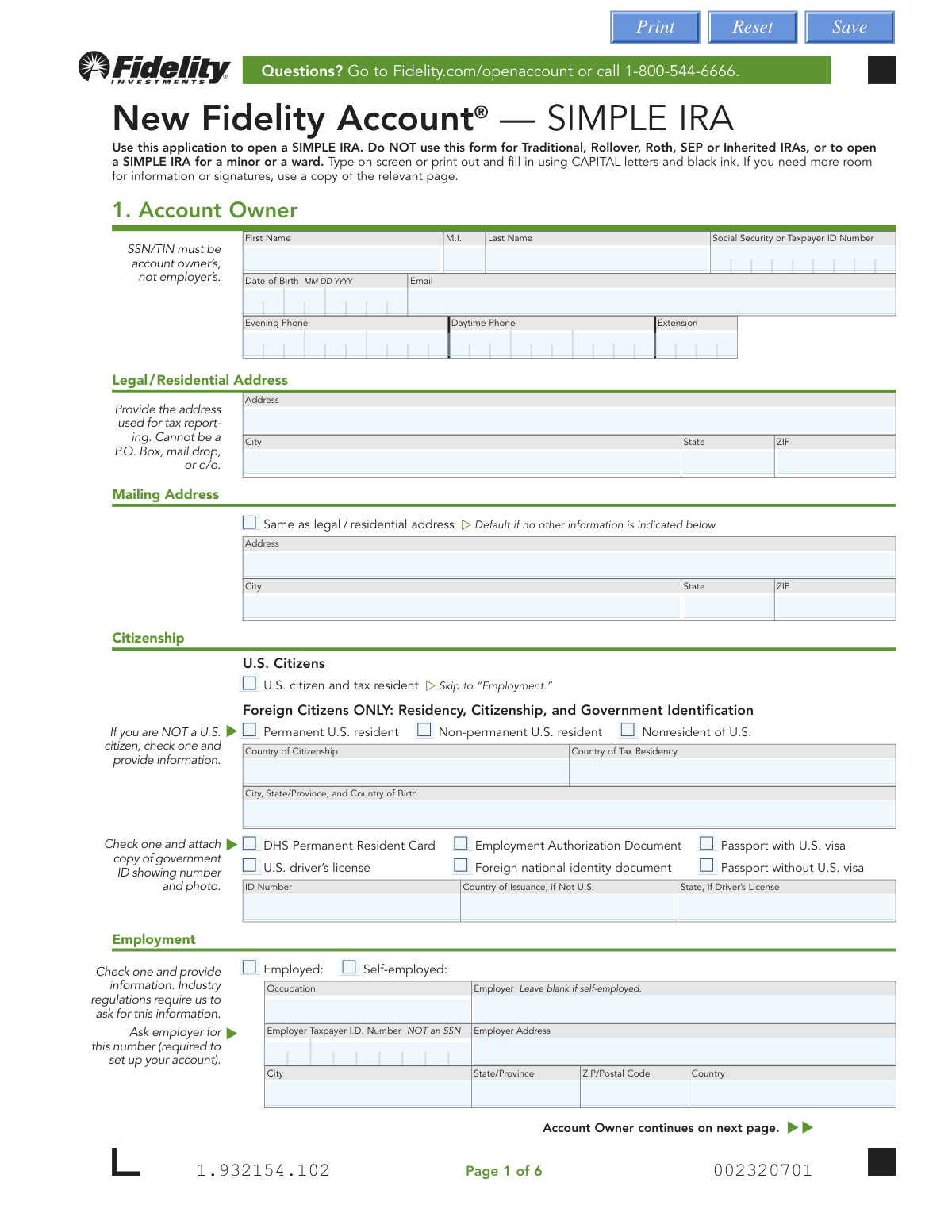
Yes! You can use AI to fill out New Fidelity Account® — SIMPLE IRA

The New Fidelity Account® — SIMPLE IRA form is an application for employees of small businesses to establish a tax-advantaged retirement savings account with Fidelity. This account allows both employee and employer contributions, making it a crucial tool for long-term financial planning and retirement security. Today, this form can be filled out quickly and accurately using AI-powered services like Instafill.ai, which can also convert non-fillable PDF versions into interactive fillable forms.
Our AI automatically handles information lookup, data retrieval, formatting, and form filling.
It takes less than a minute to fill out Fidelity SIMPLE IRA Application using our AI form filling.
Securely upload your data. Information is encrypted in transit and deleted immediately after the form is filled out.

Form specifications

Form name: New Fidelity Account® — SIMPLE IRA
Number of pages: 1
Language: English
Categories: IRA forms, Fidelity forms
main-image

Instafill Demo: How to fill out PDF forms in seconds with AI

How to Fill Out Fidelity SIMPLE IRA Application Online for Free in 2026

Are you looking to fill out a FIDELITY SIMPLE IRA APPLICATION form online quickly and accurately? Instafill.ai offers the #1 AI-powered PDF filling software of 2026, allowing you to complete your FIDELITY SIMPLE IRA APPLICATION form in just 37 seconds or less.
Follow these steps to fill out your FIDELITY SIMPLE IRA APPLICATION form online using Instafill.ai:
  1. 1 Navigate to Instafill.ai and upload the New Fidelity Account® — SIMPLE IRA application or select it from their template library.
  2. 2 Use the AI assistant to automatically fill in your personal details in Section 1, 'Account Owner,' including your name, address, Social Security Number, and employment information.
  3. 3 Complete your 'Financial Profile' in Section 2 by selecting your investment objective, annual income, net worth, and federal tax bracket.
  4. 4 Choose your 'Core Position' in Section 3 and specify your 'Contribution Allocation' in Section 4 to direct how your contributions will be invested.
  5. 5 Designate your 'Primary Beneficiaries' and 'Contingent Beneficiaries' in Section 6, providing their personal information and share percentages.
  6. 6 Carefully review all the information pre-filled and manually entered across the form to ensure accuracy and completeness.
  7. 7 Securely e-sign and date the application in Section 7 to finalize your Fidelity SIMPLE IRA account setup.

Our AI-powered system ensures each field is filled out correctly, reducing errors and saving you time.

Why Choose Instafill.ai for Your Fillable Fidelity SIMPLE IRA Application Form?

Speed

Complete your Fidelity SIMPLE IRA Application in as little as 37 seconds.

Up-to-Date

Always use the latest 2026 Fidelity SIMPLE IRA Application form version.

Cost-effective

No need to hire expensive lawyers.

Accuracy

Our AI performs 10 compliance checks to ensure your form is error-free.

Security

Your personal information is protected with bank-level encryption.

Frequently Asked Questions About Form Fidelity SIMPLE IRA Application

This form is an application to open a new Fidelity SIMPLE IRA, which is a type of retirement account for employees of small businesses. It should not be used for other types of IRAs like Traditional, Roth, or SEP IRAs.

You should fill out this form if your employer has established a Fidelity SIMPLE IRA Plan and you need to open your individual account to receive contributions. This form is for the employee, not the employer.

This is your employer's unique tax identification number, not your personal Social Security Number. It is required to link your account to your employer's plan, and you can get this number directly from your employer.

If you are not a U.S. citizen, you must complete the 'Foreign Citizens ONLY' portion of Section 1. You will also need to attach a copy of a valid government-issued ID, such as a passport or permanent resident card.

The Core Position is where uninvested cash in your account is held until you decide how to invest it. The form defaults to the Fidelity® Government Money Market Fund, but you can also select the FDIC-Insured Deposit Sweep Program.

No, Section 4 is optional. You only need to complete this section if you want your future contributions to be automatically invested into specific mutual funds as soon as they are deposited.

While naming a beneficiary is recommended, it is optional. If you leave this section blank, upon your death, the account assets will be paid out according to the rules of succession outlined in the Fidelity SIMPLE IRA Custodial Agreement.

Checking the 'per stirpes' box for a beneficiary means that if they pass away before you, their designated share of the account will be passed down to their direct descendants, such as their children.

Primary Beneficiaries are the first in line to receive your account assets. Contingent Beneficiaries will only inherit the assets if all of your Primary Beneficiaries have passed away before you.

After signing the form, you can mail the entire application and any required attachments to the address provided in Section 7. There are separate addresses for regular and overnight mail.

After Fidelity processes your application, you will receive a 'New Account Profile' in the mail confirming that your SIMPLE IRA has been successfully opened.

Yes, services like Instafill.ai use AI to accurately auto-fill form fields, which can save you time and help prevent common errors. These tools can extract information from your documents to populate the required fields quickly.

You can use a service like Instafill.ai to complete the form on your computer. Simply upload the PDF, and the platform will make it an interactive, fillable form that you can type into before printing for signature.

If your PDF is a flat scan and you can't type in it, a tool like Instafill.ai can help. It can convert non-fillable PDFs into interactive forms that you can easily complete online.

Compliance Fidelity SIMPLE IRA Application
Validation Checks by Instafill.ai

1
SSN Format and Ownership Verification
Checks that the Social Security Number (SSN) or Taxpayer ID Number (TIN) in Section 1 is a valid 9-digit number. It also flags submissions where the owner's SSN/TIN might be confused with the employer's TIN, as the form explicitly warns against this. This validation is critical for tax reporting and establishing the legal identity of the account owner, and failure would prevent account opening.
2
Legal Address Physical Location Check
Verifies that the Legal/Residential Address provided in Section 1 is a physical street address and not a P.O. Box, mail drop, or 'care of' (c/o) address. This is crucial for compliance with federal laws like the USA PATRIOT Act, which require financial institutions to verify a customer's physical location. An invalid address type will halt the application process until a valid physical address is provided.
3
Employer TIN Requirement for Employed Applicants
This check ensures that if the applicant selects 'Employed' in the Employment section, the 'Employer Taxpayer I.D. Number' field is completed with a valid 9-digit Employer Identification Number (EIN). The form states this number is required to set up the account. Failure to provide this number for an employed applicant will result in an incomplete application and prevent the account from being opened.
4
Foreign Citizen Information Completeness
This validation is triggered if the applicant does not check 'U.S. citizen.' It ensures that all required fields for foreign citizens, including residency status, country of citizenship, tax residency, and government identification details, are fully completed. This information is mandatory for regulatory compliance and tax purposes, and missing data will require the applicant to resubmit the information.
5
Financial Profile Selections Check
Confirms that the applicant has made exactly one selection in each of the four required categories under Section 2, 'Financial Profile': Investment Objective, Annual Income, Estimated Net Worth, and Estimated Liquid Net Worth. Industry regulations require firms to collect this information to understand the customer's financial situation and suitability. An incomplete profile will render the application invalid until all required selections are made.
6
Contribution Allocation Total Percentage
This check validates the 'Contribution Allocation' section in Section 4. If any funds are listed, it calculates the sum of all 'Share Percentage' fields and ensures the total is exactly 100%. This is vital to ensure that 100% of the employee's contributions are allocated as intended, preventing unallocated funds or processing errors. A total other than 100% will cause the allocation instruction to be rejected.
7
Minimum Contribution Allocation Percentage
This check works in conjunction with the total percentage check for 'Contribution Allocation'. It verifies that each individual fund allocation listed has a percentage of at least 10%, as specified by the form's instructions. An allocation below 10% would be invalid and would require the applicant to correct the percentages before the automatic investment instructions can be processed.
8
Beneficiary Designation Method Exclusivity
This validation ensures the applicant uses only one method for designating beneficiaries in Section 6. It checks that either the 'Copy Beneficiaries from Another Fidelity IRA Account' box is checked (and an account number is provided) OR the manual beneficiary sections are filled out, but not both. This prevents conflicting or ambiguous instructions for asset distribution upon the account owner's death.
9
Primary Beneficiary Share Total
If the applicant manually lists beneficiaries in the 'Primary Beneficiaries' section, this check confirms that the sum of all 'Share Percentage' values equals exactly 100%. This is critical to ensure the entire account value is distributed according to the owner's wishes without ambiguity. A total not equal to 100% will result in the beneficiary designation being rejected as invalid.
10
Contingent Beneficiary Share Total
Similar to the primary beneficiary check, this validation ensures that if any 'Contingent Beneficiaries' are listed, the sum of their 'Share Percentage' values equals exactly 100%. This guarantees a clear line of succession for the account assets if none of the primary beneficiaries are able to inherit. An incorrect total would make the contingent designation invalid.
11
No Overlap Between Primary and Contingent Beneficiaries
This logical check cross-references the names listed in the 'Primary Beneficiaries' and 'Contingent Beneficiaries' sections. It ensures that no individual or entity is designated in both categories. This is important because contingent beneficiaries only inherit if all primary beneficiaries predecease the account owner; listing the same entity in both roles creates a logical impossibility and an invalid designation.
12
Account Owner Age Verification
This check compares the 'Date of Birth' provided in Section 1 against the signature date in Section 7. It validates that the applicant is at least 18 years old, as affirmed in the signature block. This is a legal requirement for entering into the account agreement, and an applicant under 18 would be ineligible to open this type of account.
13
Employment Status Logic Check
This validation enforces the instruction in the 'Employment' section. If the 'Self-employed' checkbox is selected, it verifies that the 'Employer' name field is left blank. This ensures data integrity and prevents confusion between a self-employed individual's business name and a separate employer, which is important for correct account setup and reporting.
14
Mailing Address Completeness if Not Same as Legal
This check is triggered if the 'Same as legal / residential address' checkbox in Section 1 is left unchecked. It verifies that all fields for the separate Mailing Address (Address, City, State, ZIP) are fully completed. This is essential for ensuring the account owner receives important documents, such as statements and tax forms, at their preferred address.

Common Mistakes in Completing Fidelity SIMPLE IRA Application

Providing a P.O. Box for the Legal/Residential Address

Applicants often enter a P.O. Box in the 'Legal / Residential Address' field for convenience. However, federal regulations, such as the Patriot Act, require financial institutions to collect a physical street address for identity verification purposes. Using a P.O. Box will lead to the application being rejected, causing processing delays. To avoid this, you must enter your physical home address in this section and use the separate 'Mailing Address' section if you wish to receive mail at a P.O. Box.

Omitting or Guessing the Employer Taxpayer ID Number (TIN)

Since a SIMPLE IRA is an employer-sponsored plan, the Employer's Taxpayer Identification Number (TIN/EIN) is mandatory for Fidelity to link the employee's account to the correct employer plan. People often leave this blank because they don't know the number or can't find it easily. An missing or incorrect Employer TIN will prevent the account from being opened. Before filling out the form, contact your employer's HR or payroll department to obtain the correct number.

Using an Employer's ID Number in the Personal SSN Field

In Section 1, applicants sometimes mistakenly enter their employer's Taxpayer ID Number (TIN) instead of their own Social Security Number (SSN). This confusion can arise from focusing on the employment section of the form. This error will cause an immediate identity verification failure and halt the application process. It is crucial to ensure the 'Social Security or Taxpayer ID Number' field at the top of the form contains the account owner's personal SSN, not any number related to their employer.

Incorrectly Calculating Contribution Allocation Percentages

Section 4 allows applicants to automatically invest their contributions into various mutual funds, but the percentages must total exactly 100%. A common mistake is a simple math error, resulting in a total that is over or under 100%. If the percentages are incorrect, Fidelity cannot execute the investment instructions, and all contributions will be placed in the default core position, which may not align with the applicant's investment goals. Always double-check that the percentages add up to 100% before submitting.

Beneficiary Share Percentages Not Totaling 100%

Similar to the contribution allocation, the 'Share Percentage' for both Primary and Contingent beneficiaries in Section 6 must add up to 100% for each group. Applicants may miscalculate or forget to assign a percentage to one beneficiary. This ambiguity can cause significant delays and legal complications for heirs upon the account owner's death. To prevent this, ensure the shares for all primary beneficiaries total 100%, and separately, the shares for all contingent beneficiaries also total 100%.

Misunderstanding Primary vs. Contingent Beneficiaries

Applicants frequently list the same people in both the Primary and Contingent beneficiary sections, or list their secondary choices alongside their primary ones. Primary beneficiaries are the first in line to inherit assets, while contingent beneficiaries only inherit if all primary beneficiaries have predeceased the account owner. This mistake can lead to assets not being distributed according to the owner's true wishes. Carefully list only your first-choice heirs in the 'Primary Beneficiaries' section and your backup choices in the 'Contingent Beneficiaries' section.

Providing Incomplete Beneficiary Information

When naming individual beneficiaries, the form requires their full name, Social Security Number, and date of birth for proper identification. People often omit the SSN or DOB because they don't have the information readily available. Leaving this information incomplete can create major hurdles for your heirs, potentially requiring them to obtain court orders to claim the assets. It is essential to gather all required details for each beneficiary before completing this section to ensure a smooth transfer of assets.

Forgetting to Attach Required Government ID for Non-U.S. Citizens

For applicants who are not U.S. citizens, Section 1 requires them to check a box indicating their ID type and attach a copy of that government-issued identification. Forgetting to include this physical attachment is a very common reason for an incomplete application. This will immediately stop the account opening process until the required documentation is received. To avoid delays, make a clear, legible copy of your ID document and ensure it is securely attached to the application before mailing.

Skipping the Financial Profile and Investment Objective Sections

Applicants may feel that the questions in Section 2 about income, net worth, and investment objectives are optional or intrusive, and therefore skip them. However, these are regulatory 'Know Your Customer' (KYC) requirements that Fidelity must collect to assess investment suitability. An application with a blank financial profile cannot be approved. You must check one box in each category to complete the application and avoid rejection.

Forgetting to Sign and Date the Application

A missing signature is one of the most frequent and critical errors. An unsigned application is not legally binding and will be rejected immediately, forcing the applicant to complete and resubmit the entire form. This simple oversight happens when people are focused on filling out the details and forget the final step. Always perform a final check of the entire application, paying special attention to the signature and date fields on page 6.

Using Illegible Handwriting or Incorrect Ink Color

The instructions specify using CAPITAL letters and black ink, but people often use cursive or blue ink. Forms are frequently scanned by computers, and non-standard writing or ink can lead to data entry errors, delays, or even rejection if the information cannot be read accurately. The best way to prevent this is to type directly onto the form. Since this form is a non-fillable PDF, AI-powered tools like Instafill.ai can convert it into a fillable version and populate it with clear, typed text, eliminating handwriting issues.
Saved over 80 hours a year

“I was never sure if my IRS forms like W-9 were filled correctly. Now, I can complete the forms accurately without any external help.”

Kevin Martin Green

Your data stays secure with advanced protection from Instafill and our subprocessors

Robust compliance program

Transparent business model

You’re not the product. You always know where your data is and what it is processed for.

ISO 27001, HIPAA, and GDPR

Our subprocesses adhere to multiple compliance standards, including but not limited to ISO 27001, HIPAA, and GDPR.

Security & privacy by design

We consider security and privacy from the initial design phase of any new service or functionality. It’s not an afterthought, it’s built-in, including support for two-factor authentication (2FA) to further protect your account.

Fill out Fidelity SIMPLE IRA Application with Instafill.ai

Worried about filling PDFs wrong? Instafill securely fills new-fidelity-account-simple-ira forms, ensuring each field is accurate.