Yes! You can use AI to fill out New Jersey Judiciary Guardianship Report EZ Accounting Form
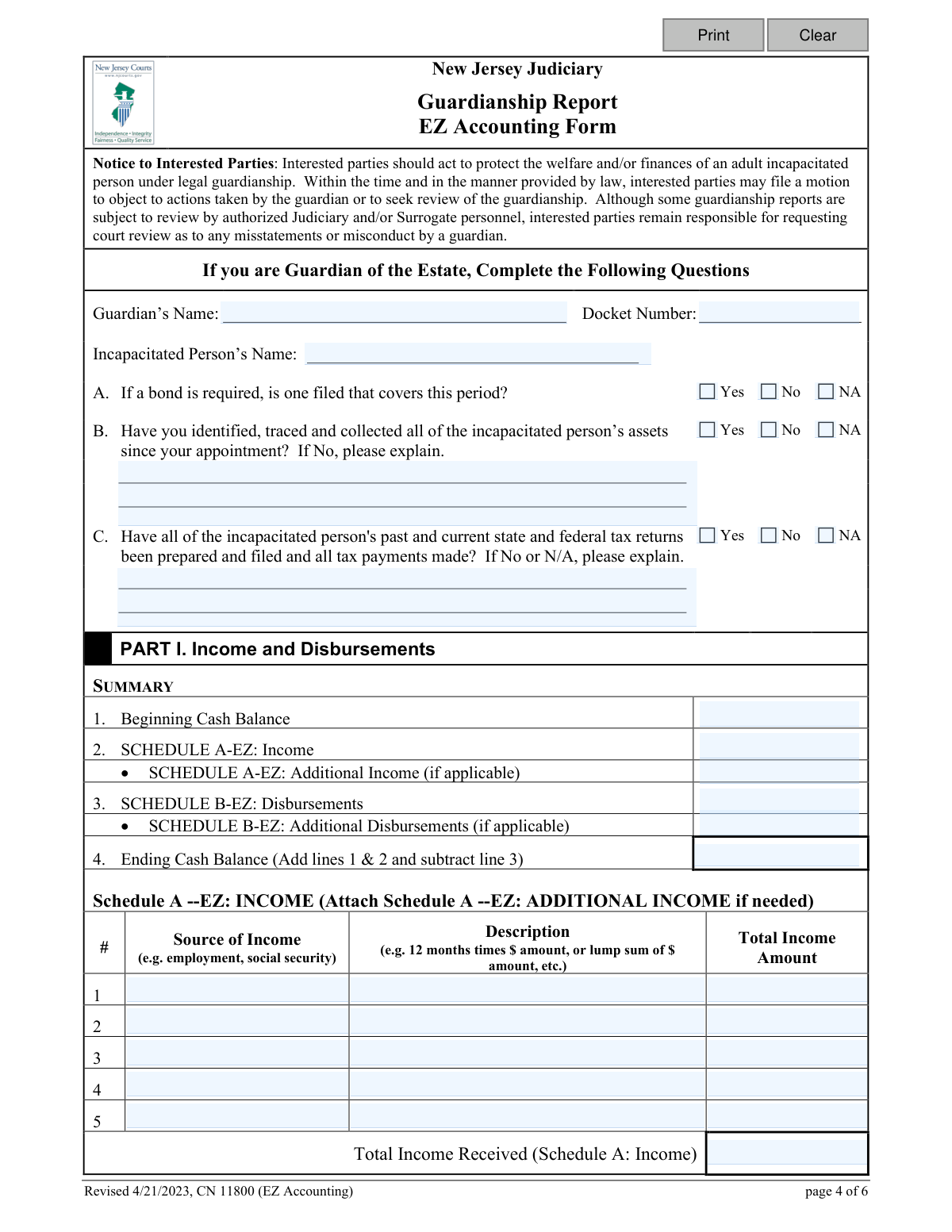
The New Jersey EZ Accounting Form is a simplified document for guardians to periodically report on the income, disbursements, and assets of an incapacitated person's estate as directed by a Judgment of Incapacity. It serves as a less complex alternative to the Comprehensive Accounting form, ensuring transparency and accountability in the management of the estate's finances. Today, this form can be filled out quickly and accurately using AI-powered services like Instafill.ai, which can also convert non-fillable PDF versions into interactive fillable forms.
CN 11800 (EZ Accounting) is part of the
New Jersey forms and new account forms categories on Instafill.
Our AI automatically handles information lookup, data retrieval, formatting, and form filling.
It takes less than a minute to fill out CN 11800 (EZ Accounting) using our AI form filling.
Securely upload your data. Information is encrypted in transit and deleted immediately after the form is filled out.
Form specifications
| Form name: | New Jersey Judiciary Guardianship Report EZ Accounting Form |
| Number of fields: | 90 |
| Number of pages: | 1 |
| Language: | English |
Instafill Demo: How to fill out PDF forms in seconds with AI
How to Fill Out CN 11800 (EZ Accounting) Online for Free in 2026
Are you looking to fill out a CN 11800 (EZ ACCOUNTING) form online quickly and accurately? Instafill.ai offers the #1 AI-powered PDF filling software of 2026, allowing you to complete your CN 11800 (EZ ACCOUNTING) form in just 37 seconds or less.
Follow these steps to fill out your CN 11800 (EZ ACCOUNTING) form online using Instafill.ai:
- 1 Navigate to Instafill.ai and upload or select the New Jersey Guardianship Report EZ Accounting Form.
- 2 Provide the guardian's name, the incapacitated person's name, and the court docket number in the designated fields.
- 3 Answer the initial questions regarding the surety bond, collection of assets, and status of tax filings for the incapacitated person.
- 4 Complete Part I by entering all income sources and disbursements for the reporting period; the AI will help summarize the totals and calculate the ending cash balance.
- 5 In Part II, report on all assets of the incapacitated person, such as real property, stocks, and bank accounts, indicating if there have been any changes since the last report.
- 6 Indicate if assistance is required from the court or an agency and add any optional information you wish to share about the guardianship.
- 7 Carefully review all the information populated by the AI for accuracy, then electronically sign the certification and download the completed form for filing.
Our AI-powered system ensures each field is filled out correctly, reducing errors and saving you time.
Why Choose Instafill.ai for Your Fillable CN 11800 (EZ Accounting) Form?
Speed
Complete your CN 11800 (EZ Accounting) in as little as 37 seconds.
Up-to-Date
Always use the latest 2026 CN 11800 (EZ Accounting) form version.
Cost-effective
No need to hire expensive lawyers.
Accuracy
Our AI performs 10 compliance checks to ensure your form is error-free.
Security
Your personal information is protected with bank-level encryption.
Frequently Asked Questions About Form CN 11800 (EZ Accounting)
This form is used by a guardian of the estate to report the financial affairs of an incapacitated person to the New Jersey Judiciary. It documents all income, disbursements, and assets over a specific reporting period to ensure proper financial management.
Guardians of the estate must file this form if their Judgment of Incapacity specifies using the 'Periodic EZ Accounting form'. If the judgment is unclear on which form to use, you can file this EZ form and await further direction from the court.
The EZ form is a simplified, three-page document for periodic reporting, while the Comprehensive form is more detailed. Your Judgment of Incapacity should state which of the two forms you are required to file.
In Item A of the form, which asks if a bond is filed, you should select 'N/A' for Not Applicable. You must still file the report by the specified deadline if the Judgment requires it.
For regular, recurring expenses, you can report the aggregate amount for the period. For example, you can list 'Cell Phone Plan (12 months)' as the category and show the total amount spent for the year (e.g., 12 x $29.99/month = $359.88).
Part I tracks the flow of money—income received and expenses paid—during the reporting period to calculate the ending cash balance. Part II is a list of all assets the person owns, such as real estate or bank accounts, and is used to report if ownership of those assets has changed since the last report.
In Schedule A – Real Property, simply check the 'N/A' (not applicable) box. You only need to provide an explanation in Part II if the ownership of an existing asset has changed during the reporting period.
If the person's income is too low to require filing tax returns, you should write a note explaining this on the form in the space provided under Item C.
If you run out of room, you can attach the 'SCHEDULE A – EZ: ADDITIONAL INCOME' or 'SCHEDULE B – EZ: ADDITIONAL DISBURSEMENTS' forms. These can be found by searching for 'Adult Guardianship' on the njcourts.gov website.
The deadline for filing your accounting report is specified in the Judgment of Incapacity you received from the court. It is your responsibility as guardian to file the report on time.
Your report is reviewed by the New Jersey Guardianship Monitoring Program. If any entries are unclear, you may be asked to provide further explanation or supporting documents.
Yes, services like Instafill.ai use AI to help you accurately auto-fill form fields. This can save you time and help reduce the chance of errors on complex forms.
You can use a service like Instafill.ai to complete the form on your computer. Simply upload the PDF to their platform, and their AI will help you fill in the required fields interactively before you print it for submission.
If you have a non-fillable or 'flat' PDF, you can use a service like Instafill.ai. It can convert the non-fillable PDF into an interactive, fillable form that you can easily complete online.
Compliance CN 11800 (EZ Accounting)
Validation Checks by Instafill.ai
1
Ending Balance Calculation Accuracy
Verifies that the 'Ending Cash Balance' in the SUMMARY section is correctly calculated by adding the 'Beginning Cash Balance' and all 'Income' totals, then subtracting all 'Disbursements' totals. This check is critical for ensuring the financial integrity and mathematical correctness of the entire report. If the calculation is incorrect, the form will be rejected for correction, as it indicates a fundamental error in the accounting.
2
Income Schedule to Summary Reconciliation
Ensures the 'Total Income Received' amount listed in the SUMMARY section (line 2) exactly matches the calculated sum of all income entries from 'Schedule A-EZ: INCOME' and any attached 'Additional Income' schedules. This validation prevents discrepancies between the detailed income list and the summary, ensuring a consistent and accurate report. A mismatch will require the user to correct the schedule entries or the summary total.
3
Disbursement Schedule to Summary Reconciliation
Validates that the 'Total All Disbursements' amount listed in the SUMMARY section (line 3) is identical to the calculated sum of all expenses from 'Schedule B-EZ: DISBURSEMENTS' and any attached 'Additional Disbursements' schedules. This is essential for accurate financial tracking and accountability. If the totals do not match, the submission will be flagged for review and correction.
4
Conditional Explanation for Uncollected Assets
Checks that if the user answers 'No' to question B ('Have you identified, traced and collected all of the incapacitated person’s assets...'), the corresponding explanation field is not empty. This is a mandatory follow-up required by the court to understand what assets are outstanding and what steps the guardian is taking. Failure to provide an explanation will block submission and prompt the user to detail the situation.
5
Conditional Explanation for Tax Filing Status
Verifies that if the user answers 'No' or 'N/A' to question C regarding the filing of tax returns, the explanation field is completed. The court requires justification for any delinquent or non-applicable tax situations to assess the guardian's diligence. An empty explanation field will result in a validation error, forcing the user to provide the necessary context.
6
Required Details for Asset Ownership Changes
For each asset category in Part II (Schedules A through E), this check confirms that if 'Yes' is selected to indicate a change in ownership, the corresponding details field is filled out. This is crucial for tracking the disposition of the incapacitated person's major assets, such as property sales. If 'Yes' is checked without an explanation, the form is considered incomplete.
7
Core Case Information Completeness
Ensures that the 'Guardian’s Name', 'Incapacitated Person’s Name', and 'Docket Number' fields are all populated. This information is fundamental for identifying the case and associating the report with the correct court file. A submission with missing core information cannot be processed and will be rejected.
8
Docket Number Format Validation
Checks if the 'Docket Number' field follows a standard format expected by the New Jersey Judiciary system. While the exact format isn't specified, this check would look for common patterns (e.g., specific prefixes, a certain number of digits) to catch obvious typos or incorrectly entered numbers. An invalid format could lead to filing errors, so the user would be prompted to review and correct the entry.
9
Income Entry Row Integrity
Validates that for each numbered row in 'Schedule A-EZ: INCOME', if any field (Source, Description, or Amount) is filled, all fields in that same row must be filled. This prevents incomplete or ambiguous income entries that would confuse reviewers. An incomplete row will trigger an error, requiring the user to either complete the row or clear it.
10
Disbursement Entry Row Integrity
Validates that for each numbered row in 'Schedule B-EZ: DISBURSEMENTS', if any field (Category, Date/Period, Payee, or Amount) is filled, all fields in that row must be completed. This ensures each expense is fully documented and auditable. The system will flag any partially filled rows and require the user to provide the missing information before submission.
11
Monetary Field Numeric Validation
Confirms that all fields intended for currency values (e.g., all 'Amount' fields, Beginning/Ending Balance) contain only valid numerical data, possibly formatted as currency. This prevents non-numeric characters from being entered, which would break calculations and make the report invalid. Any field with invalid characters will be highlighted for correction.
12
Certification Section Completion
Ensures that the guardian's name is inserted into the certification paragraph and that the 'Date' and 'Print Name' fields associated with the primary guardian's signature are filled. This is a legal requirement confirming the guardian attests to the accuracy of the report under penalty of law. The form cannot be considered legally submitted without this completed certification.
13
Conditional Assistance Details Requirement
Checks that if the user selects 'Yes' for the question 'Is information or assistance... required?', the corresponding text box for describing the needed assistance is filled out. This ensures that any request for help is clearly articulated so the court or relevant agencies can respond appropriately. A 'Yes' answer without a description will prompt the user to provide details.
14
Disbursement Date/Period Format
Validates that the 'Payment Date/Period' field in 'Schedule B-EZ: DISBURSEMENTS' contains a valid date or a recognized date range format (e.g., 'MM/DD/YYYY', 'Month YYYY', 'Month-Month YYYY'). This ensures that the timeframe for each disbursement is clear and properly recorded for review. An unrecognized format would trigger an error, asking the user to standardize the entry.
Common Mistakes in Completing CN 11800 (EZ Accounting)
Guardians often make simple arithmetic errors when calculating the Ending Cash Balance (Line 1 + Line 2 - Line 3). This creates an inconsistency in the financial summary that will be immediately flagged by reviewers, requiring correction and delaying the approval of the accounting. To prevent this, always use a calculator and double-check your math before finalizing the form. AI-powered form-filling tools like Instafill.ai can also prevent this by performing the calculations automatically.
A frequent error is listing proceeds from the sale of an asset, such as a house or car, in the Part I Income schedule. The form's instructions clearly separate Part I (recurring income and disbursements) from Part II (changes in capital assets). This mistake misrepresents the estate's financial activity and will require clarification. Asset sales and dispositions must be reported exclusively in Part II, under the appropriate asset schedule.
Filers often enter generic categories like 'Groceries' or 'Medical' in Schedule B-EZ without providing the required detail. The form requires a clear description, payment date or period, and payee for each disbursement to ensure transparency. This lack of specificity forces reviewers to request more information, delaying the process. Always itemize expenses or, for recurring costs, show the monthly breakdown as demonstrated in the instructions (e.g., '12 months x $225/month').
Questions B (asset collection) and C (tax filings) require a written explanation if the answer is 'No' or 'N/A'. Guardians frequently check the box but forget to provide the mandatory explanation in the space below. An incomplete response will cause the filing to be flagged for follow-up. Always provide a concise explanation to clarify the circumstances, such as why assets haven't been fully collected or why a tax return was not required.
The 'Beginning Cash Balance' on the summary page must exactly match the 'Ending Cash Balance' from the previous year's report to ensure accounting continuity. Guardians sometimes mistakenly enter the total value of all assets or an estimated figure, which immediately invalidates the report's financial summary. Always refer to your previously filed report to ensure this figure is accurate and consistent.
Guardians often confuse the purpose of Part I and Part II, for example by including the value of a house or car in the cash balance summary. Part I is strictly for cash flow (income received and money spent), while Part II is for listing the estate's capital assets and noting any changes in ownership. Mixing these sections creates a confusing and inaccurate report that will be returned for correction. Keep cash flow and asset inventories completely separate as instructed.
In Item C, guardians often answer 'No' if the current year's tax return is due soon but not yet filed, even if all prior-year taxes are settled. The instructions clarify that you can answer 'Yes' as long as no returns are delinquent at the time of filing. This misunderstanding creates an unnecessary red flag for reviewers, suggesting a compliance issue where none exists. Carefully read the instructions to understand the timing before answering.
In Part II, guardians must state whether the ownership of assets has changed since the last report. A common oversight is marking 'No' for all categories without reflecting a sale, transfer, or acquisition that occurred during the period. This creates an inaccurate inventory of the incapacitated person's property. You must carefully review each asset category and report any changes with a clear explanation as required.
This form is often a non-fillable PDF, leading many to print it and fill it out by hand. This frequently results in illegible entries, cramped descriptions, and calculation errors that can cause the report to be rejected. To ensure clarity and accuracy, it is better to use a digital solution. Tools like Instafill.ai can convert non-fillable PDFs into interactive forms, allowing you to type entries cleanly and avoid common mistakes.
A simple but critical mistake is submitting the form without signing and dating the certification on the final page. An unsigned report is legally invalid and will be immediately rejected by the court, forcing a complete resubmission. Before filing, always perform a final review to ensure the guardian and any co-guardians have signed and dated the form in the appropriate places.
Saved over 80 hours a year
“I was never sure if my IRS forms like W-9 were filled correctly. Now, I can complete the forms accurately without any external help.”
Kevin Martin Green
Your data stays secure with advanced protection from Instafill and our subprocessors

Robust compliance program
Transparent business model
You’re not the product. You always know where your data is and what it is processed for.
ISO 27001, HIPAA, and GDPR
Our subprocesses adhere to multiple compliance standards, including but not limited to ISO 27001, HIPAA, and GDPR.
Security & privacy by design
We consider security and privacy from the initial design phase of any new service or functionality. It’s not an afterthought, it’s built-in, including support for two-factor authentication (2FA) to further protect your account.
Fill out CN 11800 (EZ Accounting) with Instafill.ai
Worried about filling PDFs wrong? Instafill securely fills new-jersey-judiciary-guardianship-report-ez-accounting-form forms, ensuring each field is accurate.