Yes! You can use AI to fill out Adult Guardianship - EZ-Accounting Form - Additional pages
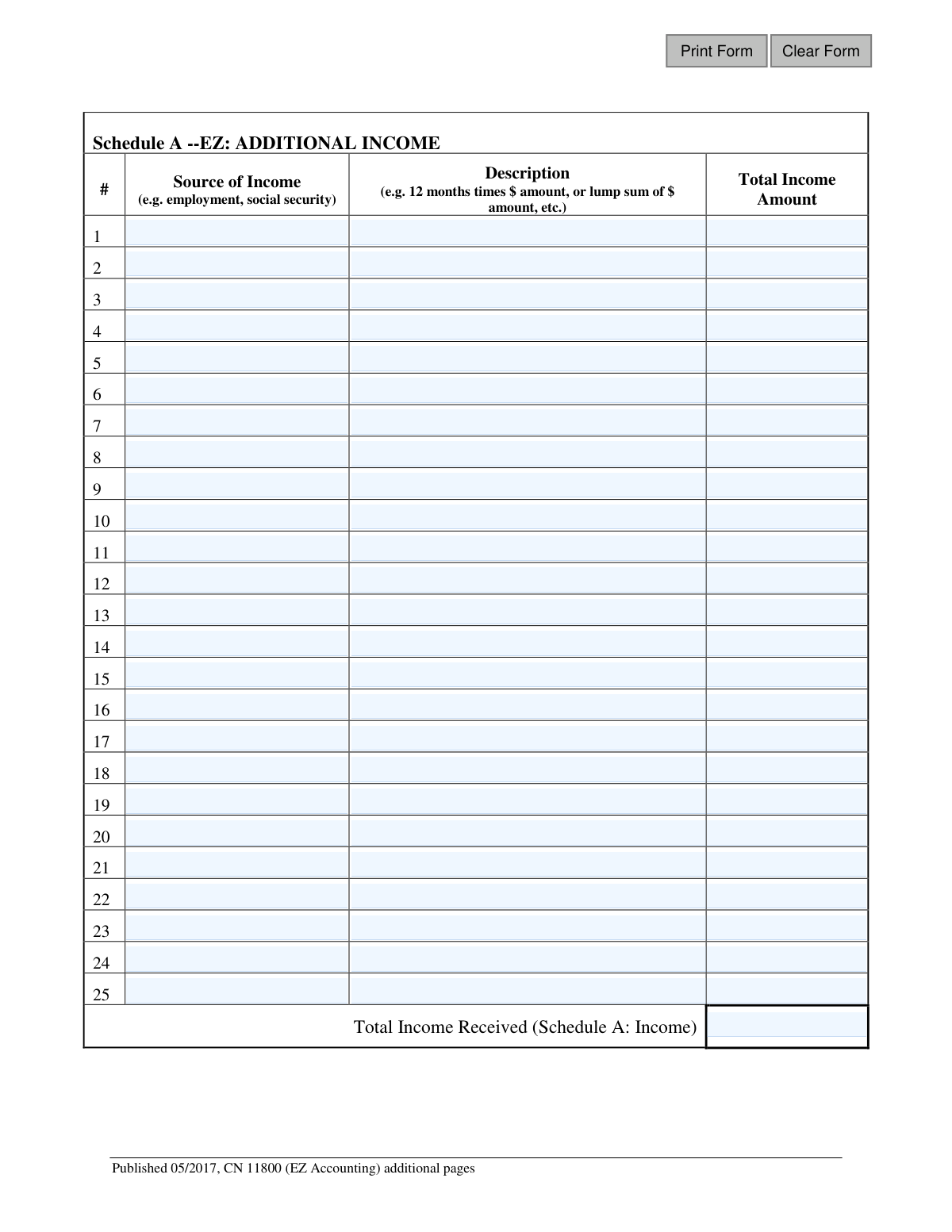
Form CN 11800 is a supplementary document for the Adult Guardianship EZ-Accounting Form, used when a guardian needs more space to detail financial activities. It includes Schedule A-EZ for listing additional income and Schedule B-EZ for itemizing extra disbursements on behalf of the incapacitated person. Today, this form can be filled out quickly and accurately using AI-powered services like Instafill.ai, which can also convert non-fillable PDF versions into interactive fillable forms.
Our AI automatically handles information lookup, data retrieval, formatting, and form filling.
It takes less than a minute to fill out CN 11800 using our AI form filling.
Securely upload your data. Information is encrypted in transit and deleted immediately after the form is filled out.
Form specifications
| Form name: | Adult Guardianship - EZ-Accounting Form - Additional pages |
| Number of fields: | 179 |
| Number of pages: | 1 |
| Language: | English |
Instafill Demo: How to fill out PDF forms in seconds with AI
How to Fill Out CN 11800 Online for Free in 2026
Are you looking to fill out a CN 11800 form online quickly and accurately? Instafill.ai offers the #1 AI-powered PDF filling software of 2026, allowing you to complete your CN 11800 form in just 37 seconds or less.
Follow these steps to fill out your CN 11800 form online using Instafill.ai:
- 1 Navigate to Instafill.ai and upload or select the 'Adult Guardianship - EZ-Accounting Form - Additional pages' (CN 11800).
- 2 In Schedule A-EZ, provide the source, description, and total amount for each additional item of income received for the adult under guardianship.
- 3 In Schedule B-EZ, list all additional disbursements, detailing the category, payment date or period, the payee, and the amount spent.
- 4 Allow the AI tool to automatically calculate the 'Total Income Received' on Schedule A-EZ and the 'Total All Disbursements' on Schedule B-EZ.
- 5 Thoroughly review all the information entered on both schedules to ensure it is accurate and corresponds with your financial records.
- 6 Download, print, or electronically submit the completed additional pages along with your main EZ-Accounting Form as required by the court.
Our AI-powered system ensures each field is filled out correctly, reducing errors and saving you time.
Why Choose Instafill.ai for Your Fillable CN 11800 Form?
Speed
Complete your CN 11800 in as little as 37 seconds.
Up-to-Date
Always use the latest 2026 CN 11800 form version.
Cost-effective
No need to hire expensive lawyers.
Accuracy
Our AI performs 10 compliance checks to ensure your form is error-free.
Security
Your personal information is protected with bank-level encryption.
Frequently Asked Questions About Form CN 11800
This form, CN 11800, provides extra space for guardians to list additional income (Schedule A) and expenses (Schedule B) when they run out of room on the main Adult Guardianship EZ-Accounting form.
No, you only need to use these additional pages if the number of income sources or disbursements you need to report exceeds the space available on the primary EZ-Accounting form.
For each income item, you must specify the source (e.g., Social Security), provide a description of how the total was calculated (e.g., '12 months x $500'), and enter the final amount.
You must list the expense category, the date or period of the payment, the name of the person or company you paid (Payee), and the exact amount spent for each disbursement.
If you need more space than the 25 lines provided on this form, you can print and attach another copy of these 'Additional pages'. Be sure to number your pages clearly for the court.
These pages are a supplement and should be attached directly to your main Adult Guardianship EZ-Accounting form. Submit them together as a single package to the appropriate court.
While this form is for listing items, you should always keep supporting documents like receipts and bank statements for all reported income and expenses, as the court may require them for verification.
The Payee is the individual, store, or company that received the payment. For example, if you paid a utility bill, the Payee would be the utility company's name.
You must add up all the individual amounts listed in the 'Total Income Amount' column for Schedule A and the 'Amount Spent' column for Schedule B. Enter these sums in their respective total fields.
Yes, services like Instafill.ai use AI to help you accurately auto-fill form fields from your saved data, which can save significant time and help prevent errors.
Upload the PDF to the Instafill.ai platform. The AI will make the fields fillable, allowing you to type your information, save your progress, and reuse your data for future filings.
If you have a non-fillable or 'flat' PDF, you can use a tool like Instafill.ai to convert it into an interactive, fillable form. This allows you to easily type your information directly into the fields.
Compliance CN 11800
Validation Checks by Instafill.ai
1
Validates Income Amount Format
This check ensures that each 'Total Income Amount' field (ttl1, ttl2, etc.) contains a valid positive numeric or currency value. This is critical for ensuring that all financial data can be accurately summed and processed. If a non-numeric value is entered, the system will reject the input and prompt the user to enter a valid number.
2
Validates Disbursement Amount Format
This check verifies that each 'Amount Spent' field (bEzAmtAddtl1, bEzAmtAddtl2, etc.) is a valid positive numeric or currency value. Correct formatting is essential for the accurate accounting of all expenditures. A validation failure will prevent submission and require the user to correct the entry to a proper numerical value.
3
Validates Disbursement Payment Date Format
This validation ensures that each 'Payment Date/Period' field (bEzPayDtAddtl1, bEzPayDtAddtl2, etc.) contains a valid date, such as in MM/DD/YYYY format, or a recognizable date period. Accurate date tracking is essential for auditing and verifying when funds were spent. An invalid format will trigger an error, prompting the user to correct the date entry.
4
Ensures Completeness of Income Rows
This check verifies that if an amount is entered in a 'Total Income Amount' field (e.g., ttl1), the corresponding 'Source of Income' field (income1) is also filled out. An income amount without a specified source is incomplete information that hinders proper accounting. A validation failure would highlight the incomplete row and require the user to provide the source of the income.
5
Ensures Completeness of Disbursement Rows
This validation confirms that if an amount is entered in an 'Amount Spent' field (e.g., bEzAmtAddtl1), the corresponding 'Payment Date/Period' (bEzPayDtAddtl1) and 'Payee' (bEzPayeeAddtl1) fields are also completed. Missing payee or date information makes the disbursement record incomplete and unauditable. The system should prevent submission until all required fields in an active row are filled.
6
Verifies Schedule A Total Income Calculation
This check automatically calculates the sum of all individual 'Total Income Amount' fields (ttl1 through ttl25) and compares it to the value entered in the 'Total Income Received' field (schedATtl). This ensures mathematical accuracy across the schedule. If the totals do not match, an error is displayed, indicating a calculation mistake that must be rectified.
7
Verifies Schedule B Total Disbursement Calculation
This validation calculates the sum of all individual 'Amount Spent' fields (bEzAmtAddtl1 through bEzAmtAddtl25) and compares it to the 'Total All Disbursements' field. This is a critical check for financial accuracy in the accounting report. A mismatch would indicate a data entry or calculation error, requiring the user to review and correct the disbursement amounts.
8
Prohibits Negative Income Values
This rule ensures that all values entered in the 'Total Income Amount' fields are zero or greater. Negative income is not a valid concept in this accounting context and would indicate a significant data entry error. The system should reject any negative values and prompt the user for a correction.
9
Prohibits Negative Disbursement Values
This validation checks that all values entered in the 'Amount Spent' fields are positive numbers. A negative disbursement is illogical and would corrupt the financial summary. If a negative value is entered, the system should flag it as an error and require a positive value for the expenditure.
10
Validates Income Source Field Content
This check ensures that the 'Source of Income' fields (income1, income2, etc.) contain meaningful text and are not empty when the corresponding row is used. This is important for clarity and legal review of the adult's financial situation. A validation failure would prompt the user to provide a clear and descriptive source for the income.
11
Validates Disbursement Payee Field Content
This validation verifies that the 'Payee' fields (bEzPayeeAddtl1, bEzPayeeAddtl2, etc.) contain a valid name for a person or organization. An empty or nonsensical payee name makes it impossible to verify the legitimacy of a disbursement. The system should require a clear payee name for every recorded disbursement.
12
Ensures Income Description is Provided
This check verifies that if an income source and amount are provided, the 'Description' field (descript1, descript2, etc.) is also filled out. The description provides vital context for the income, such as 'lump sum' or 'monthly payment'. A missing description for a completed income entry would trigger a warning or error.
13
Ensures Disbursement Category is Specified
This check ensures that for any completed disbursement row, the 'Category' field (bEzCatAddtl1, bEzCatAddtl2, etc.) is not empty. Categorizing spending is fundamental to financial accounting and helps in analyzing the ward's expenses. A failure would require the user to select or enter a category for the expense before submission.
Common Mistakes in Completing CN 11800
On Schedule A, filers often use generic terms like 'monthly check' or 'government payment' instead of the specific source. The court requires precise information to verify the origin of all funds. This ambiguity can lead to the accounting being questioned or rejected, causing significant delays. To avoid this, always list the full, official name of the entity providing the income, such as 'Social Security Administration' or 'XYZ Corporation Pension Plan'.
The 'Description' column in Schedule A is frequently misused or left blank. It is intended to show how the total income amount was derived (e.g., '12 months x $500/month' or 'One-time inheritance'). Simply repeating the total amount fails to provide the necessary context for the court. An incomplete description can trigger a request for more information, delaying the approval of your accounting. Always follow the form's example to clearly explain the nature of each income item.
Manually adding a long list of income or expenses is highly prone to simple arithmetic errors. An incorrect total for 'Total Income Received' or 'Total All Disbursements' will cause the entire accounting to be unbalanced and will be immediately rejected by the court. This requires the guardian to find the error, correct the form, and resubmit everything. To prevent this, use a calculator and double-check all totals, or use an AI-powered tool like Instafill.ai which can perform these calculations automatically to ensure accuracy.
In Schedule B, guardians may categorize expenses with vague terms like 'household,' 'supplies,' or 'miscellaneous.' These categories are too broad for a legal accounting, as they don't provide enough detail for the court to determine if the expenses were appropriate and for the sole benefit of the ward. This lack of specificity is a major red flag and will likely result in the form being rejected. Always use precise categories such as 'Groceries,' 'Rent,' 'Electricity Bill,' or 'Medical Co-pay'.
A common mistake in Schedule B is listing the payee as 'Cash,' 'ATM Withdrawal,' or 'Store.' The court needs to know exactly who received the funds to verify the legitimacy of the transaction. Frequent or large cash withdrawals are especially scrutinized and may require detailed receipts. Always list the specific name of the person or business, such as 'CVS Pharmacy,' 'Dr. Jane Smith,' or 'Safeway'.
For disbursements, filers often enter inconsistent date formats (e.g., mixing MM/DD/YY and Month-Day-Year) or provide vague periods like 'February.' This makes it difficult for the court to audit the expenses chronologically against bank statements. An unclear timeline can lead to questions and delays. Always use a consistent, full date format (e.g., MM/DD/YYYY) for each transaction.
Filers may enter monetary values with dollar signs, commas, or other non-numeric characters, which can cause data entry or calculation errors. Conversely, omitting decimal points for cents (e.g., writing '1500' instead of '1500.00') can lead to ambiguity and calculation mistakes. To ensure clarity and accuracy, enter only numbers and a decimal point, and be consistent with using two decimal places for all amounts. AI form-fillers like Instafill.ai can help by automatically formatting these fields correctly.
Each line item for both income and disbursements must be complete. It is a frequent error to leave a column blank, such as listing a disbursement amount and payee but forgetting the date or category. An incomplete entry is considered invalid as it cannot be properly audited by the court. Before submitting, meticulously review every row to ensure all corresponding columns are filled out for each transaction.
Guardians, especially those unfamiliar with accounting, sometimes enter expenses on the income schedule (Schedule A) or income on the disbursement schedule (Schedule B). For example, a medical insurance reimbursement might be incorrectly listed as a negative expense instead of income. This fundamental error breaks the accounting logic and will result in an immediate rejection of the form. Double-check that all money received is on Schedule A and all money spent is on Schedule B.
This form is a non-fillable PDF, which means many people will print it and fill it out by hand. Illegible handwriting, especially with names and numbers, is a primary reason for rejection by court clerks, as they cannot accurately process the information. This forces the filer to start over, wasting significant time. To prevent this, either write very clearly in block letters with black ink or use a service like Instafill.ai, which can convert the PDF into a fillable version so you can type your entries for perfect legibility.
Saved over 80 hours a year
“I was never sure if my IRS forms like W-9 were filled correctly. Now, I can complete the forms accurately without any external help.”
Kevin Martin Green
Your data stays secure with advanced protection from Instafill and our subprocessors

Robust compliance program
Transparent business model
You’re not the product. You always know where your data is and what it is processed for.
ISO 27001, HIPAA, and GDPR
Our subprocesses adhere to multiple compliance standards, including but not limited to ISO 27001, HIPAA, and GDPR.
Security & privacy by design
We consider security and privacy from the initial design phase of any new service or functionality. It’s not an afterthought, it’s built-in, including support for two-factor authentication (2FA) to further protect your account.
Fill out CN 11800 with Instafill.ai
Worried about filling PDFs wrong? Instafill securely fills adult-guardianship-ez-accounting-form-additional-pages forms, ensuring each field is accurate.