
Yes! You can use AI to fill out Form CH-800, Receipt for Firearms, Firearm Parts, and Ammunition (Civil Harassment Prevention)
Don't type 122 fields by hand. Tell our AI about yourself, or upload a document you already have, and it fills every field in seconds. You check it, then download, print or sign.
The AI does the filling. You just check it.
No typing into boxes, nothing to install.
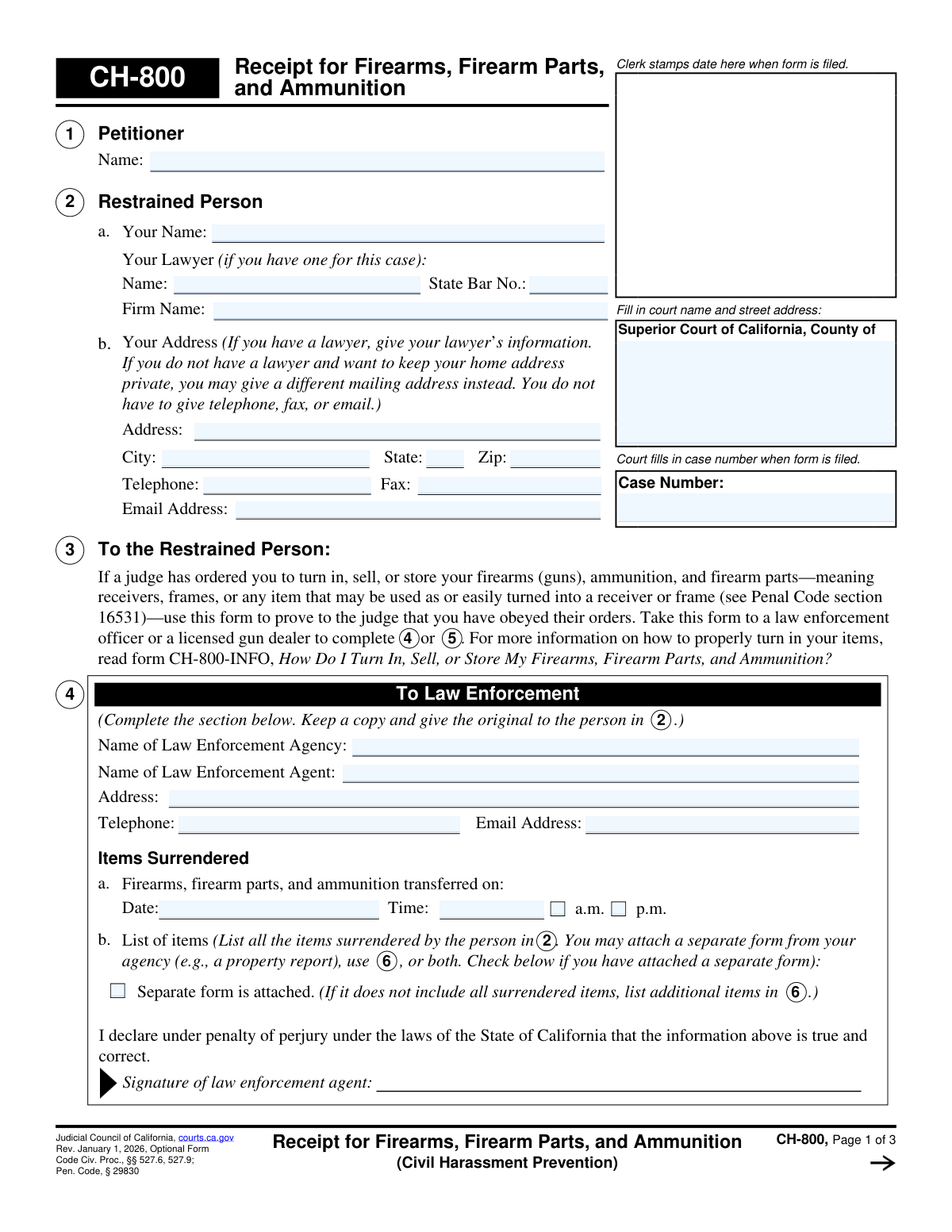
What this form asks for
The AI fills all of it, from your answers or your documents.
The AI checks your answers before you download
12 checks built for this form, so a wrong date or a missing answer is caught before anyone else sees it.
This validation ensures that either Section 4 (To Law Enforcement) or Section 5 (To Licensed Gun Dealer) is completed, but not both. The form is designed to document a single transaction with one type of entity. If both sections are filled, it creates ambiguity about the receipt's origin and validity, and the form should be rejected for clarification.
If any field in Section 4 is filled, this check verifies that the Name of Law Enforcement Agency, Name of Agent, and the transfer Date/Time are all present. An incomplete receipt from law enforcement is not legally sufficient proof of surrender. Failure to provide this complete information renders the receipt invalid for court purposes.
If Section 5 is chosen, this check mandates the completion of the Dealer's Name, License Number, and the transfer Date/Time. The license number is critical for verifying the dealer's authority to receive firearms. An omission of these details would make it impossible for the court to confirm the legitimacy of the transaction.
This validation confirms that if the 'Separate form is attached' checkbox in Section 4 or 5 is not checked, then at least one item must be detailed in the tables in Section 6. The primary purpose of this form is to create a receipt for specific items. A form with no items listed and no attachment indicated fails to fulfill its basic function.
For each row in the 'Firearms and firearm parts' table in Section 6 that contains any data, this check ensures that the Make, Model, and at least one disposition status (Stored, To be destroyed, or Sold) are selected. This prevents partial or ambiguous entries for surrendered firearms. An incomplete row would raise questions about the item's identity and what happened to it.
For each row in the 'Ammunition' table in Section 6 that is used, this validation ensures the Brand, Type, Amount, and a disposition status (Sold, Stored, or To be destroyed) are all provided. This provides a complete and unambiguous record for any ammunition surrendered. Missing information would weaken the proof of compliance with the court's order.
And 6 more checks
- Mandatory Declaration on Other Firearms
- Conditional Explanation for Other Firearms
- Conditional Date for Prior Filing
- Case Number Consistency Across Pages
- Valid State Bar Number Format
- Signature Date Validation
Let AI fill out your CH-800
No typing. Every field filled in seconds, checked, ready to sign.
How to Fill Out CH-800 Online for Free in 2026
What the AI walks you through.
- Navigate to Instafill.ai and upload or select Form CH-800.
- Use the AI assistant to accurately fill in your personal information, the petitioner's name, and the court case details in sections 1 and 2.
- Take the partially completed form to a law enforcement agency or a licensed gun dealer when you surrender, sell, or store your firearms.
- Have the law enforcement agent or licensed gun dealer complete their designated section (Section 4 or 5), detailing the items received and providing their signature.
- Complete Section 7 on the final page, declaring whether you possess any other firearms and providing your signature and the date.
- Review the entire document for accuracy, ensuring all required sections are completed by the appropriate parties.
- Download, print the original and two copies, and file them with the court clerk to officially record your compliance.
Common Mistakes in Completing CH-800
The ones the AI is built to catch.
Incorrectly Identifying the Petitioner and Restrained Person
Submitting an Incomplete Receipt from an Official
Failing to Itemize All Surrendered Items in Section 6
Entering Inaccurate Firearm Serial Numbers or Details
Omitting the Case Number on Subsequent Pages
Misinterpreting the Declaration About Other Firearms in Section 7
Forgetting the Restrained Person's Signature and Date
Disclosing a Private Home Address Unnecessarily
Neglecting to Specify Item Disposition in Section 6
Improperly Using or Forgetting Attachments
Frequently Asked Questions About CH-800
Is it really free for 7 days?
Can I fill other forms too?
How do I cancel?
How does the AI fill out CH-800?
What happens to my information?
How complex is CH-800 to fill out?
What is the purpose of Form CH-800?
Who needs to fill out this form?
Who completes Section 4 versus Section 5?
What do I do after the gun dealer or law enforcement officer signs the form?
What information do I need to list in Section 6?
What if I have more firearms to list than there is space on the form?
What am I declaring in Section 7?
What happens if I don't file this form after surrendering my firearms?
Where do I submit the completed Form CH-800?
Can I keep my home address private on this form?
Can AI tools help me fill out this form?
How can I fill out Form CH-800 online?
The PDF version of this form I found isn't fillable. What can I do?
Get your CH-800 filled out by AI
$0 today. Cancel before Nov 1 and you pay nothing.
Other forms like this one
California court forms: Judicial Council of California Form SC-105, Request for Court Order and Answer (Small Claims), Judicial Council of California Form SC-120, Defendant’s Claim and ORDER to Go to Small Claims Court (Small Claims), Judicial Council of California Form SER-001, Request for Sheriff to Serve Court Papers, Judicial Council of California Form SER-001, Request for Sheriff to Serve Court Papers, Affidavit for Collection of Personal Property California Probate Code Section 13100, Form POS-040, Proof of Service—Civil, Declaration of Facts of Death (California Superior Court), declaration-of-marriage-for-court-proceeding-california-family-law, ADOPT-200, Adoption Request, ADOPT-200, Stepparent Adoption Request, ADOPT-210, Adoption Agreement, ADOPT-310, Contact After Adoption Agreement, Judicial Council of California Form ADOPT-200, Adoption Request, Form ADR-107, Mediation Attendance Sheet, Form ADR-110, Order Appointing Referee, Form ADR-109, Stipulation or Motion for Order Appointing Referee, Form ADR-102, Request for Trial De Novo After Judicial Arbitration, Form ADR-108, Referee's Report (Code Civ. Proc., §§ 638, 639), Form ADR-106, Petition to Confirm, Correct, or Vacate Contractual Arbitration Award, Form ADR-104, Rejection of Award and Request for Trial After Attorney-Client Fee Arbitration
civil court forms: Petition for Leave to Proceed In Forma Pauperis (Court of Common Pleas of Lehigh County, Pennsylvania, Civil Division), Designation of Record on Appeal (Civil) (Maricopa County Justice Courts, Arizona) (Form APP 8150-702), Certificate of Service (Civil Court Claim), Pfändungs- und Überweisungsbeschluss (Garnishment and Transfer Order) – German Civil Enforcement Court Form, AOPC 308A, Civil Complaint, Form MC 03, Answer, Civil, Form POS-040, Proof of Service—Civil, ONTARIO Form 8: Application (General), Form ATJ 601.9, Application for Waiver of Court Fees (Civil), Nevada Justice / Municipal Civil Court Cover Sheet, Form MC 01, Summons, Form MC 10, Judgment, Civil, Form MC 99, Motion and Affidavit to Set Aside Default (Civil), Form MC 281a, Civil Mediator Application, Ex Parte Motion and Order to Renew Civil Judgment, AO 88B, Subpoena to Produce Documents, Information, or Objects or to Permit Inspection of Premises in a Civil Action, Form APP-031A, Application for Extension of Time to File Brief (Civil Case), Civil Appeal Case Information Statement, Form APP-014, Appellant's Proposed Statement on Appeal (Unlimited Civil Case), form-app-015-respondents-proposed-corrections-toadditions-to-appellants-proposed-settled-statement-unlimited-civil-case
Let AI fill out your CH-800
Your trial starts once a card is added. You pay nothing before Nov 1.
Our AI already knows this form, all 122 fields of it. Skip the typing: tell it about yourself, or upload what you have, and it fills the whole form in seconds.
- AI fills every field on all 3 pages, checkboxes included
- No typing into boxes: answer a few questions, or upload a document you already have, an old copy of this form, a photo of a document
- The AI checks the answers; you review and change anything before you download
- Download the finished PDF, print it, or sign it online
- Encrypted, and never used to train AI
Cancel before Nov 1 and you pay nothing.
A card is needed to start the trial. Cancel in two clicks from your account.
Terms · Privacy