Yes! You can use AI to fill out Form CH-830, Noncompliance With Firearms, Firearm Parts, and Ammunition Order (Civil Harassment Prevention)

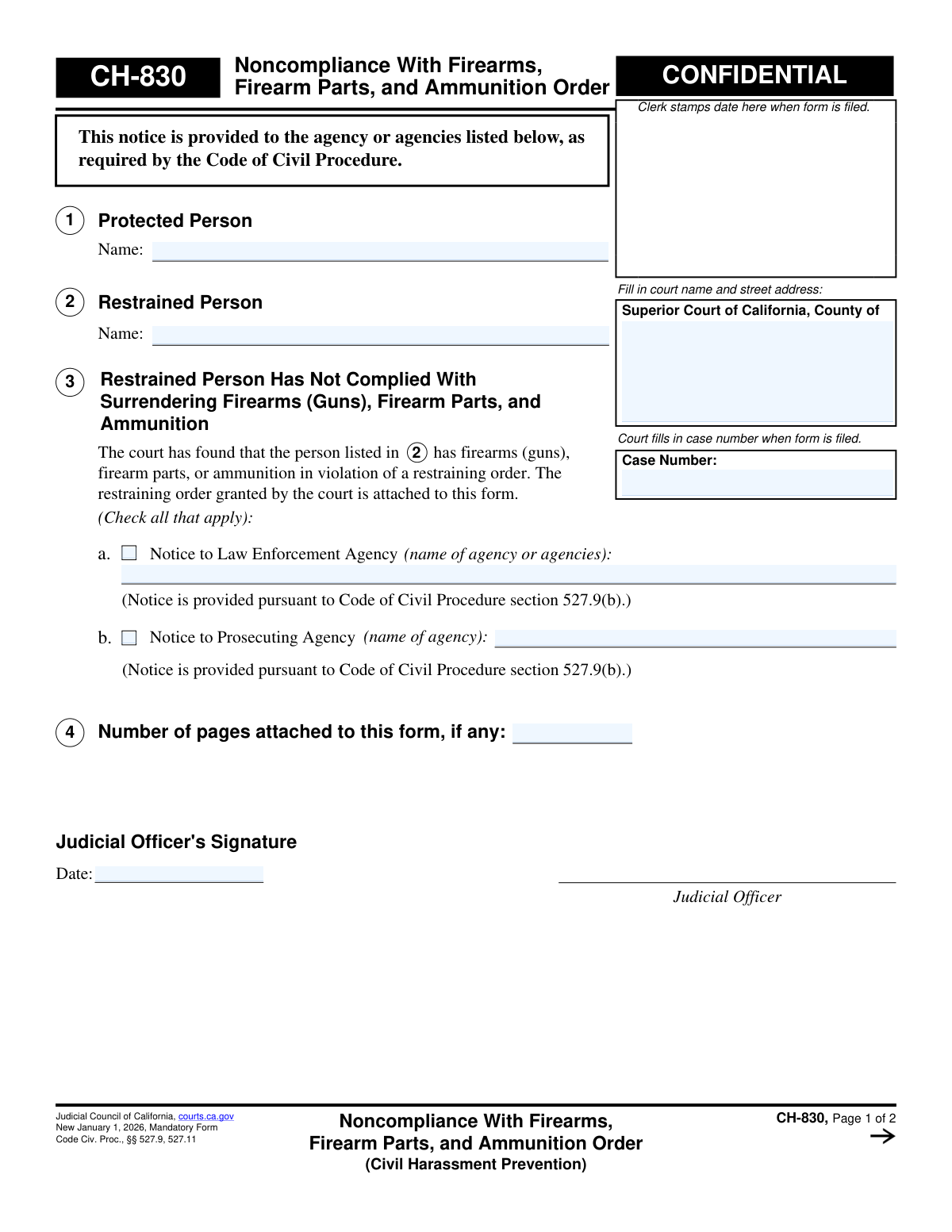
Form CH-830, Noncompliance With Firearms, Firearm Parts, and Ammunition Order, is a confidential notice used by the Superior Court of California. It officially informs law enforcement and prosecuting agencies when a person under a civil harassment restraining order has failed to surrender their firearms, parts, or ammunition as mandated by the court. This form is a critical tool for enforcing court orders and protecting individuals from potential harm. Today, this form can be filled out quickly and accurately using AI-powered services like Instafill.ai, which can also convert non-fillable PDF versions into interactive fillable forms.
CH-830 is part of the California court forms and civil court forms categories on Instafill.
Our AI automatically handles information lookup, data retrieval, formatting, and form filling.
It takes less than a minute to fill out CH-830 using our AI form filling.
Securely upload your data. Information is encrypted in transit and deleted immediately after the form is filled out.

Form specifications

Form name: Form CH-830, Noncompliance With Firearms, Firearm Parts, and Ammunition Order (Civil Harassment Prevention)
Number of fields: 26
Number of pages: 1
Language: English
main-image

Instafill Demo: How to fill out PDF forms in seconds with AI

How to Fill Out CH-830 Online for Free in 2026

Are you looking to fill out a CH-830 form online quickly and accurately? Instafill.ai offers the #1 AI-powered PDF filling software of 2026, allowing you to complete your CH-830 form in just 37 seconds or less.
Follow these steps to fill out your CH-830 form online using Instafill.ai:
  1. 1 Navigate to Instafill.ai and upload or select the CH-830 form.
  2. 2 Use the AI assistant to input the court information and case number into the designated fields.
  3. 3 Enter the full names of the protected person and the restrained person as specified in the court order.
  4. 4 Check the appropriate boxes and list the names of the law enforcement and/or prosecuting agencies to be notified.
  5. 5 Present the form to the judicial officer for review, signature, and dating to validate the notice.
  6. 6 The court clerk will then complete the 'Clerk's Certificate' section, detailing how and when the notice was sent to the relevant agencies.
  7. 7 Securely download, print, or share the completed and certified CH-830 form as required for official records.

Our AI-powered system ensures each field is filled out correctly, reducing errors and saving you time.

Why Choose Instafill.ai for Your Fillable CH-830 Form?

Speed

Complete your CH-830 in as little as 37 seconds.

Up-to-Date

Always use the latest 2026 CH-830 form version.

Cost-effective

No need to hire expensive lawyers.

Accuracy

Our AI performs 10 compliance checks to ensure your form is error-free.

Security

Your personal information is protected with bank-level encryption.

Frequently Asked Questions About Form CH-830

Form CH-830 is a court document used to officially notify law enforcement and prosecuting agencies that a person under a civil harassment restraining order has failed to surrender their firearms, firearm parts, and ammunition as required.

This form is completed and signed by a judicial officer (a judge) and processed by the court clerk. The parties in the case, such as the protected person, do not fill out this form themselves.

You should report the noncompliance to the court, which may involve filing a separate form to request a hearing. If the judge agrees, they will then issue Form CH-830 to notify law enforcement.

After a judge signs the form, the court clerk sends a copy to the law enforcement and/or prosecuting agencies listed on the form. This officially informs them of the violation so they can take appropriate action.

This means the court has found you are in violation of a restraining order by not surrendering your firearms. The court is now formally notifying law enforcement and prosecutors, which could lead to further legal consequences, including criminal charges.

The form is marked confidential to protect the privacy and safety of the individuals involved. It contains sensitive information related to a restraining order and potential law enforcement investigation.

This indicates that this specific version of the form becomes the mandatory, official version for all California courts to use starting on January 1, 2026.

The form states that the restraining order granted by the court is attached. This provides the notified agencies with the full context and legal basis for the firearms prohibition.

The court clerk sends copies to the specific law enforcement and/or prosecuting agencies that the judge has listed in section 3 of the form. This ensures the proper authorities are officially aware of the firearms violation.

No, you cannot fill out this form yourself. It is an official court order that can only be issued and signed by a judge after a legal finding of noncompliance.

Yes, for forms you are required to fill out, services like Instafill.ai use AI to help you accurately complete form fields, reducing errors and saving time.

You can upload a PDF of the form you need to complete to the Instafill.ai platform. The service's AI will identify all the form fields, allowing you to type your information directly, save your progress, and print the completed document.

You can use a service like Instafill.ai, which can convert flat, non-fillable PDFs into interactive, fillable forms. Simply upload your document, and the platform will make it possible to type your answers directly into the fields.

Compliance CH-830
Validation Checks by Instafill.ai

1
Court Information Completeness
Verifies that the court name and street address have been filled in at the top of the form. This information is legally required to identify the specific court jurisdiction handling the case. A submission without this information would be invalid and cannot be properly filed or routed.
2
Case Number Consistency Across Pages
This check ensures that the Case Number entered on Page 2 is identical to the Case Number entered on Page 1. Maintaining consistency is critical for document integrity and ensures all pages are correctly associated with the same legal case. A mismatch could lead to filing errors or the rejection of the document.
3
Protected Person Name Requirement
Validates that the name of the Protected Person in section 1 is not empty. This is a fundamental piece of information required to identify the individual who the court order is meant to protect. The form is incomplete and legally insufficient without this name.
4
Restrained Person Name Requirement
Validates that the name of the Restrained Person in section 2 is not empty. Identifying the individual who is subject to the restraining order and found in noncompliance is the primary purpose of this form. Failure to provide this name renders the entire notice ineffective.
5
Mandatory Agency Notification Selection
This check ensures that at least one agency checkbox (either 3a for Law Enforcement or 3b for Prosecuting Agency) is selected. The purpose of the form is to notify relevant agencies of noncompliance, as required by the Code of Civil Procedure. If no agency is selected, the form fails its primary function and cannot be processed.
6
Conditional Law Enforcement Agency Name
Verifies that if the checkbox for 'Notice to Law Enforcement Agency' (section 3a) is checked, the corresponding text field for the agency's name is filled. This ensures that the notification is directed to a specific, named agency. An empty field would make it impossible for the clerk to know which agency to contact.
7
Conditional Prosecuting Agency Name
Verifies that if the checkbox for 'Notice to Prosecuting Agency' (section 3b) is checked, the corresponding text field for the agency's name is filled. This ensures that the notification is directed to a specific, named prosecuting body. A submission with a checked box but no name is ambiguous and cannot be acted upon.
8
Attached Pages Number Validation
Ensures that the value entered for 'Number of pages attached' in section 4 is a valid, non-negative integer (e.g., 0, 1, 2). This is important for document control, ensuring that the receiving party knows if they have the complete filing. Non-numeric or negative values would cause processing errors.
9
Judicial Officer Signature Date Validity
This validation checks that the date provided next to the Judicial Officer's signature is in a valid date format (e.g., MM/DD/YYYY) and is not a future date. The date authenticates when the order was signed by the judicial officer. An invalid or future date would call the legitimacy of the document into question.
10
Logical Link Between Page 1 Agency and Page 2 Certificate
This validation performs a cross-check to ensure that if an agency is listed in section 3a or 3b on page 1, the corresponding section in the Clerk's Certificate on page 2 is filled out. This enforces procedural correctness, guaranteeing that the clerk certifies the delivery for every agency that the judge ordered to be notified. If an agency is listed on page 1 but not certified on page 2, the process is incomplete.
11
Clerk's Certificate Delivery Method Selection (Law Enforcement)
If the Clerk's Certificate section for the law enforcement agency is being completed, this check ensures that exactly one delivery method checkbox is selected ('by fax, email, or other electronic means' or 'by personal delivery'). This provides a clear record of how the notice was served. Selecting none or both would create ambiguity in the official record.
12
Clerk's Certificate Contact and Date (Law Enforcement)
This check validates that if the law enforcement agency notification section is completed on page 2, the contact details field and the date of transmission are both filled. The contact information is crucial for verifying the notification's destination, and the date must be a valid, non-future date to be legally sound.
13
Clerk's Certificate Delivery Method Selection (Prosecuting Agency)
If the Clerk's Certificate section for the prosecuting agency is being completed, this check ensures that exactly one delivery method checkbox is selected. This is necessary to maintain an accurate and unambiguous record of service for the prosecuting agency. Failure to select one method makes the certification incomplete.
14
Clerk's Final Certification Date Validity
Verifies that the final date entered by the clerk in the 'Clerk's Certificate' section is a valid date and is not in the future. This date formalizes when the clerk processed and sent the notices, which is a critical timestamp for legal and procedural deadlines. An invalid date would compromise the integrity of the certification.

Common Mistakes in Completing CH-830

Incorrect or Incomplete Court Information

Users often forget to fill in the full name and street address of the Superior Court or enter a generic name like 'County Court'. This can lead to the form being filed in the wrong jurisdiction or rejected by the clerk, causing significant delays in notifying law enforcement. To avoid this, always double-check the exact court name and address from previous case documents. AI-powered tools like Instafill.ai can help prevent this by auto-populating correct court information based on the case number or jurisdiction.

Missing or Mismatched Case Number

The case number is the primary identifier linking this noncompliance notice to the original restraining order case. Entering it incorrectly, leaving it blank, or transposing digits can cause the document to be lost in the system or misfiled, rendering the notice ineffective. Always copy the case number exactly as it appears on the restraining order. Using a tool like Instafill.ai can ensure the case number is carried over consistently and correctly across all related documents.

Inconsistent Spelling of Person Names

Using nicknames, initials, or misspelling the full legal names of the Protected Person (Item 1) or Restrained Person (Item 2) can create legal ambiguity and challenges in enforcement. The names on this form must match the names on the underlying restraining order exactly. An error could weaken the legal standing of the notice, as it may not be clear who the order applies to. AI form-fillers can pull data directly from the original order to eliminate typos and inconsistencies.

Failing to Identify a Law Enforcement Agency

The primary purpose of this form is to notify authorities, yet filers sometimes leave section 3a blank. This often happens when the filer is unsure which agency has jurisdiction (e.g., city police vs. county sheriff). The consequence is that law enforcement is never officially notified of the firearm noncompliance, defeating the purpose of the form and potentially endangering the protected person.

Using Vague Agency Names

Writing a generic term like 'Police Department' or 'Sheriff's Office' in section 3 is a common mistake that leads to non-delivery. Without the specific city or county, the court clerk cannot direct the notice to the correct agency. Always specify the full, official name of the agency, such as 'Los Angeles Police Department' or 'Sacramento County Sheriff's Department'. Advanced form-filling tools can help by suggesting standardized agency names based on the provided location.

Forgetting to Attach the Restraining Order

The form explicitly states, 'The restraining order granted by the court is attached to this form,' as agencies need it for context and authority. Filers sometimes forget this crucial step, making the notice incomplete and potentially unenforceable. The receiving agency cannot act on a noncompliance notice without the underlying court order it refers to, so this omission halts the entire process.

Filer Completing Restricted Sections

A self-represented litigant might mistakenly try to fill out the 'Judicial Officer's Signature' block or the 'Clerk's Certificate' on page 2. These sections are reserved exclusively for court personnel, and any entries made by the filer will invalidate the form, requiring it to be resubmitted correctly. AI-powered form fillers like Instafill.ai can help prevent this by locking or highlighting sections that should not be completed by the user, guiding them to fill only the appropriate fields.

Using an Obsolete Form Version

Courts periodically update mandatory forms, as indicated by the 'New January 1, 2026' date on this one. Submitting an outdated version after the mandatory use date will result in immediate rejection by the court clerk, wasting time and delaying the notification process. If you only have a flat, non-fillable PDF, a tool like Instafill.ai can not only convert it into a fillable version but also help verify you are using the most recent template available in its system.

Ambiguous Agency Notification

In Section 3, a filer might write in an agency name but forget to check the corresponding box for 3a or 3b, or they might check a box but write the agency name in the wrong field. This ambiguity can cause the clerk to misinterpret the instruction or hesitate to send the notice. To avoid this, ensure that for every agency you list, the corresponding checkbox is ticked and the name is written clearly in the correct field.

Incorrect Attachment Page Count

Misstating the number of attached pages in section 4 can cause confusion for the court clerk and the receiving agency. If the number is too low, they may think documents are missing; if too high, they may waste time searching for non-existent pages. Always count all attached pages, including the multi-page restraining order, and enter the correct total to ensure the record is accurate.
Saved over 80 hours a year

“I was never sure if my IRS forms like W-9 were filled correctly. Now, I can complete the forms accurately without any external help.”

Kevin Martin Green

Your data stays secure with advanced protection from Instafill and our subprocessors

Robust compliance program

Transparent business model

You’re not the product. You always know where your data is and what it is processed for.

ISO 27001, HIPAA, and GDPR

Our subprocesses adhere to multiple compliance standards, including but not limited to ISO 27001, HIPAA, and GDPR.

Security & privacy by design

We consider security and privacy from the initial design phase of any new service or functionality. It’s not an afterthought, it’s built-in, including support for two-factor authentication (2FA) to further protect your account.

Fill out CH-830 with Instafill.ai

Worried about filling PDFs wrong? Instafill securely fills form-ch-830-noncompliance-with-firearms-firearm-parts-and-ammunition-order-civil-harassment-prevention forms, ensuring each field is accurate.

Related forms by category

California court forms Judicial Council of California Form SC-105, Request for Court Order and Answer (Small Claims), Judicial Council of California Form SC-120, Defendant’s Claim and ORDER to Go to Small Claims Court (Small Claims), Judicial Council of California Form SER-001, Request for Sheriff to Serve Court Papers, Judicial Council of California Form SER-001, Request for Sheriff to Serve Court Papers, Affidavit for Collection of Personal Property California Probate Code Section 13100, Form POS-040, Proof of Service—Civil, Declaration of Facts of Death (California Superior Court), declaration-of-marriage-for-court-proceeding-california-family-law, ADOPT-200, Adoption Request, ADOPT-200, Stepparent Adoption Request, ADOPT-210, Adoption Agreement, ADOPT-310, Contact After Adoption Agreement, Judicial Council of California Form ADOPT-200, Adoption Request, Form ADR-107, Mediation Attendance Sheet, Form ADR-110, Order Appointing Referee, Form ADR-109, Stipulation or Motion for Order Appointing Referee, Form ADR-102, Request for Trial De Novo After Judicial Arbitration, Form ADR-108, Referee's Report (Code Civ. Proc., §§ 638, 639), Form ADR-106, Petition to Confirm, Correct, or Vacate Contractual Arbitration Award, Form ADR-104, Rejection of Award and Request for Trial After Attorney-Client Fee Arbitration · + 128 more →
civil court forms Petition for Leave to Proceed In Forma Pauperis (Court of Common Pleas of Lehigh County, Pennsylvania, Civil Division), Designation of Record on Appeal (Civil) (Maricopa County Justice Courts, Arizona) (Form APP 8150-702), Certificate of Service (Civil Court Claim), Pfändungs- und Überweisungsbeschluss (Garnishment and Transfer Order) – German Civil Enforcement Court Form, AOPC 308A, Civil Complaint, Form MC 03, Answer, Civil, Form POS-040, Proof of Service—Civil, ONTARIO Form 8: Application (General), Form ATJ 601.9, Application for Waiver of Court Fees (Civil), Nevada Justice / Municipal Civil Court Cover Sheet, Form MC 01, Summons, Form MC 10, Judgment, Civil, Form MC 99, Motion and Affidavit to Set Aside Default (Civil), Form MC 281a, Civil Mediator Application, Ex Parte Motion and Order to Renew Civil Judgment, AO 88B, Subpoena to Produce Documents, Information, or Objects or to Permit Inspection of Premises in a Civil Action, Form APP-031A, Application for Extension of Time to File Brief (Civil Case), Civil Appeal Case Information Statement, Form APP-014, Appellant's Proposed Statement on Appeal (Unlimited Civil Case), form-app-015-respondents-proposed-corrections-toadditions-to-appellants-proposed-settled-statement-unlimited-civil-case · + 32 more →