
Yes! You can use AI to fill out Form DISC-010, Case Questionnaire—For Limited Civil Cases (Under $35,000)
Don't type 51 fields by hand. Tell our AI about yourself, or upload a document you already have, and it fills every field in seconds. You check it, then download, print or sign.
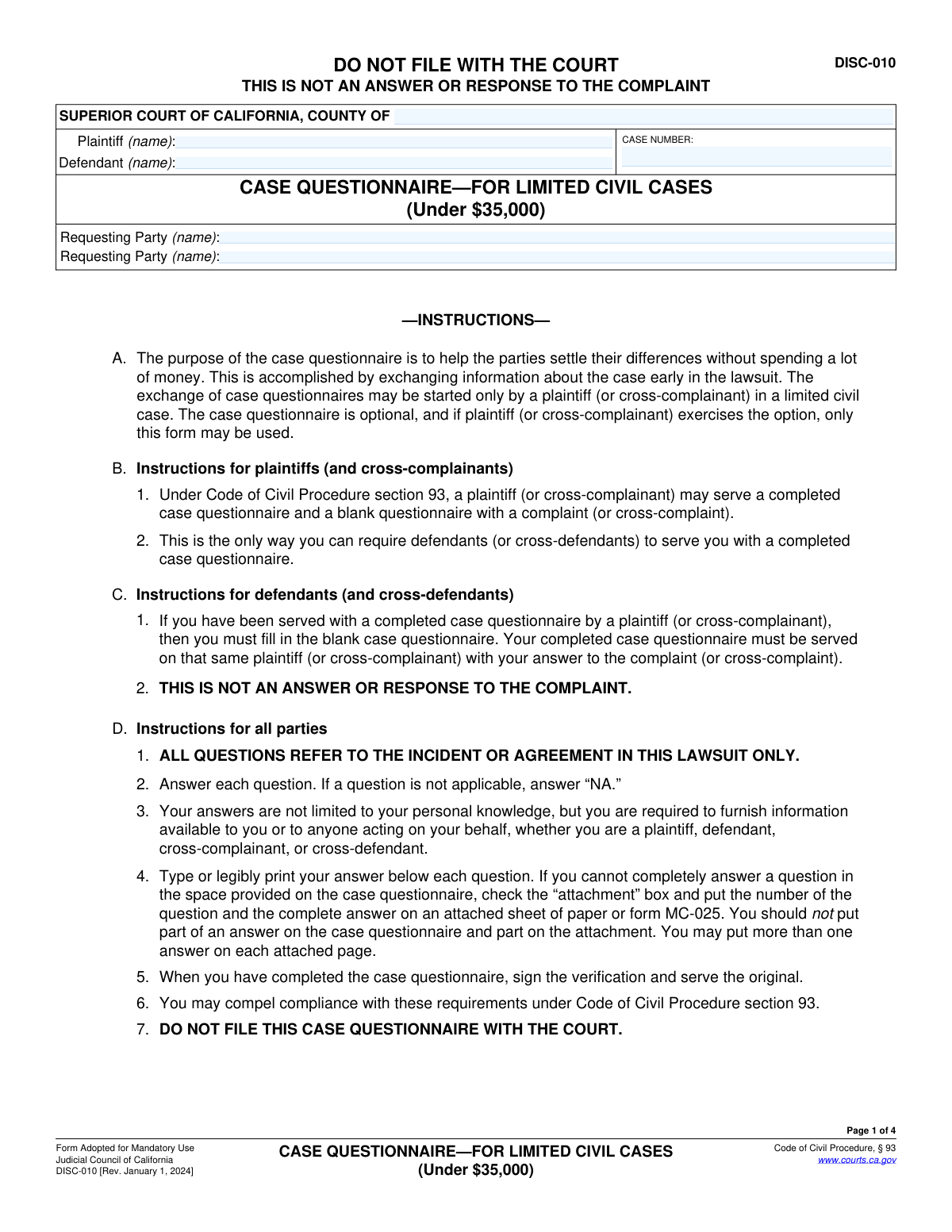
The AI does the filling. You just check it.
No typing into boxes, nothing to install.
What this form asks for
The AI fills all of it, from your answers or your documents.
The AI checks your answers before you download
12 checks built for this form, so a wrong date or a missing answer is caught before anyone else sees it.
Validates that the 'Plaintiff (name)', 'Defendant (name)', and 'CASE NUMBER' fields are identical on every page where they appear (pages 1, 2, 3, and 4). This is crucial to ensure document integrity and that all pages are correctly associated with the same case, especially if pages are handled separately. A mismatch could lead to confusion or incorrect filing.
Checks that the 'CASE NUMBER' field follows the standard format for California Superior Court case numbers. While formats can vary slightly by county, this check ensures the entry is a plausible alphanumeric string and not random text. An invalid case number makes the document impossible to associate with the correct court file.
Ensures that the 'Date' and 'TYPE OR PRINT NAME' fields within the 'VERIFICATION' section on page 4 are not empty. The declaration is legally invalid without a name and date, making the entire questionnaire potentially inadmissible. This check prevents submission of an incomplete and unenforceable document.
Validates that the 'Date' in the 'VERIFICATION' section is a valid date and is not set in the future. The date signifies when the declaration was made and must be on or before the date of submission. A future date is a logical impossibility and would invalidate the perjury declaration.
For each question with an attachment checkbox (e.g., 1c, 1d, 1e), this check ensures that either the text field is filled OR the checkbox is ticked, but not both. The form instructions state the complete answer should be on an attachment if the box is checked. This validation prevents ambiguity and ensures the reader knows where to find the complete answer without looking in two places.
Scans fields that require a telephone number (e.g., in questions 1d, 1e, 1f, 2b) to ensure the entry matches a standard U.S. phone number format (e.g., 10 digits, possibly with parentheses, spaces, or hyphens). This is important for data quality, ensuring that the contact information provided for witnesses or custodians of records is actually usable.
And 6 more checks
- Monetary Value Formatting
- Mandatory Case Identification Fields
- Requesting Party Identification
- Enforces 'NA' for Non-Applicable Answers
- Address Field Plausibility Check
- Insurance Information Co-dependency
Let AI fill out your DISC-010
No typing. Every field filled in seconds, checked, ready to sign.
How to Fill Out DISC-010 Online for Free in 2026
What the AI walks you through.
- Navigate to Instafill.ai and upload or select the California Form DISC-010.
- Provide the basic case information, including the court, county, case number, and the names of the plaintiff and defendant.
- Answer the general questions regarding your claims or defenses, individuals with knowledge of the case, and relevant documents or evidence.
- Complete the specific sections applicable to your case, such as those for personal injury, property damage, or contract-based disputes, detailing all damages and costs.
- Use the platform's features to easily create and reference attachments for any answers that require additional space, as indicated by the form.
- Carefully review all the information you have entered across the questionnaire for accuracy and completeness.
- Electronically sign the verification section, then download the completed form to serve on the opposing party as required (do not file with the court).
Common Mistakes in Completing DISC-010
The ones the AI is built to catch.
Improperly Filing the Questionnaire with the Court
Mistaking the Questionnaire for a Formal Legal Answer
Providing Vague or Conclusory Factual Descriptions
Forgetting to Sign or Date the Verification Section
Omitting Case Information on Subsequent Pages
Incorrectly Using Attachments for Long Answers
Failing to Itemize and Show Calculations for Damages
Leaving Applicable Questions Blank Instead of Using 'NA'
Providing Incomplete Contact Information for Witnesses and Providers
Incomplete or Incorrect Insurance Disclosure
Frequently Asked Questions About DISC-010
Is it really free for 7 days?
Can I fill other forms too?
How do I cancel?
How does the AI fill out DISC-010?
What happens to my information?
How complex is DISC-010 to fill out?
What is the purpose of the Case Questionnaire (Form DISC-010)?
Do I have to file this form with the court?
Who needs to fill out this form?
Is this form my official answer to the lawsuit?
As a defendant, when do I have to return this form?
What if I don't have enough space to answer a question?
Do I only answer questions based on my personal knowledge?
What kind of documents or evidence should I mention?
When do I fill out the sections for 'Personal Injury' or 'Agreements'?
What is the 'Verification' section for?
Can AI tools help me complete this Case Questionnaire?
How can I fill out Form DISC-010 online?
What should I do if my PDF of the form is not fillable?
Get your DISC-010 filled out by AI
$0 today. Cancel before Oct 31 and you pay nothing.
Other forms like this one
California court forms: Judicial Council of California Form SC-105, Request for Court Order and Answer (Small Claims), Judicial Council of California Form SC-120, Defendant’s Claim and ORDER to Go to Small Claims Court (Small Claims), Judicial Council of California Form SER-001, Request for Sheriff to Serve Court Papers, Judicial Council of California Form SER-001, Request for Sheriff to Serve Court Papers, Affidavit for Collection of Personal Property California Probate Code Section 13100, Form POS-040, Proof of Service—Civil, Declaration of Facts of Death (California Superior Court), declaration-of-marriage-for-court-proceeding-california-family-law, ADOPT-200, Adoption Request, ADOPT-200, Stepparent Adoption Request, ADOPT-210, Adoption Agreement, ADOPT-310, Contact After Adoption Agreement, Judicial Council of California Form ADOPT-200, Adoption Request, Form ADR-107, Mediation Attendance Sheet, Form ADR-110, Order Appointing Referee, Form ADR-109, Stipulation or Motion for Order Appointing Referee, Form ADR-102, Request for Trial De Novo After Judicial Arbitration, Form ADR-108, Referee's Report (Code Civ. Proc., §§ 638, 639), Form ADR-106, Petition to Confirm, Correct, or Vacate Contractual Arbitration Award, Form ADR-104, Rejection of Award and Request for Trial After Attorney-Client Fee Arbitration
civil court forms: Petition for Leave to Proceed In Forma Pauperis (Court of Common Pleas of Lehigh County, Pennsylvania, Civil Division), Designation of Record on Appeal (Civil) (Maricopa County Justice Courts, Arizona) (Form APP 8150-702), Certificate of Service (Civil Court Claim), Pfändungs- und Überweisungsbeschluss (Garnishment and Transfer Order) – German Civil Enforcement Court Form, AOPC 308A, Civil Complaint, Form MC 03, Answer, Civil, Form POS-040, Proof of Service—Civil, ONTARIO Form 8: Application (General), Form ATJ 601.9, Application for Waiver of Court Fees (Civil), Nevada Justice / Municipal Civil Court Cover Sheet, Form MC 01, Summons, Form MC 10, Judgment, Civil, Form MC 99, Motion and Affidavit to Set Aside Default (Civil), Form MC 281a, Civil Mediator Application, Ex Parte Motion and Order to Renew Civil Judgment, AO 88B, Subpoena to Produce Documents, Information, or Objects or to Permit Inspection of Premises in a Civil Action, Form APP-031A, Application for Extension of Time to File Brief (Civil Case), Civil Appeal Case Information Statement, Form APP-014, Appellant's Proposed Statement on Appeal (Unlimited Civil Case), form-app-015-respondents-proposed-corrections-toadditions-to-appellants-proposed-settled-statement-unlimited-civil-case
Let AI fill out your DISC-010
Your trial starts once a card is added. You pay nothing before Oct 31.
Our AI already knows this form, all 51 fields of it. Skip the typing: tell it about yourself, or upload what you have, and it fills the whole form in seconds.
- AI fills every field on all 4 pages, checkboxes included
- No typing into boxes: answer a few questions, or upload a document you already have, an old copy of this form, a photo of a document
- The AI checks the answers; you review and change anything before you download
- Download the finished PDF, print it, or sign it online
- Encrypted, and never used to train AI
Cancel before Oct 31 and you pay nothing.
A card is needed to start the trial. Cancel in two clicks from your account.
Terms · Privacy