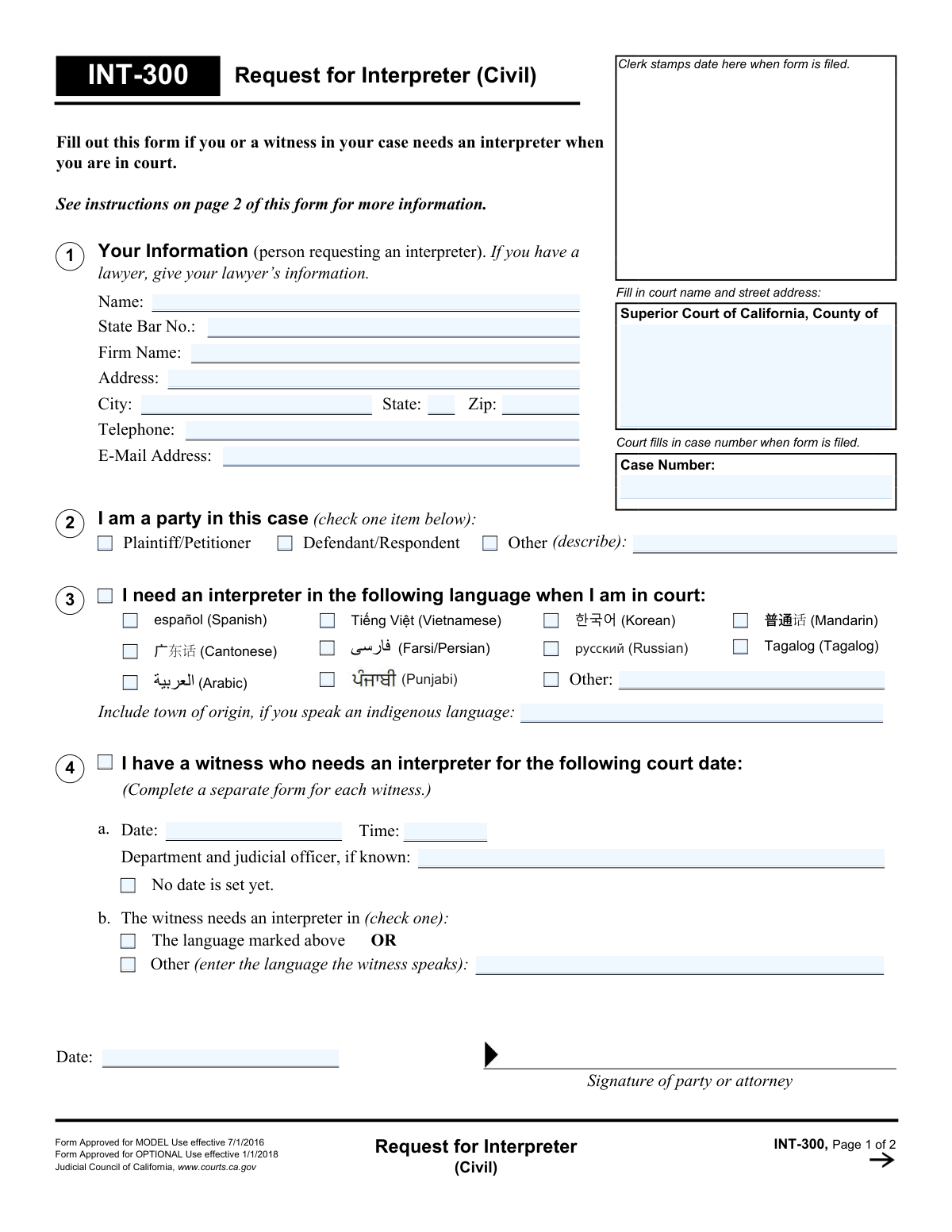
Yes! You can use AI to fill out Form INT-300, Request for Interpreter (Civil)
Form INT-300 is a legal document used in California to formally ask the court to provide an interpreter for an individual or a witness involved in a civil lawsuit who does not speak or understand English well. Submitting this form is crucial for ensuring that all parties can fully participate in legal proceedings, understand the judge, and provide testimony accurately. Today, this form can be filled out quickly and accurately using AI-powered services like Instafill.ai, which can also convert non-fillable PDF versions into interactive fillable forms.
Our AI automatically handles information lookup, data retrieval, formatting, and form filling.
It takes less than a minute to fill out INT-300 using our AI form filling.
Securely upload your data. Information is encrypted in transit and deleted immediately after the form is filled out.
Form specifications
| Form name: | Form INT-300, Request for Interpreter (Civil) |
| Number of fields: | 40 |
| Number of pages: | 1 |
| Language: | English |
Instafill Demo: How to fill out PDF forms in seconds with AI
How to Fill Out INT-300 Online for Free in 2026
Are you looking to fill out a INT-300 form online quickly and accurately? Instafill.ai offers the #1 AI-powered PDF filling software of 2026, allowing you to complete your INT-300 form in just 37 seconds or less.
Follow these steps to fill out your INT-300 form online using Instafill.ai:
- 1 Navigate to Instafill.ai and upload or select Form INT-300, Request for Interpreter (Civil).
- 2 Provide the court and case information at the top of the form, including the county and case number if you have one.
- 3 Enter your personal information, or your lawyer's information, and indicate your role in the case (e.g., Plaintiff, Defendant).
- 4 Specify the language for which an interpreter is needed. If it's for a witness, complete a separate form for each witness.
- 5 Indicate the date and time of the court hearing for which the interpreter is required, or check the box if no date is set yet.
- 6 Review all the information populated by the AI for accuracy and completeness.
- 7 Electronically sign and date the form, then file it with the court clerk's office as instructed.
Our AI-powered system ensures each field is filled out correctly, reducing errors and saving you time.
Why Choose Instafill.ai for Your Fillable INT-300 Form?
Speed
Complete your INT-300 in as little as 37 seconds.
Up-to-Date
Always use the latest 2026 INT-300 form version.
Cost-effective
No need to hire expensive lawyers.
Accuracy
Our AI performs 10 compliance checks to ensure your form is error-free.
Security
Your personal information is protected with bank-level encryption.
Frequently Asked Questions About Form INT-300
The INT-300 form, 'Request for Interpreter (Civil),' is used to ask the California Superior Court to provide an interpreter for a party or a witness in a civil case who does not speak or understand English well.
Any party involved in a civil case (such as the plaintiff, defendant, or petitioner) or their attorney should fill out this form if they or one of their witnesses requires language interpretation during court proceedings.
You must complete and file a separate INT-300 form for each individual witness who needs an interpreter. Make sure to complete section 4 for each witness-specific request.
If your required language is not on the pre-printed list, check the 'Other' box and write the name of the language in the space provided. For indigenous languages, it is helpful to also include the town of origin.
You must file the completed form with the court clerk at the courthouse where your case is being heard. Check with your local court to find out their specific deadline for how far in advance you must submit the request.
If a specific hearing date has not been set, you can still submit the form. Simply check the box in section 3 that says, 'No date is set yet.'
No, it is not guaranteed. While courts try to provide an interpreter in every civil case, sometimes they are unable to. The court will send you a response to let you know if your request was granted.
This form is for spoken languages only. To request a sign language interpreter or other accommodations for a disability, you must fill out and submit Form MC-410, 'Request for Accommodations by Persons With Disabilities and Response.'
After you file the INT-300 form, the court will review it and send you a response. This notification will inform you whether an interpreter will be provided for your hearing.
Yes, services like Instafill.ai use AI to help you accurately auto-fill form fields, which can save time and reduce the chance of errors. This is particularly useful for entering repetitive information like your name and case number.
You can upload the INT-300 PDF to Instafill.ai, which will make the document interactive. You can then type your information directly into the fields on your computer, and then download or print the completed form for submission.
If you have a non-fillable or 'flat' PDF, you can use a service like Instafill.ai. Upload the document, and the platform will convert it into an interactive, fillable form that you can easily complete online.
No, there is no fee to file this request. The form is used to ask the court to provide an interpreter at the court's expense for eligible civil cases.
If you are represented by an attorney, the form requires you to provide your lawyer's information in section 1. This includes their name, firm name, address, and State Bar Number.
Compliance INT-300
Validation Checks by Instafill.ai
1
Ensures Party Type is Selected
This validation checks that exactly one box is selected from the party type options: 'Plaintiff/Petitioner', 'Defendant/Respondent', or 'Other'. This information is critical for the court to understand the role of the person requesting the interpreter. If no box or multiple boxes are checked, the form submission should be rejected with an error prompting the user to select one option.
2
Requires Requester or Lawyer Name
This check ensures that the 'Name' field under 'Your Information' (field: ReqFullName_ft) is not empty. The name of the party or their legal representative is essential for identifying the requestor and associating the form with the correct individual in the case file. A failure to provide this information would make the form unusable, so the submission must be blocked until a name is entered.
3
Validates Language Selection
This validation ensures that a language is specified in Section 2. It checks that either one of the pre-listed language checkboxes is selected, or if the 'Other' checkbox is selected, the corresponding text field (T227) is not empty. The entire purpose of the form is to request an interpreter for a specific language, so this information is mandatory. An error should occur if no language is specified.
4
Enforces Hearing Date Logic
This check validates the logical relationship between the hearing date/time fields and the 'No date is set yet' checkbox in Section 3. If the 'No date is set yet' checkbox is checked, the 'Date' and 'Time' fields must be empty or disabled. Conversely, if a date or time is entered, the 'No date is set yet' checkbox must be unchecked. This prevents contradictory information about the hearing schedule.
5
Validates Hearing Date is in the Future
If a date is entered into the 'Date' field in Section 3 (HearingDate_dt), this validation ensures the date is not in the past. A request for an interpreter is for a future court event. Submitting a request for a past date is illogical and is almost certainly an error, so the system should flag it and require the user to enter a current or future date.
6
Validates Email Address Format
This check verifies that the value entered in the 'E-Mail Address' field (ProtectedEmail_ft) conforms to a standard email format (e.g., '[email protected]'). Proper formatting is necessary to ensure the court can successfully send notifications or responses electronically. If the format is invalid, the user should be notified so they can correct the entry or leave it blank.
7
Validates Telephone Number Format
This validation ensures the 'Telephone' number (ProtectedPhone_ft) is entered in a recognizable format, such as (XXX) XXX-XXXX or XXXXXXXXXX. This helps ensure data consistency and the usability of the phone number for contact purposes. The system should alert the user if the entry does not appear to be a valid phone number.
8
Checks for State Bar Number if Firm Name is Present
This is a conditional validation for attorney information. If the 'Firm Name' field (ProtectedLawyerFirm_ft) is filled out, this check ensures the 'State Bar No.' field (ProtectedLawyerBar_no) is also filled. This maintains the integrity of attorney data, as a lawyer practicing with a firm must have a bar number. The validation helps ensure complete information is provided when a lawyer is filing the form.
9
Ensures Witness Language is Specified Correctly
This validation applies if Section 4, 'I have a witness who needs an interpreter,' is filled out. It checks that either the 'The language marked above' checkbox is selected OR the 'Other' checkbox is selected and its corresponding language text field is filled. This prevents an ambiguous request for a witness interpreter. The form must be rejected if Section 4 is initiated but the language need is not clearly defined.
10
Validates Signature Date
This check ensures the 'Date' field next to the signature line (CH116Signature_dt) contains a valid date that is not in the future. The signature date authenticates when the document was signed. A future date is invalid and would call the document's authenticity into question. The system should default to the current date or require the user to enter a date that is today or in the recent past.
11
Validates ZIP Code Format
This check ensures the 'Zip' code field (ProtectedZip_ft) contains a valid 5-digit or 9-digit (ZIP+4) US postal code. Correct formatting is essential for mail delivery and data standardization. An invalid entry could lead to returned mail and delays in communication from the court. The system should flag any entry that does not match the expected numeric format and length.
12
Ensures Case Number Consistency Across Pages
This validation verifies that the 'Case Number' entered on Page 1 (Stamp_court_case.CaseNumber_ft) is identical to the 'Case Number' entered in the header of Page 2 (Page2.CaseNumber_ft). This is a data integrity check to ensure that all pages of the submitted document pertain to the same case. A mismatch could lead to clerical errors and misfiling of the second page.
Common Mistakes in Completing INT-300
The form instructs filers in Section 1 to provide their lawyer’s information if they are represented. Many individuals fill in their own details out of habit, leading to court communications being sent to them instead of their legal counsel. This can cause critical delays and miscommunications in the legal process. To avoid this, carefully read Section 1 and enter your attorney's name, State Bar Number, and contact details if you have legal representation.
When requesting an interpreter for an indigenous language in Section 2, the form specifically asks for the 'town of origin.' This detail is crucial because many indigenous languages have significant regional dialects that can be mutually unintelligible. Failing to provide this information can result in the court assigning an interpreter who speaks the wrong dialect, rendering the interpretation ineffective and delaying the hearing. Always specify the town or region to ensure the correct interpreter is sourced.
The instructions in Section 4 clearly state, '(Complete a separate form for each witness.)' To save time, people often try to list all witnesses on one form or add notes in the margins. This will lead to the request being rejected or only processed for one individual, leaving other witnesses without an interpreter on the court date. A new, separate INT-300 form must be filled out and filed for each witness needing language assistance.
Section 3 asks for the hearing date and time. If a date has not been set, applicants sometimes leave these fields empty, which can be interpreted as an incomplete form by the court clerk. The form provides a specific checkbox for 'No date is set yet.' This box must be checked to officially inform the court that the hearing is not yet on the calendar, ensuring the request is processed correctly and held until a date is scheduled.
This form (INT-300) is exclusively for spoken language interpreters. The instructions on page 2 clarify that sign language interpretation is a disability accommodation and requires a different form (MC-410). Submitting this form for a sign language interpreter will result in a denial and significant delays in securing the necessary accommodation. It is essential to use the correct form for the specific service needed.
The second page of the form requires the applicant's name and case number to be filled in at the top. People often overlook this, assuming the first page is sufficient. If the pages become separated during court processing, the second page cannot be linked to the case, potentially causing administrative issues or loss of information. Always fill in the header on all pages of a court filing to ensure they stay together as a single document.
In Section 4b, the form asks if the witness needs an interpreter for 'The language marked above' or an 'Other' language. Filers sometimes check both boxes, or check 'Other' and then write in the same language they requested for themselves. This ambiguity forces the court clerk to guess or follow up, delaying the request. You must clearly select only one option and, if 'Other' is chosen, specify the distinct language the witness requires.
Often, these forms are downloaded as non-fillable PDFs, forcing users to print and fill them out by hand. Poor handwriting can make names, dates, and especially the 'Other' language field unreadable, leading to data entry errors by the court clerk or outright rejection. This can result in the wrong interpreter—or no interpreter—being scheduled. To prevent this, use a tool like Instafill.ai that can convert flat PDFs into fillable forms, allowing you to type your information clearly and ensure legibility.
A missing signature or date is one of the most common and easily avoidable reasons for a form to be rejected. An unsigned form is legally invalid, and the court will not process the request for an interpreter. This simple oversight can lead to a critical failure where no interpreter is present at the hearing, causing postponements and frustration. Always double-check that you have signed and dated the form in the designated area before filing.
The top of the form requires the filer to enter the specific Superior Court name and street address. Filers may write a generic name like 'County Courthouse' or get the street address wrong, especially in large counties with multiple court locations. This can lead to the form being misrouted or delayed. It's crucial to use the full, official name and address of the specific courthouse where the case is being heard. AI-powered tools like Instafill.ai can often pre-populate this information based on the case type and jurisdiction, reducing the risk of error.
Saved over 80 hours a year
“I was never sure if my IRS forms like W-9 were filled correctly. Now, I can complete the forms accurately without any external help.”
Kevin Martin Green
Your data stays secure with advanced protection from Instafill and our subprocessors

Robust compliance program
Transparent business model
You’re not the product. You always know where your data is and what it is processed for.
ISO 27001, HIPAA, and GDPR
Our subprocesses adhere to multiple compliance standards, including but not limited to ISO 27001, HIPAA, and GDPR.
Security & privacy by design
We consider security and privacy from the initial design phase of any new service or functionality. It’s not an afterthought, it’s built-in, including support for two-factor authentication (2FA) to further protect your account.
Fill out INT-300 with Instafill.ai
Worried about filling PDFs wrong? Instafill securely fills form-int-300-request-for-interpreter-civil forms, ensuring each field is accurate.