Yes! You can use AI to fill out Adult Guardianship - Certification of Criminal and Civil Judgment History (Directive #06-23)
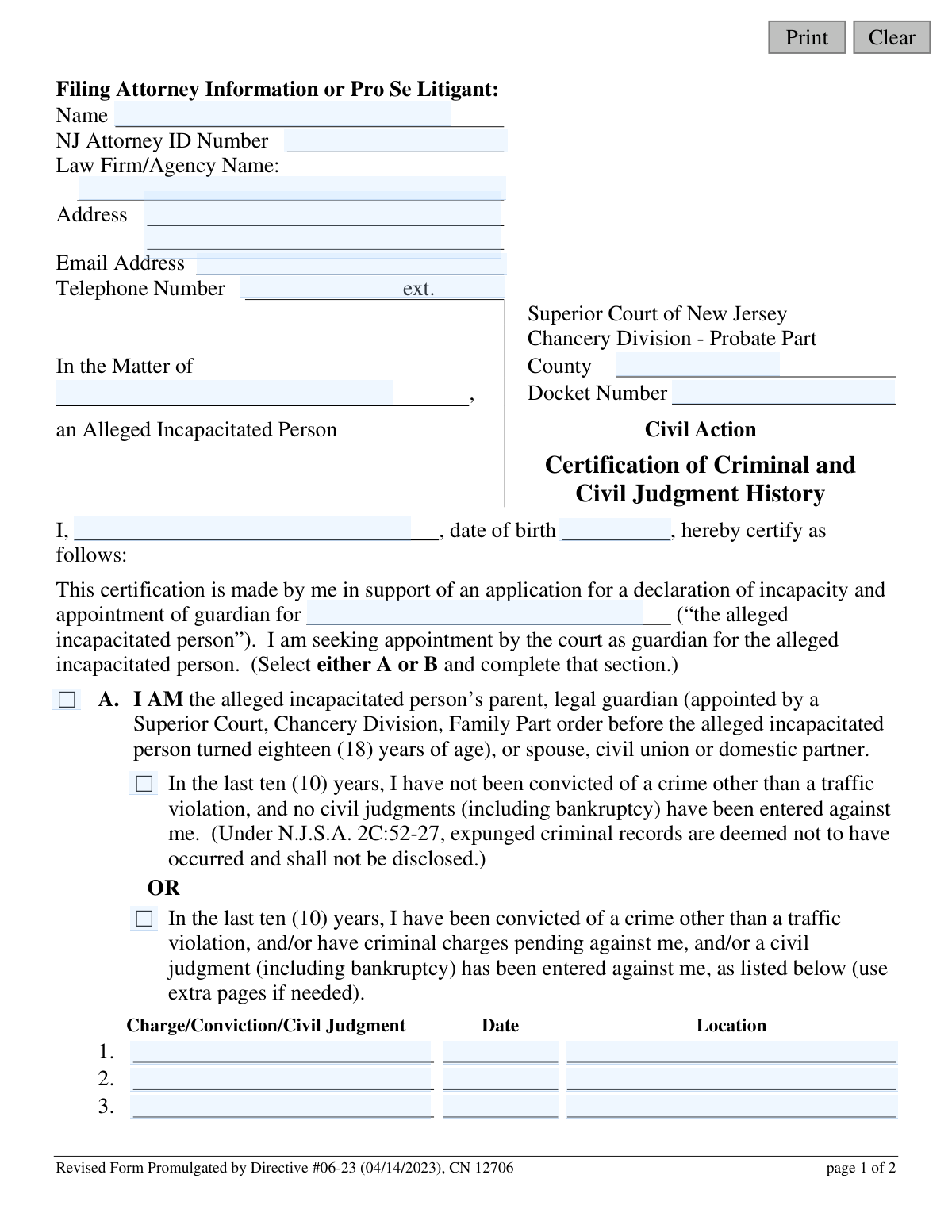
This form is a mandatory certification for individuals applying to be a guardian for an alleged incapacitated person in New Jersey. It requires the applicant to disclose their criminal record and any civil judgments, which the court uses to assess their suitability to protect the well-being of the incapacitated person. Today, this form can be filled out quickly and accurately using AI-powered services like Instafill.ai, which can also convert non-fillable PDF versions into interactive fillable forms.
Our AI automatically handles information lookup, data retrieval, formatting, and form filling.
It takes less than a minute to fill out CN 12706 using our AI form filling.
Securely upload your data. Information is encrypted in transit and deleted immediately after the form is filled out.
Form specifications
| Form name: | Adult Guardianship - Certification of Criminal and Civil Judgment History (Directive #06-23) |
| Number of fields: | 43 |
| Number of pages: | 1 |
| Language: | English |
Instafill Demo: How to fill out PDF forms in seconds with AI
How to Fill Out CN 12706 Online for Free in 2026
Are you looking to fill out a CN 12706 form online quickly and accurately? Instafill.ai offers the #1 AI-powered PDF filling software of 2026, allowing you to complete your CN 12706 form in just 37 seconds or less.
Follow these steps to fill out your CN 12706 form online using Instafill.ai:
- 1 Navigate to Instafill.ai and upload or select the 'Certification of Criminal and Civil Judgment History' form.
- 2 Provide your information as the filing attorney or pro se litigant, including name, address, and contact details.
- 3 Enter the case details for the Superior Court of New Jersey, including the county, docket number, and the name of the alleged incapacitated person.
- 4 Certify your identity by entering your full name and date of birth as the person seeking guardianship.
- 5 Select your relationship to the alleged incapacitated person (e.g., parent, spouse, or other) and complete the corresponding section to disclose any criminal convictions or civil judgments as required.
- 6 If you have a history to report, provide a brief explanation of why it does not adversely affect your ability to serve as a guardian.
- 7 Review all entered information for accuracy, then electronically sign and date the certification before downloading for filing.
Our AI-powered system ensures each field is filled out correctly, reducing errors and saving you time.
Why Choose Instafill.ai for Your Fillable CN 12706 Form?
Speed
Complete your CN 12706 in as little as 37 seconds.
Up-to-Date
Always use the latest 2026 CN 12706 form version.
Cost-effective
No need to hire expensive lawyers.
Accuracy
Our AI performs 10 compliance checks to ensure your form is error-free.
Security
Your personal information is protected with bank-level encryption.
Frequently Asked Questions About Form CN 12706
This form is required by the Superior Court of New Jersey to disclose your criminal and civil judgment history when you are applying to become the guardian for an alleged incapacitated person.
Any individual who is seeking appointment by the court to be the guardian for an adult alleged to be incapacitated must complete and sign this certification.
Complete Section A if you are the alleged incapacitated person's parent, spouse, civil union partner, domestic partner, or a legal guardian appointed before they turned 18. All other potential guardians must complete Section B.
Section A requires you to disclose any criminal convictions or civil judgments from the last ten years. Section B requires you to disclose this information from any time in your entire past.
No, the form specifically states that you do not need to report convictions for traffic violations.
No, the form notes that under New Jersey law, expunged criminal records are deemed not to have occurred and should not be disclosed.
Yes, the form explicitly includes bankruptcy as a type of civil judgment that must be disclosed according to the timeframes specified in Section A or B.
No, a conviction or judgment does not automatically disqualify you. The court will consider the details to determine if it adversely affects your ability to perform the duties of a guardian.
This form should be filed as part of your guardianship application with the Superior Court of New Jersey, Chancery Division - Probate Part, in the county where the case is being heard.
A 'Pro Se Litigant' is someone who is representing themselves in court without an attorney. If you are not using a lawyer, you would fill in your own contact information in the top section.
Yes, services like Instafill.ai use AI to help you accurately auto-fill form fields, which can save time and reduce the chance of errors.
You can use a service like Instafill.ai to upload the PDF and fill it out on your computer. The platform allows you to type directly into the fields and then download or print the completed document.
If you have a non-fillable or 'flat' PDF, you can upload it to a service like Instafill.ai. Their technology can convert the document into an interactive, fillable form for you to complete online.
Compliance CN 12706
Validation Checks by Instafill.ai
1
Guardian and Printed Name Consistency
Ensures the name of the certifying individual entered at the beginning of the certification ('I, [guardName]...') is identical to the printed name provided in the signature block ('Print Name'). This is crucial for verifying the identity of the person making the sworn statement. If the names do not match, the form submission should be flagged for review to prevent potential identity discrepancies or fraud.
2
Guardian Minimum Age Verification
Validates that the guardian's date of birth ('guardDob') indicates they are at least 18 years old. This is a fundamental requirement for an individual to serve as a legal guardian for an adult. A submission with a date of birth for a minor will be rejected, as a minor cannot legally hold this responsibility.
3
Mutually Exclusive Section Selection (A vs. B)
Verifies that the user has selected either Section A (for relatives) or Section B (for non-relatives), but not both. These sections have different disclosure requirements (10 years vs. lifetime), so selecting both creates ambiguity. If both or neither are selected, the form is considered incomplete and must be corrected before submission.
4
Mutually Exclusive History Declaration
Within the chosen section (A or B), this check ensures the user selects either the checkbox for 'no history' or the checkbox for 'has history,' but not both. This prevents contradictory statements on a legal certification. A failure in this validation indicates a user error that must be resolved to clarify their criminal and civil judgment history.
5
Conditional Requirement for Conviction Details
If a user indicates they have a history of convictions or civil judgments (in either Section A or B), this validation ensures that at least one corresponding record with a description, date, and location is provided. An empty details section after declaring a history makes the certification incomplete for the court's assessment. The form should not be submittable until the details are entered.
6
Conditional Requirement for History Explanation
Checks that the explanation field ('histDesc') is filled out if any criminal or civil judgment history is listed in Section A or B. The court requires this context to determine if the past events adversely affect the applicant's ability to serve as a guardian. Failure to provide this explanation will result in an incomplete application and likely delay the proceedings.
7
Section A Ten-Year History Window
For any conviction or judgment date ('chgDt') listed under Section A, this check verifies that the date falls within the last ten years from the current date or signature date. This is a specific legal requirement of Section A for relatives. Any date entered that is older than ten years would be a data entry error and should be flagged for correction.
8
Core Field Completeness
Ensures that essential fields such as the guardian's name ('guardName'), the alleged incapacitated person's name ('aipName'), the county ('typeCounty'), and the signature date ('sigDt') are not left blank. These fields are fundamental to identifying the parties, jurisdiction, and timing of the certification. The form cannot be processed without this basic information.
9
NJ Attorney ID Format Validation
If the NJ Attorney ID Number ('attyId') field is filled, this check validates it against the official format for New Jersey attorney identifiers. This helps ensure that if an attorney is filing, their credentials are valid and correctly recorded for court records. If the format is incorrect, it could indicate a typo or an invalid ID, requiring user correction.
10
Email Address Format Validation
Verifies that the value entered in the 'attyEmail' field is a structurally valid email address, containing an '@' symbol and a domain. This is important for ensuring the court and other parties can reliably communicate with the filer. An invalid email address would prevent important notifications from being delivered.
11
Signature Date Validity
Confirms that the signature date ('sigDt') is a valid calendar date that is not in the future. A future date is logically impossible for a signature, and an invalid date format would cause processing errors. This check ensures the legal document is dated accurately at the time of signing.
12
Docket Number Format
Validates the 'Docket Number' against the standard format used by the New Jersey Superior Court, Chancery Division (e.g., 'P-######-##'). A correctly formatted docket number is critical for ensuring the certification is filed with the correct case. An incorrect number could lead to the document being lost or misfiled, delaying the guardianship proceedings.
13
County Name Validation
Checks that the 'County' field contains a valid New Jersey county name from a predefined list. This ensures the case is filed in the correct jurisdiction and prevents errors from typos or invalid entries. An invalid county name would cause a filing rejection.
Common Mistakes in Completing CN 12706
Applicants often get confused about their legal relationship to the alleged incapacitated person and select the wrong section. For example, a long-term partner may not qualify as a 'domestic partner' under the law. This mistake is critical because Section A requires a 10-year history, while Section B requires a lifetime history, leading to a fundamentally flawed certification and likely rejection of the form. To avoid this, carefully read the definitions for parent, legal guardian, spouse, civil union, or domestic partner before making a selection.
A frequent error is applying the wrong look-back period for criminal and civil history. Applicants who should complete Section B (lifetime history) might mistakenly only provide information for the last 10 years as specified in Section A. This results in an incomplete and inaccurate declaration, which can be viewed as a material misrepresentation to the court and cause significant delays or denial. Always double-check which section applies to you and adhere strictly to the specified timeframe (10 years for A, lifetime for B).
People tend to focus on criminal history and often overlook the requirement to disclose civil judgments, which explicitly includes bankruptcy. This omission can happen due to forgetfulness or a misunderstanding that only criminal matters are significant. Failing to disclose a civil judgment can severely damage the applicant's credibility and may lead the court to question their fitness as a guardian, resulting in the application being denied. It is crucial to conduct a thorough review of one's own financial and legal history before certifying.
When disclosing a past issue, applicants may write vague entries like 'old charge' or 'financial issue' without the required specifics. The form demands a clear description of the charge/judgment, the exact date, and the location (court/jurisdiction). Incomplete information prevents the court from properly evaluating the event's relevance and will lead to requests for more information, delaying the guardianship proceedings. To prevent this, gather all necessary documents to ensure you can provide precise and complete details for each entry.
After listing a criminal or civil history, the applicant must explain why it does not adversely affect their ability to be a guardian. Many people leave this section blank or provide a simple, unconvincing statement like 'It's not relevant.' This is a missed opportunity to address the court's potential concerns directly. A weak or missing explanation can lead the court to assume the worst, potentially disqualifying the applicant. It is vital to provide a thoughtful, detailed explanation of the circumstances and why you are still the best choice for guardian.
An unsigned or undated form is legally invalid and a very common reason for immediate rejection by the court clerk. This oversight often happens when applicants are rushing or are focused on the complex details of the form. A rejected form must be resubmitted, causing unnecessary delays in the urgent matter of guardianship. Always perform a final review of the completed form, paying special attention to the signature and date fields before filing. AI-powered tools like Instafill.ai can highlight required signature fields to help prevent this error.
Simple typographical errors in the applicant's name, the alleged incapacitated person's name, or the court Docket Number can create significant administrative problems. These mistakes can lead to failed background checks, incorrect court records, and delays while the clerk's office tries to match the filing to the correct case. To avoid this, carefully proofread all identifying information. Using a tool like Instafill.ai can help by auto-filling information consistently and accurately across all related documents.
The form explicitly states that expunged criminal records should not be disclosed, as they are legally deemed not to have occurred. However, some applicants may not know if a record was officially expunged, or they might disclose it out of a mistaken belief that more disclosure is better. Disclosing an expunged record is contrary to the form's instructions and can create unnecessary complications. Before filling out the form, confirm the legal status of any past records to ensure you are complying with the instructions.
Individuals representing themselves ('Pro Se') are often confused by the 'Filing Attorney Information' section, particularly fields like 'NJ Attorney ID Number' and 'Law Firm/Agency Name'. They may leave these fields blank or write 'N/A', which can cause confusion for the court clerk. The proper procedure is to enter their own name and contact information clearly in the designated spaces. This ensures the court knows who the primary contact for the filing is, preventing communication delays.
This form is often distributed as a non-fillable PDF, forcing applicants to print it and fill it out by hand. This frequently results in illegible handwriting, especially for complex names, addresses, and detailed explanations. If the court clerk cannot read the information, the form will be rejected, forcing the applicant to start over and causing significant delays. To avoid this, it is best to use a tool like Instafill.ai, which can convert a flat PDF into a fillable form, allowing you to type your answers clearly and professionally.
Saved over 80 hours a year
“I was never sure if my IRS forms like W-9 were filled correctly. Now, I can complete the forms accurately without any external help.”
Kevin Martin Green
Your data stays secure with advanced protection from Instafill and our subprocessors

Robust compliance program
Transparent business model
You’re not the product. You always know where your data is and what it is processed for.
ISO 27001, HIPAA, and GDPR
Our subprocesses adhere to multiple compliance standards, including but not limited to ISO 27001, HIPAA, and GDPR.
Security & privacy by design
We consider security and privacy from the initial design phase of any new service or functionality. It’s not an afterthought, it’s built-in, including support for two-factor authentication (2FA) to further protect your account.
Fill out CN 12706 with Instafill.ai
Worried about filling PDFs wrong? Instafill securely fills adult-guardianship-certification-of-criminal-and-civil-judgment-history-directive-06-23 forms, ensuring each field is accurate.