Yes! You can use AI to fill out Civil Case Information Statement (Civil CIS) - Appendix XII-B1
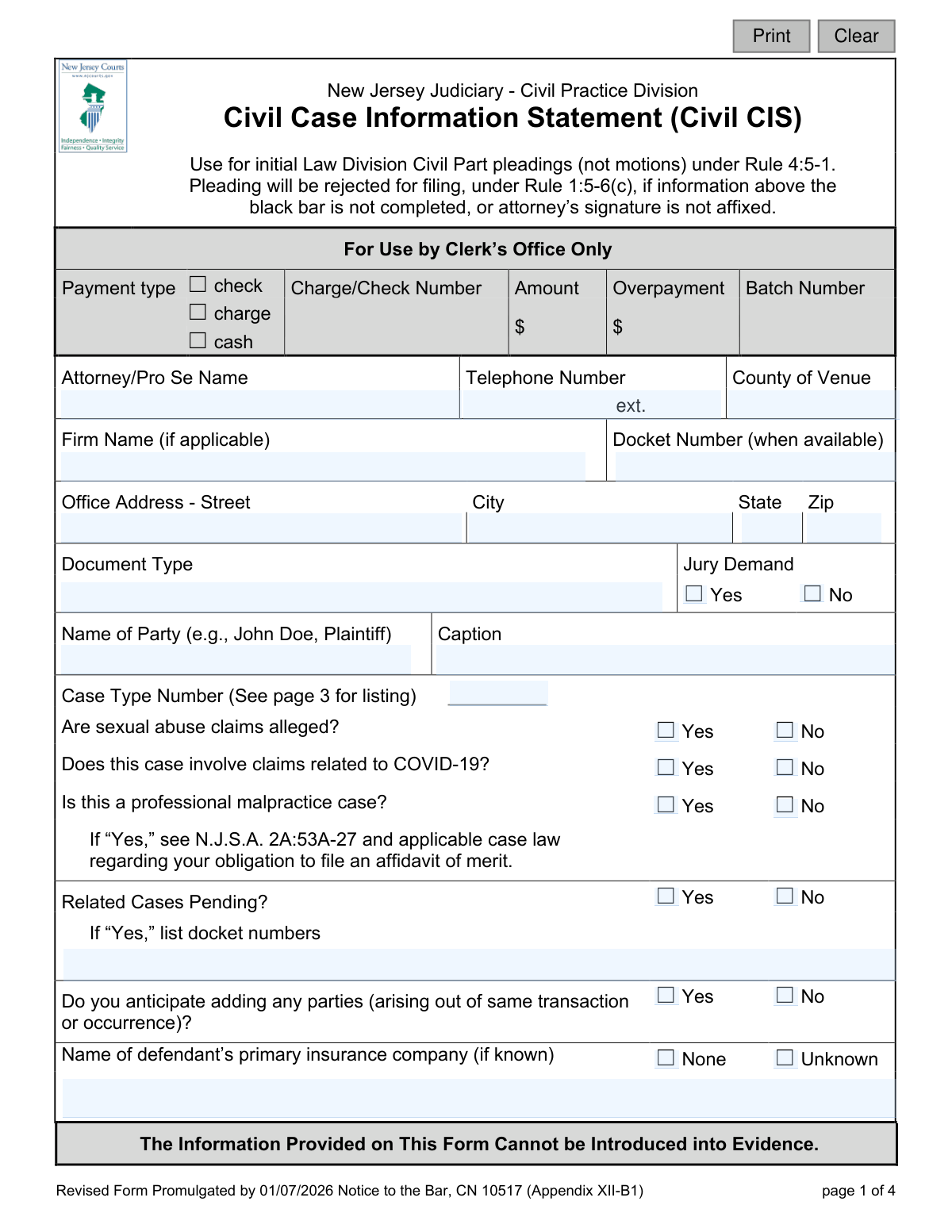
The Civil Case Information Statement (CIS) is a mandatory form required by the New Jersey Judiciary for all initial civil pleadings filed in the Law Division. It provides the court with essential information to properly categorize, track, and manage the case, including the case type, parties involved, and potential for mediation. Today, this form can be filled out quickly and accurately using AI-powered services like Instafill.ai, which can also convert non-fillable PDF versions into interactive fillable forms.
Civil CIS (Appendix XII-B1) is part of the
civil court forms and New Jersey forms categories on Instafill.
Our AI automatically handles information lookup, data retrieval, formatting, and form filling.
It takes less than a minute to fill out Civil CIS (Appendix XII-B1) using our AI form filling.
Securely upload your data. Information is encrypted in transit and deleted immediately after the form is filled out.
Form specifications
| Form name: | Civil Case Information Statement (Civil CIS) - Appendix XII-B1 |
| Number of fields: | 54 |
| Number of pages: | 1 |
| Language: | English |
Instafill Demo: How to fill out PDF forms in seconds with AI
How to Fill Out Civil CIS (Appendix XII-B1) Online for Free in 2026
Are you looking to fill out a CIVIL CIS (APPENDIX XII-B1) form online quickly and accurately? Instafill.ai offers the #1 AI-powered PDF filling software of 2026, allowing you to complete your CIVIL CIS (APPENDIX XII-B1) form in just 37 seconds or less.
Follow these steps to fill out your CIVIL CIS (APPENDIX XII-B1) form online using Instafill.ai:
- 1 Navigate to Instafill.ai and upload or select the Civil Case Information Statement (CIS) form.
- 2 Use the AI assistant to automatically fill in attorney or self-represented party information, including name, firm, address, and contact number.
- 3 Enter the case caption, county of venue, and specify the document type and whether a jury is demanded.
- 4 Select the appropriate Case Type Number from the list on page 3 and answer the initial questions regarding sexual abuse, COVID-19, professional malpractice, and related cases.
- 5 Provide details about the defendant's insurance company (if known) and complete the 'Case Characteristics' section to help the court assess the case for mediation.
- 6 Indicate if any disability accommodations or an interpreter will be needed for you or your client.
- 7 Review all the information for accuracy, digitally sign the certification, and download the completed form for filing with the court.
Our AI-powered system ensures each field is filled out correctly, reducing errors and saving you time.
Why Choose Instafill.ai for Your Fillable Civil CIS (Appendix XII-B1) Form?
Speed
Complete your Civil CIS (Appendix XII-B1) in as little as 37 seconds.
Up-to-Date
Always use the latest 2026 Civil CIS (Appendix XII-B1) form version.
Cost-effective
No need to hire expensive lawyers.
Accuracy
Our AI performs 10 compliance checks to ensure your form is error-free.
Security
Your personal information is protected with bank-level encryption.
Frequently Asked Questions About Form Civil CIS (Appendix XII-B1)
The Civil Case Information Statement (CIS) is used to provide the New Jersey court system with essential details about a new civil case. It helps the court classify the case, assign it to the correct discovery track, and manage it efficiently from the start.
This form must be completed and submitted with the initial pleading (like a complaint or answer) in the Law Division Civil Part. It is required for both attorneys and individuals representing themselves (pro se litigants).
Your entire pleading will be rejected for filing if the information above the black bar on page one is incomplete or if the form is not signed. It is crucial to fill out these sections accurately to avoid delays.
Refer to page 3 of the form, which lists all available case types and their corresponding numbers. Select the one number that best describes the primary nature of your legal action and enter it on page 1.
The discovery tracks (I, II, III, and IV) are timelines set by the court for the exchange of information between parties, ranging from 150 to 450 days. The case type you select determines which track your case is assigned to.
If you indicate the case involves professional malpractice, the form reminds you of your legal obligation under N.J.S.A. 2A:53A-27 to file a separate document called an Affidavit of Merit.
No, the form explicitly states that the information provided cannot be introduced into evidence. Its purpose is purely administrative for case management by the court.
The form includes specific sections on page 2 to request disability accommodations or an interpreter. If an interpreter is needed, you must also specify the language required.
If there are related cases, you must check 'Yes' in the 'Related Cases Pending?' section and provide the docket numbers for all related cases in the space provided.
Yes, services like Instafill.ai use AI to accurately auto-fill form fields, which can save you significant time and help prevent common errors. These tools are designed to make completing complex forms faster and easier.
You can use a service like Instafill.ai to complete the form online. Simply upload the PDF, and the platform will make it fillable, allowing you to type your information directly into the fields before downloading the completed document.
If you have a non-fillable or 'flat' PDF, you can use a tool like Instafill.ai to instantly convert it into an interactive, fillable form. This allows you to easily type in your information without needing to print and fill it out by hand.
By signing the form, you certify that you have removed sensitive personal data (like Social Security numbers or full bank account numbers) from all documents submitted to the court, as required by Rule 1:38-7(b). This protects personal privacy.
Compliance Civil CIS (Appendix XII-B1)
Validation Checks by Instafill.ai
1
Ensures Mandatory Header Fields are Complete
This check verifies that the 'Attorney/Pro Se Name', 'Telephone Number', 'County of Venue', 'Name of Party', 'Caption', and 'Case Type Number' fields are all populated. The form explicitly states that the pleading will be rejected for filing if this information is missing. This validation is critical to prevent immediate administrative rejection and ensure the case can be docketed correctly.
2
Validates Case Type Number
This check ensures the number entered in the 'Case Type Number' field corresponds to a valid case type listed on pages 3 and 4 of the form. An invalid number would prevent the case from being assigned to the correct discovery track and judge. If the number is not found in the official list, the submission should be flagged for correction.
3
Requires Description for 'Other' Case Type (999)
This is a conditional check that activates if the 'Case Type Number' is entered as '999'. It validates that the corresponding description field for the 'nature of action' is not empty. This is important because without a description, the court and clerk's office would have no information on how to classify or handle the case, leading to processing delays.
4
Requires Docket Numbers for Pending Related Cases
This validation ensures that if the user answers 'Yes' to 'Related Cases Pending?', the 'list docket numbers' field is not left empty. Providing the docket numbers is crucial for the court to identify and potentially consolidate related matters, ensuring judicial efficiency and preventing conflicting rulings. Failure to provide them would make the 'Yes' answer useless.
5
Requires Language Specification for Interpreter
This check verifies that if 'Will an interpreter be needed?' is marked 'Yes', the 'for what language?' field is completed. This is essential for the court to arrange for a qualified interpreter in the correct language, ensuring access to justice for all parties. An omission would delay proceedings until the language need is clarified and met.
6
Requires Description for Disability Accommodations
This validation confirms that if the user checks 'Yes' for 'Do you or your client need any disability accommodations?', the 'please identify the requested accommodation' field is filled out. Specificity is required for the court to make the necessary arrangements in compliance with the ADA. A blank description would require follow-up and delay the provision of necessary accommodations.
7
Verifies Attorney Signature Presence
This check confirms that the 'Attorney/Self-Represented Litigant Signature' has been provided, whether digitally or as part of a scanned document. The form states that a missing signature is grounds for rejection. The signature certifies the accuracy of the information and confirms that confidential identifiers have been redacted as required by court rules.
8
Ensures Jury Demand Selection is Made
This validation ensures that a choice of either 'Yes' or 'No' has been made for the 'Jury Demand' field. This is a fundamental aspect of a civil case that dictates how the trial will be scheduled and conducted. An unselected field creates ambiguity and would require clarification before the case can proceed.
9
Validates Logical Consistency of Insurance Information
This check ensures the defendant's insurance information is not contradictory. The user can provide the 'Name of defendant’s primary insurance company', or check 'None', or check 'Unknown'. The validation fails if, for example, a company name is provided while 'Unknown' is also checked, as this is a logical impossibility that indicates a user error.
10
Requires Relationship Type if a Relationship Exists
This is a conditional check that triggers if the user answers 'Yes' to 'Do parties have a current, past or recurrent relationship?'. It validates that one of the relationship types (e.g., 'Employer/Employee', 'Familial') has been selected. This information is used to assess the case's suitability for mediation, and a missing selection hinders that evaluation.
11
Validates Phone Number Format
This check ensures the 'Telephone Number' field conforms to a standard 10-digit US phone number format (e.g., XXX-XXX-XXXX or (XXX) XXX-XXXX). A valid phone number is essential for the court and opposing counsel to be able to contact the filing party. An incorrectly formatted number could lead to communication failures and delays.
12
Validates County of Venue
This check verifies that the 'County of Venue' field contains a valid county within New Jersey. Filing in the correct venue is a basic jurisdictional requirement. An invalid or misspelled county name could lead to the case being rejected or misrouted, requiring correction and refiling.
13
Requires Description for 'Other' Relationship Type
This validation ensures that if the 'Other' checkbox is selected under the relationship type section, the corresponding text field to 'explain' the relationship is not empty. This provides necessary context for the court to understand the nature of the parties' relationship for mediation purposes. A blank explanation defeats the purpose of the 'Other' option.
Common Mistakes in Completing Civil CIS (Appendix XII-B1)
Forgetting to sign the form is a frequent and critical error. The form explicitly states that the pleading will be rejected for filing if the attorney's or self-represented litigant's signature is not affixed. This oversight leads to an immediate rejection by the clerk's office, delaying the case filing and potentially causing statute of limitations issues. Always double-check for a signature in the designated box on page 2 before submission.
Filers often select the wrong case type number from the list on page 3, either by misinterpreting their claim or not reading the options carefully. This mistake directly impacts the case's discovery track (e.g., assigning a 150-day track to a complex case needing 450 days), leading to significant procedural delays and motions to correct the track. Carefully match the primary cause of action to the descriptions provided to ensure proper case management from the outset.
The instructions clearly warn that the pleading will be rejected if the information above the black bar on page 1 is not completed. Filers often miss fields like 'County of Venue' or their full contact information. This results in the court clerk rejecting the entire filing, which halts the legal process until a corrected form is submitted. Using a tool like Instafill.ai can help prevent this by flagging mandatory fields and ensuring all required data is entered before finalization.
Failing to check either 'Yes' or 'No' for the 'Jury Demand' is a common oversight with serious consequences. If a jury trial is desired, leaving this box unchecked may be interpreted as a waiver of that right, which can be difficult or impossible to reverse later. This simple checkbox is a critical procedural step that determines the fundamental nature of the trial, so it must be addressed deliberately.
Litigants sometimes forget or neglect to list other pending cases that arise from the same transaction or involve the same parties. This omission prevents the court from efficiently managing its docket, potentially leading to conflicting rulings from different judges or delayed consolidation orders. If related cases exist, it is crucial to list their docket numbers accurately to promote judicial economy and consistent outcomes.
When a case involves professional malpractice, checking 'Yes' to the corresponding question triggers a statutory obligation under N.J.S.A. 2A:53A-27 to file an Affidavit of Merit. Filers may not be aware of this immediate requirement, and failing to file the affidavit within the statutory period can lead to the dismissal of their case. Understanding the legal implications of this checkbox is critical to avoiding a fatal procedural defect.
Users frequently enter the full case caption (e.g., 'John Doe, Plaintiff vs. Jane Smith, Defendant') into the 'Name of Party' field. This field is intended only for the name of the party filing the document (e.g., 'John Doe, Plaintiff'). This error creates clerical work for court staff and can lead to inaccuracies in the court's electronic docketing system. The full caption should be entered only in the larger 'Caption' box.
When the defendant's insurance company is not known, filers often leave the field entirely blank rather than checking the 'Unknown' box. This ambiguity forces court staff and opposing counsel to guess whether the information was omitted by mistake or is genuinely unknown. Properly checking 'Unknown' provides clear information that is useful for early case management and potential settlement discussions.
While '999 Other' is a valid case type, it requires a brief description of the nature of the action in the space provided on page 3. Many filers select '999' but fail to provide the necessary explanation. This leaves the court without the information needed to properly classify, track, and assign the case, inevitably causing administrative delays while the clerk seeks clarification. AI-powered tools like Instafill.ai can use conditional logic to require the description field to be filled if '999' is selected.
The signature on the form certifies that 'confidential personal identifiers have been redacted' from all submitted documents per Rule 1:38-7(b). A common mistake is to sign this certification without having actually performed the redaction of sensitive data like Social Security numbers or birth dates. This not only violates the rule and can lead to sanctions but also risks public exposure of private information. If the form is a non-fillable PDF, a tool like Instafill.ai can convert it to a fillable version, making it easier to manage and redact information digitally.
Saved over 80 hours a year
“I was never sure if my IRS forms like W-9 were filled correctly. Now, I can complete the forms accurately without any external help.”
Kevin Martin Green
Your data stays secure with advanced protection from Instafill and our subprocessors

Robust compliance program
Transparent business model
You’re not the product. You always know where your data is and what it is processed for.
ISO 27001, HIPAA, and GDPR
Our subprocesses adhere to multiple compliance standards, including but not limited to ISO 27001, HIPAA, and GDPR.
Security & privacy by design
We consider security and privacy from the initial design phase of any new service or functionality. It’s not an afterthought, it’s built-in, including support for two-factor authentication (2FA) to further protect your account.
Fill out Civil CIS (Appendix XII-B1) with Instafill.ai
Worried about filling PDFs wrong? Instafill securely fills civil-case-information-statement-civil-cis-appendix-xii-b1 forms, ensuring each field is accurate.