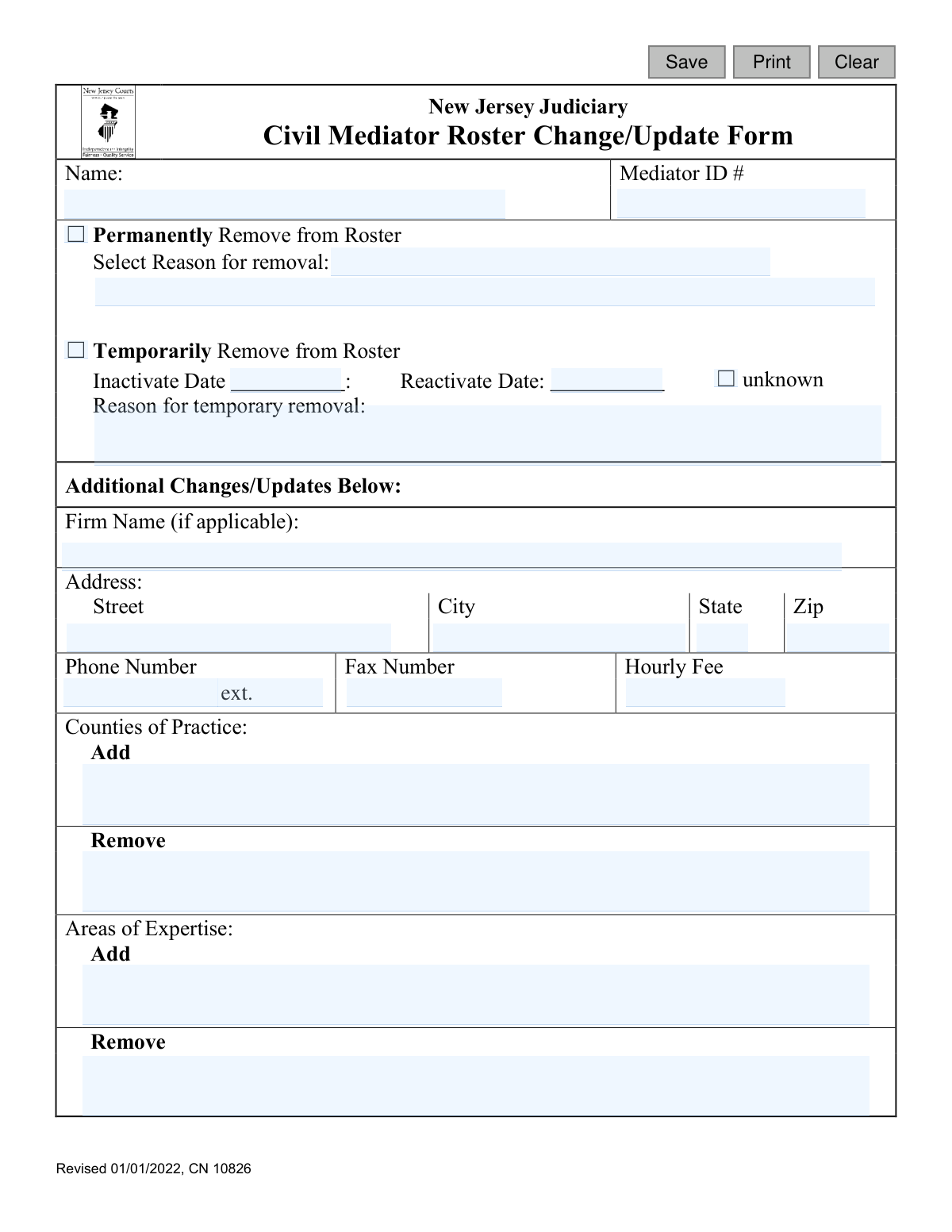
Yes! You can use AI to fill out New Jersey Judiciary Civil Mediator Roster Change/Update Form
This form is an official document from the New Jersey Judiciary for civil mediators who need to update their information on the state's roster. Mediators use it to report changes such as permanent or temporary removal from the roster, updates to their firm name, address, contact details, fees, counties of practice, and areas of expertise. Today, this form can be filled out quickly and accurately using AI-powered services like Instafill.ai, which can also convert non-fillable PDF versions into interactive fillable forms.
Our AI automatically handles information lookup, data retrieval, formatting, and form filling.
It takes less than a minute to fill out CN 10826 using our AI form filling.
Securely upload your data. Information is encrypted in transit and deleted immediately after the form is filled out.
Form specifications
| Form name: | New Jersey Judiciary Civil Mediator Roster Change/Update Form |
| Number of fields: | 27 |
| Number of pages: | 1 |
| Language: | English |
Instafill Demo: How to fill out PDF forms in seconds with AI
How to Fill Out CN 10826 Online for Free in 2026
Are you looking to fill out a CN 10826 form online quickly and accurately? Instafill.ai offers the #1 AI-powered PDF filling software of 2026, allowing you to complete your CN 10826 form in just 37 seconds or less.
Follow these steps to fill out your CN 10826 form online using Instafill.ai:
- 1 Navigate to Instafill.ai and upload the Civil Mediator Roster Change/Update Form or select it from their template library.
- 2 Provide your full name and Mediator ID number in the designated fields.
- 3 Select the appropriate checkbox to indicate the type of change: permanently remove, temporarily remove, or other updates.
- 4 If removing yourself from the roster, specify the reason and, for temporary removal, provide the inactivation and reactivation dates.
- 5 Enter any changes to your firm name, address, phone number, fax number, or hourly fee.
- 6 List any counties of practice or areas of expertise you wish to add or remove from your profile.
- 7 Review all the information populated by the AI for accuracy, make any necessary corrections, and then save or email the completed form to [email protected].
Our AI-powered system ensures each field is filled out correctly, reducing errors and saving you time.
Why Choose Instafill.ai for Your Fillable CN 10826 Form?
Speed
Complete your CN 10826 in as little as 37 seconds.
Up-to-Date
Always use the latest 2026 CN 10826 form version.
Cost-effective
No need to hire expensive lawyers.
Accuracy
Our AI performs 10 compliance checks to ensure your form is error-free.
Security
Your personal information is protected with bank-level encryption.
Frequently Asked Questions About Form CN 10826
This form is used by mediators on the New Jersey Judiciary's Civil Mediator Roster to update their contact information, practice details, or status on the roster.
Only mediators who are currently listed on the New Jersey Civil Mediator Roster should use this form to make changes to their existing record.
You must always include your full name and your Mediator ID number to ensure the changes are applied to the correct profile.
Your Mediator ID number was assigned when you were approved for the roster and can be found in previous correspondence from the NJ Judiciary or on your public roster profile.
You should email the completed form as an attachment to [email protected], as indicated at the bottom of the form.
Choosing 'Permanently Remove' takes you off the roster indefinitely, while 'Temporarily Remove' makes your profile inactive for a period of time, after which you can be reinstated.
Select the 'Temporarily Remove from Roster' option, enter your 'Inactivate Date,' and check the 'unknown' box next to 'Reactivate Date'.
No, you only need to complete the Name and Mediator ID fields, along with the specific section you wish to update, such as the 'Phone Number' field.
Use the 'Profile' section for a brief professional biography, limited to 650 characters, to highlight your experience, mediation style, or areas of expertise for the public roster.
In the 'Counties of Practice' section, list any new counties in the 'Add' box and any counties you no longer wish to serve in the 'Remove' box.
Yes, services like Instafill.ai use AI to accurately auto-fill form fields with your saved information, which can save you time and help prevent errors.
Upload the form to the Instafill.ai platform, which will make the fields interactive. You can then fill them out online or use the AI to auto-fill them with your stored professional details.
You can use a service like Instafill.ai, which converts flat, non-fillable PDFs into interactive forms. This allows you to type your information directly into the fields before saving and emailing it.
Compliance CN 10826
Validation Checks by Instafill.ai
1
Mediator ID Presence and Format
This check ensures the 'Mediator ID #' field is not empty and matches the expected format (e.g., a specific number of digits). The Mediator ID is the primary key for locating the correct record in the database. If the ID is missing or malformed, the system cannot process the update, and the user will be prompted to enter a valid ID.
2
Action Selection Requirement
Validates that the user has selected at least one primary action: 'Permanently Remove', 'Temporarily Remove', or has filled in fields under 'Additional Changes/Updates'. This ensures the submission has a clear purpose and isn't blank. A failure would result in an error message asking the user to specify the change they wish to make.
3
Permanent Removal Reason Requirement
If the 'Permanently Remove from Roster' option is selected, this check verifies that a reason for removal has also been selected from the provided list. This information is crucial for administrative tracking and statistical purposes. If no reason is selected, the form submission will be blocked, and the user will be required to choose an option.
4
Temporary Removal Date Logic
This validation ensures that if both 'Inactivate Date' and 'Reactivate Date' are provided, the 'Reactivate Date' is chronologically after the 'Inactivate Date'. Submitting an illogical date range would cause data corruption and scheduling issues. An error will be displayed, forcing the user to correct the dates before submission.
5
Reactivation Date Exclusivity
When 'Temporarily Remove from Roster' is chosen, this check ensures that the user either provides a specific 'Reactivate Date' or checks the 'unknown' box, but not both. This prevents contradictory data entry for the reactivation period. If both are filled, an error message will instruct the user to choose only one option.
6
Temporary Removal Reason Presence
Verifies that if a mediator is being temporarily removed, the 'Reason for temporary removal' text field is not empty. This context is important for administrators to understand the mediator's status. A failed validation would require the user to provide a brief explanation for the temporary inactivation.
7
Hourly Fee Format
This check validates that the 'Hourly Fee' field contains only a valid numerical value, potentially with up to two decimal places. It prevents the entry of text, currency symbols, or ranges, ensuring the data can be stored and displayed consistently. An invalid entry would trigger an error message specifying the expected format (e.g., '150.00').
8
Profile Character Limit
Ensures the text entered into the 'Profile' field does not exceed the 650-character limit specified on the form. This is important to prevent data truncation in the database and to maintain a consistent layout on the public-facing roster. If the limit is exceeded, the user will be notified and must shorten their profile text.
9
US ZIP Code Format
This validation checks that the 'Zip' field contains a valid 5-digit or 9-digit (ZIP+4) US postal code. Correctly formatted ZIP codes are essential for the accuracy of mailings and for integration with address verification systems. An invalid format will prevent submission and prompt the user for a correction.
10
US State Abbreviation Format
Validates that the 'State' field contains a valid 2-letter US state or territory abbreviation. Using standardized abbreviations ensures data consistency and prevents errors in address lookups and mailings. If the entry is not a valid 2-letter code, the user will see an error and a list of valid options may be suggested.
11
Phone Number Format
This check ensures the 'Phone Number' field contains a valid 10-digit phone number, ignoring common formatting characters like parentheses, spaces, or hyphens. A valid phone number is critical for ensuring the mediator can be contacted. The system will reject invalid entries like numbers that are too short or long.
12
Meaningful Update Requirement
If no removal option is selected, this check verifies that at least one of the 'Additional Changes/Updates' fields has been modified. This prevents users from submitting a form with no actual changes, which would be a waste of processing resources. If no changes are detected, a message will ask the user to either make a change or cancel the submission.
13
Contradictory County Update
This validation prevents a user from listing the same county in both the 'Add' and 'Remove' fields for 'Counties of Practice'. Such an entry is logically inconsistent and creates ambiguity. If a conflict is detected, the system will display an error and require the user to resolve the contradiction.
14
Contradictory Expertise Update
This check ensures a user does not list the same area of expertise in both the 'Add' and 'Remove' fields. This prevents contradictory instructions that the system cannot logically process. An error message will be shown if the same value is found in both lists, prompting the user to correct the input.
15
Inactivation Date Format and Plausibility
Validates that the 'Inactivate Date' is in a correct date format (e.g., MM/DD/YYYY) and is a plausible date (e.g., not a date in the distant past). This ensures the data is parseable and makes sense in the context of a roster update. An invalid format or an illogical date would trigger an error, requiring the user to correct it.
Common Mistakes in Completing CN 10826
Mediators often forget to include their Mediator ID number, assuming their name is sufficient for identification. This can lead to significant processing delays, especially if the mediator has a common name, as staff must manually search for the correct record. To avoid this, always double-check and enter your unique Mediator ID; it is the primary key for your record. AI-powered tools like Instafill.ai can securely store this ID and auto-populate it on future forms to prevent this omission.
Users sometimes create confusion by checking both 'Permanently Remove' and 'Temporarily Remove', or by checking a box but failing to provide the required reason. This ambiguity forces administrative staff to contact the mediator for clarification, halting the update process. To prevent this, carefully select only one removal option and fully complete all associated fields, such as the reason for removal. This ensures your request is processed without delay.
When requesting temporary removal from the roster, individuals may forget to provide a 'Reactivate Date', especially if it's uncertain. While the form includes an 'unknown' checkbox, it is often missed. This can result in the mediator remaining inactive on the roster indefinitely, potentially missing case referrals. Always provide a specific reactivation date or, if truly unknown, be sure to check the 'unknown' box to signal the need for future follow-up.
The profile section has a strict 650-character limit which is easy to exceed, especially when pasting a pre-written biography. Since this is a PDF form, there is no automatic counter to warn the user. Exceeding the limit will cause the text to be awkwardly truncated when entered into the Judiciary's system, resulting in an unprofessional and incomplete public profile. It is crucial to edit your profile text in a word processor with a character count before entering it on the form.
The form has separate boxes for adding and removing 'Counties of Practice' and 'Areas of Expertise'. In a rush, people can easily enter information in the wrong box, for example, listing a new county of practice in the 'Remove' field. This error leads to an incorrect public listing, causing you to be removed from lists where you want to be present or added to ones you don't serve. Always pause and verify you are entering the information in the correct 'Add' or 'Remove' box.
The 'Hourly Fee' field lacks specific formatting instructions, leading to inconsistent entries like '$300', '300.00', or '$300/hour'. This inconsistency can cause data entry errors on the backend and may lead to your fee being displayed incorrectly or not at all on the public roster. For clarity and consistency, enter the fee as a numerical value only (e.g., '300'). Using a tool like Instafill.ai can help by standardizing such entries based on common form requirements.
A common mistake is providing only a partial address, such as the street without the city, state, and zip code. This often happens when people are filling out the form quickly and assume the other details are already on file. An incomplete address will prevent updates and can cause official mail or client inquiries to be lost. Ensure every component of your address is filled in correctly to maintain accurate contact information.
Mediators may attempt to format their profile text with bullet points, bolding, or tabs to improve readability. However, the backend system (ACMS) is unlikely to support this formatting, causing the final public profile to appear as a messy, unformatted block of text. To avoid this, write your profile using plain text and use line breaks to create paragraphs, ensuring it will display as intended.
Users may print the form, fill it out by hand, and then email a low-quality scan or photo. This can result in unreadable text, leading to processing errors or rejection of the form. The best practice is to fill out the form electronically. If the form is a non-fillable PDF, a service like Instafill.ai can convert it into a fillable version, allowing you to type directly into the fields and save a clean, legible document for submission.
A user might fill in a new address or phone number but forget to check any of the primary action boxes (like 'Temporarily Remove'). The form's title implies updates are possible, but without a clear checkbox for 'Update Contact Info', the submission can be ambiguous. This may cause the processing staff to disregard the new information, assuming it was entered in error. It is best practice to include a brief note in the email or an unused section of the form clarifying the intent, such as 'Updating address and phone number'.
Saved over 80 hours a year
“I was never sure if my IRS forms like W-9 were filled correctly. Now, I can complete the forms accurately without any external help.”
Kevin Martin Green
Your data stays secure with advanced protection from Instafill and our subprocessors

Robust compliance program
Transparent business model
You’re not the product. You always know where your data is and what it is processed for.
ISO 27001, HIPAA, and GDPR
Our subprocesses adhere to multiple compliance standards, including but not limited to ISO 27001, HIPAA, and GDPR.
Security & privacy by design
We consider security and privacy from the initial design phase of any new service or functionality. It’s not an afterthought, it’s built-in, including support for two-factor authentication (2FA) to further protect your account.
Fill out CN 10826 with Instafill.ai
Worried about filling PDFs wrong? Instafill securely fills new-jersey-judiciary-civil-mediator-roster-changeupdate-form forms, ensuring each field is accurate.