Yes! You can use AI to fill out New Jersey Judiciary Domestic Violence Economic Mediation Case Information Form
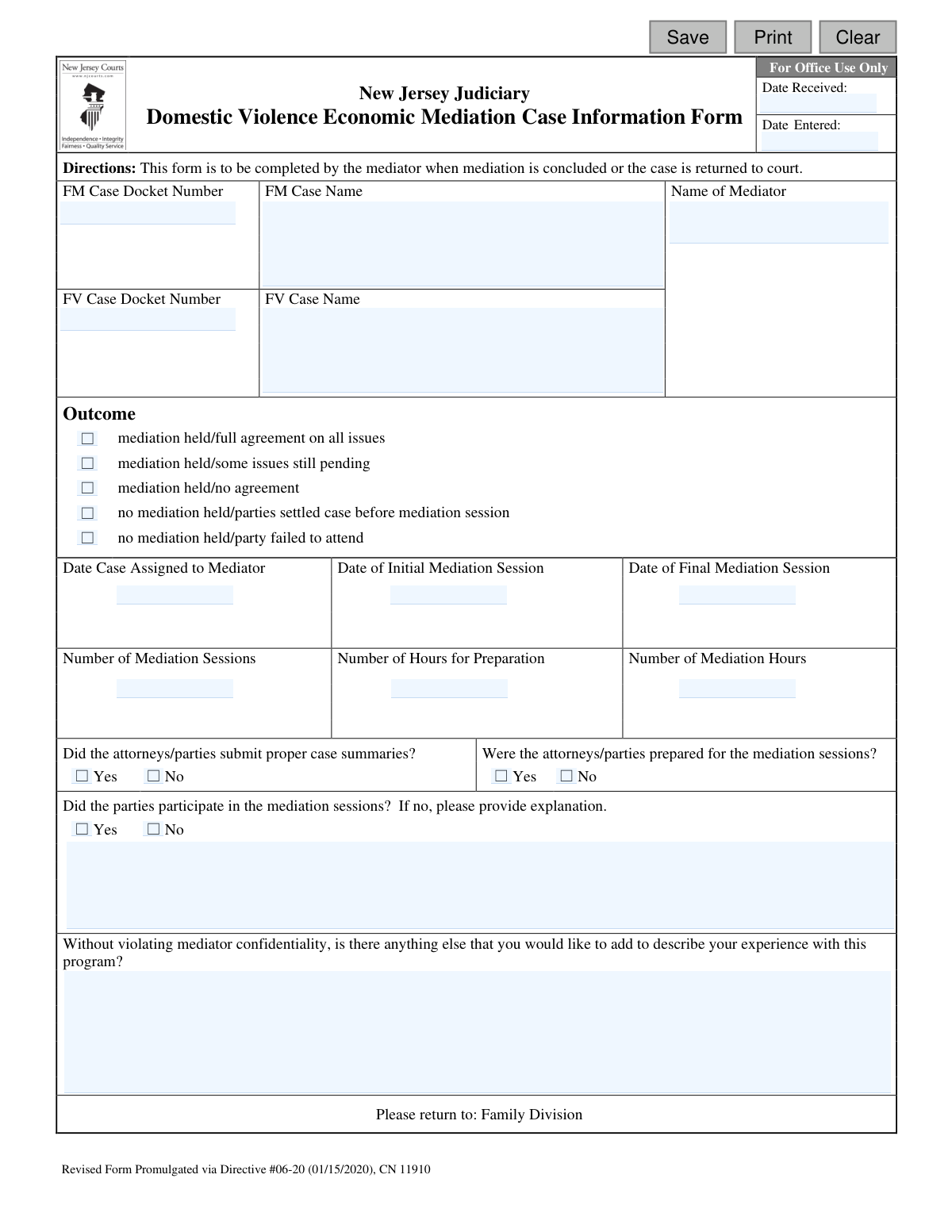
The New Jersey Domestic Violence Economic Mediation Case Information Form (DVEM) is a crucial document completed by mediators to inform the court about the status and outcome of a mediation case. It summarizes key details like whether an agreement was reached, the number of sessions held, and the preparedness of the parties involved, ensuring the court has a clear record of the mediation process. Today, this form can be filled out quickly and accurately using AI-powered services like Instafill.ai, which can also convert non-fillable PDF versions into interactive fillable forms.
Our AI automatically handles information lookup, data retrieval, formatting, and form filling.
It takes less than a minute to fill out DVEM using our AI form filling.
Securely upload your data. Information is encrypted in transit and deleted immediately after the form is filled out.
Form specifications
| Form name: | New Jersey Judiciary Domestic Violence Economic Mediation Case Information Form |
| Number of fields: | 29 |
| Number of pages: | 1 |
| Language: | English |
Instafill Demo: How to fill out PDF forms in seconds with AI
How to Fill Out DVEM Online for Free in 2026
Are you looking to fill out a DVEM form online quickly and accurately? Instafill.ai offers the #1 AI-powered PDF filling software of 2026, allowing you to complete your DVEM form in just 37 seconds or less.
Follow these steps to fill out your DVEM form online using Instafill.ai:
- 1 Navigate to Instafill.ai and upload or select the 'New Jersey Domestic Violence Economic Mediation Case Information Form'.
- 2 Use the AI assistant to automatically populate case details such as the FM and FV docket numbers and case names.
- 3 Review and confirm the dates for case assignment, initial mediation, and final mediation sessions.
- 4 Enter the quantitative data, including the number of mediation sessions, preparation hours, and total mediation hours.
- 5 Check the appropriate boxes to indicate the mediation outcome (e.g., full agreement, no agreement) and the preparedness of the parties.
- 6 Add any necessary explanations or additional comments in the designated text fields without violating mediator confidentiality.
- 7 Securely download, print, or submit the completed form to the appropriate Family Division office as instructed.
Our AI-powered system ensures each field is filled out correctly, reducing errors and saving you time.
Why Choose Instafill.ai for Your Fillable DVEM Form?
Speed
Complete your DVEM in as little as 37 seconds.
Up-to-Date
Always use the latest 2026 DVEM form version.
Cost-effective
No need to hire expensive lawyers.
Accuracy
Our AI performs 10 compliance checks to ensure your form is error-free.
Security
Your personal information is protected with bank-level encryption.
Frequently Asked Questions About Form DVEM
This form is used by mediators to report the status and outcome of a Domestic Violence Economic Mediation case to the New Jersey Judiciary's Family Division after the mediation process is complete.
The assigned mediator must complete and submit this form. It is not intended for the parties involved in the mediation.
The form should be completed and returned to the Family Division as soon as the mediation is concluded or when the case is being returned to court for any reason.
The 'FM' docket number is for the Family Part matrimonial case, while the 'FV' docket number is for the related domestic violence case. You should enter both if they are applicable to the mediation.
You will need the case docket numbers and names, key dates for the mediation process, the number of sessions and hours spent, and your assessment of the parties' preparation and participation.
You should check the box for 'no mediation held/parties settled case before mediation session' and complete the other relevant case identification details before submitting the form.
Select the outcome 'no mediation held/party failed to attend'. You can also provide a brief explanation in the designated section if necessary.
'Preparation Hours' refers to the time you spent reviewing case files and preparing for the sessions. 'Mediation Hours' is the actual time spent conducting the mediation sessions with the parties.
This section is for your general feedback on the mediation program itself, without breaching mediator confidentiality. You can offer suggestions or describe your experience to help improve the process.
As stated on the form, you must return the completed document to the Family Division of the court that assigned you the case.
Yes, services like Instafill.ai use AI to accurately auto-fill form fields from your case files, which can save you significant time and reduce errors.
Simply upload the DVEM form to Instafill.ai, which will make it fillable online. The AI can then help you populate the fields with the correct case information, dates, and details before you download or print it.
If you have a non-fillable or 'flat' PDF, you can use a tool like Instafill.ai. It can convert the static form into an interactive, fillable version that you can easily complete on your computer.
Compliance DVEM
Validation Checks by Instafill.ai
1
Docket Number Completeness and Format
Ensures that the FM or FV Case Docket Number field is not empty and follows the expected New Jersey Judiciary format (e.g., 'FM-XX-YYYYYY-ZZ'). This is a critical identifier for linking the form to the correct case in the system. If the field is empty or the format is incorrect, the form cannot be processed, and the user should be prompted to enter a valid docket number.
2
Case and Mediator Name Completeness
Verifies that the 'Case Name' and 'Name of Mediator' fields are filled out. These fields are essential for basic record-keeping, accountability, and identifying the parties involved. A failure would prevent submission and highlight the fields as required, as a form without this information has no context.
3
Mandatory Outcome Selection
Checks that exactly one option from the 'Outcome' section has been selected. The primary purpose of this form is to report the result of the mediation process. An error will be shown if no outcome or multiple outcomes are selected, ensuring that every submitted record has a clear and unambiguous status.
4
Valid Date Format for All Date Fields
Validates that all date fields ('Date Case Assigned', 'Date of Initial Mediation Session', 'Date of Final Mediation Session') are entered in a valid format (e.g., MM/DD/YYYY) and represent real dates. This prevents data corruption and ensures that dates can be correctly stored and used for reporting and analysis. Invalid entries would trigger a format error message.
5
Mediation Dates Chronological Order
Ensures the logical sequence of mediation dates: 'Date Case Assigned' must be on or before the 'Date of Initial Mediation Session', which must be on or before the 'Date of Final Mediation Session'. This check maintains the integrity of the case timeline and prevents illogical data entry. A validation failure would indicate a data entry error that needs correction.
6
Conditional Requirement for Session Dates
Makes the 'Date of Initial Mediation Session' and 'Date of Final Mediation Session' fields required if the selected 'Outcome' indicates that a mediation was held. Conversely, these fields may be disabled if no mediation was held. This logic ensures that relevant data is captured based on the case outcome and prevents users from entering unnecessary or contradictory information.
7
Valid Number of Mediation Sessions
Verifies that 'Number of Mediation Sessions' is a positive integer if mediation was held, and zero if no mediation was held. This ensures accurate data collection for statistical analysis of the mediation program's efficiency. An entry that does not align with the reported outcome would be flagged for correction.
8
Valid Number for Preparation and Mediation Hours
Checks that 'Number of Hours for Preparation' and 'Number of Mediation Hours' are valid, non-negative numbers (e.g., 0, 1.5, 10). These metrics are crucial for understanding resource allocation and program costs. The system should reject non-numeric or negative values to maintain data quality.
9
Outcome and Session Data Consistency
Cross-validates that if the 'Outcome' is 'no mediation held', then 'Number of Mediation Sessions' and 'Number of Mediation Hours' must both be zero. This prevents logical contradictions in the submitted data. If a user reports that no mediation was held but enters session hours, the system will flag the inconsistency.
10
Session Count and Date Consistency
Checks for consistency between the number of sessions and the session dates. If 'Number of Mediation Sessions' is 1, the 'Date of Initial Mediation Session' should be the same as the 'Date of Final Mediation Session'. This adds an extra layer of validation to ensure the entered data is coherent and accurate.
11
Mandatory Yes/No Responses for Preparedness
Ensures that the questions 'Did the attorneys/parties submit proper case summaries?' and 'Were the attorneys/parties prepared for the mediation sessions?' are answered with a 'Yes' or 'No'. These fields provide qualitative data on case conduct and cannot be left blank. The form submission should be blocked until these required questions are answered.
12
Conditional Requirement for Participation Explanation
Makes the explanation text box ('attyParticipateDesc') a required field if the answer to 'Did the parties participate in the mediation sessions?' ('attyPartcipate') is 'No'. This is vital for capturing the context behind a lack of participation, which is a significant event in a mediation. The system will prompt the user for an explanation before allowing submission.
13
Office Use Date Chronological Order
This validation is for internal use, ensuring that the 'Date Received' is on or before the 'Date Entered'. This maintains the logical integrity of internal processing records and helps track document handling time. An error would indicate a mistake by the data entry clerk.
Common Mistakes in Completing DVEM
Mediators often handle multiple cases and may accidentally transpose digits, omit prefixes, or use the wrong docket number (e.g., using the FM number in the FV field). This error can lead to the form being misfiled or rejected, causing significant administrative delays in case closure. To avoid this, always double-check the FM and FV docket numbers against the official court referral documents before submission.
A frequent error is entering dates that are not in chronological order, such as a final mediation date that is before the initial session date, or a session date before the case was assigned. These inconsistencies require clarification from the court, delaying case processing. Always review the dates sequentially (Date Assigned -> Initial Session -> Final Session) to ensure they are logical and accurate.
The form explicitly requires an explanation if the mediator indicates that the parties did not participate in the sessions. Mediators sometimes check 'No' but forget to fill in the corresponding text box, rendering the response incomplete. This necessitates follow-up from court staff. Always provide a concise, factual explanation in the designated field whenever selecting 'No' for party participation.
It is easy to mistakenly enter the time spent in mediation sessions into the 'Number of Hours for Preparation' field, and vice-versa. This skews the data used by the Judiciary to evaluate the program's efficiency and mediator compensation. To prevent this, carefully review the labels for each field before entering the time, ensuring each value is in its correct box.
A common logical error is selecting an outcome like 'no mediation held' while also filling in values for the number of sessions and mediation hours. This contradictory information confuses court staff and requires correction. Always ensure that session details like dates, hours, and number of sessions are left blank if the selected outcome indicates that no mediation took place.
In a rush to complete the form, a mediator might overlook the 'Outcome' section entirely, failing to check any of the boxes. Without a selected outcome, the form is useless for statistical tracking and case closure, forcing court personnel to contact the mediator for the missing information. Before submitting, always ensure one of the five outcome checkboxes is selected to accurately reflect the case's conclusion.
The final comments section explicitly warns against violating confidentiality, yet mediators may inadvertently include sensitive details about the parties' negotiations or personal statements. This is a serious ethical breach with potential legal consequences. When adding comments, focus only on procedural experiences with the mediation program itself, avoiding any specifics of the case discussion.
When the form is a non-fillable PDF, mediators often print and fill it out by hand. Poor handwriting can make docket numbers, names, and dates unreadable, leading to data entry errors by court staff and processing delays. To avoid this, it's best to use a tool like Instafill.ai, which can convert flat PDFs into fillable forms, allowing you to type directly and ensure perfect legibility.
Mediators might use informal names, abbreviations, or misspell the names of the parties in the 'Case Name' fields. This can cause filing errors if the name doesn't exactly match the official court record. Always copy the case name precisely from the official order of referral. AI-powered form filling tools like Instafill.ai can help prevent this by auto-populating information from a case file, reducing the risk of typos.
Even if a mediation concludes in a single session, the form requires both an 'Initial Mediation Session' date and a 'Final Mediation Session' date. A common mistake is to leave the final date blank if there was only one meeting. Both fields must be completed, even if the date is the same, to provide a complete record for the court's data tracking.
Saved over 80 hours a year
“I was never sure if my IRS forms like W-9 were filled correctly. Now, I can complete the forms accurately without any external help.”
Kevin Martin Green
Your data stays secure with advanced protection from Instafill and our subprocessors

Robust compliance program
Transparent business model
You’re not the product. You always know where your data is and what it is processed for.
ISO 27001, HIPAA, and GDPR
Our subprocesses adhere to multiple compliance standards, including but not limited to ISO 27001, HIPAA, and GDPR.
Security & privacy by design
We consider security and privacy from the initial design phase of any new service or functionality. It’s not an afterthought, it’s built-in, including support for two-factor authentication (2FA) to further protect your account.
Fill out DVEM with Instafill.ai
Worried about filling PDFs wrong? Instafill securely fills new-jersey-judiciary-domestic-violence-economic-mediation-case-information-form forms, ensuring each field is accurate.