Yes! You can use AI to fill out New Jersey Judiciary Domestic Violence Economic Mediation Non-Protected Party Post-Mediation Questionnaire
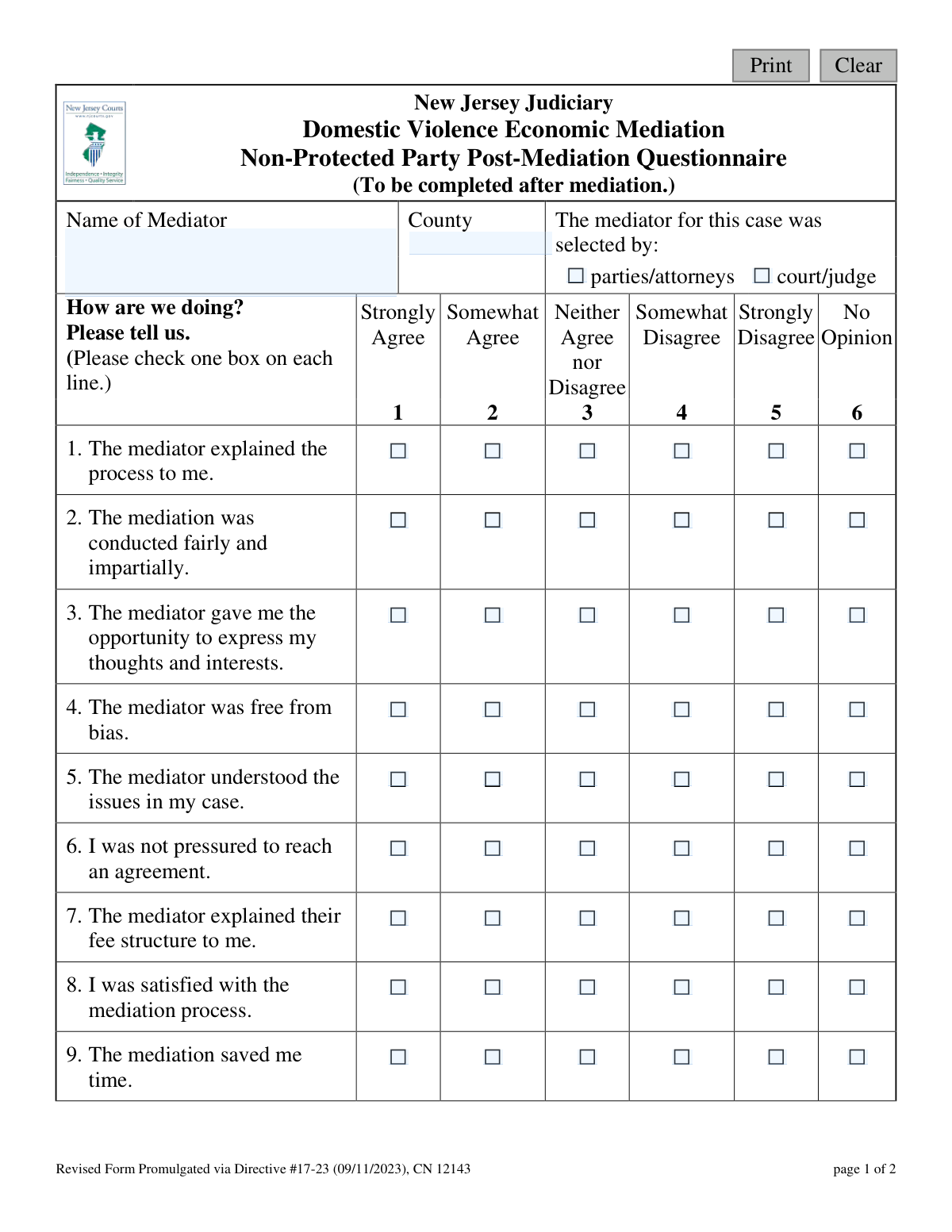
This form, officially titled the 'Non-Protected Party Post-Mediation Questionnaire,' is used by the New Jersey Judiciary to collect feedback from participants in the Domestic Violence Economic Mediation program. It helps the court system evaluate the effectiveness, fairness, and overall satisfaction with the mediation process and the performance of the mediator. Today, this form can be filled out quickly and accurately using AI-powered services like Instafill.ai, which can also convert non-fillable PDF versions into interactive fillable forms.
Our AI automatically handles information lookup, data retrieval, formatting, and form filling.
It takes less than a minute to fill out CN 12143 using our AI form filling.
Securely upload your data. Information is encrypted in transit and deleted immediately after the form is filled out.
Form specifications
| Form name: | New Jersey Judiciary Domestic Violence Economic Mediation Non-Protected Party Post-Mediation Questionnaire |
| Number of fields: | 69 |
| Number of pages: | 1 |
| Language: | English |
Instafill Demo: How to fill out PDF forms in seconds with AI
How to Fill Out CN 12143 Online for Free in 2026
Are you looking to fill out a CN 12143 form online quickly and accurately? Instafill.ai offers the #1 AI-powered PDF filling software of 2026, allowing you to complete your CN 12143 form in just 37 seconds or less.
Follow these steps to fill out your CN 12143 form online using Instafill.ai:
- 1 Navigate to Instafill.ai and upload or select the 'Non-Protected Party Post-Mediation Questionnaire'.
- 2 Enter the name of the mediator and the county where the mediation occurred.
- 3 Indicate how the mediator was selected by checking the appropriate box.
- 4 Use the AI-assisted interface to answer the series of questions rating your experience with the mediation process, from fairness to the mediator's understanding of the issues.
- 5 Answer the questions regarding whether the case settled and if the process saved you time and money.
- 6 Provide any additional suggestions or comments you have to help improve the mediation program in the space provided.
- 7 Review all your responses for accuracy before securely submitting or downloading the completed questionnaire.
Our AI-powered system ensures each field is filled out correctly, reducing errors and saving you time.
Why Choose Instafill.ai for Your Fillable CN 12143 Form?
Speed
Complete your CN 12143 in as little as 37 seconds.
Up-to-Date
Always use the latest 2026 CN 12143 form version.
Cost-effective
No need to hire expensive lawyers.
Accuracy
Our AI performs 10 compliance checks to ensure your form is error-free.
Security
Your personal information is protected with bank-level encryption.
Frequently Asked Questions About Form CN 12143
This form is used by the New Jersey Judiciary to collect your feedback on the Domestic Violence Economic Mediation process and the performance of your mediator after your session is complete.
The 'Non-Protected Party' is the individual involved in the domestic violence case who is not the person protected by a restraining order. This form is specifically for you to share your experience with the mediation.
You should complete this form after your economic mediation session has concluded to ensure your feedback is fresh and accurate.
You will need the name of your mediator and the county where the mediation took place. The rest of the form consists of your opinions and ratings of the process.
Yes, your feedback is valuable regardless of the outcome. Question 11 on the form specifically asks you to indicate whether or not your case settled.
Absolutely. Your honest feedback, whether positive or negative, is crucial for the Judiciary to monitor the quality of the mediation program and make necessary improvements.
The form does not specify submission instructions. Please follow the directions provided by the court, your attorney, or the program coordinator who gave you the form.
This questionnaire is intended for the Judiciary's internal review to assess the program's effectiveness. Individual responses are typically used for quality control and are not shared directly with the mediator.
If you are unsure whether the 'parties/attorneys' or the 'court/judge' selected the mediator, you can ask your attorney for clarification or leave that part blank if the information is not available.
Yes, services like Instafill.ai use AI to help you accurately auto-fill form fields with your information, which can save time and reduce errors.
You can use a platform like Instafill.ai to upload the PDF document. It allows you to easily type your answers into the fields online and then save or print the completed form.
If you have a flat, non-fillable PDF, you can use a service like Instafill.ai. It can convert the document into an interactive, fillable form so you can easily complete it on your computer.
Compliance CN 12143
Validation Checks by Instafill.ai
1
Mediator Name Completeness
This validation ensures that the 'Name of Mediator' field is not left empty. This information is critical for identifying the specific mediator being reviewed, allowing for targeted feedback and performance tracking. If the field is empty upon submission, the user will be prompted to enter the mediator's name before the form can be processed.
2
County Name Validation
This check verifies that the text entered in the 'County' field matches one of the 21 official counties in New Jersey. This is important for accurate geographical data aggregation and reporting, preventing data corruption from typos or invalid entries. If the entered value is not a valid county, the submission will be rejected with an error message.
3
Mediator Selection Method Required
This validation confirms that one of the two options for 'The mediator for this case was selected by' has been chosen. This data point is essential for analyzing trends and understanding the context of the mediation, such as whether court-appointed or privately-selected mediators receive different feedback. A failure to select an option will prevent form submission and highlight the required field.
4
Questionnaire Completeness Check
This check ensures that a response has been provided for each of the 10 numbered survey questions (from 'The mediator explained the process to me' to 'The mediation saved me money'). Incomplete questionnaires reduce the value of the collected data and can skew statistical analysis. If any question is left unanswered, the system will prevent submission and direct the user to the missing responses.
5
Likert Scale Value Integrity
This server-side validation verifies that the submitted value for each of the 10 survey questions is an integer between 1 and 6, corresponding to the available options. This check acts as a safeguard against data corruption, either from a front-end bug or a malicious attempt to submit invalid data. Any submission containing an invalid value for these questions will be rejected.
6
Case Settlement Status Required
This validation ensures that the user has answered the mandatory question 'Did your case settle?' by selecting either 'Yes' or 'No'. This is a key performance indicator for the mediation program, and its absence would create a significant gap in the data. The form cannot be submitted until a response is provided for this question.
7
Single Selection per Question
This check verifies that for each of the 11 multiple-choice or radio-button questions, only one valid option has been selected. This prevents ambiguity in the data that could arise if a user could, for example, select both 'Strongly Agree' and 'Strongly Disagree' for the same question. If a submission contains multiple answers for a single-choice question, it will be flagged as invalid.
8
Comment Field Length Limit
This check restricts the 'suggestions' text area to a predefined maximum character count, such as 5000 characters. This is important for managing database storage, ensuring system performance, and preventing abuse of the free-text field. If a user exceeds the limit, they will be notified and required to shorten their comment before submission.
9
Input Sanitization for Comments
This security validation scans the free-text 'suggestions' field for potentially malicious content, such as HTML tags, JavaScript, or SQL injection patterns. It then neutralizes or removes this content to protect the application and database from security vulnerabilities like Cross-Site Scripting (XSS). This check is crucial for maintaining the integrity and security of the system.
10
Form Submission Readiness
This is a comprehensive, final validation that runs when the user attempts to submit the form. It aggregates the status of all other required field checks (Mediator Name, County, Selection, all 11 questions) into a single pass/fail condition. This ensures that no incomplete forms are submitted, guaranteeing data quality and preventing the need for follow-up.
11
County Field Presence
This validation ensures that the 'County' field is not submitted as an empty value. This information is fundamental for organizing and analyzing feedback on a regional basis, which is essential for statewide program management. If the form is submitted without a county, an error will be displayed, requiring the user to provide this information.
Common Mistakes in Completing CN 12143
Users often rush and forget to enter the mediator's name and the county where the mediation took place. This information is critical for the judiciary to associate the feedback with the correct case, mediator, and jurisdiction. Without it, the entire questionnaire loses its specific value and cannot be used for targeted program improvements.
The form asks whether the mediator was selected by 'parties/attorneys' or 'court/judge'. A common mistake is leaving this section blank or, on paper forms, checking both boxes. This skews data on how mediators are being assigned. Before filling, confirm how the mediator was chosen to ensure the data is accurate for administrative review.
People frequently overlook one or more rows in the main questionnaire grid (questions 1-10), leaving them blank. This happens when rushing or feeling a question is irrelevant. Instead of skipping a line, you should select 'No Opinion' if you cannot answer, which correctly signals a lack of information rather than creating a data gap.
Many users confuse 'Neither Agree nor Disagree' with 'No Opinion'. 'Neither' implies neutrality on an issue you experienced, while 'No Opinion' means you lack the information to answer (e.g., the topic of 'fee structure' never came up). Using 'No Opinion' incorrectly can mislead analysts into thinking a part of the process was skipped when it was not.
After the long grid of questions, the simple 'Did your case settle? Yes/No' question is frequently missed. This is arguably the most critical outcome metric on the form for the judiciary. Missing this question severely diminishes the value of the submission, as settlement rates are a key indicator of the program's success.
In the final suggestions box, many people write unhelpful comments like 'It was good' or 'Needs improvement'. This provides no actionable insight for the judiciary. To be helpful, provide specific, constructive examples related to the process, such as 'The mediator could have managed time better by limiting each party to 10 minutes per issue.'
Some individuals use this feedback form to contest the legal outcome of their case or express general dissatisfaction with the other party. This form is not a legal appeal; it is designed solely to evaluate the mediation process and the mediator's performance. Using it for other purposes means the feedback is misdirected and will not achieve the user's intended goal.
A frequent data entry error is checking more than one box for a single question in the 1-10 grid, such as marking both 'Somewhat Agree' and 'Strongly Agree'. This invalidates the response for that question. To avoid this, double-check that only one box is selected for each numbered item. AI-powered form fillers like Instafill.ai can prevent this by enforcing single-choice constraints on digital forms.
If the form is printed and filled out by hand, illegible writing for the mediator's name or in the comments section makes the information useless. Data entry clerks cannot guess at what was written, so the feedback is often discarded. To prevent this, print clearly in block letters. If you only have a non-fillable PDF, a tool like Instafill.ai can convert it into a fillable digital version, ensuring all your responses are perfectly legible.
The form is intended to be completed soon after mediation, but many litigants delay and forget important details. Waiting too long can lead to inaccurate recollections about the process, fairness, or specific mediator actions. To provide the most accurate feedback, complete the questionnaire within a day or two of the session while the experience is still fresh in your mind.
Saved over 80 hours a year
“I was never sure if my IRS forms like W-9 were filled correctly. Now, I can complete the forms accurately without any external help.”
Kevin Martin Green
Your data stays secure with advanced protection from Instafill and our subprocessors

Robust compliance program
Transparent business model
You’re not the product. You always know where your data is and what it is processed for.
ISO 27001, HIPAA, and GDPR
Our subprocesses adhere to multiple compliance standards, including but not limited to ISO 27001, HIPAA, and GDPR.
Security & privacy by design
We consider security and privacy from the initial design phase of any new service or functionality. It’s not an afterthought, it’s built-in, including support for two-factor authentication (2FA) to further protect your account.
Fill out CN 12143 with Instafill.ai
Worried about filling PDFs wrong? Instafill securely fills new-jersey-judiciary-domestic-violence-economic-mediation-non-protected-party-post-mediation-questionnaire forms, ensuring each field is accurate.