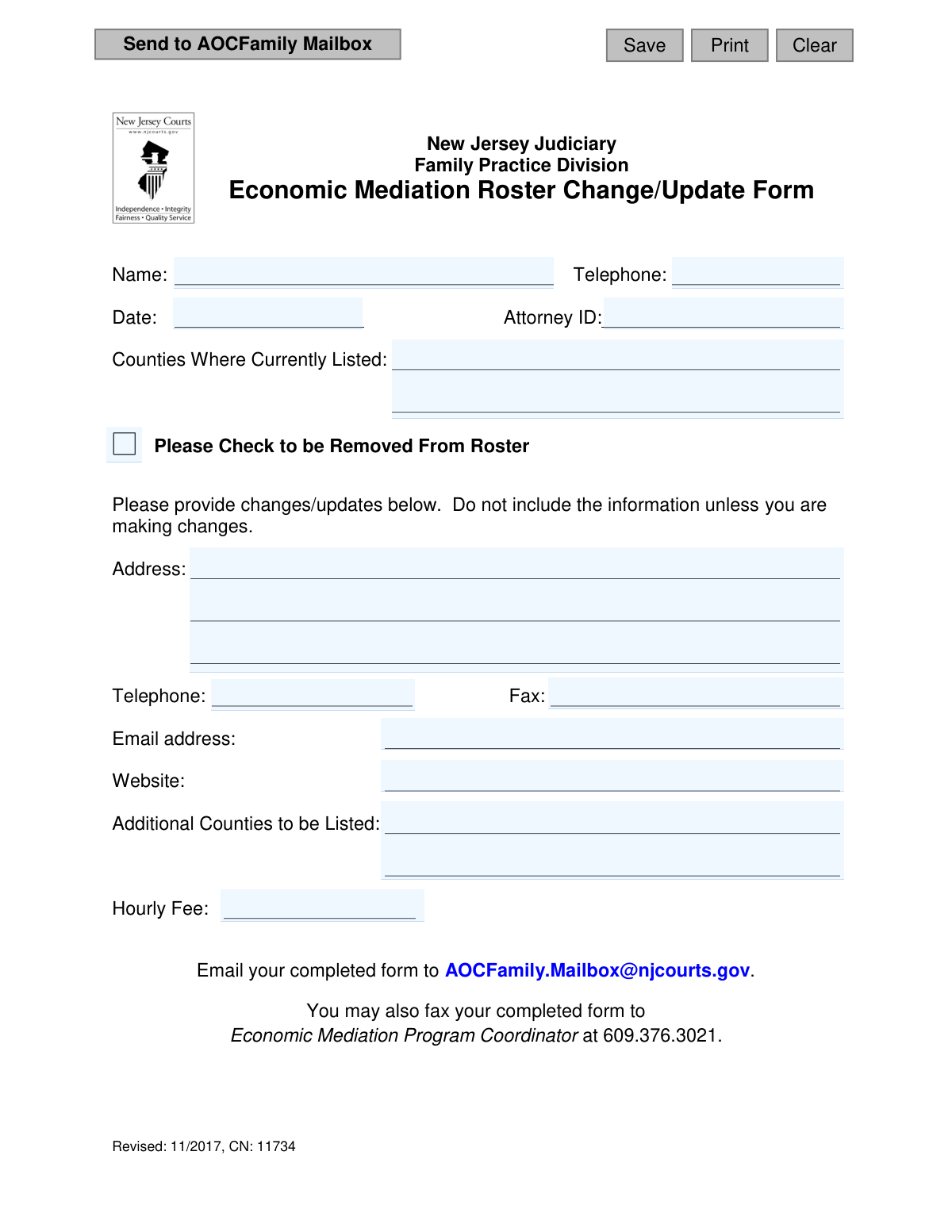
Yes! You can use AI to fill out New Jersey Judiciary Family Practice Division Economic Mediation Roster Change/Update Form

This form, officially known as the Economic Mediation Roster Change/Update Form, is provided by the New Jersey Judiciary's Family Practice Division. It allows mediators currently on the Economic Mediation Roster to update their contact information, change their hourly fee, add or remove counties of practice, or request removal from the roster entirely. Keeping this information current is crucial for the courts and public to access accurate mediator details. Today, this form can be filled out quickly and accurately using AI-powered services like Instafill.ai, which can also convert non-fillable PDF versions into interactive fillable forms.
CN 11734 is part of the family court forms and New Jersey forms categories on Instafill.
Our AI automatically handles information lookup, data retrieval, formatting, and form filling.
It takes less than a minute to fill out CN 11734 using our AI form filling.
Securely upload your data. Information is encrypted in transit and deleted immediately after the form is filled out.

Form specifications

Form name: New Jersey Judiciary Family Practice Division Economic Mediation Roster Change/Update Form
Number of fields: 18
Number of pages: 1
Language: English
main-image

Instafill Demo: How to fill out PDF forms in seconds with AI

How to Fill Out CN 11734 Online for Free in 2026

Are you looking to fill out a CN 11734 form online quickly and accurately? Instafill.ai offers the #1 AI-powered PDF filling software of 2026, allowing you to complete your CN 11734 form in just 37 seconds or less.
Follow these steps to fill out your CN 11734 form online using Instafill.ai:
  1. 1 Navigate to Instafill.ai and upload or select the Economic Mediation Roster Update Form.
  2. 2 Provide your name, attorney ID, date, and the counties where you are currently listed.
  3. 3 If you are making changes, input your new address, telephone number, fax, email, and website.
  4. 4 Specify any additional counties you wish to be listed in and update your hourly fee if necessary.
  5. 5 If you wish to be removed from the roster entirely, check the designated box.
  6. 6 Review all the information entered by the AI for accuracy and make any necessary corrections.
  7. 7 Download the completed form and submit it to the Economic Mediation Program Coordinator via email or fax as instructed on the form.

Our AI-powered system ensures each field is filled out correctly, reducing errors and saving you time.

Why Choose Instafill.ai for Your Fillable CN 11734 Form?

Speed

Complete your CN 11734 in as little as 37 seconds.

Up-to-Date

Always use the latest 2026 CN 11734 form version.

Cost-effective

No need to hire expensive lawyers.

Accuracy

Our AI performs 10 compliance checks to ensure your form is error-free.

Security

Your personal information is protected with bank-level encryption.

Frequently Asked Questions About Form CN 11734

This form is used by mediators currently on the New Jersey Judiciary's Economic Mediation Roster to update their contact information, add counties to their service area, change their hourly fee, or request removal from the roster.

Only mediators who are already listed on the Family Practice Division's Economic Mediation Roster and need to make changes to their information should complete this form. It is not for new applications to the roster.

This means you should only fill in the fields for the information that has changed. For example, if only your email address has changed, you only need to provide your name, Attorney ID, and the new email address.

To be removed from the roster, fill in your name, Attorney ID, and the date, then check the box next to 'Please Check to be Removed From Roster.' You can then submit the form without providing any other updates.

To add new counties, list them in the 'Additional Counties to be Listed' section. You do not need to re-list the counties you already serve.

You can submit the form by emailing it to [email protected] or by faxing it to the Economic Mediation Program Coordinator at 609.376.3021.

Regardless of the change you are making, you must always include your Name, current Telephone number, Date, and Attorney ID so the Judiciary can identify your record.

Yes, you can update your hourly rate by entering the new amount in the 'Hourly Fee' field.

No, this form is only for making updates or changes. If all your information on the roster is current, you do not need to take any action.

The form does not specify a processing time. After submitting your form, allow a reasonable amount of time for the Family Practice Division to process the changes and update the official roster.

Yes, services like Instafill.ai can use AI to accurately auto-fill form fields with your saved information, which can save you time and reduce errors.

Simply upload the form to the Instafill.ai platform. The AI will identify the fields, and you can then click to fill them with your saved professional information, making the process quick and easy.

If you have a non-fillable or 'flat' PDF, you can upload it to a service like Instafill.ai. It can convert the flat PDF into an interactive, fillable form that you can complete and save digitally.

Compliance CN 11734
Validation Checks by Instafill.ai

1
Ensures Core Identifying Fields are Present
Validates that both the 'Name' and 'Attorney ID' fields are filled out before submission. These two fields are the minimum required to uniquely and correctly identify the mediator in the system. Without this information, the Judiciary cannot process the update request, so the form should be rejected with an error message indicating these fields are mandatory.
2
Validates Attorney ID Format
Checks that the 'Attorney ID' field is not empty and follows the expected format for New Jersey attorneys. This ID is crucial for uniquely identifying the mediator in the Judiciary's system and linking them to their official record. An invalid or missing ID would prevent the system from finding the correct record to update.
3
Confirms at Least One Update is Provided
Verifies that the user has either checked the 'Remove From Roster' box or filled in at least one of the update fields (Address, Telephone, Fax, Email, Website, Additional Counties, Hourly Fee). This prevents the submission of empty forms which serve no purpose and waste administrative time. If no changes are detected, the user should be prompted to either provide an update or cancel the submission.
4
Logical Check for Removal vs. Field Updates
Performs a logical consistency check. If the 'Please Check to be Removed From Roster' box is checked, the system should ignore or flag any data entered into the update fields. This prevents contradictory requests and ensures a clear action is taken. The system could display a warning to the user that providing updates while requesting removal is a conflicting action.
5
Ensures Date is in a Valid Format
Verifies that the 'Date' field contains a valid date, preferably in a standard format like MM/DD/YYYY. This is important for record-keeping, establishing when the update request was made. If the date is invalid or in an unrecognized format, it could cause confusion or errors in tracking the history of changes to a mediator's record.
6
Validates New Email Address Format
Ensures that the value entered into the 'Email address' field (`emailNew`) conforms to a standard email format (e.g., [email protected]). Correct email formatting is critical for official communication and sending confirmations. An invalid email address would lead to communication failures and prevent the mediator from receiving important notices.
7
Validates New Telephone and Fax Number Formats
Checks that the 'Telephone' (`phoneNew`) and 'Fax' (`faxNew`) update fields, if filled, contain valid 10-digit phone numbers, allowing for common formatting like parentheses and hyphens. This ensures that contact information on the public-facing roster is accurate and usable. Submitting incorrectly formatted numbers would render the contact information useless.
8
Ensures Hourly Fee is a Valid Numeric Value
Validates that the 'Hourly Fee' (`feeNew`) field contains a valid numerical value, possibly allowing for a currency symbol or decimal point. This is crucial for providing clear and accurate cost information to the public. The validation should reject non-numeric text to prevent data entry errors and ensure the fee is displayed correctly on the roster.
9
Validates Website URL Format
Verifies that the 'Website' (`webNew`) field, if provided, contains a valid URL format, such as one starting with 'http://' or 'https://'. This ensures that links on the roster are functional and direct users to the correct external page. An invalid URL would result in a broken link, providing a poor user experience.
10
Verifies Additional Counties are Valid
Checks that the counties listed in the 'Additional Counties to be Listed' field are valid New Jersey counties. This can be done by cross-referencing the input against a predefined list of the 21 NJ counties. This validation prevents typos and the inclusion of non-existent locations, ensuring the roster's geographic data is accurate.
11
Prevents Duplicate County Listings
Compares the counties entered in 'Additional Counties to be Listed' (`cntyListingNew`) against those in 'Counties Where Currently Listed' (`cntyListingCurr`). The system should flag or prevent the submission if a user tries to add a county where they are already listed. This check maintains data cleanliness and prevents redundant information in the database.
12
Checks Hourly Fee for a Reasonable Range
Validates that the 'Hourly Fee' is within a plausible range (e.g., not $0 or an excessively high number like $99,999). While not a strict rule, this check can catch significant typographical errors, like an extra zero. If a fee is outside a predefined reasonable threshold, the system could prompt the user with a warning to confirm the amount is correct before submission.

Common Mistakes in Completing CN 11734

Entering Redundant Information

People often fill out every field out of habit, even those with no changes, despite instructions to only provide updates. This creates unnecessary work for administrators who must compare all fields to find the actual changes, delaying processing. To avoid this, carefully read the instructions and only enter information in the specific fields you need to update. Since this form is a non-fillable PDF, tools like Instafill.ai can convert it into an interactive version, making it easier to target and fill only the necessary fields.

Misplacing County Listings

The form distinguishes between 'Counties Where Currently Listed' and 'Additional Counties to be Listed.' A common error is to list new counties in the current section or to re-list all counties in the 'Additional' section. This can result in being listed in the wrong jurisdictions or not being added to new ones as intended. Ensure you only list existing counties at the top and new ones in the designated 'Additional' section below.

Missing or Incorrect Attorney ID

The Attorney ID is the primary identifier used to locate a mediator's record. Entering this number incorrectly, or omitting it entirely, can make it impossible for the program coordinator to process the update, especially for individuals with common names. This often results in the form being rejected, requiring resubmission and causing significant delays. Always double-check your Attorney ID before submitting the form.

Inconsistent Hourly Fee Formatting

The 'Hourly Fee' field lacks a specified format, leading to entries like '$400/hr,' '400,' or 'Four Hundred Dollars.' This inconsistency can cause data entry errors when the information is manually transferred to the official roster. For clarity, always use a consistent numerical format, such as '$400.00'. AI-powered form fillers like Instafill.ai can help prevent this by automatically standardizing data into the correct format.

Incorrectly Requesting Full Roster Removal

Users may mistakenly check the 'Please Check to be Removed From Roster' box when they only intend to be removed from a single county. This checkbox is for complete removal from the entire Economic Mediation Roster. This error can lead to being unintentionally de-listed from all mediation activities, requiring a new application to get back on the roster.

Providing an Incomplete Address Change

When updating an address, it's common for people to only enter the new street line and forget the city, state, and ZIP code. An incomplete address is unusable and forces the administrator to contact the mediator for the missing details. This back-and-forth communication significantly delays the update process. AI tools like Instafill.ai can prevent this by using address auto-completion to ensure all required address components are filled in correctly.

Confusing Current vs. New Contact Information

The form has a 'Telephone' field in the top identification section and another in the 'changes/updates' section below. A frequent mistake is entering the new phone number in the top field instead of the designated update field. This creates ambiguity for the processor, who cannot be certain whether an update is intended or which number is the correct one to use.

Omitting Current County Listings for Context

Mediators sometimes forget to fill out the 'Counties Where Currently Listed' field, especially when updating non-county information like a phone number or fee. This field is crucial context for the administrator to identify which specific roster entries need updating. Omitting this information can lead to updates being missed if the mediator is listed in multiple counties.

Using an Obsolete Form Version

The form is marked 'Revised: 11/2017,' but mediators may use an older version saved on their computer. Submitting an obsolete form can lead to missing required information or sending it to an outdated email or fax number. This can cause the update request to be lost or rejected entirely. Always ensure you are using the most current version of the form by downloading it directly from the NJ Judiciary website.

Submission to Incorrect Email or Fax

The form must be sent to a specific email address or fax number. A simple typo, such as writing 'AOC.Family' instead of 'AOCFamily' or transposing digits in the fax number, will cause the submission to fail. The sender is often not notified of the delivery failure, leading them to believe their information has been updated when it has not.
Saved over 80 hours a year

“I was never sure if my IRS forms like W-9 were filled correctly. Now, I can complete the forms accurately without any external help.”

Kevin Martin Green

Your data stays secure with advanced protection from Instafill and our subprocessors

Robust compliance program

Transparent business model

You’re not the product. You always know where your data is and what it is processed for.

ISO 27001, HIPAA, and GDPR

Our subprocesses adhere to multiple compliance standards, including but not limited to ISO 27001, HIPAA, and GDPR.

Security & privacy by design

We consider security and privacy from the initial design phase of any new service or functionality. It’s not an afterthought, it’s built-in, including support for two-factor authentication (2FA) to further protect your account.

Fill out CN 11734 with Instafill.ai

Worried about filling PDFs wrong? Instafill securely fills new-jersey-judiciary-family-practice-division-economic-mediation-roster-changeupdate-form forms, ensuring each field is accurate.

Related forms by category

family court forms Form 12.995(c), Safety-Focused Parenting Plan, Florida Supreme Court Approved Family Law Form 12.901(b)(3), Petition for Dissolution of Marriage with No Dependent or Minor Child(ren) or Property (02/18), Form N161, Appellant’s notice (All appeals except small claims track appeals and appeals to the Family Division of the High Court), Form N161, Appellant's Notice (All appeals except small claims track appeals and appeals to the Family Division of the High Court), Florida Supreme Court Approved Family Law Form 12.915, Designation of Current Mailing and E-mail Address, declaration-of-marriage-for-court-proceeding-california-family-law, Florida Supreme Court Approved Family Law Form 12.902(d), Uniform Child Custody Jurisdiction and Enforcement Act (UCCJEA) Affidavit, Florida Supreme Court Approved Family Law Form 12.941(a), Petition for Enforcement of Out-of-State Custody Decree and for Order to Pick Up Minor Child(ren), Florida Supreme Court Approved Family Law Form 12.970(a), Petition for Temporary Custody by Extended Family, Adoption Request (Stepparent), Florida Family Law Rules of Procedure Form 12.900(b), Notice of and Consent to Limited Appearance, Florida Family Law Rules of Procedure Form 12.900(d), Termination of Limited Appearance, Florida Family Law Rules of Procedure Form 12.900(e), Acknowledgment of Assistance by Attorney, Florida Family Law Rules of Procedure Form 12.900(g), Agreement Limiting Representation, Florida Family Law Rules of Procedure Form 12.900(h), Notice of Related Cases, Florida Family Law Rules of Procedure Form 12.901(a), Joint Petition for Simplified Dissolution of Marriage, Form 12.902(b), Family Law Financial Affidavit (Short Form), Florida Family Law Rules of Procedure Form 12.902(c), Family Law Financial Affidavit (Long Form), Florida Family Law Rules of Procedure Form 12.902(e), Child Support Guidelines Worksheet, Florida Supreme Court Approved Family Law Form 12.902(f)(1), Marital Settlement Agreement for Dissolution of Marriage with Dependent or Minor Child(ren) · + 54 more →
New Jersey forms State of New Jersey Alternate Benefit Program Withdrawal Request Acknowledgement Receipt, Horizon Blue Cross Blue Shield of New Jersey Applied Behavior Analysis Supplemental Information Form, State of New Jersey Application for Employment (Form DPF-663), New Jersey Judiciary Plea Form (Plea 01), Supplemental Plea Form for Certain Sexual Offenses: Megan’s Law/Parole Supervision for Life/Community Supervision for Life (Plea 05), Financial Questionnaire to Establish Indigency, New Jersey Judiciary Resource Family Information Form, Foreclosure Case Information Statement (FCIS) - Appendix XII-B2, New Jersey Judiciary Records Request Form, Superior Court of New Jersey, Application for Appeal and Order, FL Certification of Requested Background Checks for Kinship Legal Guardianship, Certification of Caregiver as to Knowledge of Identity and/or Location of Parents, FL Order Judgment for Kinship Legal Guardianship, New Jersey Judiciary Certification of Repair and Plea of Guilty, Uniform Summary Support Order (USSO), New Jersey Judiciary Volunteer Application (CN 10293), Application to Take the New Jersey Court Interpreter Oral Examination, New Jersey Judiciary Attorney Fee Arbitration Request, Order to Show Cause with Temporary Restraints Pursuant to Rule 4:52, Tax Court of New Jersey, State Tax Complaint · + 268 more →