Yes! You can use AI to fill out Order of Referral to Domestic Violence Economic Mediation Program (DVEM)

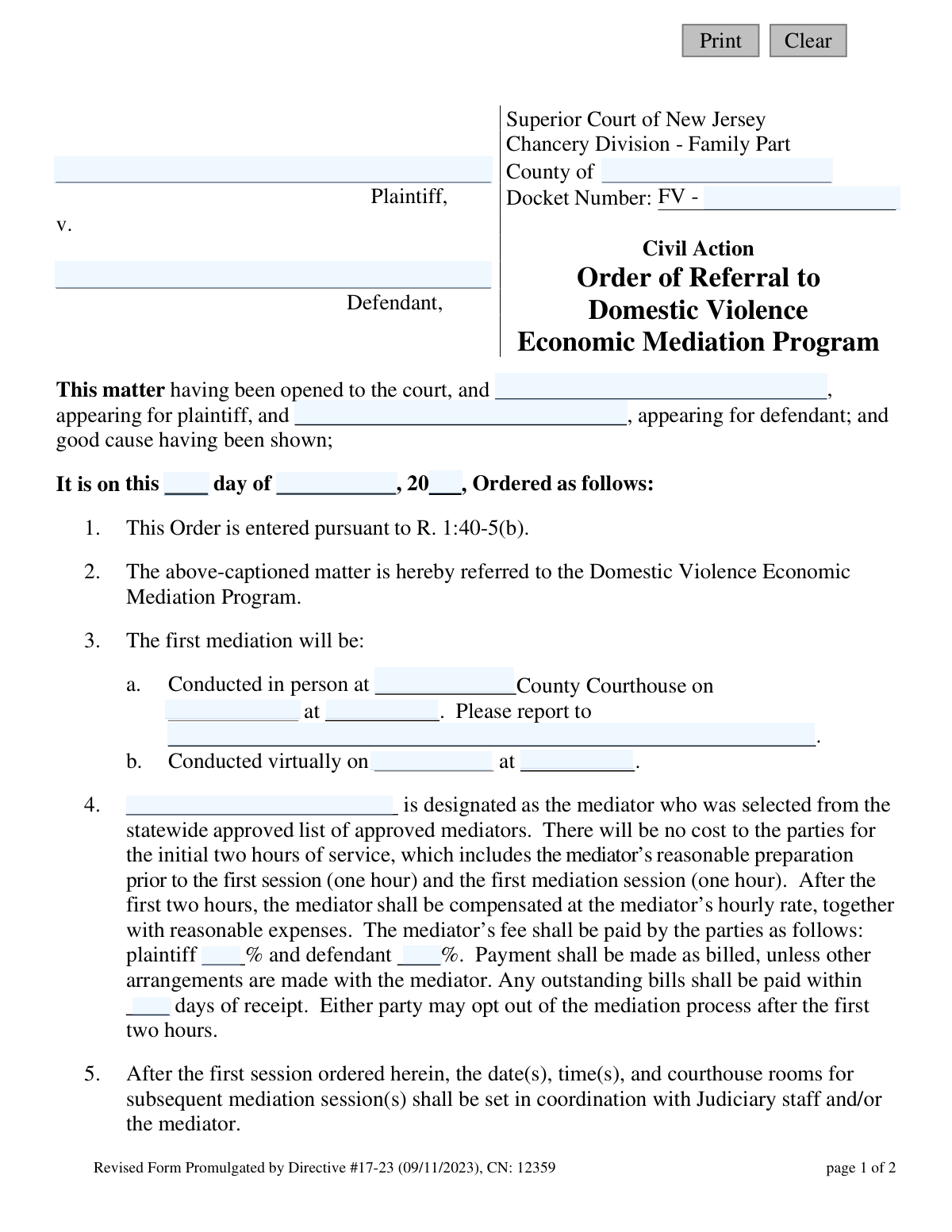
This is an official court order from the Superior Court of New Jersey, Chancery Division - Family Part, used to refer parties in a domestic violence case to the Domestic Violence Economic Mediation Program (DVEM). The form mandates mediation to resolve economic issues, appointing a mediator and outlining the terms, costs, and procedures for the sessions. Today, this form can be filled out quickly and accurately using AI-powered services like Instafill.ai, which can also convert non-fillable PDF versions into interactive fillable forms.
NJ DVEM Referral Order is part of the domestic violence forms and New Jersey forms categories on Instafill.
Our AI automatically handles information lookup, data retrieval, formatting, and form filling.
It takes less than a minute to fill out NJ DVEM Referral Order using our AI form filling.
Securely upload your data. Information is encrypted in transit and deleted immediately after the form is filled out.

Form specifications

Form name: Order of Referral to Domestic Violence Economic Mediation Program (DVEM)
Number of fields: 28
Number of pages: 1
Language: English
main-image

Instafill Demo: How to fill out PDF forms in seconds with AI

How to Fill Out NJ DVEM Referral Order Online for Free in 2026

Are you looking to fill out a NJ DVEM REFERRAL ORDER form online quickly and accurately? Instafill.ai offers the #1 AI-powered PDF filling software of 2026, allowing you to complete your NJ DVEM REFERRAL ORDER form in just 37 seconds or less.
Follow these steps to fill out your NJ DVEM REFERRAL ORDER form online using Instafill.ai:
  1. 1 Navigate to Instafill.ai and upload or select the 'Order of Referral to DVEM' form.
  2. 2 Enter the case details, including the county, plaintiff and defendant names, and the FV docket number.
  3. 3 Input the names of the attorneys representing the plaintiff and defendant, if any.
  4. 4 Specify the mediation details, including whether it is in-person or virtual, the date, time, and location.
  5. 5 Designate the mediator's name and specify the cost-sharing percentages for the plaintiff and defendant.
  6. 6 Use the AI-powered review feature to check all entered information for accuracy and completeness before the judge signs the order.
  7. 7 Securely download, print, or e-file the completed and signed order as directed by the court.

Our AI-powered system ensures each field is filled out correctly, reducing errors and saving you time.

Why Choose Instafill.ai for Your Fillable NJ DVEM Referral Order Form?

Speed

Complete your NJ DVEM Referral Order in as little as 37 seconds.

Up-to-Date

Always use the latest 2026 NJ DVEM Referral Order form version.

Cost-effective

No need to hire expensive lawyers.

Accuracy

Our AI performs 10 compliance checks to ensure your form is error-free.

Security

Your personal information is protected with bank-level encryption.

Frequently Asked Questions About Form NJ DVEM Referral Order

This is a court order from the Superior Court of New Jersey that requires the parties in a domestic violence case to attend mediation to resolve economic and financial issues.

A Superior Court Judge fills out and signs this form. As a plaintiff or defendant, you will receive a completed copy that orders you to attend mediation; you do not fill it out yourself.

The initial two hours of service, which includes one hour of preparation and the first one-hour session, are free. After that, the parties must pay the mediator's hourly rate as specified in the order.

The judge determines the percentage of the mediator's fee that the plaintiff and defendant will each pay. This division is specified in section 4 of your order.

You must provide the mediator with your Case Information Statement (CIS), Early Settlement Panel (ESP) Statements, tax returns, and appraisal reports before the first session.

Section 3 of the order specifies the date, time, and location of your first session. It will be either in person at a designated courthouse or conducted virtually.

Yes, either party has the right to opt out of the mediation process after the initial two-hour session is complete.

Yes, mediation proceedings are confidential and cannot be used as evidence in court, as stated in section 9 of the order. No verbatim record of the sessions is made.

If your case is not fully settled, the mediator will submit a form to the court summarizing the issues that are settled and those that remain unresolved. Your case will then proceed in court on the unresolved issues.

Yes, you are allowed to attend mediation sessions with your attorney or another person of your choice as defined by the Uniform Mediation Act.

Participating in good faith means you are required to cooperate, provide accurate and complete information, and make a genuine effort to reach a settlement during the mediation sessions.

Yes, services like Instafill.ai use AI to help you accurately auto-fill form fields, which can save time and reduce errors on various legal documents.

You can upload your form to the Instafill.ai platform, and its AI will make the document interactive. You can then type your information directly into the fields and save or print the completed form.

You can use a service like Instafill.ai, which can convert flat, non-fillable PDFs into interactive forms that you can easily complete on your computer.

Compliance NJ DVEM Referral Order
Validation Checks by Instafill.ai

1
Docket Number Format Validation
Ensures the 'docketNo' field follows the required format, starting with 'FV -' followed by the case number. This is crucial for correct case identification and filing within the court system. A failure would prevent the order from being correctly associated with its case file.
2
Completeness of Party Information
Verifies that both the Plaintiff's Name ('plaName') and Defendant's Name ('defName') fields are populated. These fields are fundamental to the order's validity, as they identify the legal parties involved. An incomplete submission would render the order legally insufficient.
3
Valid Order Date
Checks that the 'orderDay', 'orderMo', and 'orderYr' fields combine to form a valid calendar date that is not in the future. This prevents data entry errors like an impossible date (e.g., April 31) or a post-dated order. An invalid date would question the document's authenticity and timeline.
4
Exclusive Mediation Type Selection
Ensures that details for either in-person mediation OR virtual mediation are provided, but not both. This validation prevents ambiguity and confusion regarding the location and format of the first mediation session. If both are filled, the form should be rejected for clarification.
5
In-Person Mediation Details Completeness
If in-person mediation is selected, this check confirms that 'eventCounty', 'eventDt', 'eventTime', and 'eventRpt' are all populated. Missing any of these details would leave parties without essential information on where and when to appear. This prevents logistical failures and ensures parties can comply with the order.
6
Virtual Mediation Details Completeness
If virtual mediation is selected, this check verifies that 'virtualEventDt' and 'virtualEventTime' are filled. This is necessary to provide the parties with the correct date and time for the scheduled virtual session. Failure to provide this information would make it impossible for the mediation to occur as ordered.
7
Logical Mediation Date Chronology
Validates that the mediation date ('eventDt' or 'virtualEventDt') occurs on or after the order's date ('orderDay'/'orderMo'/'orderYr'). A mediation session cannot be scheduled before the court officially orders it. This check maintains the logical and legal timeline of events.
8
Mediator Fee Allocation Sum
Verifies that the percentage values entered in 'medFeePla' and 'medFeeDef' are numeric and sum to exactly 100. This ensures the financial responsibility for the mediator's services is fully and correctly allocated between the parties. An incorrect sum would create billing disputes and ambiguity.
9
Mediator Fee Payment Term Validation
Ensures the 'medFeeDays' field contains a positive integer. This field defines the payment window for outstanding bills, so it must be a whole number greater than zero to represent a valid deadline. A non-positive or non-integer value would make the payment term unenforceable.
10
Required Mediator Contact Information
Checks that the mediator's name ('medName'), address ('medAddr1'), and phone number ('medPh') are all provided. This information is critical for the parties to communicate with the mediator and provide required documents prior to the session. Missing information would create a barrier to the mediation process.
11
Mediator Phone Number Format
Validates that the 'medPh' field conforms to a standard phone number format (e.g., ###-###-####). A properly formatted number is essential for reliable communication between the parties and the mediator. An invalid format could lead to failed contact attempts and delays.
12
Judge's Signature Date Chronology
Confirms that the Judge's signature date ('sigDt') is on or after the main order date. A judge cannot logically sign an order before it is officially dated. This validation upholds the procedural integrity and timeline of the court order.
13
Mandatory County Specification
Ensures the 'typeCounty' field, which specifies the county of the Superior Court, is not empty. This is a critical piece of jurisdictional information required for the order to be valid and properly filed. Without it, the document's origin and authority are unclear.
14
Judge's Name Presence
Verifies that the 'jdgName' field is populated with the name of the presiding judge. An order is not legally valid without identifying the judicial officer who issued it. This is a mandatory field for the document's authenticity.

Common Mistakes in Completing NJ DVEM Referral Order

Incorrect Docket Number Formatting

Users often enter the docket number without the required 'FV -' prefix or use incorrect spacing. This is a critical identifier for the case file within the court system. An incorrect or incomplete docket number can lead to significant delays in processing the order, misfiling of the document, or rejection by the court clerk. To avoid this, always enter the docket number exactly as it appears on previous court documents, ensuring the 'FV -' prefix is included. AI-powered tools like Instafill.ai can help by validating the format against predefined court standards.

Conflicting or Ambiguous Mediation Scheduling

The form provides two distinct options for mediation: Section 3a for in-person and 3b for virtual. A common error is filling out details for both, or only partially filling out the selected option, creating confusion. This can result in parties and attorneys missing the session or showing up at the wrong location or time. To prevent this, carefully select only one option (either 3a or 3b) and fill in all required details (date, time, and location/reporting instructions) for that choice, leaving the other section completely blank.

Incorrect Mediator Fee Percentage Allocation

In Section 4, the form requires specifying the percentage of the mediator's fee to be paid by the plaintiff and defendant. A frequent mistake is entering percentages that do not add up to exactly 100%. This mathematical error can render the financial portion of the order invalid, leading to disputes over payment and requiring the form to be amended and resubmitted. Always double-check that the two percentage values sum to 100 before finalizing the document.

Omitting Critical County Information

The form requires the county to be specified in the header ('County of'). This field is sometimes overlooked, especially when filers are focused on the case-specific details. Leaving the county blank makes the order legally ambiguous, as it isn't tied to a specific court jurisdiction, potentially rendering it unenforceable. Ensure the county where the case is filed is clearly entered at the top of the form to establish proper jurisdiction.

Inconsistent or Missing Mediator Information

The mediator's name and contact details are requested in two separate places: once in Section 4 and again at the bottom of the form. People sometimes fill out one but not the other, or use different spellings or abbreviations. This inconsistency creates confusion for the court, the parties, and administrative staff. To avoid this, enter the mediator's full, correctly spelled name and complete contact information in all designated fields.

Using Incomplete or Abbreviated Party Names

Filers may use informal names, initials, or abbreviations for the Plaintiff and Defendant instead of their full legal names. Court orders are formal legal documents that require precise identification of all parties involved. Using incomplete names can create ambiguity and potential challenges to the order's validity. Always use the full legal names of the plaintiff and defendant as they appear on the original complaint and other official case documents.

Leaving Payment Deadline for Fees Ambiguous

Section 4 includes a clause for when outstanding bills must be paid: 'within ___ days of receipt.' Leaving this field blank or entering a vague term like 'promptly' creates an unenforceable payment term. This can lead to disputes with the mediator over late payments and unnecessary conflict. To ensure clarity and enforceability, always enter a specific number of days (e.g., 15, 30) in this field.

Omitting In-Person Reporting Instructions

When an in-person mediation is selected (Section 3a), the form includes the line 'Please report to ______.' This field is intended for a specific room number, office, or check-in desk within the courthouse. A common oversight is leaving this blank, which can cause parties and their attorneys to be lost or late on the day of the mediation. Always provide a precise location to prevent delays and ensure the session starts on time.

Incomplete Attorney or 'Pro Se' Status

The form has fields to list the attorneys appearing for the plaintiff and defendant. If a party is represented, this information must be complete. If a party is self-represented, the field is often left blank, which is ambiguous. This can lead to communication breakdowns, as the court and mediator won't know who to contact. Clearly enter the attorney's full name or write 'Pro Se' (or 'Self-Represented') to indicate that the party does not have legal counsel.

Submitting a Poorly Filled, Non-Digital Form

This form is often distributed as a non-fillable PDF, tempting users to print it and fill it out by hand. Handwritten entries can be illegible, leading to data entry errors by court staff and delays in processing the order. Illegible names, dates, or numbers can cause serious confusion. To avoid this, use a tool like Instafill.ai that can convert flat PDFs into digitally fillable forms, ensuring all entries are clean, legible, and correctly formatted for submission.
Saved over 80 hours a year

“I was never sure if my IRS forms like W-9 were filled correctly. Now, I can complete the forms accurately without any external help.”

Kevin Martin Green

Your data stays secure with advanced protection from Instafill and our subprocessors

Robust compliance program

Transparent business model

You’re not the product. You always know where your data is and what it is processed for.

ISO 27001, HIPAA, and GDPR

Our subprocesses adhere to multiple compliance standards, including but not limited to ISO 27001, HIPAA, and GDPR.

Security & privacy by design

We consider security and privacy from the initial design phase of any new service or functionality. It’s not an afterthought, it’s built-in, including support for two-factor authentication (2FA) to further protect your account.

Fill out NJ DVEM Referral Order with Instafill.ai

Worried about filling PDFs wrong? Instafill securely fills order-of-referral-to-domestic-violence-economic-mediation-program-dvem forms, ensuring each field is accurate.

Related forms by category

domestic violence forms Form DV-100, Request for Domestic Violence Restraining Order, Dakota County CDA New Admissions Informal Review Request Form (Housing Choice Voucher Program) and HUD Form 5382, Certification of Domestic Violence, Dating Violence, Sexual Assault, or Stalking, and Alternate Documentation, DV-100, Request for Domestic Violence Restraining Order (Domestic Violence Prevention), Form DV-200, Proof of Personal Service (CLETS) (Domestic Violence Prevention), Judicial Council of California Form DV-110, Temporary Restraining Order (CLETS-TRO) (Domestic Violence Prevention), Form DV-109, Notice of Court Hearing (Domestic Violence Prevention), Form DV-101, Description of Abuse (Domestic Violence Prevention), Form DV-108, Request for Orders to Prevent Child Abduction (Domestic Violence Prevention), Form DV-116, Order on Request to Continue Court Hearing (Temporary Restraining Order) (CLETS-TRO) (Domestic Violence Prevention), Form DV-130, Restraining Order After Hearing (Order of Protection) (Domestic Violence Prevention), Form DV-105, Request for Child Custody and Visitation Orders (Domestic Violence Prevention), Form DV-140, Child Custody and Visitation Order (Domestic Violence Prevention), Form DV-145, Order to Prevent Child Abduction (Domestic Violence Prevention), State of Michigan Form MC 282, Domestic Violence Screening for Referral to Mediation, MC 282a, Domestic Violence Screening, Form CR-161, Criminal Protective Order—Other Than Domestic Violence (CLETS—CPO), Form CR-162, Order to Surrender Firearms, Firearm Parts, and Ammunition in Domestic Violence Case (CLETS—CPO), Form CR-102, Domestic Violence Plea Form With Waiver of Rights—Misdemeanor (Criminal), Form CR-160, Criminal Protective Order—Domestic Violence (CLETS—CPO), Form DV-120, Response to Request for Domestic Violence Restraining Order (Domestic Violence Prevention) · + 26 more →
New Jersey forms State of New Jersey Alternate Benefit Program Withdrawal Request Acknowledgement Receipt, Horizon Blue Cross Blue Shield of New Jersey Applied Behavior Analysis Supplemental Information Form, State of New Jersey Application for Employment (Form DPF-663), New Jersey Judiciary Plea Form (Plea 01), Supplemental Plea Form for Certain Sexual Offenses: Megan’s Law/Parole Supervision for Life/Community Supervision for Life (Plea 05), Financial Questionnaire to Establish Indigency, New Jersey Judiciary Resource Family Information Form, Foreclosure Case Information Statement (FCIS) - Appendix XII-B2, New Jersey Judiciary Records Request Form, Superior Court of New Jersey, Application for Appeal and Order, FL Certification of Requested Background Checks for Kinship Legal Guardianship, Certification of Caregiver as to Knowledge of Identity and/or Location of Parents, FL Order Judgment for Kinship Legal Guardianship, New Jersey Judiciary Certification of Repair and Plea of Guilty, Uniform Summary Support Order (USSO), New Jersey Judiciary Volunteer Application (CN 10293), Application to Take the New Jersey Court Interpreter Oral Examination, New Jersey Judiciary Attorney Fee Arbitration Request, Order to Show Cause with Temporary Restraints Pursuant to Rule 4:52, Tax Court of New Jersey, State Tax Complaint · + 271 more →