What Instafill.ai Form Filler could do in May 2025
This post of May 23, 2025 listed the new and updated capabilities of Instafill.ai Form Filler, with examples from agriculture, legal, healthcare and food service. The current list of what the product does is on the capabilities page.
1. Batch form filling
Batch filling generates hundreds of completed PDFs from one structured spreadsheet. Each row is one copy of the form. Before the first batch, the form goes through a one-time fine-tuning in which the AI analyzes its structure, maps its fields and learns its logic, such as how to treat checkboxes, required formats or overflow tables. After that you upload a file, match columns to form fields (automatically or by hand), and the system fills one copy of the form per row. It formats dates, sets checkboxes, and splits data across pages or generates supplemental attachments when needed. It works from a phone or tablet as well as a desktop.
The output is a ZIP of the completed PDFs, named by row values such as a client name or an event date. A later file for the same form generates new documents with no further setup. A batch can be started from the dashboard, by email-to-fill, or through the API.
| Input formats | .csv, .xlsx, .xls, .tsv |
| Output | One PDF per row, optionally in a ZIP |
| Field mapping | Columns mapped to form fields by the AI, with manual override |
| Checkboxes | Yes or No selected from the spreadsheet value |
| Overflow | Attachments generated when the items exceed the form's rows |
Batch filling also came with these:
- Context-aware form variants. It identifies and fills the right version of a form, such as a county-specific, role-specific or version-specific PDF.
- Field-level mapping from spreadsheets. It reads several data sources, such as Smartsheet, Excel and CSV exports, and aligns the fields across formats.
- Line limits. Forms that allow only 4 to 6 entries are handled by splitting into several documents, adding "See Attachment A" references or generating supplemental tables.
- Narrative interpretation. Unstructured narratives, such as a description of discrimination in a legal complaint, are turned into standard form inputs and checkbox choices.
- Yes/No and checkbox automation. Boxes such as "OK to Text?" or "Disability Discrimination" are selected from the spreadsheet or the form logic.
Batch filling today: Batch processing and the batch fill guide.
2. Webhook-based form automation
A webhook triggers form filling from an external source such as Cognito Forms, Customer.io or Make.com. The source sends structured data to Instafill.ai, the AI maps the payload to a predefined PDF form, and a filled document comes back with no manual step. Any platform that can send an HTTP POST works, with custom payload formats. You choose the form during the one-time fine-tuning setup, and after that parsing and formatting of dates, names and checkboxes are automatic. The result can be a direct download, an email or a callback URL. Typical uses are intake forms, client onboarding and compliance reports. See webhook integration.
3. Email-to-fill
Each client gets a unique Instafill.ai email address tied to one form. When a system such as Cognito Forms sends its submission emails, with text answers and attachments, to that address, the AI extracts the data, maps it to the fine-tuned form and returns a completed PDF within minutes. No API or technical integration is needed, and a person can forward the emails by hand with the same result. Attachments such as narratives or supporting documents are read as context. The result goes to a designated recipient and includes the filled form, a summary of the interpreted fields and any redactions or flagged issues. Uses include legal intake, client onboarding and government applications. See autofill from sources.
4. First-shot processing and fine-tuning
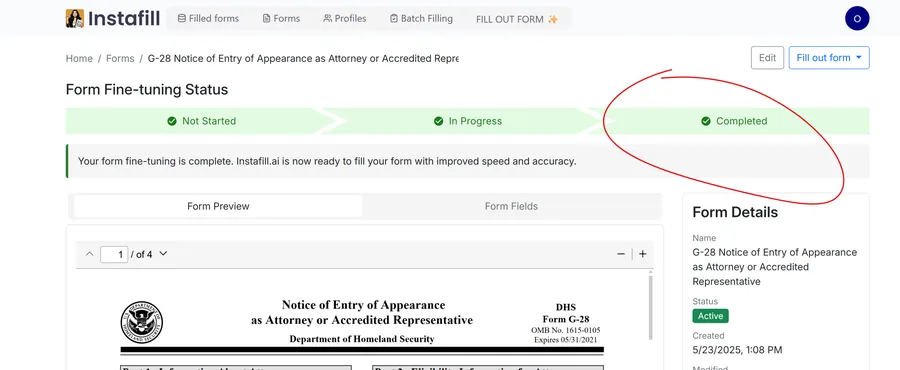
The first time a new form is processed, Instafill.ai attempts a first-shot fill from general intelligence and the available input. That gives a baseline and shows where the model needs adjustment, such as misaligned fields, checkbox logic or formatting. Fine-tuning follows, and it needs to happen only once per form type. At the time of this post, the Instafill.ai team reviewed the filled form and applied corrections by hand, which took 1 to 2 business days. That step is now automatic: fine-tuning usually takes under 20 minutes, and you can improve it later with examples and a one-click regeneration. See AI training and fine-tuning.
5. Workflow automation and e-signatures
Returned documents are ready for e-signature platforms or for submission to an agency, such as a state lab or a health department.
Instafill.ai left signature areas blank and clearly marked, so that you could add a typed, drawn or certificate-based signature in any PDF editor once the form was checked. You can now add a signature inside Instafill.ai: see E-sign PDF forms and Sign a filled form.
6. Profiles
A profile saves structured information, such as names, addresses and contact details, for a person, a client or an organization, so you do not retype it for each form. Applying more than one profile to a form is possible, for example one for the client and one for their employer or attorney. Profiles reduce typos and keep information consistent across forms, they are useful to a team that works with many clients, and they combine well with batch fill and webhooks. See Profile management and Profiles.
7. Multiple languages
Instafill.ai handles forms and data in several languages, which suits international teams, immigration cases and multilingual government filings. Data can be entered in the applicant's own language, and special characters, accents and international phone formats are kept. The post listed the languages as follows.
- Fully tested: English, Ukrainian, Spanish (Latin America and Spain), French (France, Canada and Switzerland), German (Germany, Austria and Switzerland), Italian (Italy and Switzerland), Romansh, Portuguese (Portugal and Brazil), Hungarian, Dutch, Polish, Romanian, Turkish and Catalan.
- Beta: Vietnamese, Tagalog, Arabic (left-to-right fields only), Simplified Chinese, Korean and Japanese.
Non-Latin languages are supported for input, but how well the form layout fits depends on the PDF. See multilingual support for the current list.
8. Smart data formatting
Values are formatted to what each form expects:
- Phone numbers, in standard or international formats.
- Social Security numbers: 123456789 becomes 123-45-6789.
- Addresses, split into street, city, state and ZIP with consistent casing and punctuation.
- Dates in the required format, such as MM/DD/YYYY or DD.MM.YYYY.
- Names: "john DOE" becomes "John Doe".
- Checkboxes, set to Yes or No from the context or the rules in your data.
- Currency, with dollar signs, commas and decimals as needed.
- ID numbers, with dashes kept and license or passport numbers formatted correctly.