E-Sign PDF Forms
Sign filled PDF forms directly in Instafill.ai - by drawing, typing, or uploading a signature image. No printing, scanning, or external e-signature software needed.
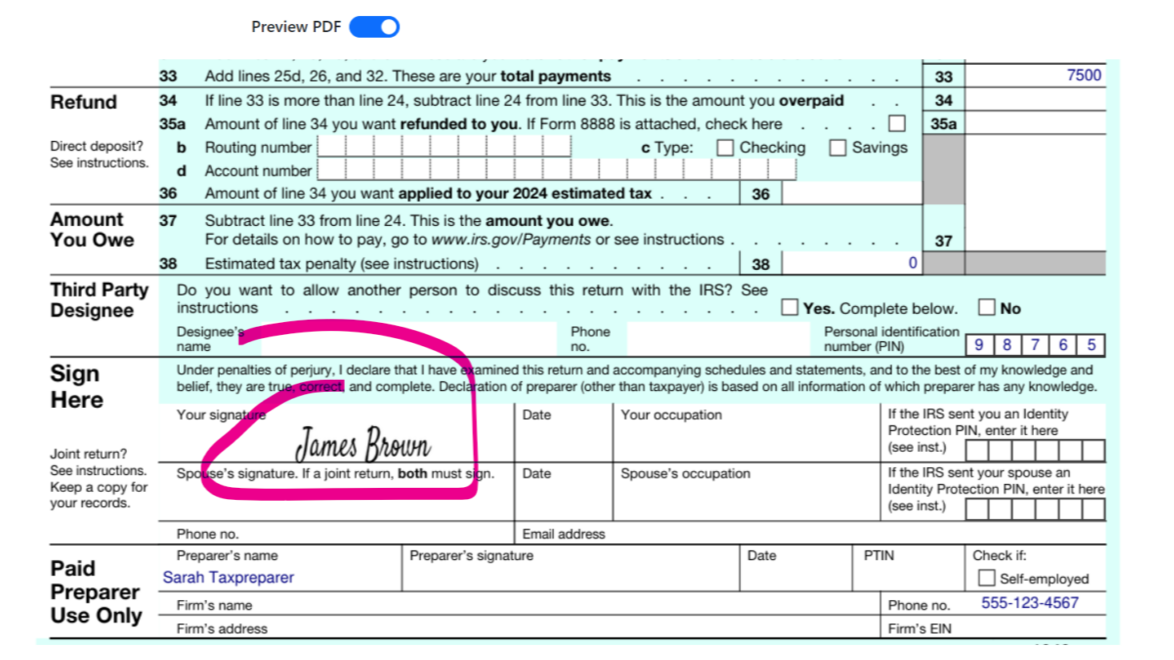
Overview
After AI form filler fills out your form, you often need to sign it before submission. Without a built-in signing option, that means downloading the PDF, printing it, signing by hand, scanning it back, and uploading the result. Or paying for a separate e-signature tool.
Instafill.ai Sign lets you skip all of that. Once your form is filled, you create a signature - draw it, type it, or upload an image of your handwritten signature - and place it directly on the document. Save the changes and download a signed PDF ready to submit. The whole process takes seconds.
This also works after batch filling. When you merge multiple filled forms into a single flat PDF, you can sign the merged document right in the viewer before downloading - no extra steps or software.
Instafill.ai Sign works on desktop and mobile, in any modern browser.
For a detailed walkthrough, see How to e-Sign PDF documents with AI form filler.
Key Capabilities
| Capability | What it means for you |
|---|---|
| Three capture methods | Draw with mouse, touchpad, or touchscreen. Type your name and choose a signature font. Or upload an image of your handwritten signature |
| Place on any page | Position the signature anywhere on the document and resize as needed before saving |
| Clear and redo | Retry your signature as many times as needed until you are satisfied with the appearance |
| Works after batch fill | After merging batch-filled PDFs into one flat document, sign the merged file directly in the viewer |
| Desktop and mobile | Sign forms in any modern browser on phones, tablets, and desktops |
| No external software | No need for Adobe Sign, DocuSign, or any other e-signature subscription. Signing is included |
How It Works
Fill your form
Fill a form using any method - single-session autofill, batch processing, or manual entry in the visual editor.
Create your signature
After the form is filled, the PDF opens in the viewer. Choose your signing method:
- Draw: Use your mouse, touchpad, or touchscreen to draw your signature freehand. This is ideal if you want your digital signature to closely resemble your handwritten one.
- Type: Enter your name and the system generates a stylized signature in a chosen font. Quick and consistent across documents.
- Upload: Upload a scanned or photographed image of your handwritten signature. A good option for maintaining the exact look of your traditional signature.
Place and save
Position the signature on the page, resize if needed, and click Save. Instafill.ai downloads the signed PDF to your device automatically. The resulting file is a standard PDF that can be opened in any PDF reader.
Signing after batch fill
When you fill forms in batch and merge the results into a single flat PDF, the merged file opens in the viewer with the same three signature options. This lets you fill, merge, and sign in one continuous workflow without leaving Instafill.ai.
For a walkthrough of the batch fill, merge, and sign flow, see 3 Updates to Instafill.ai Batch Filling.
Use Cases
| Who | What they sign | Why it matters |
|---|---|---|
| Attorneys | Engagement letters, settlement agreements, court filings | Sign after AI fills client details - no print/scan loop for every closing or filing |
| Healthcare providers | Patient consent forms, credentialing packets, authorization forms | Sign completed forms before forwarding to insurance or hospital systems |
| Real estate professionals | Lease agreements, closing documents, property transfer forms | Sign filled forms immediately after AI populates client and property data |
| Government and permits | Permit applications, licensing renewals, tax authorizations | Sign and submit digitally instead of mailing or hand-delivering paper |
| Construction firms | Prequalification packets, safety compliance forms, bid submissions | Sign batch-filled permit forms in one merged document |
| Insurance agents | Claims forms, policy applications, compliance filings | Sign after batch filling client data from spreadsheets |
Case Study: How an Australian Medical Practice Automated DVA Diagnosis Form Processing
Med For Men processes 100-300 veterans' diagnosis forms per month. The practice uses batch filling to generate all forms for a patient at once, merges them into a single flat PDF, and the doctor signs the merged document directly in Instafill.ai - eliminating the need for separate signing tools or manual PDF merging.
Benefits
| No printing or scanning | Sign forms entirely on screen. No paper, no scanner, no extra steps |
| One workflow from fill to sign | Fill with AI, review in the editor, sign, and download - all in Instafill.ai |
| Consistent appearance | Typed signatures look identical across every document. Drawn and uploaded signatures are placed cleanly |
| Works on any device | Sign on desktop, tablet, or phone in any modern browser |
| No extra cost | Signing is included with Instafill.ai. No separate e-signature subscription required |
Current Limitations
- Single signer only. The current version supports one signer per document. Multi-party co-signing is on our roadmap.
- PDF documents only. Signing is available for PDF forms. Other file types are not supported for signing at this time.
If you need any of the missing features, reach out to [email protected]. Customer requests directly shape our roadmap.
Common Questions
Are electronic signatures legally valid?
In most cases, yes. The ESIGN Act (2000) and UETA (adopted by 47 US states) recognize electronic signatures as legally equivalent to handwritten signatures when there is clear intent to sign and a record of the signing action.
Some documents still require wet signatures in certain jurisdictions - wills, some court orders, and adoption papers are common examples. Consult legal counsel if you are unsure whether your specific document type accepts electronic signatures.
Can I sign a merged batch-filled document?
Yes. After batch filling, select your completed forms, click "Merge into flat PDF," and the merged document opens in the viewer with all three signature options - draw, type, or upload. See the batch processing feature page for the full workflow.
Can I redo my signature before saving?
Yes. You can clear and redo your signature as many times as needed before placing it on the document and saving.
Does signing work on mobile?
Yes. The signing interface works in modern mobile browsers on phones and tablets. Drawing with a finger or stylus works well on touchscreens.
What happens to the signature after I save?
The signature is embedded into the PDF. When you save, Instafill.ai downloads the signed document to your device. The resulting file is a standard PDF that can be opened in any PDF reader.
Can I sign a form that was not filled by Instafill.ai?
The signing feature is available within the Instafill.ai workflow - after filling a form or merging batch-filled documents. To sign an externally filled PDF, upload it to Instafill.ai first.
Can multiple people sign the same document?
Not yet. The current version supports one signer per document. Multi-party signing is on our roadmap. If this is a priority for your workflow, let us know at [email protected].