
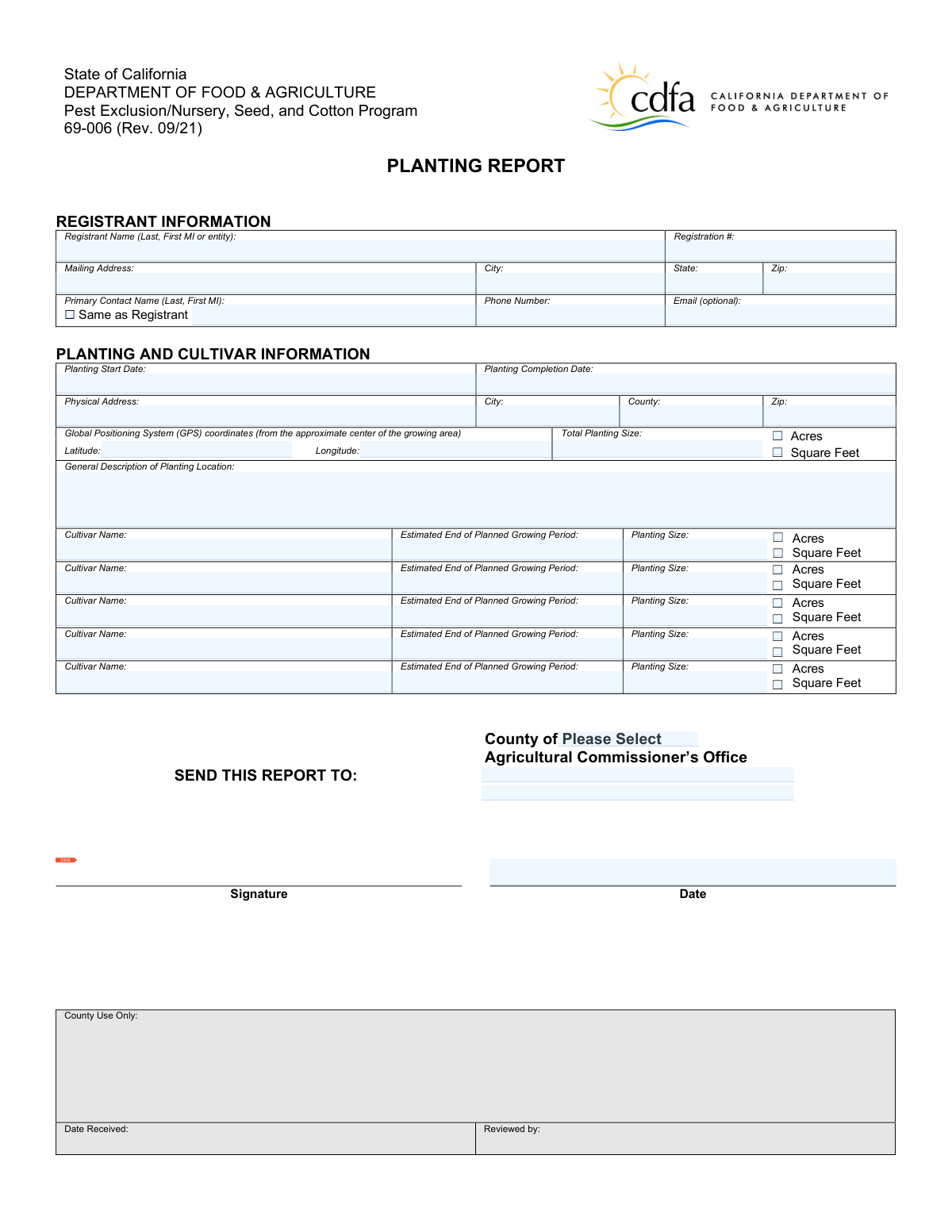
Yes! You can use AI to fill out Form 69-006, Planting Report
Don't type 32 fields by hand. Tell our AI about yourself, or upload a document you already have, and it fills every field in seconds. You check it, then download, print or sign.
The AI does the filling. You just check it.
No typing into boxes, nothing to install.
What this form asks for
The AI fills all of it, from your answers or your documents.
The AI checks your answers before you download
15 checks built for this form, so a wrong date or a missing answer is caught before anyone else sees it.
Ensures that the 'Registrant Name' field is filled with the full name of the registrant. This check confirms that the name provided matches the official records. It verifies that the name is not abbreviated or incomplete. The validation also ensures that the field is not left blank.
Confirms that the 'Registration #' field contains a valid registration number. This validation checks the format and length of the registration number against predefined standards. It ensures that the number is unique and not duplicated. The check also verifies that the field is not empty.
Ensures that the 'Mailing Address' field includes a complete and accurate mailing address. This validation checks for the presence of street name, number, and any additional address details. It confirms that the address is formatted correctly. The check also verifies that the field is not left blank.
Checks that the 'City', 'State', and 'Zip' fields for the mailing address are all provided and correct. This validation ensures that the city name is spelled correctly and matches the state. It confirms that the state abbreviation is valid. The check also verifies that the zip code is in the correct format and corresponds to the city and state.
Validates that the 'Primary Contact Name' is provided or marked as 'Same as Registrant' if applicable. This check ensures that either a primary contact name is given or the option for 'Same as Registrant' is selected. It confirms that the contact name is not left blank without justification. The validation also verifies that the name provided matches the format requirements.
Ensures that the 'Phone Number' field contains a valid phone number for the primary contact. It checks for the correct number of digits and valid formatting. The validation also confirms that the phone number is not left blank. Additionally, it may verify the phone number against known formats for the region specified.
And 9 more checks
- Planting Start Date and Planting Completion Date
- Physical Address
- City, County, and Zip
- Global Positioning System (GPS) coordinates
- Total Planting Size
- General Description of Planting Location
- Cultivar Name
- Estimated End of Planned Growing Period
- Planting Size for Each Cultivar
Let AI fill out your 69-006
No typing. Every field filled in seconds, checked, ready to sign.
How to Fill Out 69-006 Online for Free in 2026
What the AI walks you through.
- Visit instafill.ai site and select 69-006.
- Enter registrant name and registration number.
- Provide mailing and physical addresses.
- Input planting and cultivar details.
- Sign and date the form electronically.
- Check for accuracy and submit form.
Common Mistakes in Completing 69-006
The ones the AI is built to catch.
Incomplete registrant information
Missing registration number
Inaccurate mailing address details
Omission of planting start date
Omission of planting completion date
Incomplete physical address of planting location
Missing GPS coordinates
Incorrect total planting size
Missing cultivar name
Omission of estimated end of growing period
Incorrect planting size for cultivars
Failure to sign and date the form
Submission after 72-hour deadline
Not reporting to FSA as required
Legibility issues in handwritten forms
Frequently Asked Questions About 69-006
Is it really free for 7 days?
Can I fill other forms too?
How do I cancel?
How does the AI fill out 69-006?
What happens to my information?
How complex is 69-006 to fill out?
What is the purpose of Form 69-006, Planting Report?
Who is required to submit Form 69-006?
When must the Planting Report be submitted?
What information is required in the Registrant Information section?
Is an email address mandatory in the Registrant Information section?
What details are needed in the Planting and Cultivar Information section?
How should the Planting Start Date and Planting Completion Date be determined?
What should be included in the Physical Address if the planting location lacks a traditional address?
How should Global Positioning System (GPS) coordinates be formatted?
What units can be used to indicate the Total Planting Size?
What is required in the General Description of Planting Location?
How many cultivar names can be listed on the form?
What is the Estimated End of Planned Growing Period?
Are there alternative formats available for visually or hearing-impaired individuals?
How can one request an alternative format of the form?
Where should the completed Planting Report be sent?
What are the consequences of not submitting the Planting Report within the required timeframe?
Is there a fee associated with submitting the Planting Report?
Can changes to the planting information be made after submission?
Where can additional information on FSA reporting requirements be found?
Get your 69-006 filled out by AI
$0 today. Cancel before Nov 1 and you pay nothing.
Let AI fill out your 69-006
Your trial starts once a card is added. You pay nothing before Nov 1.
Our AI already knows this form, all 32 fields of it. Skip the typing: tell it about yourself, or upload what you have, and it fills the whole form in seconds.
- AI fills every field on both pages, checkboxes included
- No typing into boxes: answer a few questions, or upload a document you already have, an old copy of this form, a photo of a document
- The AI checks the answers; you review and change anything before you download
- Download the finished PDF, print it, or sign it online
- Encrypted, and never used to train AI
Cancel before Nov 1 and you pay nothing.
A card is needed to start the trial. Cancel in two clicks from your account.
Terms · Privacy