
Yes! You can use AI to fill out Form 8975, Country-by-Country Report
Don't type 48 fields by hand. Tell our AI about yourself, or upload a document you already have, and it fills every field in seconds. You check it, then download, print or sign.
The AI does the filling. You just check it.
No typing into boxes, nothing to install.
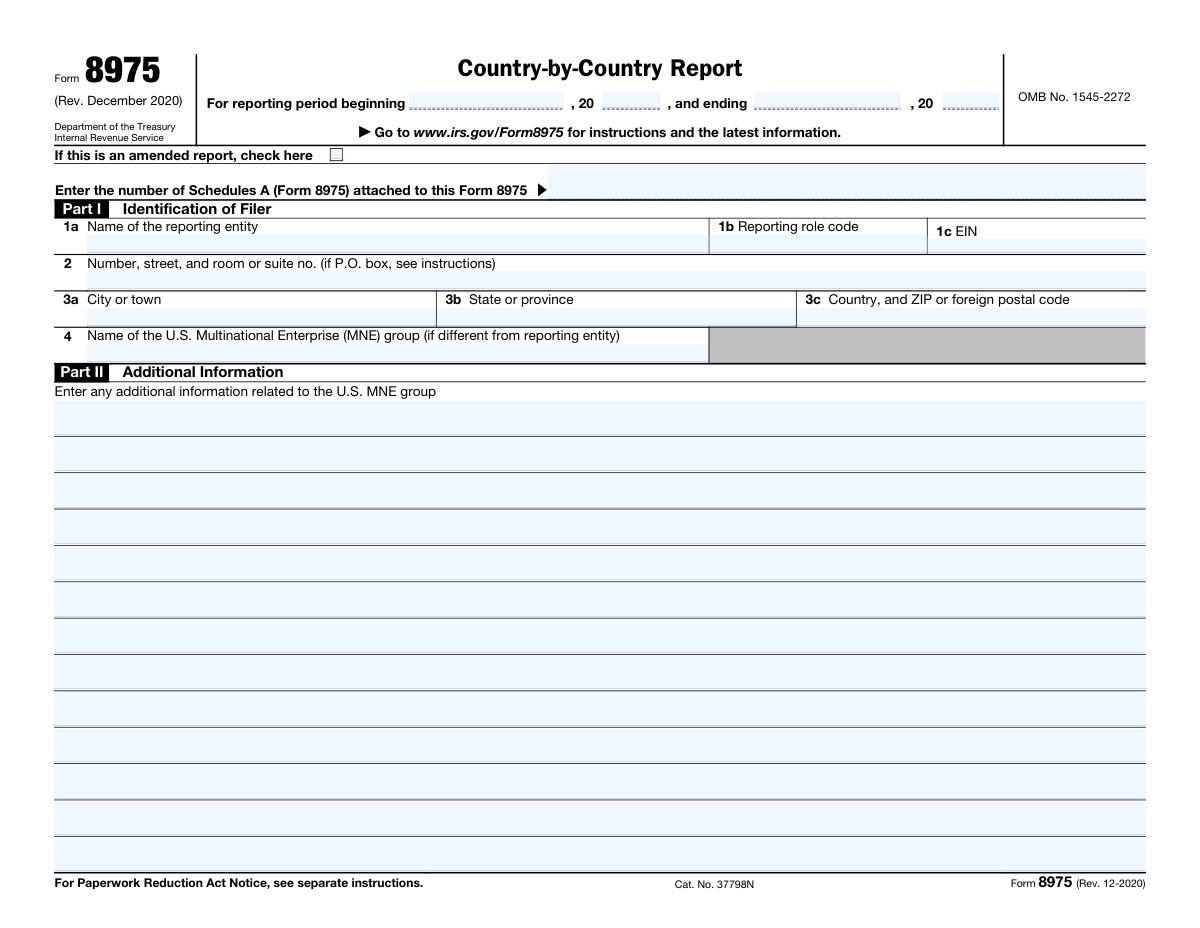
What this form asks for
The AI fills all of it, from your answers or your documents.
The AI checks your answers before you download
15 checks built for this form, so a wrong date or a missing answer is caught before anyone else sees it.
The validation process ensures that the Country-by-Country Report form is utilized appropriately for the correct tax year. It checks that the reporting period specified on the form aligns with the beginning and ending dates of the tax year in question. This validation is crucial to maintain the accuracy of the report and to comply with the regulatory requirements for the reporting period. Any discrepancies in the reporting period dates are flagged for correction to ensure the report's validity.
The validation mechanism confirms whether the 'amended report' checkbox is marked in instances where the Country-by-Country Report being submitted is intended to amend a previously filed report. This check is vital to differentiate between original submissions and amendments. It helps in maintaining the integrity of the filing process and ensures that the tax authorities are aware of the nature of the submission. Failure to correctly indicate an amended report can lead to processing errors and potential compliance issues.
The validation process verifies the attachment of the correct number of Schedules A (Form 8975) to the Country-by-Country Report. It cross-references the total number of schedules reported on the form with the actual schedules attached. This step is essential to ensure completeness of the information provided and to prevent any missing or extraneous documentation. The validation helps in avoiding submission errors that could arise from mismatched or incomplete schedule counts.
The validation process includes a check to ensure that the name of the reporting entity is accurately entered in Part I, section 1a of the Country-by-Country Report. This involves verifying the legal name against official records or prior filings to prevent any misidentification. Accurate entry of the reporting entity's name is critical for the proper attribution of the report to the correct entity and for the maintenance of accurate tax records.
The validation process confirms that the reporting role code is properly provided in Part I, section 1b of the Country-by-Country Report. This code is essential to identify the reporting entity's role within the multinational enterprise group. The validation ensures that the code is present and corresponds to the predefined set of role codes, facilitating correct processing and interpretation of the report by tax authorities.
The software ensures that the Employer Identification Number (EIN) provided in Part I, section 1c, adheres to the standard EIN format. It checks for the correct number of digits and the presence of only numerical characters. The validation process includes a checksum verification to confirm the EIN's legitimacy. Additionally, the software cross-references the EIN with a database to ensure it corresponds to the reporting entity.
And 9 more checks
- Ensures that the address of the reporting entity is complete and includes number, street, and room or suite number in Part I, section 2.
- Checks for the correct entry of the city or town in Part I, section 3a.
- Confirms the state or province is accurately entered in Part I, section 3b.
- Verifies the country and ZIP or foreign postal code is correctly entered in Part I, section 3c.
- Checks if the name of the U.S. MNE group is different from the reporting entity and entered correctly in Part I, section 4.
- Ensures that any additional information in Part II is relevant to the Country-by-Country Report.
- Verifies that additional information continues on Page 2 if more space is needed.
- Confirms that the Paperwork Reduction Act Notice has been reviewed for data privacy information.
- Performs a final review of the form for accuracy before submission.
Let AI fill out your Form 8975
No typing. Every field filled in seconds, checked, ready to sign.
How to Fill Out Form 8975 Online for Free in 2026
What the AI walks you through.
- Visit instafill.ai site and select Form 8975.
- Enter the reporting entity's name.
- Fill in the EIN and address details.
- Provide information about the MNE group.
- Add any additional information required.
- Sign and date the form electronically.
- Check for accuracy and submit form.
Common Mistakes in Completing Form 8975
The ones the AI is built to catch.
Incorrect reporting entity name in Part I, 1a
Incorrect reporting role code in Part I, 1b
Invalid Employer Identification Number (EIN) in Part I, 1c
Incomplete or incorrect address in Part I, 2
Incomplete city, state, country, or ZIP or foreign postal code in Part I, 3
Misrepresentation of U.S. MNE group name in Part I, Section 4
Insufficient or missing information in Part II
Failure to review the form for accuracy before submission
Frequently Asked Questions About Form 8975
Is it really free for 7 days?
Can I fill other forms too?
How do I cancel?
How does the AI fill out Form 8975?
What happens to my information?
How complex is Form 8975 to fill out?
What is the purpose of Form 8975, Country-by-Country Report?
When is Form 8975 due?
Who is required to file Form 8975?
What information is required in Part I of Form 8975?
What is a reporting role code?
What is the difference between the reporting entity and the U.S. MNE group?
How should the address be entered in Part III of Form 8975?
What additional information should be entered in Part II of Form 8975?
Is there a specific format for entering the country, state or province, and ZIP or foreign postal code?
What is the Paperwork Reduction Act Notice, and where can I find it?
What is the OMB No. for Form 8975?
What is the category number for Form 8975?
Is Form 8975 an amended report?
How many Schedules A (Form 8975) can be attached to this Form 8975?
Where can I find instructions and the latest information about Form 8975?
What happens if I fail to file Form 8975 on time?
What penalties may apply for failing to file or incorrectly filing Form 8975?
Get your Form 8975 filled out by AI
$0 today. Cancel before Nov 1 and you pay nothing.
Let AI fill out your Form 8975
Your trial starts once a card is added. You pay nothing before Nov 1.
Our AI already knows this form, all 48 fields of it. Skip the typing: tell it about yourself, or upload what you have, and it fills the whole form in seconds.
- AI fills every field on both pages, checkboxes included
- No typing into boxes: answer a few questions, or upload a document you already have, an old copy of this form, a photo of a document
- The AI checks the answers; you review and change anything before you download
- Download the finished PDF, print it, or sign it online
- Encrypted, and never used to train AI
Cancel before Nov 1 and you pay nothing.
A card is needed to start the trial. Cancel in two clicks from your account.
Terms · Privacy