Yes! You can use AI to fill out Application for Construction-related Temporary Structures
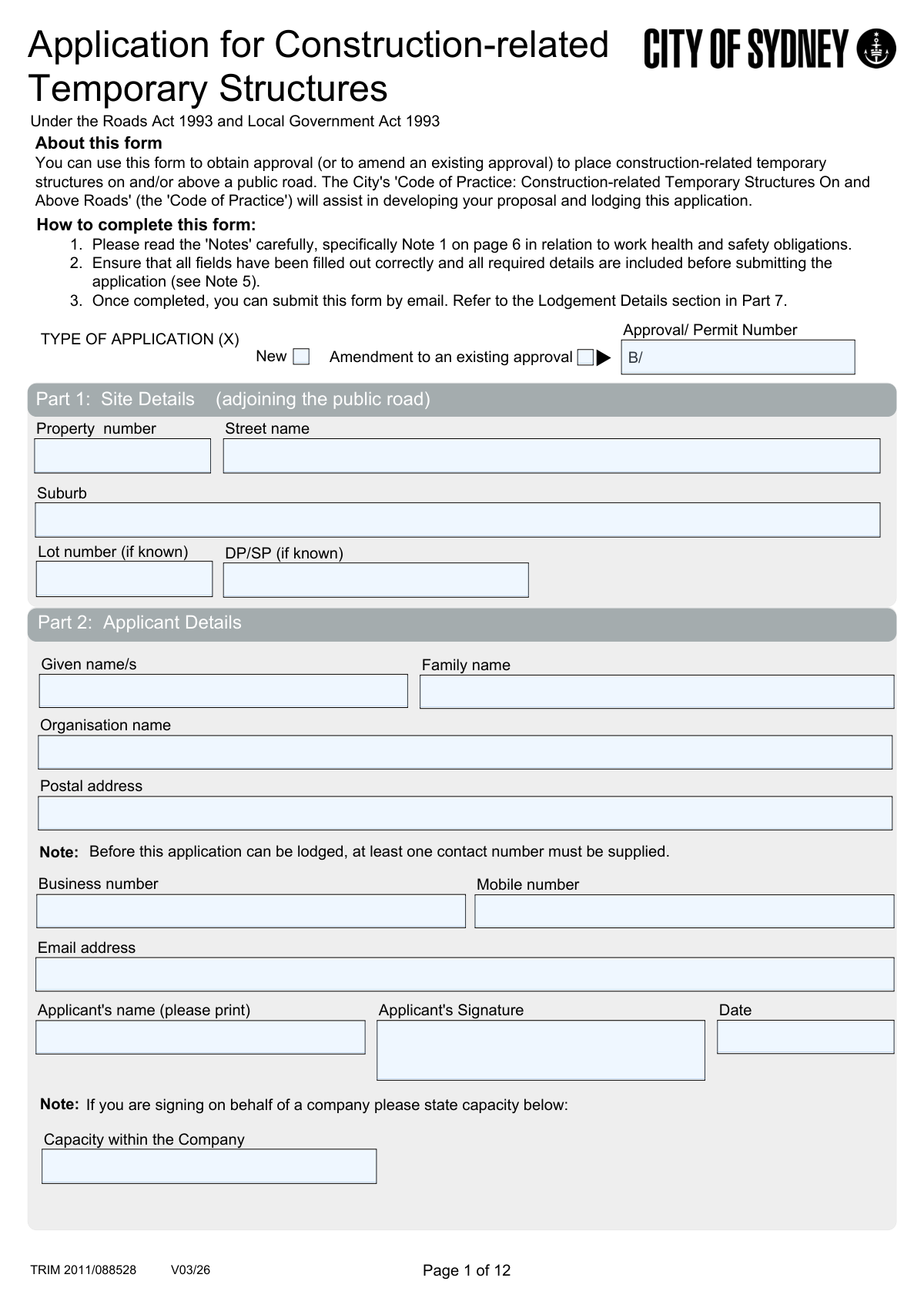
This is an application form used to seek approval from the City of Sydney for the placement of temporary structures related to construction on or above public roads. It ensures that structures like hoardings, scaffolding, and site sheds comply with the 'Code of Practice' and relevant legislation, addressing public safety, traffic impact, and amenity. Today, this form can be filled out quickly and accurately using AI-powered services like Instafill.ai, which can also convert non-fillable PDF versions into interactive fillable forms.
Our AI automatically handles information lookup, data retrieval, formatting, and form filling.
It takes less than a minute to fill out Application for Temporary Structures using our AI form filling.
Securely upload your data. Information is encrypted in transit and deleted immediately after the form is filled out.
Form specifications
| Form name: | Application for Construction-related Temporary Structures |
| Number of pages: | 11 |
| Language: | English |
Instafill Demo: How to fill out PDF forms in seconds with AI
How to Fill Out Application for Temporary Structures Online for Free in 2026
Are you looking to fill out a APPLICATION FOR TEMPORARY STRUCTURES form online quickly and accurately? Instafill.ai offers the #1 AI-powered PDF filling software of 2026, allowing you to complete your APPLICATION FOR TEMPORARY STRUCTURES form in just 37 seconds or less.
Follow these steps to fill out your APPLICATION FOR TEMPORARY STRUCTURES form online using Instafill.ai:
- 1 Navigate to Instafill.ai and upload the 'Application for Construction-related Temporary Structures' form.
- 2 Provide your personal or company details in the Applicant Details section (Part 2) and specify the site address in Part 1.
- 3 In Part 3, describe the proposed temporary structures, including type, location, duration, and the nature of the construction work.
- 4 Answer the detailed questions regarding potential impacts on laneways, vehicle access, bus routes, and street infrastructure.
- 5 Upload all required supporting documents, such as site plans, public liability insurance certificates, and structural design certifications, as outlined in the checklist (Part 5).
- 6 Carefully review all the information automatically populated by the AI to ensure accuracy and completeness before proceeding.
- 7 Electronically sign the declaration and submit the completed application and all attachments via email as instructed in the Lodgement Details section (Part 7).
Our AI-powered system ensures each field is filled out correctly, reducing errors and saving you time.
Why Choose Instafill.ai for Your Fillable Application for Temporary Structures Form?
Speed
Complete your Application for Temporary Structures in as little as 37 seconds.
Up-to-Date
Always use the latest 2026 Application for Temporary Structures form version.
Cost-effective
No need to hire expensive lawyers.
Accuracy
Our AI performs 10 compliance checks to ensure your form is error-free.
Security
Your personal information is protected with bank-level encryption.
Frequently Asked Questions About Form Application for Temporary Structures
This form is used to apply for approval to place temporary construction-related structures, like hoardings or scaffolding, on or above a public road. Anyone planning to undertake such work must complete this application to get a permit from the City.
You must submit several documents, including a site plan, structural drawings, a copy of your Public Liability Insurance policy, and a structural certification form. A complete checklist of required documents is available in Part 5 and Note 5 of the application.
You must have a public liability insurance policy with a minimum coverage of $20 million for any individual claim. The applicant must be named as the insured person or company, and a copy of the current policy must be provided with the application.
You can lodge the completed application form and all supporting documents by emailing them to [email protected]. If your files are larger than 25MB, email the form first and wait for instructions on how to send the larger documents.
Yes, the City's Code of Practice requires the installation of approved artwork or historic images in certain situations, particularly for structures in place for an extended period. You must provide details of your intended graphics in Part 3(m) of the form.
If the work qualifies as 'exempt development' under the State Planning SEPP, you can specify the relevant code. If not, you will need to lodge a Development Application and have it approved before this temporary structures permit can be granted.
You must provide detailed vehicle swept-path drawings prepared by a qualified traffic engineer to show that access is maintained. You also need to provide evidence that you have consulted with the owners of any affected properties.
If you need to vary from the Code of Practice, you must indicate this in Part 3(o) and complete the checklist on page 9. You will need to provide detailed reasons to justify why a variation should be granted for the City's consideration.
The Design Certification on page 10 must be signed by an appropriately qualified and experienced structural engineer. They must hold chartered membership of Engineers Australia and/or have National Engineering Registration (NER).
After submission, a Council Officer will review your application and may contact you to discuss the proposal or request more information. You will also be contacted regarding any required fees or performance bonds before an approval is issued.
Yes, services like Instafill.ai use AI to help you fill out forms like this one accurately and quickly. These tools can auto-fill your information into the correct fields, saving time and helping to prevent errors.
To fill this form online, you can upload the PDF to the Instafill.ai platform. It will make the document interactive, allowing you to easily type your information, check boxes, and add signatures directly on the form before downloading.
If you have a non-fillable or 'flat' PDF, you can use a service like Instafill.ai to make it interactive. Simply upload the file, and the AI will convert it into a fillable form that you can complete on your device.
Compliance Application for Temporary Structures
Validation Checks by Instafill.ai
1
Requires Permit Number for Amendments
Checks if the 'Type of Application' is an 'Amendment to an existing approval'. If it is, the 'Approval / Permit Number' field must be completed. This ensures that any changes can be correctly associated with the original approval, maintaining a clear audit trail. Failure to provide the number will prevent the form submission and prompt the user to enter the required information.
2
Ensures At Least One Contact Number is Provided
Validates that the applicant has supplied a value for either the 'Mobile number' or 'Business number' field, as stipulated by the note in Part 2. This is critical for ensuring the City can contact the applicant regarding the application. If neither field is filled, the application will be blocked, and an error message will indicate that at least one phone number is mandatory.
3
Validates Email Address Format
Verifies that the text entered into the 'Email address' field conforms to a standard email format (e.g., '[email protected]'). This is essential for ensuring that all digital correspondence, including notifications and the final permit, is successfully delivered to the applicant. An invalid format will trigger an error, requiring the user to correct the entry before proceeding.
4
Conditional Requirement for 'Capacity within the Company'
Checks if the 'Organisation name' field has been filled out. If it has, this validation makes the 'Capacity within the Company' field mandatory. This ensures that when an application is submitted on behalf of a company, the authority of the signatory is clearly stated. If the organisation name is present but the capacity is missing, the submission will fail.
5
Mandatory Selection of Temporary Structure Type
Ensures that at least one checkbox is selected in Part 3(a) 'Type of Temporary Structure/s'. If the 'Other form of temporary structure' checkbox is selected, the corresponding text field must not be empty. This check guarantees that the application clearly defines the scope of the proposed works. An application without a structure type selected cannot be processed.
6
Validates Installation Commencement Date
Verifies that the 'When do you wish to commence installation?' date in Part 3(f) is a valid date and is not in the past. This prevents nonsensical or impossible start dates from being submitted. This check is important for scheduling and planning purposes, and an invalid date will require correction before the form can be submitted.
7
Conditional Requirement for Development Consent Number
In Part 3(n), if the applicant answers 'Yes' to the question 'Is this application associated with building work under a Development Approval?', this validation ensures the 'Development Consent number' field is filled. The format should also be checked to ensure it starts with 'D/'. This links the temporary structure permit to the primary development consent for regulatory consistency.
8
Logical Validation of Insurance Coverage Dates
Checks the 'Cover: From' and 'To' dates in the Public Liability Insurance section (Part 4). It ensures both are valid dates and that the 'From' date occurs on or before the 'To' date. This prevents illogical date ranges and confirms the insurance policy is current for the proposed period. An invalid range will result in a validation error.
9
Requires Variation Justification on Design Checklist
On the 'Checklist - Key Design Elements' (Page 9), this validation checks if 'Compliance' for any item is marked as 'No'. If it is, the corresponding 'Request for variation' text field for that item becomes mandatory. This ensures that any deviation from the Code of Practice is explicitly requested and justified, which is critical for the assessment process.
10
Verifies Structural Certifier's Registration Number
Ensures the 'NER Number' field on the 'Design Certification (Structural)' form (Page 10) is completed. This is a critical check to confirm that a registered and qualified engineer, as required by the Code of Practice, has certified the structural adequacy of the proposed works. An empty or improperly formatted NER number would halt the submission, as it invalidates the certification.
11
Mandatory Conflict of Interest Declaration
Validates that the 'Conflict of Interest' question in Part 5 has been answered ('Yes' or 'No'). If the answer is 'Yes', the 'state relationship' text field becomes mandatory. This is a crucial transparency requirement to ensure the integrity of the council's decision-making process. Failure to complete this section will block the application submission.
12
Validates Attachment of Required Documents
Checks for the presence of mandatory file attachments as indicated by the checklists in Part 5 and Note 5, such as the 'Site plan', 'Structural drawings', and 'Public Liability Insurance' policy. The validation also confirms that each file is a PDF and does not exceed the 300MB size limit. This ensures a complete application package is received for assessment, preventing delays.
13
Conditional Details for Laneway Installation
In Part 3(g), if the applicant answers 'Yes' to installing structures in a laneway, this validation ensures the subsequent description box is filled out. This is critical because laneway installations have significant impacts on access and require specific details, including vehicle swept-path diagrams as noted elsewhere. An empty description field after a 'Yes' response will trigger a validation error.
14
Ensures Duration is a Positive Number
Validates that the value entered in the 'How many weeks will the structure/s be in place?' field is a positive integer. This prevents non-numeric, zero, or negative values from being entered for the project duration. Accurate duration information is essential for fee calculation, scheduling, and assessing long-term impacts.
Common Mistakes in Completing Application for Temporary Structures
Applicants often forget to sign the form or, when signing on behalf of a company, fail to state their 'Capacity within the Company' in Part 2. This happens due to oversight when rushing to complete the application. An unsigned or improperly authorized application is considered invalid and cannot be processed, leading to immediate rejection and delays.
In Part 3, applicants frequently provide overly brief or generic descriptions of the proposed work and temporary structures. The form requires a detailed account of dimensions, materials, and site-specific conditions. This mistake occurs when applicants underestimate the level of detail required for a proper assessment, resulting in requests for further information and significant processing delays.
Applicants may incorrectly answer 'No' to questions regarding impacts on laneways, driveways, bus routes, or street furniture (Part 3, questions g-j). This is often an attempt to avoid providing detailed diagrams or consultation records. However, council officers can easily verify these impacts, and misrepresentation can lead to the application being refused or an approval being revoked, as noted in the form's warnings.
The form requires proof of consultation with affected parties, such as neighbouring properties for laneway access or Transport for NSW for bus route impacts. Applicants often neglect to perform this consultation or fail to attach the corresponding evidence. An application without this documentation is considered incomplete and will be put on hold until the required feedback and outcomes are provided.
A common error is submitting a Public Liability Insurance certificate that does not meet the requirements outlined in Part 4. This includes providing a policy with less than the required $20 million coverage, a policy that has expired, or one that does not explicitly name the applicant as the insured party. This renders the application non-compliant and will prevent approval until a valid certificate is supplied.
Applicants frequently fail to adhere to the strict digital file requirements specified in 'Note 5' on page 7. Mistakes include submitting documents that are not in PDF format, exceeding the 300MB file size limit, or not following the mandatory naming conventions. This can cause submission failure or require manual intervention from council staff, delaying the entire process.
The application requires several critical attachments, including the 'Design Certification (Structural)' and the 'Checklist - Key Design Elements for hoardings'. Forgetting to have these completed by qualified professionals and attached to the submission is a major error. The absence of these mandatory documents will lead to an outright rejection of the application, and the application fee may be forfeited.
The designer or contractor may hastily complete the Hoarding Design Checklist on page 9, marking all items as compliant without proper verification or failing to provide a detailed justification for a requested variation. The form explicitly warns that an inaccurate checklist can result in the application being rejected without notice. This mistake undermines the integrity of the application and can lead to the loss of the application fee.
In Part 3(n), applicants are often unsure whether their project falls under a Development Approval (DA) or qualifies as 'exempt development'. Providing the wrong information or leaving this section blank prevents the council from verifying the project's legal planning pathway. This is a critical piece of information that, if incorrect, will halt the assessment until the applicant clarifies the status and provides the correct consent numbers or exemption codes.
As per 'Note 5', the application must detail any street trees within five meters of the proposed structure, including their size, protection methods, and any required pruning. Applicants often overlook this, failing to provide the necessary details or the required arborist report. This omission can cause delays and may require a redesign of the structure's footprint to ensure compliance with the city's tree protection policies.
Saved over 80 hours a year
“I was never sure if my IRS forms like W-9 were filled correctly. Now, I can complete the forms accurately without any external help.”
Kevin Martin Green
Your data stays secure with advanced protection from Instafill and our subprocessors

Robust compliance program
Transparent business model
You’re not the product. You always know where your data is and what it is processed for.
ISO 27001, HIPAA, and GDPR
Our subprocesses adhere to multiple compliance standards, including but not limited to ISO 27001, HIPAA, and GDPR.
Security & privacy by design
We consider security and privacy from the initial design phase of any new service or functionality. It’s not an afterthought, it’s built-in, including support for two-factor authentication (2FA) to further protect your account.
Fill out Application for Temporary Structures with Instafill.ai
Worried about filling PDFs wrong? Instafill securely fills application-for-construction-related-temporary-structures forms, ensuring each field is accurate.