Yes! You can use AI to fill out Application for Prior Learning Assessment

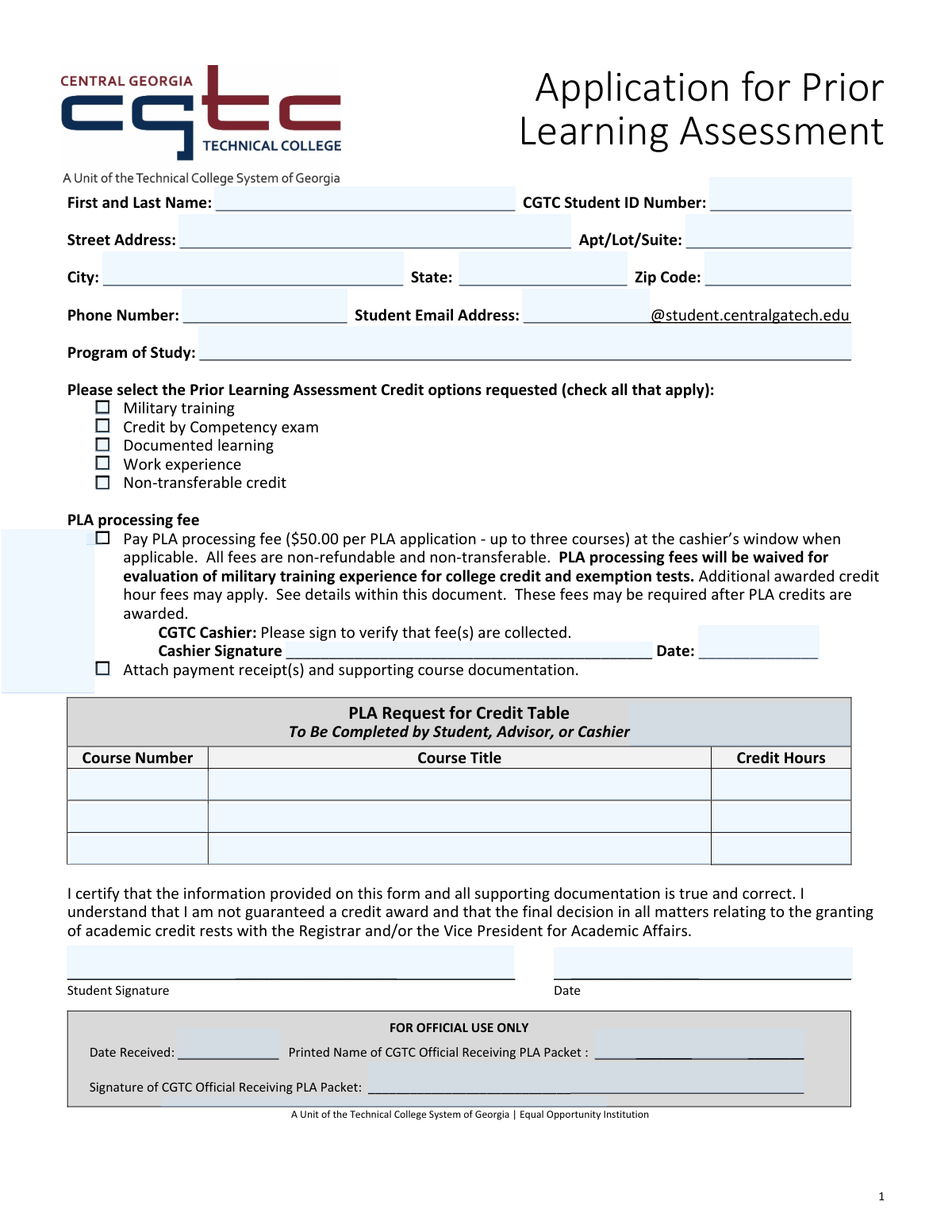
This form is an Application for Prior Learning Assessment (PLA) for students at Central Georgia Technical College (CGTC). It allows students to formally request college credit for knowledge and skills acquired through non-traditional means, such as military training, work experience, competency exams, or other documented learning. By submitting this application, students can potentially earn academic credit for up to three courses, reducing their required coursework. Today, this form can be filled out quickly and accurately using AI-powered services like Instafill.ai, which can also convert non-fillable PDF versions into interactive fillable forms.
Our AI automatically handles information lookup, data retrieval, formatting, and form filling.
It takes less than a minute to fill out CGTC PLA Application using our AI form filling.
Securely upload your data. Information is encrypted in transit and deleted immediately after the form is filled out.

Form specifications

Form name: Application for Prior Learning Assessment
Number of pages: 1
Language: English
Categories: prior learning assessment forms
main-image

Instafill Demo: How to fill out PDF forms in seconds with AI

How to Fill Out CGTC PLA Application Online for Free in 2026

Are you looking to fill out a CGTC PLA APPLICATION form online quickly and accurately? Instafill.ai offers the #1 AI-powered PDF filling software of 2026, allowing you to complete your CGTC PLA APPLICATION form in just 37 seconds or less.
Follow these steps to fill out your CGTC PLA APPLICATION form online using Instafill.ai:
  1. 1 Navigate to Instafill.ai and upload or select the Application for Prior Learning Assessment form.
  2. 2 Use the AI assistant to automatically fill in your personal details, such as your full name, CGTC Student ID number, address, and contact information.
  3. 3 Enter your current Program of Study at the college.
  4. 4 Check the boxes corresponding to the type of prior learning you are requesting credit for, such as military training, work experience, or competency exams.
  5. 5 Complete the 'PLA Request for Credit Table' by listing the course number, title, and credit hours for each course you are seeking credit for.
  6. 6 Address the PLA processing fee section, attach your payment receipt and supporting documents, and then electronically sign and date the certification.
  7. 7 Review all the information you've provided for accuracy, then download, print, or submit your completed application as required by CGTC.

Our AI-powered system ensures each field is filled out correctly, reducing errors and saving you time.

Why Choose Instafill.ai for Your Fillable CGTC PLA Application Form?

Speed

Complete your CGTC PLA Application in as little as 37 seconds.

Up-to-Date

Always use the latest 2026 CGTC PLA Application form version.

Cost-effective

No need to hire expensive lawyers.

Accuracy

Our AI performs 10 compliance checks to ensure your form is error-free.

Security

Your personal information is protected with bank-level encryption.

Frequently Asked Questions About Form CGTC PLA Application

This form allows current Central Georgia Technical College (CGTC) students to request academic credit for knowledge and skills gained outside of traditional college courses, such as through work experience, military training, or certifications.

Any enrolled CGTC student who believes their prior experience is equivalent to a course in their program of study can fill out this form to have that experience evaluated for potential college credit.

Yes, there is a non-refundable $50.00 processing fee for each application, which can cover up to three courses. However, this fee is waived for students requesting credit for military training experience.

You must attach your payment receipt (if applicable) and all supporting documentation that proves your prior learning, such as military transcripts, work portfolios, or professional certifications.

You can request an assessment for up to three different courses on one application form for the single $50.00 fee. You must list each course's number, title, and credit hours in the provided table.

The fee must be paid at the CGTC cashier’s window. The cashier will sign your form to verify payment, and you must attach the receipt to your application packet.

No, submitting an application does not guarantee that you will be awarded credit. The final decision is made by the Registrar or the Vice President for Academic Affairs after a complete review of your documentation.

You only need to enter the local part of your email address, which is the text that comes before '@student.centralgatech.edu'. The form automatically includes the rest of the address.

If you have a non-fillable or 'flat' PDF, you can use a service like Instafill.ai to convert it into an interactive form. This allows you to easily type your information into the fields online.

Yes, AI-powered services like Instafill.ai can help you fill out this form quickly and accurately. These tools can auto-fill fields with your saved personal information, reducing manual entry and saving time.

To fill out this form online, you can upload it to a platform like Instafill.ai. The service will make the document interactive, allowing you to type in your responses, save your progress, and then download or print the completed form.

You can request credit for several types of experience, including military training, competency exams, documented learning like portfolios, relevant work experience, and non-transferable credits.

For each course you are requesting credit for, you must provide the official Course Number (e.g., ENGL 1101), the full Course Title, and the number of Credit Hours associated with it.

Compliance CGTC PLA Application
Validation Checks by Instafill.ai

1
CGTC Student ID Number Format
This check verifies that the 'CGTC Student ID Number' field is not empty and conforms to the college's specific format. It is crucial for accurately identifying the student in the system and linking the application to the correct academic record. If the ID is missing or incorrectly formatted, the application cannot be processed and will be rejected pending correction.
2
Student Email Local Part Validation
This validation ensures the 'Student Email Local Part' field contains only valid characters and does not include the '@' symbol or the domain. This is important because the system automatically appends '@student.centralgatech.edu' to create the full email address for communication. An invalid entry would result in an undeliverable email address, preventing the student from receiving important updates about their application status.
3
At Least One PLA Option Selected
This check confirms that the student has selected at least one checkbox from the 'Prior Learning Assessment Credit options' list (e.g., Military training, Work experience). The entire purpose of the form is to request a PLA review, so at least one assessment type must be specified. If no option is checked, the form is considered incomplete as the college would not know which type of assessment to perform.
4
ZIP Code Format
This validation ensures the 'ZIP Code' field contains either a 5-digit or a 9-digit (ZIP+4) numeric code. A valid ZIP code is essential for ensuring any physical mail correspondence regarding the application reaches the student. An invalid format could lead to returned mail and significant delays in the application process.
5
Course Request Table Integrity
This check validates that for any row in the 'PLA Request for Credit Table' where a 'Course Number' is entered, the corresponding 'Course Title' and 'Credit Hours' fields are also filled. This ensures that each course credit request is complete and provides all necessary information for evaluation. Incomplete rows will be flagged, and the form will be returned to the student for completion.
6
Minimum Course Request
This validation ensures that at least the first row of the 'PLA Request for Credit Table' is filled out with a course number, title, and credit hours. An application for prior learning must request credit for at least one specific course. If the table is empty, the application has no actionable request and cannot be processed.
7
Credit Hours Numeric Validation
This check verifies that the value entered in any 'Credit Hours' field is a positive number. Credit hours are a quantitative measure used for academic records and tuition calculation, so the data must be numeric. Submitting non-numeric text (e.g., 'three') would cause processing errors and require manual correction.
8
Fee Payment Logic for PLA Options
This validation enforces the business rule that PLA processing fees are waived for military training. If 'Military training' is the only PLA option checked, the fee payment fields are not required. However, if any other option (like 'Work experience' or 'Documented learning') is checked, the 'Pay PLA processing fee' checkbox becomes mandatory, as a fee is required for these evaluations.
9
Conditional Cashier Information Requirement
This check ensures that if the 'Pay PLA processing fee' box is checked, then the 'Cashier Signature' and 'Cashier Date' fields must be filled out. This provides proof of payment, which is required before the application can be officially reviewed. Failure to provide cashier verification for a paid application will halt the process until proof of payment is supplied.
10
Student Certification Completeness
This validation confirms that both the 'Student Signature' and the signature 'Date' fields are filled out. The student's signature legally certifies the accuracy of the provided information and acknowledges their understanding of the process. An unsigned or undated application is not legally binding and will be considered incomplete and invalid.
11
Date Field Format Validation
This check ensures that all date fields on the form, including 'Cashier Date' and the student's signature 'Date', are entered in a valid and consistent format (e.g., MM/DD/YYYY). Proper date formatting is crucial for record-keeping, tracking application timelines, and ensuring data integrity. An invalid date format would cause data entry errors and could be rejected by the system.
12
Prohibition of Student Input in Official Use Section
This validation verifies that all fields within the 'FOR OFFICIAL USE ONLY' section are left blank upon student submission. These fields are reserved for internal processing by college officials. If a student enters data in this section, it can interfere with administrative workflows and cause confusion, potentially leading to processing delays or errors.
13
Program of Study Completeness
This check ensures the 'Program of Study' field is not left empty. This information is critical for routing the application to the correct academic department and dean for evaluation. Without a specified program, officials cannot determine which curriculum standards to apply for the credit assessment, rendering the application un-processable.

Common Mistakes in Completing CGTC PLA Application

Incorrect Student Email Format

Students often enter their full email address out of habit, instead of just the local part before the '@' symbol as instructed. This results in a malformed address (e.g., '[email protected]@student.centralgatech.edu'), leading to communication failures and processing delays. To avoid this, carefully read the field label and enter only the unique part of your email address. AI-powered tools like Instafill.ai can prevent this by parsing field instructions and automatically entering the data in the correct format.

Incomplete Course Information in the Request Table

Applicants frequently leave the 'PLA Request for Credit Table' partially filled, providing a course number but omitting the full course title or credit hours. This happens due to uncertainty or rushing, but it prevents staff from identifying the exact course for evaluation. An incomplete request will be returned, delaying the assessment process. Ensure all three columns (Course Number, Course Title, Credit Hours) are completed for each requested course.

Forgetting to Attach the Payment Receipt

The form requires a payment receipt to be attached, but students often submit the application immediately after paying without collecting and attaching the receipt. This is a critical procedural error that halts the application, as staff cannot verify payment. To prevent this, make it a final checklist item to staple or clip the cashier's receipt to the form before submission. This step is crucial unless you qualify for a fee waiver (e.g., military training).

Filling Out 'FOR OFFICIAL USE ONLY' Sections

Seeing blank lines, students sometimes mistakenly fill in the sections at the bottom of the form reserved for official use, such as 'Date Received' or the 'Signature of CGTC Official'. This can cause confusion, require manual correction by staff, or even necessitate that the student fills out a new form. Always leave sections marked 'FOR OFFICIAL USE ONLY' completely blank. If the form is a non-fillable PDF, a tool like Instafill.ai can convert it into a smart, fillable version that can lock these official sections to prevent accidental entries.

Incorrect Student ID Number Format

Data entry errors like transposing digits or adding spaces/hyphens to the 'CGTC Student ID Number' are very common. An incorrect ID prevents the system from matching the application to the student's academic record, causing an immediate processing stop until the information is corrected. To avoid this, double-check the number against your official student ID card. Using a form-filling tool like Instafill.ai can help by storing your correct ID and populating it accurately every time.

Misinterpreting Prior Learning Assessment Categories

Students may misunderstand the distinctions between PLA options, for example, checking 'Work experience' when they have a professional certification that should be submitted under 'Documented learning'. This mistake routes the application to the wrong evaluation pathway, wasting time and effort. Carefully review the description of each option and select the one that best fits your supporting documentation. If unsure, consult an academic advisor before submitting.

Forgetting the Student Signature or Date

Submitting an unsigned or undated application is a frequent and critical oversight. The signature certifies the accuracy of the information, and without it, the form is legally invalid and cannot be processed. This mistake often happens when a student is in a hurry. Before submitting, perform a final review of the form, paying special attention to the signature and date fields at the bottom.

Using an Informal Name Instead of a Legal Name

Applicants sometimes enter a nickname or a preferred name in the 'First and Last Name' field instead of their full legal name. This creates a mismatch with official college records, complicating the process of verifying identity and applying credits to the correct academic profile. Always use the full legal name that is on file with the college to ensure seamless processing. Form-filling tools can help by saving a profile with your legal name for consistent use across all documents.

Omitting Apartment or Suite Number

When filling out the address, students living in multi-unit buildings often forget to include their apartment, lot, or suite number. This seemingly small omission can result in important documents, such as credit award notifications, being returned as undeliverable. Always complete the 'Apt/Lot/Suite' field if it applies to your address to ensure you receive all correspondence without delay.

Student Signing on the Cashier's Signature Line

The form includes a signature line specifically for the cashier to verify payment, but students sometimes sign it themselves by mistake. This invalidates the payment verification section and can cause confusion, requiring the student to get the form properly signed by the cashier. Students should only sign in the 'Student Signature' box and leave all other signature lines for the appropriate officials.
Saved over 80 hours a year

“I was never sure if my IRS forms like W-9 were filled correctly. Now, I can complete the forms accurately without any external help.”

Kevin Martin Green

Your data stays secure with advanced protection from Instafill and our subprocessors

Robust compliance program

Transparent business model

You’re not the product. You always know where your data is and what it is processed for.

ISO 27001, HIPAA, and GDPR

Our subprocesses adhere to multiple compliance standards, including but not limited to ISO 27001, HIPAA, and GDPR.

Security & privacy by design

We consider security and privacy from the initial design phase of any new service or functionality. It’s not an afterthought, it’s built-in, including support for two-factor authentication (2FA) to further protect your account.

Fill out CGTC PLA Application with Instafill.ai

Worried about filling PDFs wrong? Instafill securely fills application-for-prior-learning-assessment forms, ensuring each field is accurate.