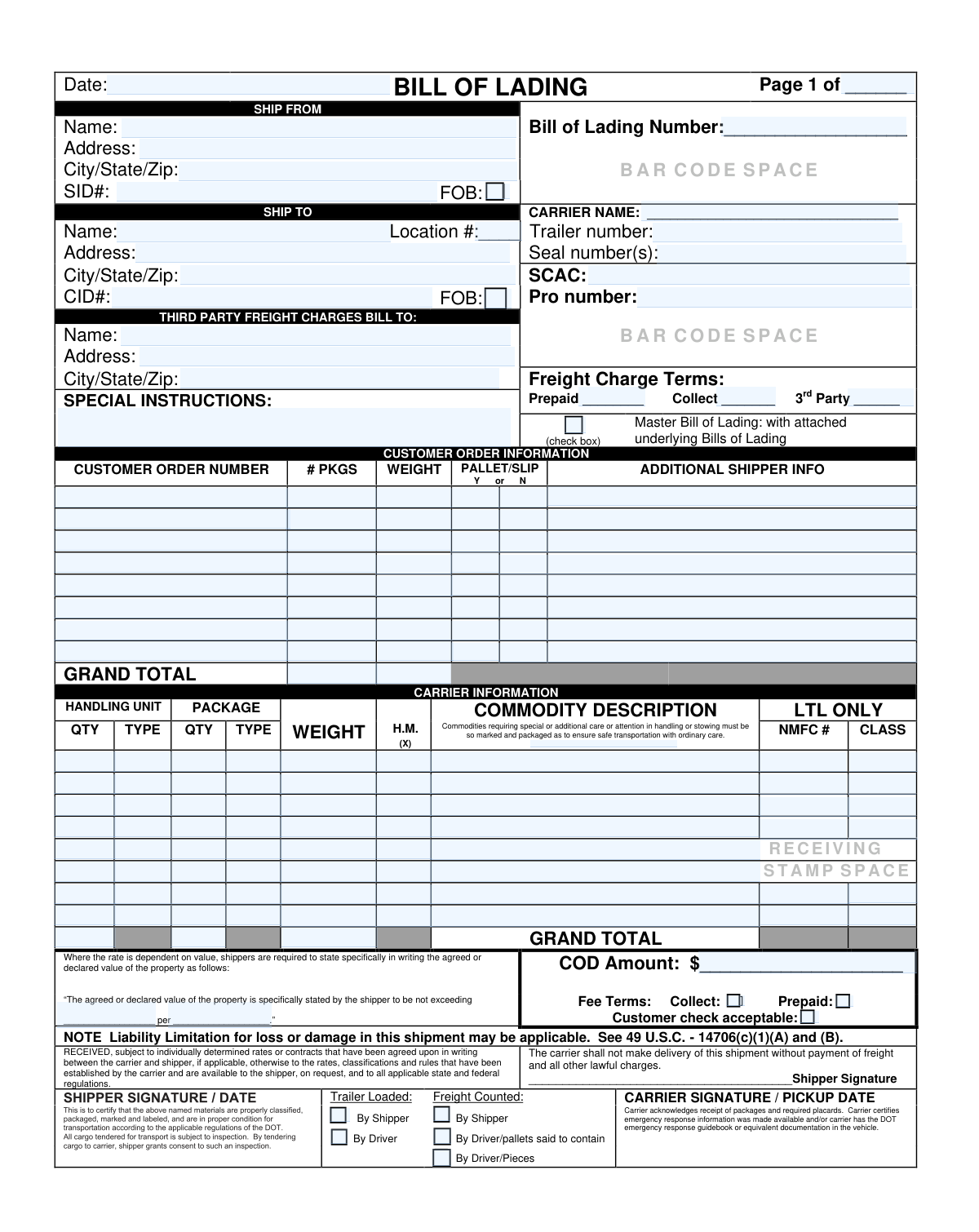
Yes! You can use AI to fill out Bill of Lading (BOL) and Supplement to the Bill of Lading

A Bill of Lading (BOL) is a formal transportation document that serves as a receipt for goods, a contract of carriage, and a key reference for billing and tracking (e.g., BOL number, PRO number, SCAC, freight terms). It captures shipper/consignee/third-party billing details, handling units, package counts, weights, commodity descriptions, and LTL classification data (NMFC and freight class), plus signatures and certifications required for compliant transport (including DOT-related hazmat acknowledgments when applicable). The attached “Supplement to the Bill of Lading” provides additional line space for customer order and commodity details when the shipment exceeds the first page. Today, this form can be filled out quickly and accurately using AI-powered services like Instafill.ai, which can also convert non-fillable PDF versions into interactive fillable forms.
Our AI automatically handles information lookup, data retrieval, formatting, and form filling.
It takes less than a minute to fill out Bill of Lading (BOL) using our AI form filling.
Securely upload your data. Information is encrypted in transit and deleted immediately after the form is filled out.

Form specifications

Form name: Bill of Lading (BOL) and Supplement to the Bill of Lading
Number of pages: 2
Filled form examples: Form Bill of Lading (BOL) Examples
Language: English
Categories: shipping forms, logistics forms, freight forms, transportation forms
main-image

Instafill Demo: filling out a legal form in seconds

How to Fill Out Bill of Lading (BOL) Online for Free in 2026

Are you looking to fill out a BILL OF LADING (BOL) form online quickly and accurately? Instafill.ai offers the #1 AI-powered PDF filling software of 2026, allowing you to complete your BILL OF LADING (BOL) form in just 37 seconds or less.
Follow these steps to fill out your BILL OF LADING (BOL) form online using Instafill.ai:
  1. 1 Go to Instafill.ai and upload the Bill of Lading (BOL) PDF (and any supplement pages) or select the BOL template from the form library.
  2. 2 Let the AI detect and map fields, then confirm the document header details such as date, page number, and the Bill of Lading number.
  3. 3 Enter the party and routing information: Ship From, Ship To, carrier details (carrier name, SCAC, trailer and seal numbers), and tracking references like PRO number and any SID/CID identifiers.
  4. 4 Complete freight billing and terms: choose prepaid/collect/third-party, fill third-party bill-to details if applicable, add COD amount/declared value and fee terms, and include any special instructions.
  5. 5 Fill in customer order information rows (order numbers, package counts, weights, pallet/slip indicators, and additional shipper info), then verify page subtotals and grand totals.
  6. 6 Fill in the commodity/carrier information table (handling units, package types, weights, hazmat indicator, commodity descriptions, NMFC numbers, and freight class), ensuring totals match the customer order section.
  7. 7 Review the AI validation checks for missing/incorrect fields, then finalize with required certifications and signatures (shipper and carrier/driver) and export, print, or share the completed BOL.

Our AI-powered system ensures each field is filled out correctly, reducing errors and saving you time.

Why Choose Instafill.ai for Your Fillable Bill of Lading (BOL) Form?

Speed

Complete your Bill of Lading (BOL) in as little as 37 seconds.

Up-to-Date

Always use the latest 2026 Bill of Lading (BOL) form version.

Cost-effective

No need to hire expensive lawyers.

Accuracy

Our AI performs 10 compliance checks to ensure your form is error-free.

Security

Your personal information is protected with bank-level encryption.

Frequently Asked Questions About Form Bill of Lading (BOL)

This Bill of Lading is the official shipping document that identifies the shipper, consignee, carrier, and the freight being transported. It also records key details like package counts, weights, freight terms, and special instructions for pickup and delivery.

Typically, the shipper (the “Ship From” party) completes the BOL before the carrier picks up the freight. The carrier/driver may add or verify items like trailer number, seal number(s), PRO number, and pickup signature/date.

You should provide the full name, street address, and city/state/ZIP for both the origin (Ship From) and destination (Ship To). If applicable, include identifiers like SID# (shipper ID), CID# (consignee/customer ID), and the Ship To location number.

The Bill of Lading Number is the unique identifier for the shipment and is usually assigned by the shipper, broker, or transportation system. Enter it exactly as provided, since it’s used for tracking, billing, and document matching.

The PRO number is a tracking/reference number assigned by the carrier, and it may be different from the BOL number. If you don’t have a PRO number yet, it’s often added by the carrier at pickup or after the shipment is booked.

Select “Prepaid” if the shipper pays the freight charges, “Collect” if the consignee pays, or “3rd Party” if another company pays. If you choose 3rd Party, you must complete the “Third Party Freight Charges Bill To” name and address fields.

FOB (Freight On Board) indicates where ownership/risk transfers based on your shipping terms (origin or destination). Check the FOB box that matches your agreement (Ship From for FOB Origin, Ship To for FOB Destination) if your company uses FOB terms on BOLs.

For each customer order/PO, enter the order number, the number of packages, and the weight for that line. Mark Y or N to indicate whether the shipment for that line is palletized or includes a slip/packing slip, and then complete the Grand Total fields by summing all rows.

List each commodity with handling unit quantity/type, package quantity/type, and weight, then provide a clear commodity description. For LTL shipments, include the NMFC number and freight class if required for rating and billing; if you don’t know them, your carrier or broker can help determine the correct classification.

Mark the H.M. indicator only if the commodity is regulated as hazardous material and requires hazmat handling/placards. You should also ensure the shipment is properly classified, packaged, marked, and accompanied by any required hazmat documentation per DOT rules.

The trailer number identifies the trailer carrying the load, and seal number(s) identify the security seal(s) applied to the trailer doors. These are often recorded by the carrier/driver at pickup, but the shipper may enter them if known at the time of loading.

A Master Bill of Lading is used when this document summarizes multiple underlying (house) bills of lading attached to it. Check the box only if you are attaching additional BOL pages/documents that are part of the same master shipment.

Fill out COD Amount only if the carrier must collect payment from the consignee upon delivery, and indicate whether a customer check is acceptable. Declared value is used when liability/rates depend on value; enter the amount and the basis (e.g., per shipment or per pound) if your contract requires it.

The shipper signs and dates in the “Shipper Signature/Date” area to certify the shipment details and condition. The carrier/driver signs and dates the “Carrier Signature/Pickup Date” area, and the trailer loaded/freight counted checkboxes should reflect who performed those actions.

Yes—AI tools like Instafill.ai can extract your shipping details and auto-fill the correct BOL fields to save time and reduce errors. If your PDF is flat/non-fillable, Instafill.ai can convert it into an interactive fillable form, then you can upload the document, map or confirm fields (shipper/consignee, freight terms, line items), and export a completed BOL for printing or sharing.

Compliance Bill of Lading (BOL)
Validation Checks by Instafill.ai

1
Validates Document Date is present and in an acceptable date format
Checks that the Document Date field is not blank and matches an allowed format (e.g., MM/DD/YYYY or YYYY-MM-DD) and represents a real calendar date. This is important for legal enforceability, billing timelines, and carrier pickup/delivery auditing. If validation fails, the submission should be rejected or routed for manual review because downstream systems often require a normalized issue date.
2
Ensures Page Number and total page count are complete and logically consistent
Validates that the page indicator (e.g., "Page 1 of ___" and supplement page fields) contains a current page number and, when provided, a total page count, both as positive integers. Also checks that the current page number does not exceed the total and that supplement pages are numbered consistently. If this fails, the form may be incomplete or mis-collated, so the system should flag it to prevent missing line items or totals.
3
Validates Bill of Lading Number is present, properly formatted, and consistent across pages
Checks that the Bill of Lading Number is not empty, contains only expected characters (letters/numbers/dashes), and meets length constraints (e.g., 6–30 chars). Also verifies that the BOL number on the main page matches the BOL number on any supplement page(s). If validation fails, tracking, invoicing, and document matching can break, so the record should be blocked or require correction.
4
Ship From party completeness and address structure validation
Ensures Ship From Name, street Address, and City/State/ZIP are all present and not placeholder text. Validates City/State/ZIP follows a recognizable pattern (e.g., "City, ST 12345" or "City ST 12345") and that state/province is a valid code and ZIP/postal code matches expected length/format for the country context. If invalid, rating, dispatch, and compliance documents may be incorrect, so the submission should be flagged for remediation.
5
Ship To party completeness and address structure validation
Ensures Ship To Name, Address, and City/State/ZIP are provided and formatted consistently, and that the destination is not identical to the origin unless explicitly allowed by business rules. This prevents misdelivery and supports accurate lane determination for pricing and routing. If validation fails, the system should stop processing and request corrected destination details.
6
Validates FOB selection rules (origin vs destination) and prevents conflicting FOB flags
Checks that FOB is either marked for Ship From or Ship To as applicable, and that both FOB checkboxes are not selected simultaneously unless the workflow explicitly supports dual FOB (rare). FOB impacts who owns freight risk/cost at different points, so incorrect selection can cause billing disputes. If the rule is violated, the form should be rejected or require user confirmation with an override reason.
7
Freight Charge Terms are mutually exclusive and require supporting third-party details when applicable
Validates that exactly one freight charge term is selected/filled (Prepaid, Collect, or 3rd Party) and that the corresponding identifier/account code is present for the chosen term. If 3rd Party is selected, it additionally requires 3rd Party Bill To Name, Address, and City/State/ZIP to be completed. If validation fails, billing cannot be routed correctly, so the submission should be blocked until corrected.
8
Carrier identification validation (Carrier Name, SCAC, and tracking identifiers)
Ensures Carrier Name is present and SCAC is exactly 2–4 uppercase letters (standard SCAC format). Also validates that at least one tracking reference is provided (Pro Number and/or Bill of Lading Number) and that Pro Number meets allowed character rules (alphanumeric, limited punctuation) and length constraints. If invalid, carrier tendering and shipment tracking integrations may fail, so the record should be flagged for correction.
9
Trailer Number and Seal Number(s) format and dependency validation
Checks Trailer Number is present when a carrier pickup is indicated and conforms to expected patterns (alphanumeric, no illegal characters, reasonable length). Validates Seal Number(s) are provided when required by policy and that multiple seals are separated by commas with each seal token non-empty and within length limits. If validation fails, chain-of-custody and security controls are weakened, so the system should require correction or an exception approval.
10
Customer Order rows: required fields per populated row and Y/N pallet/slip validation
For each Customer Order row that has any data, validates that Customer Order Number, # PKGS, and Weight are present and that # PKGS is a positive integer and Weight is a positive number. Validates pallet/slip indicators are restricted to 'Y' or 'N' (or the correct single-box selection) and prevents both Y and N being marked for the same row. If validation fails, totals and handling expectations become unreliable, so the row (or entire submission) should be rejected depending on severity.
11
Customer Order totals: Grand Total and Page Subtotal must equal sum of line items
Computes the sum of # PKGS and Weight across all populated customer order rows on a page and compares it to the Page Subtotal fields, and compares the sum across all pages to the Grand Total fields. Allows only a small tolerance for weight rounding if configured (e.g., 0.1 or 1.0 units) and requires exact match for package counts. If mismatched, the system should flag the discrepancy because it can cause billing errors and claims disputes.
12
Commodity/Carrier information rows: numeric constraints and required pairings
For each populated commodity/carrier info row, validates Handling Unit Quantity, Package Quantity, and Weight are positive numbers (with quantities typically integers) and that Type fields (handling unit type, package type) are present when their corresponding quantities are present. Also checks that package quantity is not unreasonably larger than handling units without explanation (configurable threshold) to catch data entry errors. If validation fails, rating and load planning may be incorrect, so the row should be flagged for correction.
13
Hazardous Materials (H.M.) indicator requires additional classification fields
If any commodity row has the H.M. indicator marked (e.g., 'X'), validates that the commodity description is sufficiently specific and that required hazmat-related classification fields are provided per policy (at minimum NMFC/Class for LTL rating, and optionally additional hazmat details if your system captures them). This is critical for DOT compliance, placarding, and emergency response readiness. If validation fails, the shipment should be blocked from tendering until compliant information is supplied.
14
NMFC Number and Freight Class format validation for LTL-only fields
Validates NMFC numbers follow expected numeric patterns (often 3–6 digits, sometimes with suffixes depending on carrier rules) and that Freight Class is one of the allowed classes (e.g., 50, 55, 60, 65, 70, 77.5, 85, 92.5, 100, 110, 125, 150, 175, 200, 250, 300, 400, 500). Ensures that if one of NMFC/Class is provided for a row, the other is also provided when required by rating rules. If invalid, LTL rating and invoicing can fail, so the system should require correction or apply a default class only with explicit override.
15
COD Amount and Declared Value fields: currency format and fee terms consistency
Checks that COD Amount and Declared Value Amount, if provided, are valid currency values (non-negative, max two decimals, within configured maximums) and that Declared Value includes a 'per' basis (e.g., per shipment/package/pound) when an amount is entered. Validates Fee Terms selection (Collect vs Prepaid) is present when COD is entered and that 'Customer check acceptable' is only checked when COD is non-zero. If validation fails, collections and liability limits may be misapplied, so the submission should be flagged and prevented from finalization.
16
Signature and responsibility checkbox consistency (Trailer Loaded / Freight Counted / Pickup)
Validates that required signature/date fields are present when the document is finalized (e.g., Shipper Signature/Date and Carrier Signature/Pickup Date) and that responsibility checkboxes are not contradictory (e.g., Trailer Loaded marked both By Shipper and By Driver, or Freight Counted marked in multiple mutually exclusive ways). This is important for claims handling and dispute resolution regarding loading and count responsibility. If validation fails, the system should prevent completion or require a single, consistent selection with a timestamped correction.

Common Mistakes in Completing Bill of Lading (BOL)

Leaving the Date and Page numbering blank or inconsistent

People often skip the document date and the “Page 1 of ___” / supplement page fields because they seem administrative, especially when rushing at pickup. Missing or inconsistent page counts can cause carriers or receivers to treat the BOL as incomplete, misplace the supplement page, or dispute what was tendered. Always enter the issue date and ensure the page number and total pages match across the main BOL and any supplement pages. AI-powered tools like Instafill.ai can auto-populate dates and enforce consistent page numbering across multi-page documents.

Mixing up Ship From, Ship To, and Third-Party Bill To details

A very common error is putting the payer’s address (third party) in the Ship To section, or copying the Ship To address into the Bill To area. This leads to billing delays, misrouted invoices, and sometimes delivery appointment issues if the consignee contact/location is wrong. Double-check that Ship From is the origin, Ship To is the delivery location, and Third Party Bill To is only the billing party (not the delivery site). Instafill.ai can help by mapping stored company profiles to the correct sections and flagging duplicate/mismatched addresses.

Incorrect or missing Bill of Lading Number / PRO Number

Shippers frequently enter the carrier PRO number in the Bill of Lading Number field (or vice versa), or omit one because they assume they’re the same. This causes tracking failures, difficulty matching paperwork to freight, and delays in claims or payment reconciliation. Use the shipper-assigned BOL number exactly as printed/assigned, and enter the carrier’s PRO number only when provided by the carrier. Instafill.ai can validate expected formats (alphanumeric, length) and reduce transposition errors.

Not completing carrier identifiers (SCAC) or entering the wrong carrier name

Carrier name and SCAC are often left blank or filled with a broker name instead of the actual transporting carrier, especially when a 3PL is involved. Incorrect carrier identification can create compliance issues, misdirected tenders, and confusion at pickup/delivery when the wrong carrier shows up on paperwork. Confirm the legal carrier name and the correct SCAC for the transporting carrier, not the shipper or broker. Instafill.ai can auto-fill known carrier profiles and validate SCAC formatting (typically 2–4 letters).

FOB box checked incorrectly (Ship From vs Ship To)

FOB terms are frequently misunderstood, and users may check both boxes or the wrong one because they interpret FOB as “who pays freight” rather than where title/risk transfers. Incorrect FOB marking can lead to disputes over responsibility for freight charges, accessorials, or damage claims. Confirm the contract terms and check only the FOB box that matches the agreed point (origin/Ship From or destination/Ship To). Instafill.ai can prompt for FOB logic and help ensure the selection aligns with the chosen freight charge terms.

Freight charge terms mismatch (Prepaid/Collect/3rd Party) and incomplete 3rd-party billing info

A common mistake is checking “3rd Party” but leaving the Third Party Bill To name/address blank, or entering an account code in the wrong term line. This results in invoice rejections, rebilling fees, and delayed delivery release if the carrier requires payment confirmation. If 3rd party is selected, fully complete the Bill To name, address, and city/state/ZIP; if prepaid or collect, ensure only the correct term is marked and any required identifiers are entered in the matching box. Instafill.ai can enforce conditional requirements (e.g., require Bill To fields when 3rd party is selected) and format addresses consistently.

Trailer number and seal number(s) missing or formatted poorly

Trailer and seal details are often unknown at the time of preparation, so they get left blank or written later in a way that’s illegible or inconsistent (especially multiple seals). Missing seal numbers can create security and chain-of-custody issues and complicate claims for shortages or tampering. Enter the trailer ID and list all seal numbers clearly, separating multiple seals with commas as the form requests. Instafill.ai can standardize the entry format and ensure multiple seal values are captured cleanly.

Customer order table errors: wrong Y/N pallet/slip marking and missing PO/order numbers

Users frequently mark both Y and N, put “Yes/No” instead of a single Y or N, or forget to include the customer order/PO number for each line. This creates receiving delays, appointment problems, and chargebacks when the consignee can’t match freight to purchase orders or packing slips. For each row, enter the correct customer order number, package count, weight, and mark only one of Y or N for pallet/slip as instructed. Instafill.ai can constrain entries to valid Y/N values and help ensure each line has the required identifiers.

Totals don’t reconcile (Grand Total packages/weight vs line items and page subtotals)

It’s very common to update line items but forget to update the page subtotal and grand total fields, especially when using the supplement page. Non-matching totals can trigger carrier reweigh/recount disputes, billing adjustments, and receiving exceptions. Always sum #PKGS and WEIGHT across all customer order rows (and across pages) and ensure the grand totals match the commodity table totals as well. Instafill.ai can automatically calculate and cross-check totals to prevent reconciliation errors.

Commodity table incomplete: vague descriptions, missing NMFC/class, or incorrect hazmat marking

Shippers often write generic descriptions (e.g., “parts” or “freight”), omit NMFC numbers and freight class for LTL, or forget to mark the H.M. “X” when hazardous materials are present. This can lead to misrating (higher charges later), refused pickups, regulatory violations, and serious delays if hazmat documentation/placarding is required. Provide specific commodity descriptions, include NMFC and class when applicable, and mark H.M. correctly only when the shipment is hazardous and properly documented. Instafill.ai can help by validating required LTL fields, prompting for hazmat indicators, and formatting commodity lines consistently.

Missing signatures/dates and incorrect “Trailer Loaded / Freight Counted” checkboxes

People frequently forget the shipper signature/date or carrier signature/pickup date, and they often check the wrong “By Shipper/By Driver” boxes for loading and counting. Missing signatures can invalidate the tender record and complicate claims, while incorrect count/load responsibility can shift liability in shortage/damage disputes. Ensure the shipper signs and dates, the carrier signs with pickup date, and select the correct loading/counting method that reflects what actually happened (e.g., driver counted pieces vs “pallets said to contain”). Instafill.ai can highlight required signature blocks and reduce missed checkbox selections by guiding users through completion.
Saved over 80 hours a year

“I was never sure if my IRS forms like W-9 were filled correctly. Now, I can complete the forms accurately without any external help.”

Kevin Martin Green

Your data stays secure with advanced protection from Instafill and our subprocessors

Robust compliance program

Transparent business model

You’re not the product. You always know where your data is and what it is processed for.

ISO 27001, HIPAA, and GDPR

Our subprocesses adhere to multiple compliance standards, including but not limited to ISO 27001, HIPAA, and GDPR.

Security & privacy by design

We consider security and privacy from the initial design phase of any new service or functionality. It’s not an afterthought, it’s built-in, including support for two-factor authentication (2FA) to further protect your account.

Fill out Bill of Lading (BOL) with Instafill.ai

Worried about filling PDFs wrong? Instafill securely fills bill-of-lading-bol-and-supplement-to-the-bill-of-lading forms, ensuring each field is accurate.