Yes! You can use AI to fill out CBRS Letter of Authorization (LOA) Address Change Request
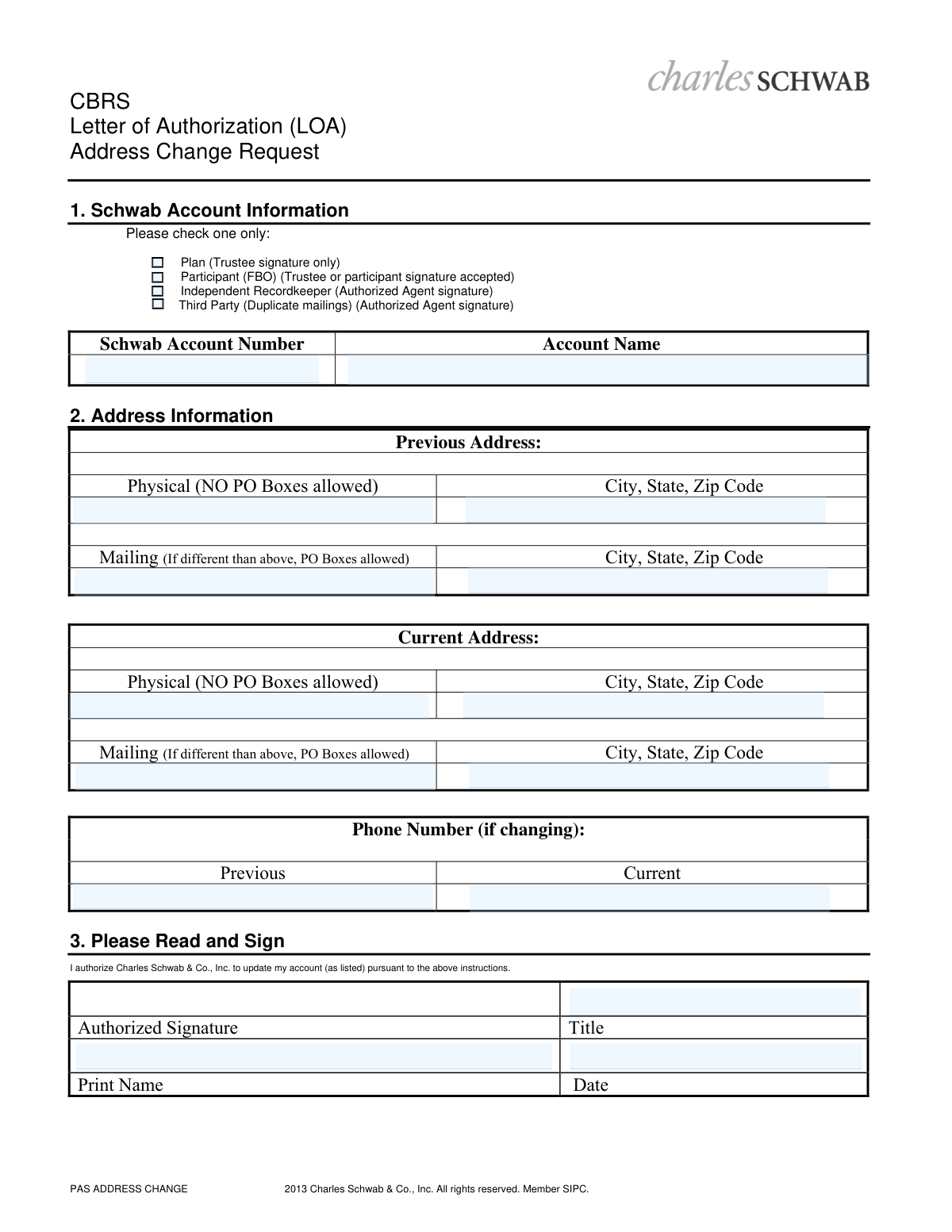
This form is a formal Letter of Authorization (LOA) for clients of Charles Schwab & Co., Inc. to request a change of their physical or mailing address on file for a specific account. It is crucial for ensuring that all account statements, trade confirmations, and other important correspondence are sent to the correct location. Today, this form can be filled out quickly and accurately using AI-powered services like Instafill.ai, which can also convert non-fillable PDF versions into interactive fillable forms.
Our AI automatically handles information lookup, data retrieval, formatting, and form filling.
It takes less than a minute to fill out CBRS LOA Address Change Request using our AI form filling.
Securely upload your data. Information is encrypted in transit and deleted immediately after the form is filled out.
Form specifications
| Form name: | CBRS Letter of Authorization (LOA) Address Change Request |
| Number of pages: | 1 |
| Language: | English |
Instafill Demo: How to fill out PDF forms in seconds with AI
How to Fill Out CBRS LOA Address Change Request Online for Free in 2026
Are you looking to fill out a CBRS LOA ADDRESS CHANGE REQUEST form online quickly and accurately? Instafill.ai offers the #1 AI-powered PDF filling software of 2026, allowing you to complete your CBRS LOA ADDRESS CHANGE REQUEST form in just 37 seconds or less.
Follow these steps to fill out your CBRS LOA ADDRESS CHANGE REQUEST form online using Instafill.ai:
- 1 Navigate to Instafill.ai and upload or select the CBRS Letter of Authorization (LOA) Address Change Request form.
- 2 Provide your Schwab account information, including the account number and name, and check the box corresponding to your account type (e.g., Plan, Participant).
- 3 Enter the complete previous physical and mailing addresses that are currently on file with Charles Schwab.
- 4 Input the new, current physical and mailing addresses where you wish to receive future correspondence.
- 5 If your phone number is also changing, provide both the previous and current numbers in the designated fields.
- 6 Review all the information auto-filled by the AI for accuracy, ensuring all details match your records.
- 7 Sign and date the authorization section, print your name and title, and then submit the completed form to Charles Schwab as instructed.
Our AI-powered system ensures each field is filled out correctly, reducing errors and saving you time.
Why Choose Instafill.ai for Your Fillable CBRS LOA Address Change Request Form?
Speed
Complete your CBRS LOA Address Change Request in as little as 37 seconds.
Up-to-Date
Always use the latest 2026 CBRS LOA Address Change Request form version.
Cost-effective
No need to hire expensive lawyers.
Accuracy
Our AI performs 10 compliance checks to ensure your form is error-free.
Security
Your personal information is protected with bank-level encryption.
Frequently Asked Questions About Form CBRS LOA Address Change Request
This form is used to officially authorize Charles Schwab & Co., Inc. to update the physical and/or mailing address associated with a specific Schwab account.
This form should be completed by the account holder or an authorized party, such as a Trustee, Participant, or Independent Recordkeeper, who needs to change the address on record for a Schwab account.
You will need your Schwab Account Number, the full Account Name, your complete previous address, and your new address. You must also be prepared to sign and date the form.
Select the box that describes your relationship to the account. For example, choose 'Plan' if you are the trustee, or 'Participant (FBO)' if the account is held for your benefit.
The physical address is your actual residence or business location and cannot be a P.O. Box. The mailing address is where you receive mail and can be a P.O. Box if it differs from your physical location.
You may use a P.O. Box for your 'Mailing Address' but not for your 'Physical Address'. The form explicitly prohibits P.O. Boxes for the physical address fields.
You should still fill out all address fields. Enter your previous addresses, then re-enter your current physical address and provide the new mailing address in the appropriate fields.
The person authorized to sign depends on the account type selected in Section 1. This could be the Trustee, Participant, or an Authorized Agent, who must provide their signature, printed name, title, and the date.
The form does not include submission instructions. Please contact your Schwab representative or check the Charles Schwab website for guidance on where to send the completed form.
Yes, services like Instafill.ai use AI to accurately auto-fill form fields from your saved profile. This can save you time and help reduce errors.
To use Instafill.ai, upload the CBRS LOA PDF to the platform. The AI will make the form fillable online, allowing you to quickly enter your information before downloading the completed document for signature.
If you have a non-fillable PDF, you can use a tool like Instafill.ai. It can convert flat PDFs into interactive, fillable forms so you can easily type your information into the fields.
In the 'Title' field, write your official role related to the account, such as 'Trustee,' 'Participant,' or 'Authorized Agent.' This should correspond to the box you checked in Section 1.
Compliance CBRS LOA Address Change Request
Validation Checks by Instafill.ai
1
Ensures a single account type is selected
This check verifies that exactly one of the four account type checkboxes (Plan, Participant, Independent Recordkeeper, Third Party) is selected. This information is critical for determining who has the authority to sign the form and for internal processing workflows. If zero or more than one box is checked, the form is ambiguous and will be rejected for clarification.
2
Validates Schwab Account Number format and presence
This validation ensures the 'Schwab Account Number' field is not empty and conforms to the standard format for Schwab account numbers. An incorrect or missing account number makes it impossible to identify the specific account for the address change. The submission will be rejected if the account number is invalid, malformed, or missing.
3
Verifies Account Name is provided
This check confirms that the 'Account Name' field is completed. The account name is a crucial identifier, used in conjunction with the account number, to verify that the correct account is being updated. An empty field increases the risk of error and will result in the form being rejected to ensure accuracy.
4
Ensures Current Physical Address is provided
This validation confirms that the 'Current Address: Physical' street, city, state, and zip code fields are all completed. The primary purpose of the form is to change an address, making the new physical address the most critical piece of information. If this address is missing or incomplete, the request cannot be fulfilled and will be rejected.
5
Prohibits PO Boxes in Physical Address fields
This check scans the 'Current Physical Address' field to ensure it does not contain 'P.O. Box', 'PO Box', or similar text, as explicitly stated on the form. Financial regulations often require a verifiable physical street address for compliance purposes. A submission with a PO Box in this field will be rejected and require correction.
6
Confirms an actual address change is requested
This validation compares the 'Previous Address' fields with the 'Current Address' fields to ensure they are not identical. Submitting a form with no actual change is a waste of processing resources and may indicate user error. If no change is detected between the previous and current addresses, the form will be flagged for review or rejected as redundant.
7
Verifies presence of an Authorized Signature
This check ensures that the 'Authorized Signature' field contains a signature, which is the legal authorization for the requested change. A missing signature completely invalidates the request, as there is no proof of consent from an authorized party. The form will be rejected immediately if the signature is missing.
8
Ensures Printed Name is provided
This validation confirms that the 'Print Name' field, corresponding to the authorized signature, is completed. The printed name clarifies the identity of the signatory, which is essential for verification, especially if the signature is not perfectly legible. A missing printed name can cause processing delays or rejection while the signatory's identity is confirmed.
9
Validates Date format and logical range
This check verifies that the 'Date' field is filled with a valid date in a standard format (e.g., MM/DD/YYYY). It also ensures the date is not in the future or excessively old, as stale-dated requests may no longer be valid. An invalid, missing, or out-of-range date can create compliance issues and will cause the form to be rejected.
10
Cross-validates Signatory Title with Account Type
This logical check cross-references the signatory's 'Title' with the selected 'Account Type' to ensure proper authority. For example, if 'Plan' is checked, the form states a 'Trustee signature only' is accepted, so the title should be 'Trustee'. A mismatch indicates the signatory may not have the authority to make changes, and the request will be rejected to prevent unauthorized account modifications.
11
Validates City, State, and Zip Code format
This check ensures that all 'City, State, Zip Code' fields are properly formatted across all address blocks. It verifies the state is a valid two-letter abbreviation and the zip code is a 5-digit or 9-digit number. Correct formatting is crucial for data integrity and mail deliverability, and errors will cause the form to be flagged for correction.
12
Validates Phone Number format if provided
This check verifies that if a phone number is entered in the 'Previous' or 'Current' phone number fields, it follows a standard format (e.g., 10 digits, with or without parentheses and hyphens). This ensures the data is clean and usable for contacting the client if necessary. An improperly formatted phone number is unusable and will be flagged for correction.
Common Mistakes in Completing CBRS LOA Address Change Request
This error occurs when the person signing the form does not have the authority required by the account type selected in Section 1. For example, a participant might sign when the 'Plan (Trustee signature only)' box is checked. This mismatch immediately invalidates the request, as the signature cannot be legally authorized, requiring the form to be completed and signed again by the correct individual.
The form explicitly states 'NO PO Boxes allowed' for the physical address fields, yet users often enter one out of habit. This is a compliance requirement for financial institutions to maintain a physical service address. Submitting a P.O. Box will lead to processing delays or rejection until a valid residential or business address is provided.
Users frequently transpose digits, omit a number, or leave the account number field blank entirely. Since the account number is the primary identifier used to locate the account, even a single-digit error will prevent the system from finding it. This results in an immediate failure to process the address change request.
Applicants often focus on providing their new address and neglect to fill out the 'Previous Address' section. This information is crucial for Charles Schwab to verify the identity of the requester against the data on file. Leaving this section blank will halt the process while the firm attempts to contact the client for verification, causing significant delays.
Forgetting to sign or date the authorization in Section 3 is one of the most common and critical errors. An unsigned or undated Letter of Authorization is not a legally valid instruction and will be rejected outright. This requires the entire process to be restarted with a newly completed and executed form.
When signing on behalf of a plan, trust, or as an agent, the signatory often forgets to include their official title (e.g., 'Trustee', 'Authorized Agent'). This title is essential for verifying that the individual has the legal capacity to authorize changes to the account. The absence of a required title can lead to the form's rejection due to insufficient proof of authority.
People sometimes write a nickname, an abbreviated name, or a slightly different version of the official account name. Processing systems rely on an exact match with the name registered to the account number. A mismatch can cause the system to fail to locate the account or flag the request for manual review, delaying the update.
In Section 1, the user must check one box to indicate the account type (Plan, Participant, etc.), as this dictates the signature requirements. Forgetting to make a selection leaves the authorization ambiguous and makes it impossible for the processor to verify the signature's validity. This oversight will cause the form to be returned as incomplete.
Poor handwriting, especially for the account number, printed name, and address details, can make the form impossible to process accurately. If the data entry personnel cannot decipher the information, the request will be delayed or rejected. Using an AI-powered tool like Instafill.ai to populate fields digitally eliminates this issue entirely, and can even make non-fillable PDFs like this one fillable.
Saved over 80 hours a year
“I was never sure if my IRS forms like W-9 were filled correctly. Now, I can complete the forms accurately without any external help.”
Kevin Martin Green
Your data stays secure with advanced protection from Instafill and our subprocessors
Robust compliance program
Transparent business model
You’re not the product. You always know where your data is and what it is processed for.
ISO 27001, HIPAA, and GDPR
Our subprocesses adhere to multiple compliance standards, including but not limited to ISO 27001, HIPAA, and GDPR.
Security & privacy by design
We consider security and privacy from the initial design phase of any new service or functionality. It’s not an afterthought, it’s built-in, including support for two-factor authentication (2FA) to further protect your account.
Fill out CBRS LOA Address Change Request with Instafill.ai
Worried about filling PDFs wrong? Instafill securely fills cbrs-letter-of-authorization-loa-address-change-request forms, ensuring each field is accurate.