Yes! You can use AI to fill out Check and Journal Request Form

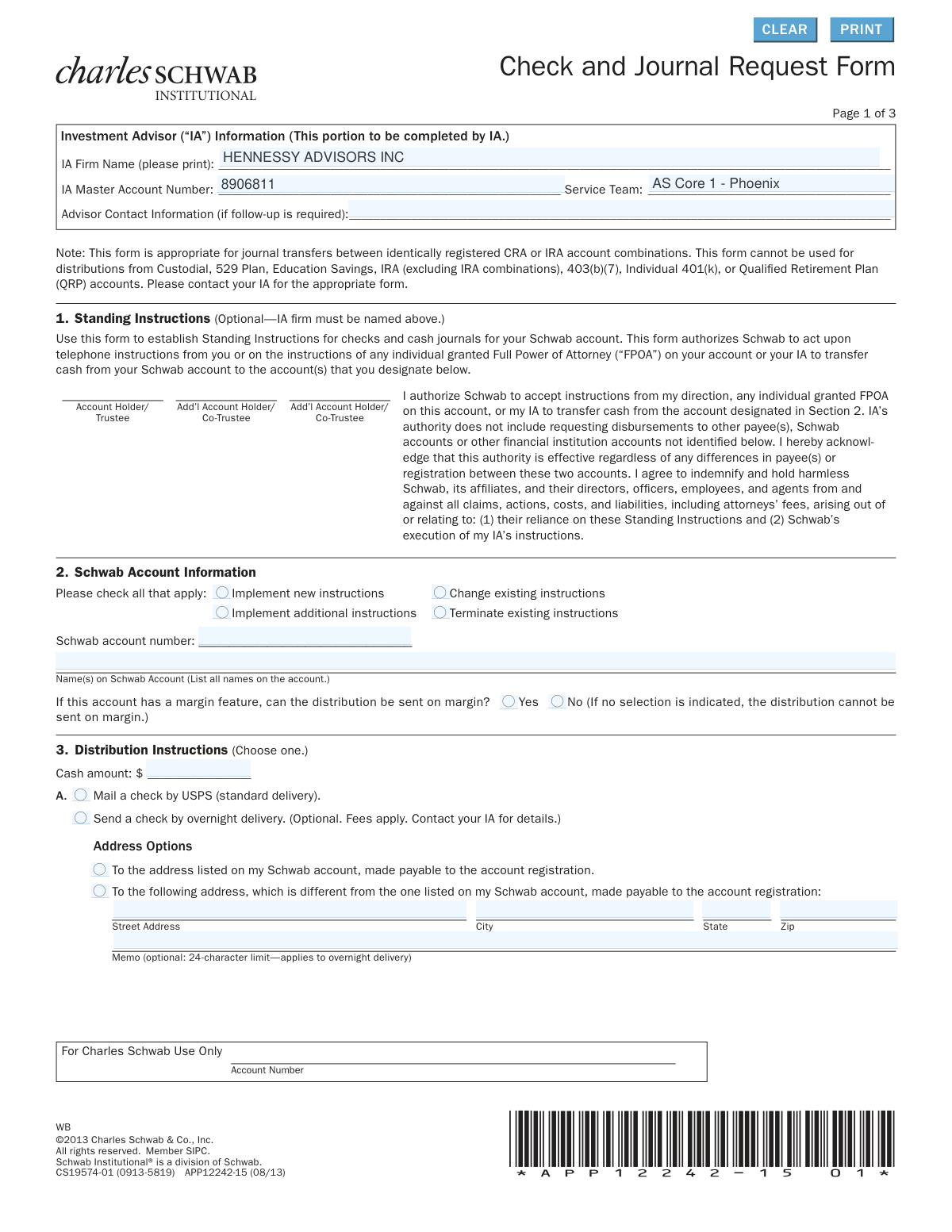
This form allows account holders to provide Charles Schwab with instructions for distributing funds, either by issuing a check or by journaling (transferring) cash or securities to another Schwab account. It is essential for managing one-time, periodic, or total account distributions and can be used to establish standing instructions for an Investment Advisor. Today, this form can be filled out quickly and accurately using AI-powered services like Instafill.ai, which can also convert non-fillable PDF versions into interactive fillable forms.
Our AI automatically handles information lookup, data retrieval, formatting, and form filling.
It takes less than a minute to fill out APP12242-15 using our AI form filling.
Securely upload your data. Information is encrypted in transit and deleted immediately after the form is filled out.

Form specifications

Form name: Check and Journal Request Form
Number of pages: 1
Language: English
main-image

Instafill Demo: How to fill out PDF forms in seconds with AI

How to Fill Out APP12242-15 Online for Free in 2026

Are you looking to fill out a APP12242-15 form online quickly and accurately? Instafill.ai offers the #1 AI-powered PDF filling software of 2026, allowing you to complete your APP12242-15 form in just 37 seconds or less.
Follow these steps to fill out your APP12242-15 form online using Instafill.ai:
  1. 1 Navigate to Instafill.ai and upload or select the Charles Schwab Check and Journal Request Form.
  2. 2 Provide the Investment Advisor (IA) firm name and master account number in the designated section, if applicable.
  3. 3 Enter your Schwab account number and specify whether you are implementing new instructions, changing existing ones, or terminating them.
  4. 4 Complete the Distribution Instructions section, choosing whether to mail a check or journal funds to another Schwab account, and provide all necessary details like amount, payee, and address.
  5. 5 Specify the frequency of the distribution, selecting from one-time, periodic, or total account distribution, and fill in the corresponding details.
  6. 6 Carefully review all the information auto-filled by the AI to ensure accuracy and completeness, particularly account numbers and distribution amounts.
  7. 7 Electronically sign and date the form in Section 5. Ensure all required account holders sign, as specified by the form's instructions.

Our AI-powered system ensures each field is filled out correctly, reducing errors and saving you time.

Why Choose Instafill.ai for Your Fillable APP12242-15 Form?

Speed

Complete your APP12242-15 in as little as 37 seconds.

Up-to-Date

Always use the latest 2026 APP12242-15 form version.

Cost-effective

No need to hire expensive lawyers.

Accuracy

Our AI performs 10 compliance checks to ensure your form is error-free.

Security

Your personal information is protected with bank-level encryption.

Frequently Asked Questions About Form APP12242-15

This form is used to request a one-time, periodic, or total distribution from your Schwab account. You can request the funds as a mailed check or as a transfer (journal) of cash or securities to another Schwab account.

This form is intended for clients who have a Schwab Institutional account managed by an Investment Advisor (IA). Your IA will typically initiate or assist you with completing this form.

No, this form cannot be used for distributions from 529 Plans, Custodial accounts, most IRAs, or other qualified retirement plans. It is primarily for transfers between identically registered accounts.

Standing Instructions are an optional authorization you can give Schwab to act on telephone instructions from you or your Investment Advisor for the transfers specified on the form. This can make future, similar requests quicker and easier.

A check request results in a physical check being mailed to you or a designated third party. A journal request is an internal, electronic transfer of cash or securities from your Schwab account to another Schwab account.

Yes, Section 3 allows you to request a check made payable to a third party. You can have it mailed to your address on file or to a different specified address.

Yes, Section 4B allows you to set up periodic cash distributions. You can choose a fixed amount to be sent on a weekly, monthly, quarterly, or other recurring schedule.

Signature requirements vary; at least one account holder must sign for third-party payments or to close an account. All account holders must sign if you are establishing Standing Instructions for your Investment Advisor.

The form states that Schwab will not process your distribution request if there are not sufficient available funds in the account to cover the amount requested.

Yes, in Section 4C, you can request a total distribution of all account assets and select the option to close the account, which requires an account holder's signature.

You should allow approximately four to six weeks to process distributions of securities in physical certificate form. Note that fees may apply for this service.

Yes, services like Instafill.ai use AI to auto-fill form fields accurately and save time. This can help you complete complex forms with greater speed and fewer errors.

Simply upload the form's PDF to the Instafill.ai platform. The AI will automatically detect the fields and fill them with your saved information, after which you can review, sign, and download the completed document.

If you have a non-fillable PDF, you can use a service like Instafill.ai. It can convert flat PDFs into interactive, fillable forms that you can easily complete and sign on your computer.

Compliance APP12242-15
Validation Checks by Instafill.ai

1
Mutually Exclusive Distribution Instruction Selection
This check ensures that in Section 3, the user has selected either 'A. Mail a check' or 'B. Journal to Schwab account(s)', but not both. These options are mutually exclusive ways to distribute funds. If both or neither are selected, the form cannot be processed as the core intent of the distribution is ambiguous, leading to rejection of the request.
2
Mutually Exclusive Frequency of Distribution Selection
This validation verifies that in Section 4, the user has selected only one frequency option: 'A. One-Time', 'B. Periodic', or 'C. Total'. These choices define fundamentally different transaction schedules. Selecting more than one would create a conflicting instruction, so the form must be rejected and returned for clarification.
3
Schwab Account Number Presence and Format
This check confirms that the 'Schwab account number' field in Section 2 is not empty and adheres to the expected format (e.g., an 8-digit number). This number is the primary identifier for the source account of the transaction. Without a valid and correctly formatted account number, the system cannot locate the account, and the entire request will fail.
4
Conditional Requirement for New Address
This validation is triggered if the user selects the option 'To the following address, which is different from the one listed on my Schwab account' in Section 3A. It ensures that the 'Street Address', 'City', 'State', and 'Zip' fields are all filled out. Failure to provide a complete address would result in the check being undeliverable, causing delays and potential security risks.
5
IRA Contribution Tax Year Validity
If the 'This is a contribution to an IRA for tax year' box is checked in Section 3B, this check validates that the provided year is a 4-digit number (YYYY format) and is a plausible tax year (e.g., not a future year). This is critical for correct tax reporting to the IRS. An invalid year would cause tax reporting errors for the client and must be corrected before processing.
6
Periodic Distribution Completeness
When 'Periodic (on schedule)' (Section 4B) is selected, this check ensures all required sub-fields are completed. This includes the 'Beginning' date, a selected 'Frequency', and either a 'Fixed Amount' or a selection under 'Income Payment'. Missing any of these components makes the instruction incomplete and impossible for the system to schedule correctly.
7
Signature Requirement for Account Closure
This check verifies that if 'Total' distribution (Section 4C) is chosen and the 'Be closed' option is selected, at least one 'Account Holder/Trustee/Executor' signature is present in Section 5. Closing an account is a significant action that requires explicit authorization from the account holder. A missing signature will prevent the account closure part of the request from being processed.
8
Signature Requirement for Standing Instructions
This validation ensures that if Section 1 is completed to establish or change Standing Instructions, the signatures of ALL account holders are present in Section 5. Granting an IA authority to move funds requires consent from all owners of the account. The form will be rejected if any required signatures are missing to prevent unauthorized activity.
9
Memo Field Character Limit
This check validates that any text entered into the 'Memo' fields within Section 3A does not exceed the 24-character limit specified on the form. This limit is likely due to system constraints on check printing or record-keeping. Exceeding the limit could cause the memo to be truncated or the request to fail processing, so the user must be prompted to shorten it.
10
Date Field Format (MM/DD/YYYY)
This check ensures that all date fields on the form, such as the 'Beginning' date in Section 4B and the signature dates in Section 5, are entered in a valid 'mm/dd/yyyy' format. Consistent and valid date formatting is essential for accurate scheduling and record-keeping. An invalid format would cause processing errors and require manual correction.
11
Logical Link Between Journal Selection and Details
This validation confirms that if 'B. Journal to Schwab account(s)' is selected in Section 3, then the user has provided the necessary details in either Section 4A ('One-Time') or Section 4C ('Total'). The selection in Section 3B is an instruction to journal, but the actual assets and destination account are specified in Section 4. Without the corresponding details in Section 4, the instruction is incomplete and cannot be executed.
12
Instruction Type Selection Requirement
This check ensures that at least one of the checkboxes ('Implement new instructions', 'Change existing instructions', etc.) is selected in Section 2. This selection clarifies the purpose of the submission and how it should be treated in relation to any existing instructions on file. Without this context, the request is ambiguous and may be processed incorrectly.
13
Third-Party Payee Information Completeness
If a check is to be made payable to a third party (as indicated by the options in Section 3A), this check verifies that the 'Payee First Name' and 'Last Name' fields are completed. Issuing a check requires a clearly identified payee. Missing this information would make it impossible to write the check, forcing the request to be rejected.
14
Signature Requirement for Third-Party Distributions
This check verifies that if a distribution is being sent to a third party or an address not on file (any option in Section 3A other than the first), at least one account holder signature is present in Section 5. This is a critical security measure to prevent fraud and ensure that the account holder has authorized the movement of funds to an external party. Lack of a signature will cause immediate rejection of the request.

Common Mistakes in Completing APP12242-15

Missing Required Signatures

The signature rules in Section 5 are complex and often missed. For example, setting up Standing Instructions (Section 1) or granting post-closure IA access requires signatures from ALL account holders, not just one. A missing signature is one of the most common reasons for outright rejection, requiring the form to be completed and submitted again. To avoid this, carefully read the instructions in Section 5 to determine if one or all account holders must sign based on your request.

Incorrect or Incomplete Schwab Account Number

Users frequently mistype the Schwab account number in Section 2 or the receiving account number in Section 4. This simple data entry error will cause the entire request to fail, as the system cannot identify the correct source or destination account. This leads to significant processing delays. Double-check the account number against your statement before submitting. AI-powered tools like Instafill.ai can help prevent this by auto-filling and validating account numbers from saved profiles.

Ambiguous Distribution or Frequency Selection

The form requires users to 'Choose one' option in both Section 3 (Distribution Instructions) and Section 4 (Frequency). A common mistake is checking multiple boxes, such as requesting both a check (3A) and a journal (3B), or selecting both 'One-Time' (4A) and 'Periodic' (4B). This ambiguity makes the request impossible to process and will result in it being returned. Ensure you have selected only one option in each of these critical sections.

Incomplete Information for Journal Transfers

When requesting a one-time journal of securities in Section 4A, people often omit critical details in the table. Missing information such as the security's Symbol/CUSIP, the specific share quantity, or the receiving account number makes the instruction non-actionable. This forces the processing agent to reject the form and request clarification, delaying the transfer. Always fill out every relevant column in the table for each security being journaled.

Failing to Specify Action on Instructions

In Section 2, users must specify whether they are implementing new instructions, changing existing ones, or terminating them. It is common for this checkbox to be overlooked, leaving the firm unsure of the user's intent, especially if instructions for that account already exist. This leads to processing delays while they seek clarification. Always check the appropriate box to clearly state the purpose of your submission.

Incorrect IRA Contribution Year

When journaling funds as an IRA contribution in Section 3B, filers must specify the tax year. People often forget to enter the year or mistakenly enter the current calendar year for a prior-year contribution made before the tax deadline. This error can have significant tax consequences, leading to incorrect reporting to the IRS and potential penalties. Always verify the correct tax year for which you are making the contribution.

Requesting Account Closure Without a Signature

In Section 4C, a user might check the box to close their Schwab account after distributing the assets but forget the corresponding signature requirement. The form explicitly states that an account holder signature is required in Section 5 to authorize an account closure. Without the signature, Schwab will process the asset distribution but will leave the account open, which may not be the client's intention.

Failing to List All Account Holders' Names

Section 2 requires listing all names on the Schwab account exactly as they appear on the account registration. People with joint accounts sometimes only list their own name out of habit. This mismatch with Schwab's records will cause a verification failure, halting the request until the information is corrected. This can be avoided by referencing an account statement to ensure all names are listed correctly. Tools like Instafill.ai can store and accurately populate this information automatically.

Ignoring the Margin Loan Question

When an account has a margin feature, Section 2 asks if the distribution can be sent on margin. Many people skip this 'Yes/No' question. The form defaults to 'No,' meaning the distribution will fail if there isn't enough settled cash, even if a sufficient margin balance is available. This can cause an unexpected rejection of the payment. To avoid this, make a clear selection based on whether you authorize using your margin balance for the distribution.

Using the Form for Ineligible Account Types

The note at the top of the form clearly states it cannot be used for distributions from Custodial, 529, ESA, most IRA, or QRP accounts. However, users may overlook this disclaimer and attempt to use the form for these restricted account types. This results in an automatic rejection and the need to find and fill out the correct, specific form for that account, causing significant delays. Since this form is a non-fillable PDF, a tool like Instafill.ai could convert it to a fillable version, and its AI could flag a user attempting to enter an ineligible account type.
Saved over 80 hours a year

“I was never sure if my IRS forms like W-9 were filled correctly. Now, I can complete the forms accurately without any external help.”

Kevin Martin Green

Your data stays secure with advanced protection from Instafill and our subprocessors

Robust compliance program

Transparent business model

You’re not the product. You always know where your data is and what it is processed for.

ISO 27001, HIPAA, and GDPR

Our subprocesses adhere to multiple compliance standards, including but not limited to ISO 27001, HIPAA, and GDPR.

Security & privacy by design

We consider security and privacy from the initial design phase of any new service or functionality. It’s not an afterthought, it’s built-in, including support for two-factor authentication (2FA) to further protect your account.

Fill out APP12242-15 with Instafill.ai

Worried about filling PDFs wrong? Instafill securely fills check-and-journal-request-form forms, ensuring each field is accurate.