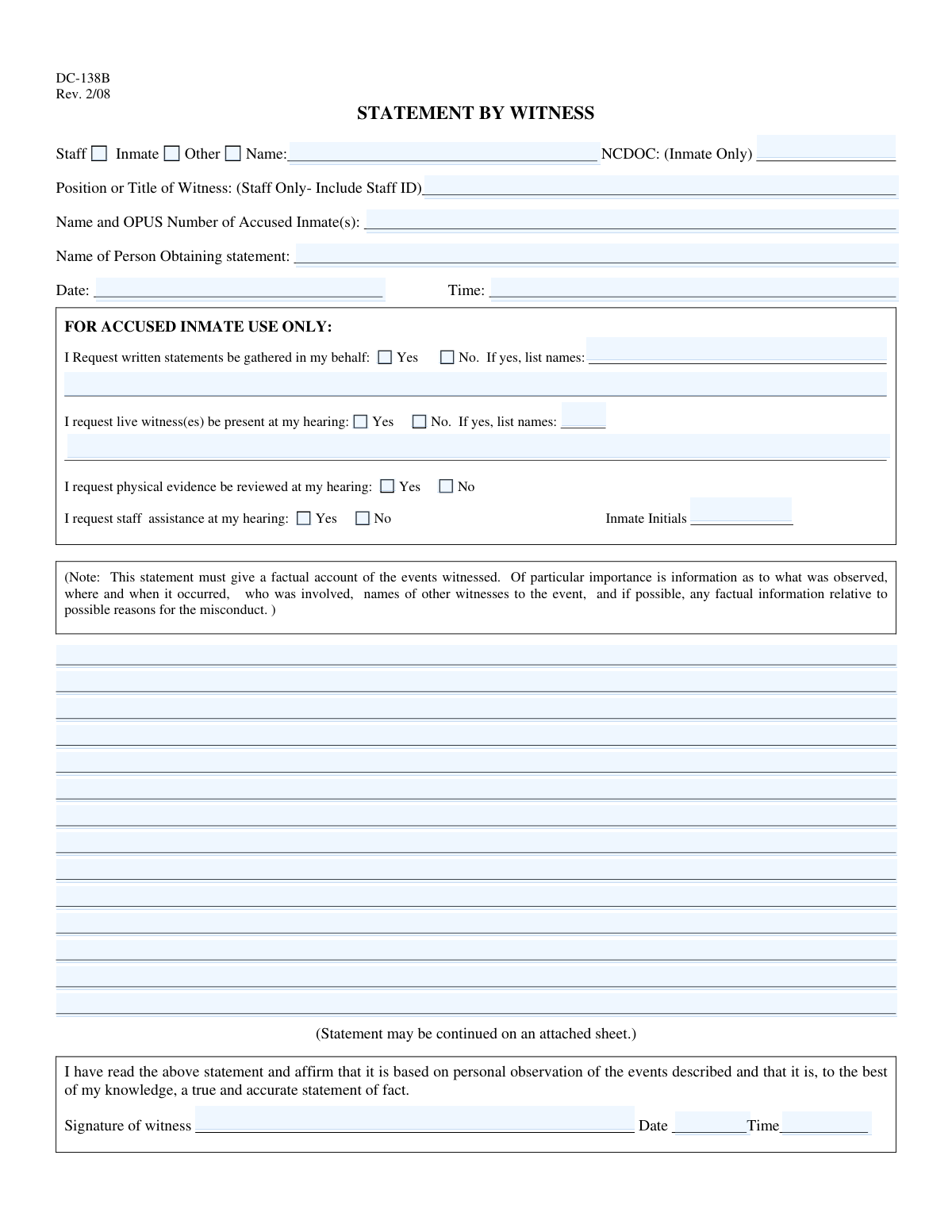
Yes! You can use AI to fill out DC-138B (Rev. 2/08), Statement by Witness
DC-138B (Statement by Witness) is an official witness statement form used in a correctional setting to document a first-hand, factual narrative of an incident, including who was involved, what was observed, and where and when it occurred. It also includes a section for the accused inmate to request written statements, live witnesses, review of physical evidence, and staff assistance for a hearing. Accurate completion is important because the statement may be used as evidence in disciplinary proceedings and must be affirmed as true based on personal observation. Today, this form can be filled out quickly and accurately using AI-powered services like Instafill.ai, which can also convert non-fillable PDF versions into interactive fillable forms.
Our AI automatically handles information lookup, data retrieval, formatting, and form filling.
It takes less than a minute to fill out DC-138B using our AI form filling.
Securely upload your data. Information is encrypted in transit and deleted immediately after the form is filled out.
Form specifications
| Form name: | DC-138B (Rev. 2/08), Statement by Witness |
| Number of pages: | 1 |
| Language: | English |
| Categories: | Maryland court forms, District court forms, Legal witness forms, Maryland legal forms |
Instafill Demo: filling out a legal form in seconds
How to Fill Out DC-138B Online for Free in 2026
Are you looking to fill out a DC-138B form online quickly and accurately? Instafill.ai offers the #1 AI-powered PDF filling software of 2026, allowing you to complete your DC-138B form in just 37 seconds or less.
Follow these steps to fill out your DC-138B form online using Instafill.ai:
- 1 Go to Instafill.ai and upload the DC-138B form (or select it from the form library) to start an AI-guided fill session.
- 2 Choose the witness type (Staff, Inmate, or Other) and enter the witness name; if the witness is an inmate, provide the NCDOC ID, and if staff, add position/title and staff ID.
- 3 Enter the accused inmate name(s) and OPUS number(s), plus the name of the person obtaining the statement, and the statement date and time.
- 4 Use the AI prompt to draft or refine the Statement Body into a clear factual account (what was observed, where/when it occurred, who was involved, other witnesses, and relevant factual context).
- 5 If completing the accused-inmate-only section, select Yes/No for written statements, live witnesses, physical evidence review, and staff assistance, and list requested names and counts where applicable; add inmate initials if required.
- 6 Review the completed form for accuracy and completeness, then add the witness signature and the signature date/time using Instafill.ai’s signing/typing tools.
- 7 Download the finalized PDF (and any continuation sheet if needed) and submit it according to facility procedures or share it securely with the appropriate staff.
Our AI-powered system ensures each field is filled out correctly, reducing errors and saving you time.
Why Choose Instafill.ai for Your Fillable DC-138B Form?
Speed
Complete your DC-138B in as little as 37 seconds.
Up-to-Date
Always use the latest 2026 DC-138B form version.
Cost-effective
No need to hire expensive lawyers.
Accuracy
Our AI performs 10 compliance checks to ensure your form is error-free.
Security
Your personal information is protected with bank-level encryption.
Frequently Asked Questions About Form DC-138B
DC-138B is used to record a factual witness statement about an incident, typically for an inmate disciplinary process or related investigation. It documents what the witness personally observed, including who, what, when, where, and any other relevant details.
The person who witnessed the event completes the witness portion and checks whether they are Staff, Inmate, or Other. The âFOR ACCUSED INMATE USE ONLYâ section is completed only by the accused inmate to request witnesses, evidence review, or staff assistance.
Check âStaffâ if the witness is a staff member, âInmateâ if the witness is an inmate (and include the NCDOC number), or âOtherâ if the witness is neither staff nor an inmate. Only one category should be selected for the witness.
NCDOC is the inmate identification number and is completed only when the witness is an inmate. If the witness is staff or âOther,â leave the NCDOC field blank.
Staff should enter their job title/position and include their staff ID number. If the witness is not staff, this field should be left blank.
List each accused inmateâs full name followed by their OPUS number. If there are multiple accused inmates, include each one on a separate line or clearly separated in the same field.
This is the person who collected or recorded the witness statement (often a staff member). Enter their full name and include a title or staff ID if applicable.
Write a factual account based on personal observation: what was seen/heard, where and when it happened, who was involved, and names of any other witnesses. Avoid opinions or guesses unless clearly labeled as such and supported by observed facts.
You may continue the statement on an attached sheet, as the form allows. Make sure the attachment is clearly labeled and referenced, and that the witness still signs and dates the statement.
By signing, the witness affirms the statement is based on personal observation and is true and accurate to the best of their knowledge. The witness should sign and enter the date and time after reviewing the completed statement.
It allows the accused inmate to request written statements, request live witnesses at the hearing, request physical evidence review, and request staff assistance. The accused inmate should check Yes/No boxes and list names where requested.
List the full names of the people the accused wants statements from or wants present at the hearing. If multiple names are needed, separate them clearly (commas or new lines) and include as many as necessary, using an additional sheet if needed.
Processing time and submission location depend on the facilityâs disciplinary or investigative procedures. Typically, the completed form is returned to the staff member obtaining the statement or submitted per facility instructions; ask the hearing officer or designated staff for the correct deadline and drop-off method.
YesâAI form-filling tools can help you enter names, IDs, dates/times, and organize the narrative so it matches the form fields. Services like Instafill.ai can auto-fill form fields accurately and save time, but you should still review for correctness before signing.
Upload the DC-138B PDF to Instafill.ai, then provide the witness details and incident information when prompted so the AI can map your answers into the correct fields. Review the completed form, make edits if needed, and then download/print for signature and submission according to facility rules.
If the PDF isnât fillable, Instafill.ai can convert flat non-fillable PDFs into interactive fillable forms. After conversion, you can auto-fill the new fields and export a clean, typed version for printing and signature.
Compliance DC-138B
Validation Checks by Instafill.ai
1
Ensures exactly one Witness Type is selected (Staff/Inmate/Other)
Validate that one and only one of the witness type checkboxes (Staff, Inmate, Other) is selected. This prevents ambiguity about which identification rules apply (e.g., staff ID vs. NCDOC ID). If none or multiple are selected, the submission should be rejected and the user prompted to choose a single witness type.
2
Requires Witness Name and enforces full-name format
Check that the Witness Name field is present and contains a plausible full name (e.g., at least two alphabetic tokens, not just initials or a single character). This is important for traceability and for matching the witness to institutional records. If the name is missing or clearly invalid, the form should fail validation and require correction.
3
Validates NCDOC ID is provided and correctly formatted when Witness Type = Inmate
When the Inmate witness type is selected, require the NCDOC (Inmate Only) ID field and validate it matches the expected numeric/length pattern used by the organization (e.g., digits only, within an allowed length range). This ensures the witness can be uniquely identified and prevents misattribution. If the NCDOC ID is missing or malformed, block submission and request a corrected ID.
4
Prevents NCDOC ID entry when Witness Type is not Inmate
If Staff or Other is selected, the NCDOC ID field should be blank (or ignored) to avoid mixing identifiers and creating record conflicts. This reduces downstream matching errors and prevents accidental disclosure of inmate identifiers. If a non-inmate witness includes an NCDOC ID, flag the submission for correction.
5
Requires Staff Position/Title and Staff ID when Witness Type = Staff
When Staff is selected, require the Position/Title of Witness field and validate that it includes both a job title and a staff ID (e.g., contains an ID token that matches an expected pattern such as alphanumeric or numeric of a defined length). This is important for accountability and for verifying the witnessâs employment status. If missing or the staff ID portion is not detectable/valid, the form should fail validation.
6
Ensures Staff Position/Title is blank when Witness Type is not Staff
If the witness is Inmate or Other, the Staff-only Position/Title (with Staff ID) should not be populated to prevent incorrect classification and data contamination. This also avoids mistakenly treating a non-staff witness as staff in downstream workflows. If populated while not Staff, return a validation error instructing the user to clear the field or change witness type.
7
Validates 'Other' witness type includes clarifying identification in Name field
When Other is selected, validate that the Witness Name field includes sufficient identifying information (e.g., full name and optionally a descriptor such as role/relationship if required by policy), and is not left generic (e.g., 'unknown', 'N/A'). This helps ensure the witness can be contacted or referenced later. If the entry is too vague, require additional detail before acceptance.
8
Requires Accused Inmate Name(s) and OPUS Number(s) with correct pairing
Validate that the Accused Inmate Name and OPUS Number field is completed and includes at least one accused inmate with an associated OPUS number, using a consistent pattern (e.g., 'Last, First â OPUS ######'). This is critical to link the statement to the correct disciplinary case(s). If names are present without OPUS numbers (or vice versa), or the OPUS format is invalid, the submission should be rejected.
9
Validates OPUS Number format and uniqueness within the accused list
Check that each OPUS number conforms to the expected format (commonly digits-only with a defined length) and that the same OPUS number is not repeated for different names in the same submission. This prevents duplicate or conflicting accused identification. If an OPUS number is malformed or duplicated inconsistently, flag the record and require correction.
10
Requires Name of Person Obtaining Statement and validates plausible identity format
Ensure the Name of Person Obtaining Statement is present and looks like a real name (at least two tokens), and optionally validate inclusion of title/staff ID if your process requires it. This supports chain-of-custody and auditability for how the statement was collected. If missing or clearly invalid, the form should not be accepted.
11
Validates Statement Date format and allowable range
Validate the Statement Date is provided and matches an accepted date format (e.g., MM/DD/YYYY) and is not an impossible date. Also enforce a reasonable range (e.g., not in the far future and not unreasonably old per retention/workflow rules). If invalid or out of range, block submission and request a corrected date.
12
Validates Statement Time format and normalizes to a standard
Check that Statement Time is present and matches an accepted time format (e.g., HH:MM with AM/PM or 24-hour HH:MM), and that minutes are within 00â59. Standardizing time reduces confusion across facilities and improves timeline reconstruction. If time is missing or malformed, fail validation and prompt for a corrected time.
13
Requires Statement Body and enforces minimum narrative completeness
Ensure the Statement Body is not empty and meets a minimum length/word count threshold to represent a factual narrative (e.g., at least 2â3 sentences or a minimum character count). This is important because the form explicitly requires a factual account (what was observed, where/when, who was involved). If too short or blank, reject submission and require additional detail.
14
Validates Witness Signature presence and signature timestamp completeness
Require the Witness Signature field and require both Witness Signature Date and Witness Signature Time, each in valid formats. This confirms attestation and supports evidentiary integrity by recording when the witness affirmed the statement. If the signature is missing or the signature date/time is incomplete or invalid, the form should fail validation.
15
Checks chronological consistency between Statement timestamp and Signature timestamp
Validate that the witness signature date/time is the same as or later than the statement date/time (and not earlier), since the witness cannot sign before the statement is given. This prevents timeline inconsistencies that can undermine credibility or create audit issues. If the signature timestamp precedes the statement timestamp, flag the submission and require correction or an explanatory override workflow.
16
Validates Accused Inmate request sections: mutually exclusive Yes/No and dependent fields
For each request item (Written Statements, Live Witnesses, Physical Evidence, Staff Assistance), ensure exactly one of Yes/No is selected (not both, not neither). If Written Statements = Yes, require at least one name in the written-statement names field(s); if Live Witnesses = Yes, require at least one name and ensure the 'Number Requested' is a positive integer consistent with the count of names provided. If Staff Assistance = Yes, require Accused Inmate Initials; if any dependency is unmet, fail validation and prompt for the missing information.
Common Mistakes in Completing DC-138B
People often check the wrong box or leave all witness-type boxes blank, especially when the witness is not clearly âstaffâ (e.g., contractors, volunteers). This can cause the form to be treated as incomplete or misrouted, and it may delay the disciplinary process. Always select exactly one witness type and confirm it matches the witnessâs status at the facility; if the form is being completed digitally, AI tools like Instafill.ai can flag missing or conflicting selections before submission.
A common error is entering an NCDOC number for a staff witness, or leaving the NCDOC field blank when the witness is an inmate. This happens because the NCDOC field is visually close to the Name field and people assume it is required for everyone. The consequence is identification ambiguity and potential rejection for missing required inmate identification. Avoid this by completing NCDOC only when âInmateâ is checked; Instafill.ai can enforce conditional logic so inmate-only fields are required only when applicable.
Staff witnesses frequently write only a job title (e.g., âOfficerâ) and forget the required staff ID, or they put the ID in the wrong place. This can make it difficult to verify the witness and may require follow-up, delaying the hearing packet. If âStaffâ is selected, include both position/title and staff ID in the Position/Title field exactly as requested. AI-powered form filling tools like Instafill.ai can prompt for the staff ID when âStaffâ is selected and format it consistently.
People often list only the accused inmateâs name without the OPUS number, or they list multiple accused inmates but fail to pair each name with the correct OPUS number. This happens when the writer assumes the name alone is sufficient or doesnât have the OPUS number available at the time. The result can be misidentification, incorrect case association, or administrative delays. Always provide full name plus OPUS number for each accused inmate, and keep each inmateâs details clearly separated; Instafill.ai can validate expected number formats and reduce mismatches.
The person collecting the statement is sometimes not recorded, or a partial name/nickname is used (e.g., âSgt. Jâ). This typically happens when the focus is on the narrative and the administrative fields are treated as optional. Missing or unclear collector identification can undermine chain-of-custody and create questions about authenticity. Use the full legal name and include title or staff ID if applicable; Instafill.ai can standardize names and ensure required administrative fields are completed.
Writers frequently omit the time, use inconsistent formats (e.g., 2/3/24 vs. 03-02-2024), or enter a signature date/time that doesnât match the statement date/time. This happens because the form asks for date/time in multiple places and people rush or assume one timestamp covers all. Inconsistencies can trigger credibility concerns or require corrections and re-signing. Use a consistent facility-accepted format (often MM/DD/YYYY and 24-hour time if required) and ensure the signature timestamp aligns with when the statement was affirmed; Instafill.ai can auto-format and cross-check timestamps.
The âFOR ACCUSED INMATE USE ONLYâ section is sometimes filled out by the witness or staff member, or itâs left blank when the accused intended to make requests. This confusion happens because the section appears on the same page as the witness statement and may be completed in one sitting. The consequence is invalid or disputed requests for witnesses/evidence/assistance, potentially affecting hearing preparation. Ensure only the accused inmate completes that section and that the witness completes only the witness statement and signature areas; Instafill.ai can guide role-based completion and prevent edits to restricted sections.
A frequent mistake is selecting âYesâ for written statements or live witnesses but leaving the names blank, listing only first names, or using vague identifiers (e.g., âthe nurseâ). This happens when the accused assumes staff will know who they mean or plans to provide names later. Missing names can result in the request being unfulfilled or delayed because staff cannot identify the requested witnesses. If âYesâ is checked, list full names (and any identifying details available) and separate multiple names clearly; Instafill.ai can require the names field when âYesâ is selected and prompt for completeness.
When requesting staff assistance, the accused often checks âYesâ but forgets to add initials, or initials are placed in the wrong area. This happens because the initials line is easy to overlook and people assume the checkbox is sufficient. The consequence can be an unconfirmed request, leading to delays or denial of assistance due to incomplete documentation. If staff assistance is requested, add the accused inmateâs usual initials in the designated field; Instafill.ai can flag missing initials when the âYesâ option is selected.
Witnesses often write conclusions (âhe was guilty,â âshe started itâ) instead of a factual account, or they omit key details like exact location, time, sequence of events, and other witnesses. This happens because people write from memory under stress and donât realize the form explicitly requires observable facts. The consequence is a weaker statement that may be discounted or require follow-up interviews. Stick to what you personally observed, include where and when it occurred, who was involved, and names of other witnesses; Instafill.ai can provide structured prompts/checklists to ensure the narrative includes required elements.
Some submissions include a completed narrative but no witness signature, or the witness signs even though the statement includes hearsay they did not personally observe. This happens when the signature block is at the end of a long page and is overlooked, or when the witness misunderstands the affirmation language. Missing signatures can invalidate the statement, and signing inaccurate content can create credibility and disciplinary issues. Always sign and date/time the statement after reviewing it for accuracy and ensuring it reflects personal observation; if the form is a flat non-fillable PDF, Instafill.ai can convert it into a fillable version and prevent submission until signature/date/time fields are completed.
Saved over 80 hours a year
âI was never sure if my IRS forms like W-9 were filled correctly. Now, I can complete the forms accurately without any external help.â
Kevin Martin Green
Your data stays secure with advanced protection from Instafill and our subprocessors

Robust compliance program
Transparent business model
Youâre not the product. You always know where your data is and what it is processed for.
ISO 27001, HIPAA, and GDPR
Our subprocesses adhere to multiple compliance standards, including but not limited to ISO 27001, HIPAA, and GDPR.
Security & privacy by design
We consider security and privacy from the initial design phase of any new service or functionality. Itâs not an afterthought, itâs built-in, including support for two-factor authentication (2FA) to further protect your account.
Fill out DC-138B with Instafill.ai
Worried about filling PDFs wrong? Instafill securely fills dc-138b-rev-208-statement-by-witness forms, ensuring each field is accurate.