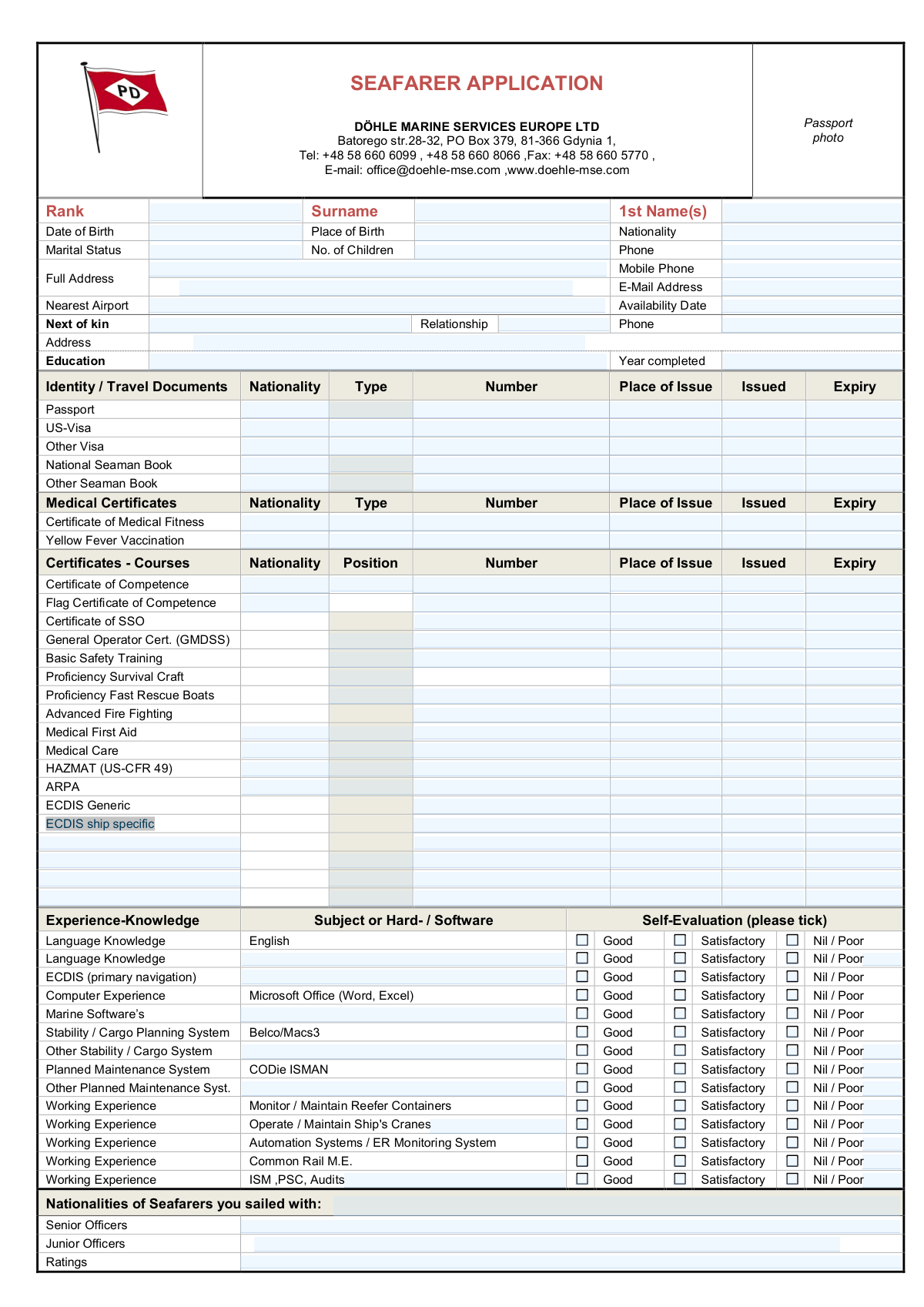
Yes! You can use AI to fill out Döhle Marine Services Europe Ltd Seafarer Application

The Seafarer Application form from Döhle Marine Services Europe Ltd is a detailed document for maritime professionals seeking employment. It collects essential information including personal data, contact details, travel documents, medical and training certificates, and extensive sea service history. Compiling this information accurately is crucial for the crewing agency to assess a candidate's qualifications and suitability for a position. Today, this form can be filled out quickly and accurately using AI-powered services like Instafill.ai, which can also convert non-fillable PDF versions into interactive fillable forms.
Our AI automatically handles information lookup, data retrieval, formatting, and form filling.
It takes less than a minute to fill out Seafarer Application using our AI form filling.
Securely upload your data. Information is encrypted in transit and deleted immediately after the form is filled out.

Form specifications

Form name: Döhle Marine Services Europe Ltd Seafarer Application
Number of pages: 2
Language: English
Categories: seafarer forms
main-image

Instafill Demo: How to fill out PDF forms in seconds with AI

How to Fill Out Seafarer Application Online for Free in 2026

Are you looking to fill out a SEAFARER APPLICATION form online quickly and accurately? Instafill.ai offers the #1 AI-powered PDF filling software of 2026, allowing you to complete your SEAFARER APPLICATION form in just 37 seconds or less.
Follow these steps to fill out your SEAFARER APPLICATION form online using Instafill.ai:
  1. 1 Navigate to Instafill.ai and upload or select the Seafarer Application form.
  2. 2 Use the AI assistant to automatically fill in your personal information, including your name, date of birth, nationality, and contact details.
  3. 3 Input details of your identity and travel documents, such as your passport, seaman's book, and any visas, letting the AI guide you through the required fields.
  4. 4 List all your medical certificates and specialized training course certifications, providing numbers, issue dates, and expiry dates for each.
  5. 5 Document your sea service history for the last five years, including vessel names, types, ranks held, and dates of service.
  6. 6 Complete the self-evaluation sections for language skills, computer literacy, and experience with specific marine systems and equipment.
  7. 7 Review all the information populated by the AI for accuracy, make any necessary corrections, and then submit the completed application as instructed.

Our AI-powered system ensures each field is filled out correctly, reducing errors and saving you time.

Why Choose Instafill.ai for Your Fillable Seafarer Application Form?

Speed

Complete your Seafarer Application in as little as 37 seconds.

Up-to-Date

Always use the latest 2026 Seafarer Application form version.

Cost-effective

No need to hire expensive lawyers.

Accuracy

Our AI performs 10 compliance checks to ensure your form is error-free.

Security

Your personal information is protected with bank-level encryption.

Frequently Asked Questions About Form Seafarer Application

This form is used by Döhle Marine Services Europe Ltd. to collect essential personal, professional, and experiential information from seafarers applying for employment opportunities.

Any seafarer, including officers and ratings, who is seeking a position with Döhle Marine Services Europe Ltd. should complete this application to be considered for recruitment.

You should have your passport, Seaman's Book, medical certificates (like Certificate of Medical Fitness and Yellow Fever), and all relevant maritime certificates such as your Certificate of Competence, Basic Safety Training, and GMDSS.

List your sea service for the past five years, starting with the most recent vessel. For each entry, provide your rank, vessel details (name, type, IMO, GRT, TEU), dates of employment, and main engine information.

In this section, you are asked to honestly rate your own skill level for various systems, software, and languages. You should tick the box corresponding to 'Good', 'Satisfactory', or 'Nil / Poor' based on your proficiency.

You can submit the form by sending it to the email address [email protected] or by fax to +48 58 660 5770, as listed at the top of the document.

This is the earliest date you are available to join a vessel. Enter the specific date you can be ready for a new contract.

If a certificate is valid for life or does not have a specified expiry date, you can write 'N/A' or 'No Expiry' in the 'Expiry' field for that particular certificate.

Focus on providing detailed information for the last 5 years as requested. If you have significant, relevant experience beyond that, you can attach a separate CV or addendum to your application.

Yes, providing next of kin information is critical for emergency contact purposes. Ensure you fill in their full name, relationship to you, phone number, and address accurately.

Yes, you can use AI-powered services like Instafill.ai to help fill out this form. These tools can auto-fill fields from your saved documents, saving you time and helping to ensure accuracy.

Simply upload the Seafarer Application PDF to the Instafill.ai platform. The AI will make the form interactive and help you complete the fields quickly using your securely stored personal and professional information.

If you have a non-fillable PDF, you can use a tool like Instafill.ai to convert it into an interactive, fillable form. This allows you to type your information directly into the fields online, which is much easier than printing and handwriting.

Compliance Seafarer Application
Validation Checks by Instafill.ai

1
Logical Document Date Order
This validation ensures that for every document, visa, and certificate listed, the 'Expiry' date is chronologically after the 'Issued' date. This is a critical data integrity check to prevent illogical or erroneous data entry that would invalidate the document's record. A failure would trigger an error message asking the user to review and correct the dates for the specific document.
2
Valid Future Availability Date
This check confirms that the 'Availability Date' is a valid date and is not in the past. This is important for the crewing department to accurately schedule and plan for future assignments based on when the seafarer is actually ready to join a vessel. If the date is in the past, the form will not be accepted, and the user will be required to provide a current or future date.
3
Sea Service Chronology
For each entry in the 'Sea-Service' history, this validation verifies that the 'To' date is later than the 'From' date. This ensures that the recorded periods of employment are logical and represent a valid duration of service. An invalid date range would be flagged, preventing the submission until the user corrects the start and end dates for the affected service record.
4
IMO Number Structure Validation
This check validates that the 'IMO No' field for each vessel in the sea service history consists of exactly seven digits. The IMO number is a unique global identifier for ships, and its correctness is vital for verifying vessel details and an applicant's experience. An incorrect format will result in an error, requiring the user to input a valid 7-digit number.
5
Conditional Next of Kin Information
This validation enforces the rule that the 'Next of Kin - Phone', 'Relationship', and 'Address' fields are required if and only if the 'Next of Kin - Full Name' field has been completed. This ensures that if emergency contact information is provided, it is complete and usable. If the name is present but other details are missing, the system will prompt the user to complete the section before proceeding.
6
Passport Validity Check
This check ensures the 'Expiry' date of the applicant's passport is in the future. A valid, unexpired passport is a mandatory requirement for international travel and employment as a seafarer. If the passport is expired, the system should flag this as a critical issue, potentially allowing submission but warning the user and notifying the recruitment team.
7
Mandatory Personal Information
This validation confirms that essential personal identification fields such as 'Surname', '1st Name(s)', 'Date of Birth', and 'Nationality' are not left empty. This information is fundamental for creating a profile, verifying identity, and processing the application. Failure to provide this data will block the form submission until all required fields are completed.
8
Logical Date of Birth
This check verifies that the 'Date of Birth' is a valid date that occurs before the current date, and often checks that the applicant is over a minimum legal working age (e.g., 18 years old). This prevents data entry errors and confirms the applicant's eligibility for employment. If the date is invalid or indicates the applicant is underage, the submission will be rejected with an explanatory error message.
9
Exclusive Self-Evaluation Selection
For each skill and experience item in the 'Experience-Knowledge' section, this validation ensures that only one of the three options ('Good', 'Satisfactory', 'Nil / Poor') is selected. This prevents ambiguous or conflicting self-assessments, ensuring the data is clean and easy to interpret. If a user selects more than one option for a single item, an error will be displayed, forcing them to choose only one.
10
Certificate Expiry Status
This validation checks if the 'Expiry' date for critical maritime certificates (e.g., Certificate of Competence, Basic Safety Training) is in the future. Possessing valid, unexpired certificates is a legal and operational requirement for seafarers to be assigned to a vessel. The system should flag any expired certificates to both the user and the crewing manager, as this directly impacts the applicant's immediate deployability.
11
Valid Email Address Format
This check verifies that the value entered in the 'E-Mail Address' field follows the standard [email protected] format. It is essential for ensuring that all electronic communication, including job offers and official correspondence, reaches the applicant. If the format is invalid, the system will reject the submission and prompt the user to enter a correct email address.
12
Sea Service History within 5 Years
This validation checks that the 'To' date for at least one entry in the 'Sea-Service (Last 5 years)' section falls within the last five years from the submission date. This ensures the applicant is providing the recent experience requested by the form, which is crucial for assessing current competency. If all service dates are older than five years, a warning may be displayed to the user.

Common Mistakes in Completing Seafarer Application

Incomplete or Inaccurate Sea-Service History

Applicants often leave critical fields like IMO Number, GRT, TEU, or Employer blank in the Sea-Service section, usually because the information is not readily available. This is a major error as recruiters use this data to verify experience and assess suitability for specific vessel types. Missing or inaccurate information can lead to an application being discarded for being incomplete or unprofessional. To avoid this, gather all discharge books and contracts before filling out the form to ensure every detail is entered correctly and completely.

Inconsistent or Incorrect Date Formatting

Many applicants enter dates in various formats (e.g., MM/DD/YY, DD-MM-YYYY, YYYY/MM/DD) across the numerous certificate and document sections. This inconsistency creates confusion and can lead to data entry errors by the employer, potentially misinterpreting an expiry date. Always use a clear and consistent format, such as DD-MMM-YYYY (e.g., 25-OCT-2025), for all date fields to ensure clarity and prevent processing delays.

Mixing Up 'Issued' and 'Expiry' Dates

In the dense tables for certificates and travel documents, it is a frequent mistake to accidentally swap the 'Issued' and 'Expiry' dates. This simple transcription error can have significant consequences, making a valid certificate appear expired or vice-versa, which could lead to immediate disqualification or administrative hurdles. To prevent this, carefully read each column header and fill in the details for one certificate at a time before moving to the next.

Using Abbreviations for Official Information

Seafarers may use common abbreviations for vessel names (e.g., 'M/V Explorer' instead of 'Motor Vessel Explorer'), employers, or trading areas (e.g., 'FE' for Far East). While convenient, this information is used for official verification where exact names are required, especially when cross-referencing with an IMO number. Using non-standard abbreviations can hinder the verification process and shows a lack of attention to detail, so always use the full, official names as they appear on documents.

Failing to Provide Complete Next of Kin Details

The 'Next of Kin' section is often filled out hastily, with applicants providing a name but omitting a phone number or full address. This information is not just an administrative formality; it is critical for emergency situations. Incomplete data creates a serious liability for the company and could cause significant distress in a real emergency. Always provide complete and accurate contact information for your next of kin as if it were your own.

Attaching an Unprofessional or Low-Quality Photo

The form specifies a space for a passport photo, but applicants sometimes attach a casual selfie, a cropped group photo, or a low-resolution image. This creates a poor first impression and is impractical for official use, as the photo may be needed for company ID cards or visa applications. Always use a recent, clear, passport-style headshot with a neutral background to maintain a professional image.

Overlooking Document-Specific Fields like 'Place of Issue'

When transcribing data for dozens of certificates, applicants tend to focus on the certificate number and expiry date, often skipping fields like 'Place of Issue' or the 'Nationality' of the issuing authority. These details are crucial for validating the authenticity of a document, especially for flag state endorsements and Certificates of Competence. Leaving these fields blank results in an incomplete record and may require follow-up, delaying the application process.

Inaccurate Self-Evaluation of Skills and Experience

In the 'Experience-Knowledge' section, applicants may be tempted to overstate their proficiency ('Good') to appear more capable, or understate it ('Satisfactory') out of modesty. Both can be detrimental; overstating skills can lead to being placed in a role you are unqualified for, while understating them can lead to being overlooked for a position you are perfect for. Be honest and realistic in your self-assessment, as your true skill level will become apparent on the job.

Illegible Handwriting on a Printed Form

This form appears to be a non-fillable PDF, meaning many applicants will print it and fill it out by hand. Poor or rushed handwriting can make names, numbers, and dates impossible to read, leading to data entry errors or the application being set aside in frustration. To avoid this, write clearly in block capitals. Better yet, use a tool like Instafill.ai that can convert a non-fillable PDF into a fillable version, allowing you to type your answers for perfect legibility.

Incorrectly Listing Vessel Technical Specifications

Applicants frequently make errors when entering technical data like Gross Registered Tonnage (GRT), TEU capacity, or Main Engine Power (kW). They might confuse the specs of different vessels they've served on, guess the numbers, or leave them blank. This data is vital for employers to gauge the relevance of an applicant's experience, so incorrect information can misrepresent qualifications. Always refer to your seaman's book or discharge papers to find the exact, official specifications for each vessel.
Saved over 80 hours a year

“I was never sure if my IRS forms like W-9 were filled correctly. Now, I can complete the forms accurately without any external help.”

Kevin Martin Green

Your data stays secure with advanced protection from Instafill and our subprocessors

Robust compliance program

Transparent business model

You’re not the product. You always know where your data is and what it is processed for.

ISO 27001, HIPAA, and GDPR

Our subprocesses adhere to multiple compliance standards, including but not limited to ISO 27001, HIPAA, and GDPR.

Security & privacy by design

We consider security and privacy from the initial design phase of any new service or functionality. It’s not an afterthought, it’s built-in, including support for two-factor authentication (2FA) to further protect your account.

Fill out Seafarer Application with Instafill.ai

Worried about filling PDFs wrong? Instafill securely fills dhle-marine-services-europe-ltd-seafarer-application forms, ensuring each field is accurate.