
Yes! You can use AI to fill out Fidelity Account Authority
Don't type 77 fields by hand. Tell our AI about yourself, or upload a document you already have, and it fills every field in seconds. You check it, then download, print or sign.
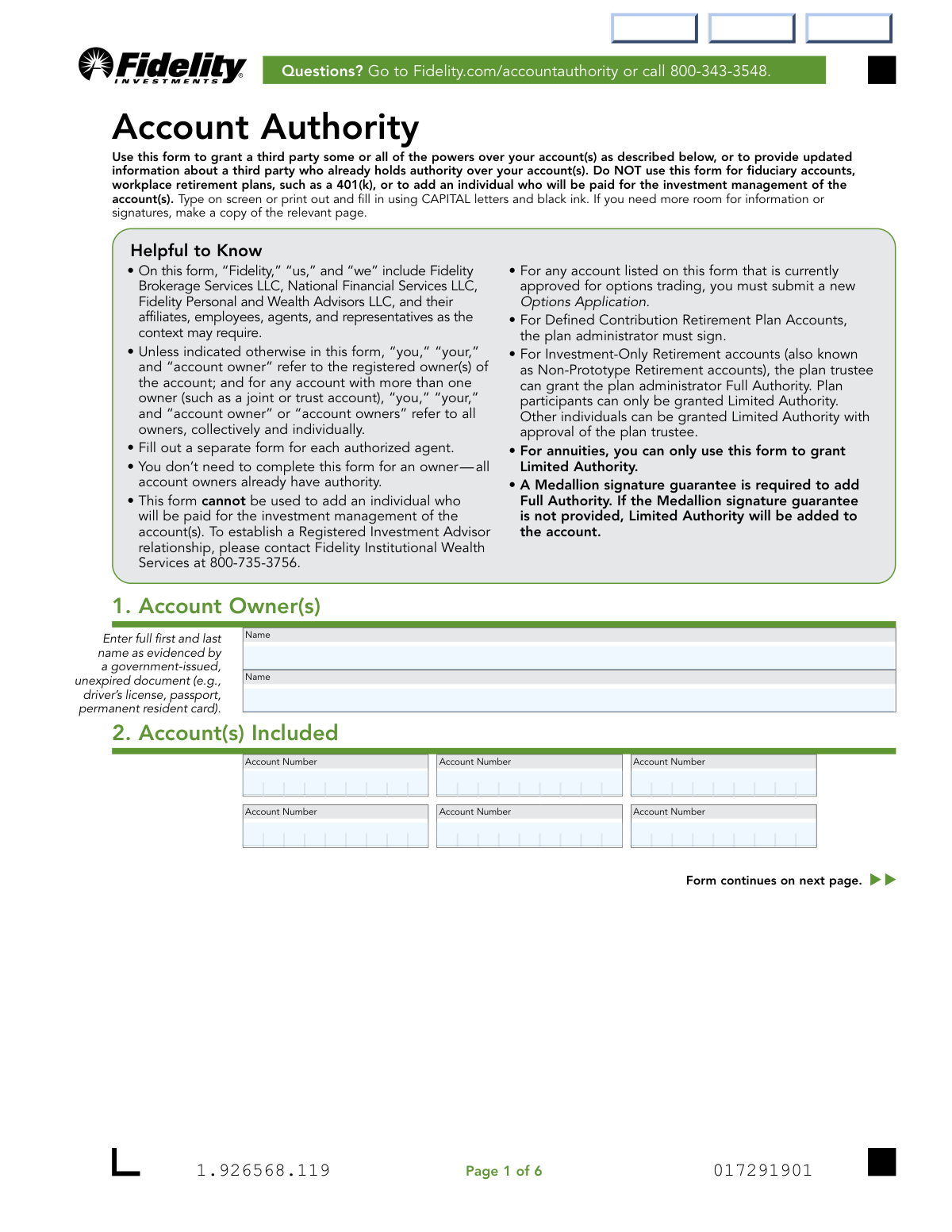
The AI does the filling. You just check it.
No typing into boxes, nothing to install.
What this form asks for
The AI fills all of it, from your answers or your documents.
The AI checks your answers before you download
14 checks built for this form, so a wrong date or a missing answer is caught before anyone else sees it.
Validates that the 'Date of Birth' provided for the authorized agent in Section 5 indicates they are 18 years of age or older. The form explicitly states the agent 'Cannot be a minor,' and this check is crucial for ensuring the individual has the legal capacity to enter into the agreements outlined. A submission with an underage agent would be rejected for legal and compliance reasons.
Ensures that if 'Grant FULL Authority' is selected in Section 3, a Medallion signature guarantee is provided in Section 7. This is a critical anti-fraud measure, as Full Authority allows for the removal of assets from an account. If Full Authority is requested without the guarantee, the form processing should either be rejected or, as the form notes, default to granting Limited Authority instead.
Verifies that 'Full Authority' is not being requested for ineligible account types as listed in Section 3 (Annuities, BrokerageLink, Roth IRA for Kids, and UGMA/UTMA accounts). This check cross-references the account numbers in Section 2 against their registration types in the system. This prevents the granting of powers that are legally or contractually prohibited for certain types of accounts.
Confirms that only one level of authority ('Limited Authority' or 'Full Authority') is selected in Section 3. The form instructs the user to 'Choose only one,' and this validation prevents ambiguity in the level of power being granted. If both or neither are selected, the form should be flagged for correction, though the form states Limited Authority is the default if no choice is made.
Checks that if the 'Foreign citizen' box is checked in Section 5, all subsequent fields in that section are completed, including Country of Citizenship, residency status, and all Government ID details. This information is required by federal regulations for identity verification and anti-money laundering (AML) purposes. An incomplete section would result in rejection of the form.
Validates that the 'ID Expiration Date' provided in Section 5 for a foreign citizen is a date in the future. The form requires an 'unexpired' ID to ensure the identity document is currently valid for verification purposes. Submitting a form with an expired ID would fail the identity verification process and be rejected.
And 8 more checks
- Plan Administrator Signature Requirement
- Conditional Employment Information
- Agent Contact Information Completeness
- SSN/Taxpayer ID Number Format
- Account Number Presence
- Conditional Agent Removal Information
- Mutual Fund Account Signature Logic
- Signature and Date Presence
Let AI fill out your Fidelity Account Authority
No typing. Every field filled in seconds, checked, ready to sign.
How to Fill Out Fidelity Account Authority Online for Free in 2026
What the AI walks you through.
- Navigate to Instafill.ai and upload the Fidelity Account Authority form or select it from the template library.
- Enter the account owner's name(s) and the specific Fidelity account numbers to be included in the authorization in Section 1 and 2.
- In Section 3, select the desired level of authority for the agent, choosing between 'Limited Authority' and 'Full Authority' based on the powers you wish to grant.
- Have the designated authorized agent complete Section 5 with their personal information, including name, address, SSN, and employment details.
- The authorized agent must sign and date Section 6, and the account owner(s) must sign and date Section 7.
- If granting 'Full Authority', obtain a Medallion signature guarantee in Section 7 as required, unless an exception applies.
- Review the entire form for accuracy and completeness, then submit it to Fidelity using their digital upload process or by mail as instructed on the form.
Common Mistakes in Completing Fidelity Account Authority
The ones the AI is built to catch.
Providing a Notary Stamp Instead of a Medallion Signature Guarantee
Failing to Obtain a Medallion Guarantee for Full Authority
Missing Required Signatures for Joint Mutual Fund Accounts
Account Owner Completing the Authorized Agent's Section
Using Nicknames or Incomplete Names
Incomplete Information for Foreign Citizen Agents
Listing Ineligible Account Types
Incorrectly Disclosing Financial Associations or Affiliations
Requesting an Invalid Authority Level for a Specific Account
Omitting Required Contact Information for the Agent
Incorrect Person Signing in a Signature Block
Frequently Asked Questions About Fidelity Account Authority
Is it really free for 7 days?
Can I fill other forms too?
How do I cancel?
How does the AI fill out Fidelity Account Authority?
What happens to my information?
How complex is Fidelity Account Authority to fill out?
What is the purpose of the Fidelity Account Authority form?
Who needs to fill out this form?
What is the difference between 'Limited Authority' and 'Full Authority'?
Can I use this form for my 401(k) or other workplace retirement plan?
What is a Medallion signature guarantee and why is it required?
What information does the person I'm authorizing need to provide?
How do I submit the completed form?
Can I grant authority on any type of Fidelity account?
I already have an authorized agent. What happens if I submit this form for a new one?
Who needs to sign this form?
Can AI tools help me fill out this form?
How can I use Instafill.ai to complete this form online?
What should I do if the PDF form I downloaded is not fillable?
Get your Fidelity Account Authority filled out by AI
$0 today. Cancel before Nov 1 and you pay nothing.
Other forms like this one
investment forms: Form 3468, Investment Credit, Form 8960, Net Investment Income Tax, How to Transfer Assets from Morgan Stanley to Fidelity Investments (Fidelity Stock Plan Services Guide), Fidelity Investments Transfer/Rollover/Exchange Form, Fidelity Investments Standing Transfer Instructions Form, One-Time Withdrawal – IRA, Fidelity Investments, Fidelity Investments Transfer/Rollover Form, Special Tax Notice: Your Rollover Options - Fidelity Investments, Fidelity Investment-Only (Non-Prototype) Retirement Account Application, Fidelity Investments® Beneficiary Distribution Form, Fidelity Investments Distribution Form, One-Time Withdrawal – Investment-Only (Non-Prototype) Retirement Account, Fidelity Investments Withdrawal — One-Time, Fidelity Investments Withdrawals—529 College Savings Plan, Fidelity Investments Change of Account Ownership — Mutual Fund Only Accounts, Fidelity Investments 403(b) Beneficiary Designation, Fidelity Investments Qualified Plan Beneficiary Designation, Fidelity Investments 403(b)/401(a) Beneficiary Designation, Fidelity Investments Qualified Plan Beneficiary Designation, Fidelity Investments Earnings Automatic Withdrawal Plan — IRA
investment account forms: Fidelity Investment-Only (Non-Prototype) Retirement Account Application, One-Time Withdrawal – Investment-Only (Non-Prototype) Retirement Account, Fidelity Investments Change of Account Ownership — Mutual Fund Only Accounts, HSA Bank Investment Account Transfer Form, Fidelity Investment-Only (Non-Prototype) Retirement Account Application, Voya Investment Management Traditional, Roth, Rollover, and SEP Individual Retirement Account (IRA) Application and Adoption Agreement, Voya Investment Management Account Maintenance Form (Includes Substitute Form W-9), U.S. Bancorp Investments Account Transfer Form, Fidelity Investments Account Application/Enrollment Form and Beneficiary Designation, Fidelity Investments 403(b) Custodial Account Application, New York Life Investments Funds Individual Retirement Account Application and NYLIFE Securities LLC Investor Profile, 529 Plan Account Application, 529 Plan Account Transfer Form, Account Application for Merrill West Virginia Residents - The Hartford SMART529, Account Opening Form for Professional Clients (Institutions, Companies, Intermediaries and Eligible Counterparties), Action Required Letter of Authorization - Merrill Lynch, AwardChoice Limited Individual Investor Account Form, Beneficiary Designation Form - Merrill Lynch, BlackRock IRA Rollover Certification Form, BlackRock New Account Application For Non-Retirement Accounts
Fidelity forms: Fidelity Funds Account Transfer of Assets Form, Fidelity Stock Plan Services (SPS) Transfer Request Form, How to Transfer Assets from Morgan Stanley to Fidelity Investments (Fidelity Stock Plan Services Guide), Fidelity Investments Transfer/Rollover/Exchange Form, Fidelity Investments Standing Transfer Instructions Form, Fidelity Charitable 144/145 Contribution Form, One-Time Withdrawal – IRA, Fidelity Investments, Fidelity Investments Transfer/Rollover Form, Fidelity Advisor 403(b) Distribution Request Form, Fidelity Advisor IRA Distribution Request for Automatic Rollover Accounts, Special Tax Notice: Your Rollover Options - Fidelity Investments, Fidelity Charitable Letter of Authorization, Fidelity Advisor Trading Authorization and Indemnification, Fidelity Investment-Only (Non-Prototype) Retirement Account Application, Fidelity NetBenefits Send a Document Form, Fidelity NetBenefits Auditor's Guide: An Overview of Fidelity's 2024 Plan Year Reporting Package, Fidelity NetBenefits Distribution - Recurring Payments, Fidelity Investments® Beneficiary Distribution Form, Fidelity Investments Distribution Form, Fidelity One-Time Withdrawal Form — Nonretirement
UK investment forms: Triple Point Venture VCT plc | Investor Application Form, Form 3468, Investment Credit, Form 8960, Net Investment Income Tax, How to Transfer Assets from Morgan Stanley to Fidelity Investments (Fidelity Stock Plan Services Guide), Fidelity Investments Transfer/Rollover/Exchange Form, Fidelity Investments Standing Transfer Instructions Form, One-Time Withdrawal – IRA, Fidelity Investments, Fidelity Investments Transfer/Rollover Form, Special Tax Notice: Your Rollover Options - Fidelity Investments, Fidelity Investment-Only (Non-Prototype) Retirement Account Application, Fidelity Investments® Beneficiary Distribution Form, Fidelity Investments Distribution Form, One-Time Withdrawal – Investment-Only (Non-Prototype) Retirement Account, Fidelity Investments Withdrawal — One-Time, Fidelity Investments Withdrawals—529 College Savings Plan, Fidelity Investments Change of Account Ownership — Mutual Fund Only Accounts, Fidelity Investments 403(b) Beneficiary Designation, Fidelity Investments Qualified Plan Beneficiary Designation, Fidelity Investments 403(b)/401(a) Beneficiary Designation, Fidelity Investments Qualified Plan Beneficiary Designation
Let AI fill out your Fidelity Account Authority
Your trial starts once a card is added. You pay nothing before Nov 1.
Our AI already knows this form, all 77 fields of it. Skip the typing: tell it about yourself, or upload what you have, and it fills the whole form in seconds.
- AI fills every field on all 6 pages, checkboxes included
- No typing into boxes: answer a few questions, or upload a document you already have, an old copy of this form, a photo of a document
- The AI checks the answers; you review and change anything before you download
- Download the finished PDF, print it, or sign it online
- Encrypted, and never used to train AI
Cancel before Nov 1 and you pay nothing.
A card is needed to start the trial. Cancel in two clicks from your account.
Terms · Privacy