Yes! You can use AI to fill out Fidelity Advisor Change of Ownership

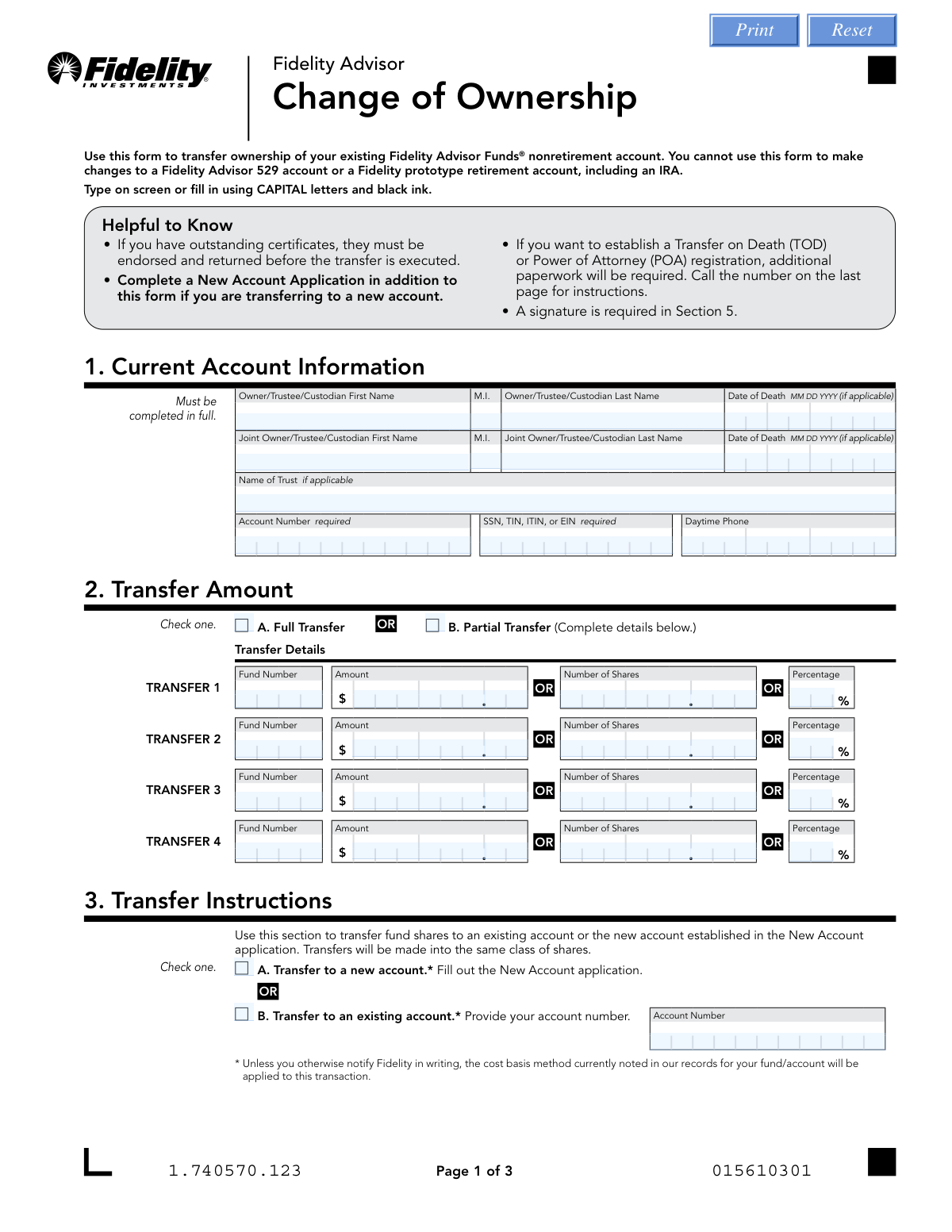
This form is used to legally transfer ownership of a Fidelity Advisor nonretirement account from one party to another. It is essential for documenting changes due to events like death, gifts, or divorce, ensuring the assets are correctly re-registered to the new owner. Today, this form can be filled out quickly and accurately using AI-powered services like Instafill.ai, which can also convert non-fillable PDF versions into interactive fillable forms.
Our AI automatically handles information lookup, data retrieval, formatting, and form filling.
It takes less than a minute to fill out Fidelity Change of Ownership using our AI form filling.
Securely upload your data. Information is encrypted in transit and deleted immediately after the form is filled out.

Form specifications

Form name: Fidelity Advisor Change of Ownership
Number of pages: 1
Language: English
main-image

Instafill Demo: How to fill out PDF forms in seconds with AI

How to Fill Out Fidelity Change of Ownership Online for Free in 2026

Are you looking to fill out a FIDELITY CHANGE OF OWNERSHIP form online quickly and accurately? Instafill.ai offers the #1 AI-powered PDF filling software of 2026, allowing you to complete your FIDELITY CHANGE OF OWNERSHIP form in just 37 seconds or less.
Follow these steps to fill out your FIDELITY CHANGE OF OWNERSHIP form online using Instafill.ai:
  1. 1 Navigate to Instafill.ai and upload or select the Fidelity Change of Ownership form.
  2. 2 Use the AI assistant to accurately fill in Section 1 with the current account owner's information, account number, and SSN/TIN.
  3. 3 In Section 2, specify whether you are making a full or partial transfer and detail the specific funds and amounts if applicable.
  4. 4 Complete Section 3 by indicating if the shares are moving to a new or existing Fidelity account.
  5. 5 In Section 4, check the box that corresponds to the reason for the transfer, such as a gift, divorce, or transfer due to death.
  6. 6 Proceed to Section 5 to provide the required signatures. The AI can help determine if a signature guarantee is necessary based on the transfer details.
  7. 7 Review the entire form for accuracy, then download the completed document to submit to Fidelity via their approved methods like mail or web upload.

Our AI-powered system ensures each field is filled out correctly, reducing errors and saving you time.

Why Choose Instafill.ai for Your Fillable Fidelity Change of Ownership Form?

Speed

Complete your Fidelity Change of Ownership in as little as 37 seconds.

Up-to-Date

Always use the latest 2026 Fidelity Change of Ownership form version.

Cost-effective

No need to hire expensive lawyers.

Accuracy

Our AI performs 10 compliance checks to ensure your form is error-free.

Security

Your personal information is protected with bank-level encryption.

Frequently Asked Questions About Form Fidelity Change of Ownership

This form is used to transfer ownership of an existing Fidelity Advisor FundsĀ® nonretirement account to another person, trust, or entity. It is not for use with IRAs, 529 plans, or other retirement accounts.

The current account owner(s) must complete and sign this form to authorize the transfer of their nonretirement account assets to a new owner.

You must provide the current owner's full name, account number, and Social Security or Taxpayer ID Number (TIN). If the account is jointly owned, the joint owner's information is also required.

Yes, in Section 2 you can select 'Partial Transfer' and specify the exact fund number and the amount, number of shares, or percentage you wish to transfer.

If the new owner does not have a Fidelity account, you must select 'Transfer to a new account' and also submit a New Account Application. If they already have an account, you can select 'Transfer to an existing account' and provide their account number.

A signature guarantee is a fraud protection measure required for certain high-value or high-risk transactions, like removing an owner from an account over $10,000. It must be obtained from a financial institution like a bank or broker-dealer, not a notary public.

You can upload the form online, fax it, or mail it to the address on the form. If your form requires an original signature guarantee, you must mail the physical document.

The reason for the transfer, such as a gift, divorce, or death, is critical for tax reporting purposes as it determines how the cost basis of the assets is handled for the new owner.

No, this form cannot be used to establish a Transfer on Death (TOD) or Power of Attorney (POA). You must contact Fidelity to request the specific paperwork required for those registrations.

If you have physical share certificates for the account, they must be properly endorsed and returned to Fidelity before the ownership transfer can be executed.

Yes, services like Instafill.ai use AI to help you accurately auto-fill form fields, which saves time and reduces the chance of errors.

You can use a service like Instafill.ai to upload the PDF, and its AI will make the form interactive so you can type your information directly into the fields. Once complete, you can download the form for submission.

If you have a non-fillable or 'flat' PDF, you can upload it to a service like Instafill.ai. It has the capability to convert the document into an interactive, fillable form that you can complete on your computer.

Unless you specify otherwise, the cost basis method on record will be applied. For transfers due to death or gift, Section 4 provides specific options that determine how the cost basis is adjusted or carried over to the new owner.

Compliance Fidelity Change of Ownership
Validation Checks by Instafill.ai

1
Current Account Information Completeness
This check verifies that all required fields in Section 1, 'Current Account Information', are filled. Specifically, it ensures the primary Owner's First and Last Name, the Account Number, and the SSN/TIN are provided. This information is fundamental for identifying the source account, and failure to provide it will prevent the form from being processed.
2
SSN/TIN/EIN Format Validation
This validation ensures that the Social Security Number (SSN), Taxpayer Identification Number (TIN), or Employer Identification Number (EIN) in Section 1 consists of exactly nine digits. It may also check for valid formatting (e.g., XXX-XX-XXXX or XX-XXXXXXX). Correct tax information is a legal requirement for financial accounts, and an invalid number will lead to processing rejection and potential tax reporting issues.
3
Date of Death Format and Plausibility
This check validates that any 'Date of Death' entered in Section 1 is in a valid 'MM DD YYYY' format and represents a real date that is not in the future. This is critical for correctly processing transfers due to death and adjusting cost basis per IRS regulations. An invalid or future date would halt the transfer process pending correction.
4
Transfer Amount Selection Exclusivity
This validation ensures that in Section 2, 'Transfer Amount', the user has selected either 'A. Full Transfer' or 'B. Partial Transfer', but not both. Selecting both creates ambiguity in the transfer instruction. If this validation fails, the form is considered invalid as the system cannot determine how much of the account to transfer.
5
Partial Transfer Detail Requirement
If 'B. Partial Transfer' is selected in Section 2, this check confirms that at least one of the four 'TRANSFER' detail blocks has been completed. A partial transfer selection without any specific fund details is an incomplete instruction. The form would be rejected as Fidelity would not know which assets to transfer.
6
Partial Transfer Method Exclusivity
Within a single partial transfer block in Section 2, this validation ensures that only one of the three possible fields (Amount, Number of Shares, or Percentage) is filled. Providing more than one value for a single fund transfer is contradictory and makes the instruction impossible to execute. For example, specifying both $1,000 and 50 shares for the same fund is an invalid entry.
7
Transfer Instruction Selection Logic
This check verifies that in Section 3, 'Transfer Instructions', the user has selected either 'A. Transfer to a new account' or 'B. Transfer to an existing account', but not both. It also ensures that if 'B' is selected, the 'Account Number' field for the existing account is filled. Incomplete or contradictory instructions will cause the transfer to fail.
8
Reason for Transfer Selection Requirement
This validation ensures that one of the primary reasons for transfer ('Transfer Due to Death', 'Transfer Due to Gift', or 'Transfer Due to Divorce') is checked in Section 4. This information is crucial for determining the correct tax and cost basis treatment of the transferred assets. Failure to specify a reason will result in the transfer being treated as a standard re-registration, which may have unintended tax consequences.
9
Transfer Due to Death Consistency Check
This check ensures that if 'Transfer Due to Death' is selected in Section 4, a 'Date of Death' has been provided for the relevant owner in Section 1. This cross-field validation confirms the logical consistency of the request. A mismatch or missing date would require manual follow-up and delay the processing of the inherited assets.
10
Gift Transfer Completeness
If 'Transfer Due to Gift' is selected in Section 4, this validation confirms that the 'Print Name of Gift Recipient', 'Date of Gift', and the 'Gift Recipient Signature' are all present. These elements are required for the recipient to formally accept the gift and its associated cost basis. Missing information will prevent the gift transfer from being executed as requested.
11
Non-Spouse Inheritance Percentage Validation
In Section 4, if the transfer is due to death and the 'Surviving joint owner is not the surviving spouse' option is selected, this check verifies that the provided owner percentages are filled and sum to exactly 100%. This information is required to properly adjust the cost basis for the inherited portion. An incorrect sum makes it impossible to calculate the basis adjustment accurately.
12
Primary Shareholder Signature and Date Requirement
This is a critical check to ensure that the primary account holder has signed and dated the form in Section 5. A signature provides legal authorization for the ownership change. A missing signature or date will result in immediate rejection of the form, as Fidelity has no authority to act without it.
13
Joint Owner Signature Validation
This validation checks if a Joint Owner is listed in Section 1. If a joint owner exists and is not the deceased party, their signature and date are required in Section 5 to authorize the change. This prevents fraudulent transfers and ensures all living owners consent to the change in ownership.
14
Signature Guarantee Requirement Flag
This check flags transactions that likely require a signature guarantee based on the form's rules. For example, if a 'Full Transfer' to a new owner is requested (a complete ownership change), the system would flag that a guarantee is needed if the account value exceeds $10,000. This proactive check helps prevent the form from being rejected for a missing guarantee, which is a common point of failure.

Common Mistakes in Completing Fidelity Change of Ownership

Missing or Invalid Signature Guarantee

Applicants often misunderstand or overlook the signature guarantee requirement in Section 5. They might obtain a notary public stamp, which is explicitly not accepted, or fail to get a guarantee when the transfer value exceeds the stated thresholds. This error is critical and will lead to immediate rejection of the form, as the guarantee is a primary fraud prevention measure. To avoid this, carefully read the thresholds ($10,000 for owner removal, $100,000 for owner addition) and obtain the guarantee from an eligible financial institution, not a notary.

Incomplete Current Account Information

People frequently forget to fill in the Account Number or the SSN/TIN/EIN in Section 1, both of which are marked as required. This often happens when the information is not readily available, but its absence makes it impossible for Fidelity to locate and verify the correct account. This oversight guarantees processing delays and requires the applicant to resubmit the form. Using a tool like Instafill.ai can help by securely storing and auto-filling this critical information, ensuring it's never missed.

Contradictory Transfer Amount Selection

In Section 2, a common mistake is checking both the 'Full Transfer' and 'Partial Transfer' boxes. This creates ambiguity and makes it impossible for the processor to know the applicant's true intent. This logical error forces a rejection of the form and requires clarification from the applicant, delaying the ownership change. To prevent this, carefully decide if you are transferring all assets or only a portion, and check only one box.

Ambiguous Partial Transfer Details

When specifying a partial transfer in Section 2, users sometimes fill in more than one field for a single fund (e.g., providing both a dollar amount and a number of shares). The form uses 'OR' to indicate that only one metric should be chosen per fund transfer. Providing multiple values makes the instruction unclear and will halt the processing of the request. You must choose only one method—dollar amount, share amount, or percentage—for each fund you wish to partially transfer.

Forgetting the New Account Application

If 'Transfer to a new account' is selected in Section 3, the form explicitly states that a 'New Account Application' must also be completed. Applicants often overlook this instruction and submit only the Change of Ownership form. Without the new account details, the transfer cannot be executed, leading to significant delays until the second required form is received. Always ensure all necessary accompanying documents are completed and submitted together.

Missing Recipient Signature for Gift Transfers

In Section 4, if the reason for transfer is a gift, the gift recipient must sign and date the form to accept the shares at fair market value. This signature is often missed, especially if the recipient is not the one filling out the rest of the form. Without this signature, Fidelity will default to a different cost basis tracking method, which may have unintended tax consequences for the recipient. The recipient must always sign in the designated box to confirm their acceptance.

Incorrect Submission Method

The final page provides multiple submission options (Upload, Fax, Mail), but includes a critical instruction: forms requiring an original signature guarantee must be mailed. People often miss this and will upload or fax the form anyway, invalidating the guarantee. This results in the form being rejected and requiring a resubmission via mail, delaying the entire process. Always verify if a signature guarantee is needed and choose the submission method accordingly.

Forgetting Signatures or Dates in Section 5

A simple but frequent error is forgetting to sign or date the form in Section 5. The form explicitly states it cannot be processed without these details. This oversight can happen due to haste or because multiple parties need to sign and one is missed. A missing signature or date will cause an automatic rejection, requiring the form to be sent back for completion. AI-powered tools like Instafill.ai can highlight required signature fields to help prevent this common mistake.

Ignoring Formatting Instructions

The form instructs users to 'fill in using CAPITAL letters and black ink.' Many people ignore this and use mixed-case handwriting or blue ink, which can cause issues with optical character recognition (OCR) software used in processing. This can lead to data entry errors on Fidelity's end or cause the form to be flagged for manual review, slowing down the transfer. Using a tool like Instafill.ai can convert the flat PDF into a fillable version, ensuring all text is typed, legible, and correctly formatted.

Incomplete 'Reason for Transfer' Details

The 'Reason for Transfer' in Section 4 has complex sub-options that are easily missed, especially for transfers due to death. For example, if the surviving joint owner is not the spouse, the form requires the percentage of assets invested by each owner to adjust the cost basis correctly. Failing to provide these percentages will result in an incorrect cost basis calculation, potentially creating future tax complications for the new owner. It is crucial to read every option in this section carefully and provide all requested details.
Saved over 80 hours a year

ā€œI was never sure if my IRS forms like W-9 were filled correctly. Now, I can complete the forms accurately without any external help.ā€

Kevin Martin Green

Your data stays secure with advanced protection from Instafill and our subprocessors

Robust compliance program

Transparent business model

You’re not the product. You always know where your data is and what it is processed for.

ISO 27001, HIPAA, and GDPR

Our subprocesses adhere to multiple compliance standards, including but not limited to ISO 27001, HIPAA, and GDPR.

Security & privacy by design

We consider security and privacy from the initial design phase of any new service or functionality. It’s not an afterthought, it’s built-in, including support for two-factor authentication (2FA) to further protect your account.

Fill out Fidelity Change of Ownership with Instafill.ai

Worried about filling PDFs wrong? Instafill securely fills fidelity-advisor-change-of-ownership forms, ensuring each field is accurate.