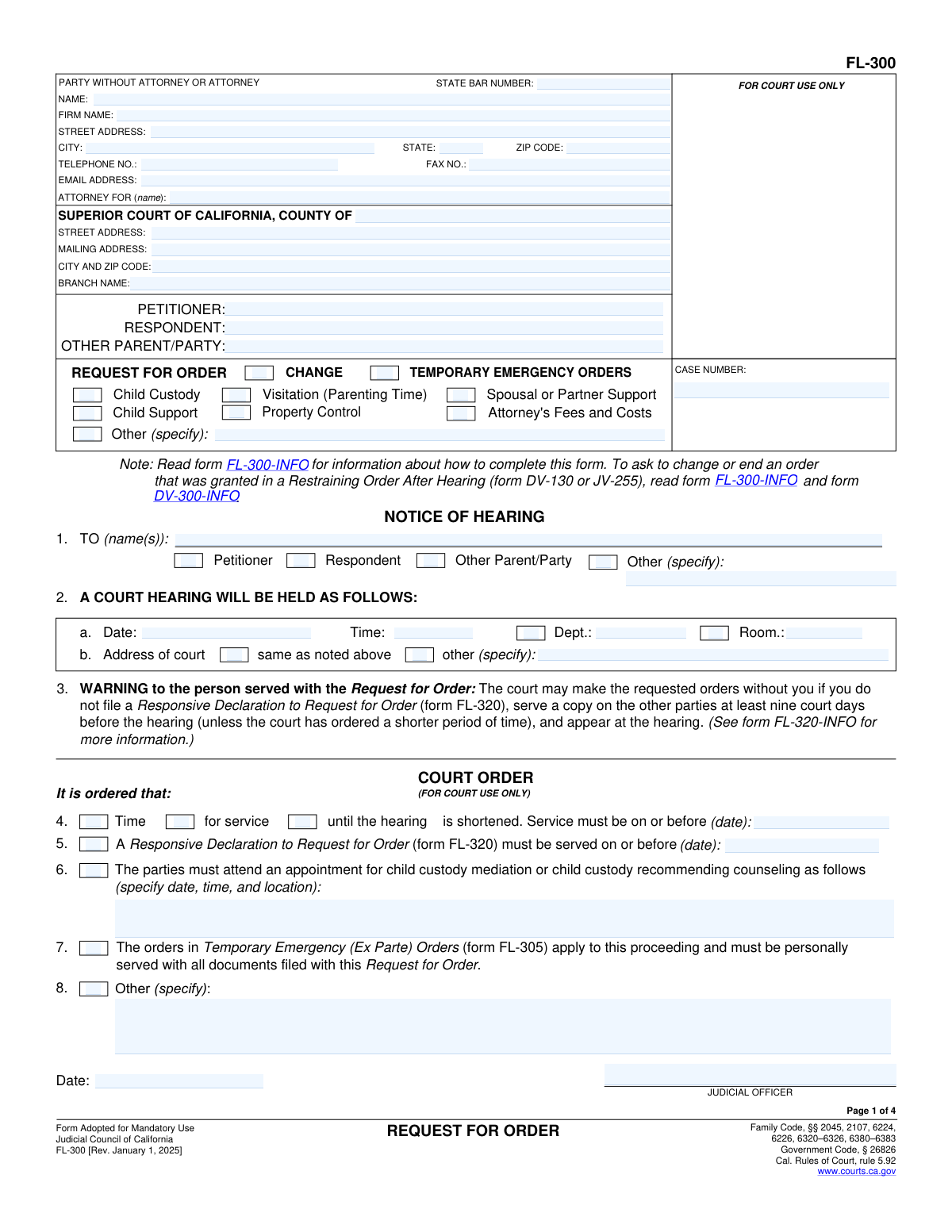
Yes! You can use AI to fill out Form FL-300, Request for Order

Form FL-300, officially known as the Request for Order, is a legal document used in California family law cases. It allows individuals to request court orders on matters such as child custody, support, visitation, and property control. Filling out this form is crucial for initiating or modifying court orders in family law proceedings, ensuring that all parties' rights and responsibilities are clearly defined and legally enforceable.
Our AI automatically handles information lookup, data retrieval, formatting, and form filling.
It takes less than a minute to fill out FL-300 using our AI form filling.
Securely upload your data. Information is encrypted in transit and deleted immediately after the form is filled out.

Form specifications

Form name: Form FL-300, Request for Order
Form issued by: Judicial Council of California
Number of fields: 246
Number of pages: 4
Version: 2025
Official download URL: https://courts.ca.gov/system/files?file=2025-07/fl300.pdf
Language: English
main-image

Instafill Demo: filling out a legal form in seconds

How to Fill Out FL-300 Online for Free in 2025

Are you looking to fill out a FL-300 form online quickly and accurately? Instafill.ai offers the #1 AI-powered PDF filling software of 2025, allowing you to complete your FL-300 form in just 37 seconds or less.
Follow these steps to fill out your FL-300 form online using Instafill.ai:
  1. 1 Visit instafill.ai site and select FL-300
  2. 2 Enter petitioner and respondent details
  3. 3 Select type of order requested
  4. 4 Fill in child custody or support details
  5. 5 Provide hearing date and court info
  6. 6 Sign and date the form electronically
  7. 7 Check for accuracy and submit form

Our AI-powered system ensures each field is filled out correctly, reducing errors and saving you time.

Why Choose Instafill.ai for Your Fillable FL-300 Form?

Speed

Complete your FL-300 in as little as 37 seconds.

Up-to-Date

Always use the latest 2025 FL-300 form version.

Cost-effective

No need to hire expensive lawyers.

Accuracy

Our AI performs 10 compliance checks to ensure your form is error-free.

Security

Your personal information is protected with bank-level encryption.

Frequently Asked Questions About Form FL-300

Form FL-300, Request for Order, is used in family law cases to ask the court to make orders about child custody, visitation, child support, spousal support, attorney fees, and other issues. It is a formal way to request the court to take action on a matter related to your case.

To request a temporary emergency order using Form FL-300, you must fill out the form completely, detailing the emergency situation that requires immediate court intervention. You must then file the form with the court clerk, and the court will review your request to determine if an emergency hearing is necessary. It's important to provide as much detail and evidence as possible to support your request.

To complete Form FL-300, you will need to provide detailed information about your case, including the names of the parties involved, the case number, the specific orders you are requesting from the court, and the reasons for your requests. You may also need to attach supporting documents, such as financial information for support requests or evidence supporting your claims.

To change or end an order granted in a Restraining Order After Hearing, you must file a new Request for Order (Form FL-300) with the court, explaining why you believe the order should be modified or terminated. The court will then schedule a hearing to consider your request, and you will need to present evidence or arguments supporting your position.

Not filing a Responsive Declaration to Request for Order (Form FL-320) can have serious consequences. If you fail to respond, the court may grant the orders requested by the other party without considering your side of the story. This could result in orders being made against you regarding custody, support, or other important issues without your input. It's crucial to file a timely response to protect your rights and interests.

To request child custody or visitation changes on Form FL-300, you must fill out the form completely, specifying the changes you are requesting in the appropriate sections. You will need to provide details about the current custody or visitation arrangement and the reasons for the requested changes. After completing the form, file it with the court clerk in the county where your case is being handled. You may also need to serve the other party with a copy of the form and notice of the hearing date.

The process for requesting child support through Form FL-300 involves completing the form with all required information, including the amount of support you are requesting and the basis for that amount. You must file the completed form with the court and serve the other party. The court will then schedule a hearing to consider your request. Be prepared to provide financial documentation to support your request at the hearing.

To request spousal or domestic partner support using Form FL-300, complete the form by detailing the amount and duration of support you are seeking. Include any relevant financial information that supports your request. After filing the form with the court and serving the other party, a hearing will be scheduled where you can present your case for why the support is necessary.

Requesting property control orders on Form FL-300 requires you to specify the property in question and the type of control order you are seeking. Fill out the form with as much detail as possible about the property and the reasons for your request. After filing the form with the court and serving the other party, a hearing will be set where you can argue your case for the property control order.

To request attorney's fees and costs on Form FL-300, you must complete the form by indicating the amount you are requesting and providing a justification for why these fees and costs should be awarded. This may include demonstrating the other party's ability to pay and your own financial need. After filing the form and serving the other party, the court will hold a hearing to consider your request.

The Request for Order (Form FL-300) must be served to the other party in the case according to the legal requirements for serving court documents in your jurisdiction. This typically involves delivering the form in person or through certified mail, ensuring that the other party receives it within a specified timeframe before the hearing date. It's important to check with your local court rules for specific serving requirements.

To request accommodations for disabilities for the court hearing, you should contact the court clerk's office as soon as possible before your hearing date. You may need to submit a formal request in writing, detailing the specific accommodations you require. The court will then review your request and make the necessary arrangements to ensure you have equal access to the court proceedings.

When requesting child custody or visitation changes using Form FL-300, you may need to attach additional forms such as a Child Custody and Visitation (Parenting Time) Application Attachment (Form FL-311), an Income and Expense Declaration (Form FL-150), or any other relevant documents that support your request. The exact forms required can vary depending on your specific circumstances and local court rules.

To indicate that additional information is attached to Form FL-300, you should check the appropriate box or boxes on the form that correspond to the attachments you are including. Additionally, you should list the titles of the attached documents on the form or in a separate attachment page to ensure the court is aware of all the materials you are submitting.

The 'Temporary Emergency (Ex Parte) Orders' section on Form FL-300 is significant because it allows a party to request immediate court orders without the other party being present, under emergency circumstances. These orders are temporary and are typically granted only when there is a clear and present danger to a child or party's safety, health, or welfare. The court will review the request and may schedule a hearing where both parties can be present to discuss the matter further.

On Form FL-300, you must clearly and concisely state the reasons for requesting changes to property control orders in the designated sections. It's important to provide specific facts and circumstances that justify the requested changes to ensure the court understands the basis of your request.

While Form FL-300 does not specify a maximum length for the facts supporting your request, it's advisable to be concise and to the point. The court appreciates clear, relevant, and succinct information that directly supports your request without unnecessary details.

To request urgent processing of your Request for Order on Form FL-300, you must clearly indicate the urgency in your filing and provide a compelling reason, such as imminent risk of harm or significant financial loss. You may also need to file an ex parte application if the situation requires immediate court attention without waiting for the standard hearing schedule.

When completing the Income and Expense Declaration in support of a request on Form FL-300, ensure all financial information is accurate, up-to-date, and thoroughly documented. Include all sources of income, monthly expenses, assets, and liabilities. This declaration must be signed under penalty of perjury, so honesty and completeness are crucial.

For more detailed instructions on completing Form FL-300, you can visit the official website of the California Courts or consult the form's instructions page. Additionally, legal aid organizations and self-help centers at courthouses often provide guidance and resources for filling out family law forms correctly.

Compliance FL-300
Validation Checks by Instafill.ai

1
Verifies that the petitioner's, respondent's, and other parent/party's names are accurately filled in the header information section.
Ensures that the names of all parties involved, including the petitioner, respondent, and any other parent or party, are accurately recorded in the header information section. Confirms that there are no discrepancies or omissions in the names provided. Validates that the names match the legal documents to avoid any confusion or legal issues. Checks that the format of the names adheres to the standard required by the form.
2
Confirms that the case number, if known, is provided in the header information section.
Verifies that the case number, when available, is correctly entered in the designated section of the header information. Ensures that the case number follows the required format and is free from typographical errors. Checks that the case number is legible and matches the records to facilitate easy reference. Confirms that the absence of a case number is justified if it is not known at the time of filing.
3
Ensures that the superior court's name, county, branch name, city, zip code, street address, and mailing address are correctly included in the header information section.
Validates that all details pertaining to the superior court, including its name, county, branch name, and location details, are accurately provided. Confirms that the city, zip code, street address, and mailing address are correctly listed to ensure proper jurisdiction and correspondence. Checks that the information is up-to-date and matches the official records. Ensures that no critical details are omitted, which could delay the processing of the request.
4
Validates that the appropriate boxes are marked to indicate the type of orders being requested in the Temporary Emergency Orders section.
Ensures that the requester has clearly marked the boxes corresponding to the types of orders they are seeking in the Temporary Emergency Orders section. Confirms that the selections are relevant to the case and comply with the legal requirements. Checks that the markings are unambiguous and easily identifiable by the court. Validates that no required selections are left blank, which could render the request incomplete.
5
Checks that if 'Other' orders are requested, the nature of the request is specified in the Temporary Emergency Orders section.
Verifies that when the 'Other' option is selected in the Temporary Emergency Orders section, a detailed description of the nature of the request is provided. Ensures that the description is clear, concise, and directly related to the orders being sought. Confirms that the specification is sufficient for the court to understand and act upon the request. Checks that the description does not leave any room for ambiguity or misinterpretation.
6
Verifies that the notice of hearing section is completed with the names of the parties to whom the notice is being sent, the date, time, department, and room number of the hearing.
Ensures that all necessary details in the notice of hearing section are accurately filled out, including the names of the involved parties. Confirms the inclusion of the hearing's date and time to avoid any scheduling conflicts. Verifies the department and room number are specified to guide the parties to the correct location. Validates that this section is complete to ensure all parties are properly notified of the hearing.
7
Ensures that the address of the court where the hearing will be held is indicated in the notice of hearing section.
Confirms that the court's address is clearly stated in the notice of hearing section to provide precise location information. Validates the accuracy of the address to prevent any confusion or delays on the hearing day. Ensures that the address is up-to-date and matches the court's official records. Checks that this critical piece of information is not omitted to facilitate smooth proceedings.
8
Confirms that any domestic violence restraining/protective orders currently in effect between the parties are specified in the Restraining Order Information section, if applicable.
Verifies the presence of any active domestic violence restraining or protective orders in the specified section. Ensures that such orders are clearly detailed to inform the court of any existing legal protections. Validates the accuracy of the information provided to maintain the integrity of the legal process. Checks for completeness to ensure all relevant orders are considered during the hearing.
9
Validates that the requested orders for child custody and visitation include the names and birth dates of the children involved and detail the physical and legal custody arrangements.
Ensures that the names and birth dates of all children involved are accurately listed in the custody and visitation section. Confirms that the physical and legal custody arrangements are clearly detailed to avoid ambiguities. Verifies the completeness of this section to ensure the court has all necessary information to make informed decisions. Checks that the arrangements are specified in a manner that prioritizes the children's best interests.
10
Checks that the requested child support amounts are indicated, whether based on the child support guideline or a specified monthly amount, in the Child Support section.
Ensures that the child support section clearly indicates the requested amounts, adhering to guidelines or specifying a monthly figure. Validates the accuracy of the amounts to ensure they meet legal standards and the children's needs. Confirms that the basis for the requested support is clearly stated, whether it follows guidelines or is a mutually agreed amount. Checks for completeness to ensure the court can properly assess the support request.
11
Verifies that the monthly amount of spousal or partner support requested is specified in the Spousal or Domestic Partner Support section.
Ensures that the monthly amount of spousal or partner support is clearly stated, confirming the financial obligations between parties. Validates the accuracy of the amount to prevent disputes. Checks for consistency with other financial documents. Confirms that the section is completed to avoid processing delays.
12
Ensures that the requested orders for property control are detailed in the Property Control section.
Verifies that all property control requests are explicitly listed, ensuring clarity in asset division. Checks for completeness to prevent omissions that could affect legal outcomes. Validates the specificity of each request to facilitate enforcement. Confirms that the section aligns with applicable laws and regulations.
13
Confirms that the total amount of attorney's fees and costs being requested is specified in the Attorney's Fees and Costs section.
Ensures that the attorney's fees and costs are accurately detailed, providing transparency in legal expenses. Validates the calculation to ensure fairness and reasonableness. Checks for supporting documentation where required. Confirms that this section is completed to uphold the rights of all parties involved.
14
Validates that any additional orders being requested are specified in the Other Orders Requested section.
Verifies that all additional orders are clearly stated, ensuring no request is overlooked. Checks for relevance and legality of each order. Validates the completeness of the section to avoid future legal complications. Confirms that the requests are within the court's jurisdiction.
15
Checks that the form is signed and dated, declaring under penalty of perjury that the information provided is true and correct in the Declaration section.
Ensures the form is properly executed with a signature and date, validating the document's authenticity. Confirms the declarant's acknowledgment of the penalty of perjury, emphasizing the seriousness of the information provided. Checks for legibility of the signature to prevent disputes over identity. Validates the date to ensure timely processing and legal relevance.

Common Mistakes in Completing FL-300

Filling out the header information incorrectly or incompletely can lead to delays in processing the form. Ensure all required fields, such as the case number, names of the parties, and the court details, are accurately filled. Double-check the information against official documents to avoid discrepancies. Omitting any part of the header can result in the form being rejected or returned for correction.

Not marking the requested order types clearly can cause confusion and may result in the court not addressing all necessary issues. Carefully review each section of the form to identify which orders are being requested. Use checkboxes or other indicated methods to specify the orders sought. This ensures the court understands the full scope of the requests being made.

Leaving out the notice of hearing details can prevent the other party from being properly notified, potentially delaying the proceedings. Include the date, time, and location of the hearing in the designated sections. Verify this information with the court calendar to ensure accuracy. Proper notification is crucial for maintaining the legal validity of the process.

Failing to specify details regarding a restraining order can weaken the request or lead to its denial. Clearly outline the reasons for the restraining order and the specific protections being sought. Provide as much detail as possible to support the request. This clarity helps the court make an informed decision on the matter.

Incomplete information about child custody arrangements can lead to ambiguous orders that do not fully address the needs of the child. Detail the proposed custody and visitation schedules, including holidays and special occasions. Be specific about any restrictions or conditions being requested. Comprehensive details help the court create orders that are in the best interest of the child.

Filling in incorrect child support amounts can lead to legal discrepancies and financial strain on one or both parties. It is crucial to accurately calculate child support based on the state's guidelines and current financial situations. Double-checking calculations with a financial advisor or attorney can prevent errors. Ensuring all income sources and deductions are considered will also aid in providing accurate figures.

Omitting spousal support details can result in unresolved financial obligations and potential legal issues. Clearly stating whether spousal support is being requested, the amount, and the duration is essential for clarity and enforcement. Consulting with a legal professional can help in understanding the implications and requirements. Detailed documentation of both parties' financial situations will support the request.

Incomplete property control requests may lead to disputes over asset division and ownership. Specifying which properties are in question and the desired control or division is necessary for a clear order. Including detailed descriptions and valuations of properties can prevent misunderstandings. Legal advice is recommended to ensure all relevant properties are accounted for and properly requested.

Not including attorney's fees details can leave one party unfairly burdened with legal costs. If seeking attorney's fees, the request must specify the amount and the justification for the award. Providing a breakdown of fees incurred and the necessity of legal representation strengthens the request. It's advisable to consult with an attorney to ensure the request complies with legal standards and is appropriately documented.

Failing to specify other orders requested can limit the court's ability to address all concerns in the proceeding. Clearly listing any additional orders, such as restraining orders or custody arrangements, ensures comprehensive legal coverage. Each request should be detailed and justified to facilitate court review and approval. Seeking legal guidance can help in identifying and articulating all necessary orders for the case.

Filling in the incorrect time for service details can lead to delays or denials of the request. It's crucial to double-check the time specified to ensure it matches the actual service time. Utilizing a calendar or scheduling tool can help verify the accuracy of the time entered. Always confirm the time with all parties involved to avoid any discrepancies.

Exceeding the page limit in the facts section can result in the court not considering the additional information. It's important to be concise and stick to the relevant facts within the allowed page limit. Drafting the facts section beforehand and editing it down can help stay within the limit. Seeking legal advice can also ensure that only the most pertinent information is included.

A missing declaration signature can invalidate the entire form, causing unnecessary delays. The declarant must sign the form to attest to the truthfulness of the information provided. Before submission, review the form thoroughly to ensure all required signatures are present. Keeping a checklist of all necessary signatures can prevent this oversight.

Failing to request accommodations in advance can hinder the ability to receive necessary support during the proceedings. It's essential to identify and request any needed accommodations as early as possible. Early communication with the court about accommodation needs ensures they can be arranged in time. Documenting the request and following up can also help in securing the required accommodations.
Saved over 80 hours a year

“I was never sure if my IRS forms like W-9 were filled correctly. Now, I can complete the forms accurately without any external help.”

Kevin Martin Green

Your data stays secure with advanced protection from Instafill and our subprocessors

Robust compliance program

Transparent business model

You’re not the product. You always know where your data is and what it is processed for.

ISO 27001, HIPAA, and GDPR

Our subprocesses adhere to multiple compliance standards, including but not limited to ISO 27001, HIPAA, and GDPR.

Security & privacy by design

We consider security and privacy from the initial design phase of any new service or functionality. It’s not an afterthought, it’s built-in, including support for two-factor authentication (2FA) to further protect your account.

Fill out FL-300 with Instafill.ai

Worried about filling PDFs wrong? Instafill securely fills fl-300 forms, ensuring each field is accurate.